5 Things to Know About 404, 302, and 301 Redirects

enewton@brightedge.com
M Posted 8 years 7 months ago
t 9 min read

When creating or migrating a website, learning how to use redirects is a valuable step in building an optimized website. Redirects, such as 301 redirects, 302 redirects, and others can help you maintain your PageRank and the reputation you have earned through backlinks and traffic, even when you have to make significant adjustments to the content on your domain. Failure to use a proper redirect can also result in lost PageRank.

404 redirects are bad. They are a terrible user experience and the search bots will penalize you meaningfully for it. 404s occur when a page is deleted from the site and the server, but links to the page and bookmarks still exist. When a user calls that page from the browser, the server returns a 404 Page Not Found. If the search bot gets a 404 a few times, it will deindex the page from the search results.

With a properly constructed redirect, any value from backlinks that point to your old pages will flow through the redirect to the new page. This can help you maintain your rankings within the SERPs and avoid drops in traffic and revenue. It is important to note, however, that there are different types of redirects, including http redirect, html redirect, 301 redirect, and 302 redirect. Each of these redirects is best suited for particular purposes. Here are five things that all website owners should know about redirecting users. Proper redirects are an integral part of smart content pages. If you're looking to create a new website, check out this site checklist before you launch it. 

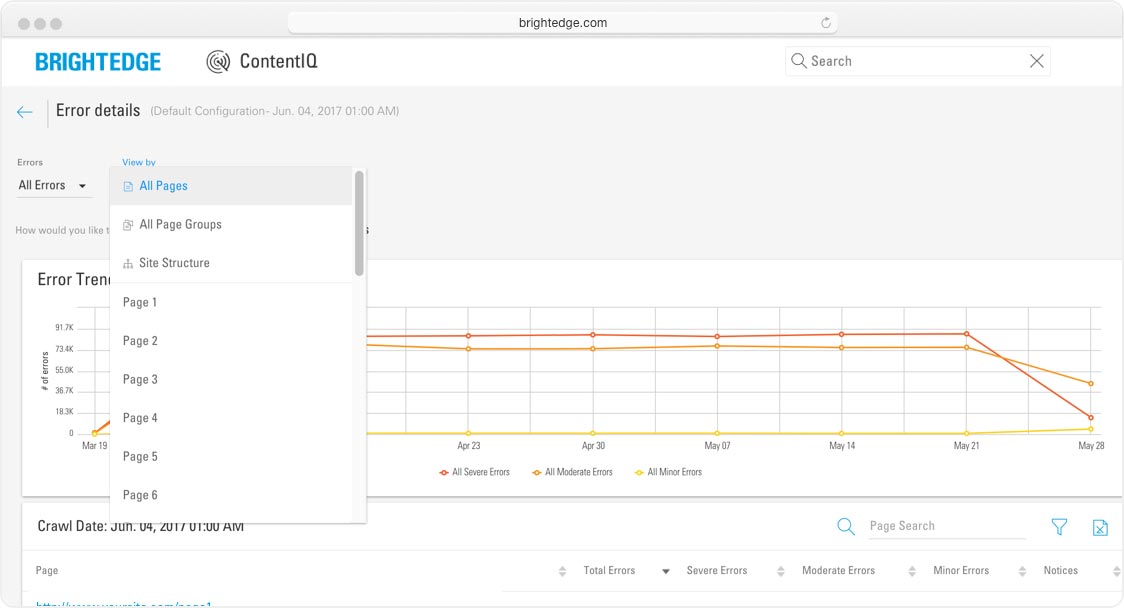
Leverage ContentIQ To Check For Redirect Errors

1) What is an HTML Redirect and Why is This Method Discouraged?

302 vs 301 redirects for websites - brightedgeAn HTML redirect will automatically send your page visitor to a new site after a certain amount of time. It will generally give your visitor a message that the site has been moved and that they will be redirected in a few seconds. This type of redirect is often discouraged because the unexpected jump can be confusing for users. They can also harm the user experience because in certain situations, using the back button on the browser will just take the user back to the redirecting page, causing them to get stuck in a loop.

2) What is a 301 Redirect and When Should I Use it? How About rel="canonical"?

A 301 redirect indicates to search engines that this page has been moved permanently. This is the type of HTTP redirect you should use if you move your entire website to a new domain, for example. Some brands may also use this redirect when they purchase URLs that contain common misspellings of their own domain, and then redirect traffic to the correct website. This HTTP redirect can also help you avoid confusion with the ‘www.yoursite.com’ and ‘yoursite.com’ dilemma.

Since many people use shorthand when they write out websites, establishing which version of your site will be the default and then redirecting the other version to the one you chose will help you provide a superior user experience and ensure that everything is clear for the search engine spiders. Despite rumors to the contrary, Matt Cutts of Google has indicated that when you use a 301 redirect you do not have to worry about losing any more PageRank than you would through a link. This means that the 301 does not hurt performance.

It is also important to note that while some site builders believe that using a rel=”canonical” will do the same job as a 301 redirect, but this is incorrect. The rel=”canonical” tag was designed to indicate the original and primary company when duplicate content needs to exist. It is better to use a 301 when actually moving a page.

3) What is a 302 Redirect and When Should I Use it?

A 302 redirect is a temporary redirect. This is what you use when you want to redirect a visitor from one page to another for just a short period. For example, if you are redesigning a portion of your site and need to redirect users for a few days to a different page, you might use the 302 redirect. They assist in providing customers with a continued experience rather than sending them to a 404 page not found or another site error.

Site maintenance efforts often use the 302 redirect. This HTTP redirect should generally be used less frequently than a 301, since there are far fewer situations when you might need to temporarily redirect visitors from one site to another. Google recognizes that people sometimes use a 302 redirect when they mean a 301. For this reason, John Mueller has said that when a 302 redirect is first placed on a site, the algorithm assumes it's temporary.

When it becomes apparent, however, that the 302 redirect is actually being used on a more permanent basis, they will start treating it more as a 301 redirect. This means indexing the targeted page instead of the original page. Remember that you only want to use a 302 redirect when you plan on bringing customers back to the old page at some point and some point soon.

4) Is Redirecting Ssers Secure?

There are some instances when open redirects, even when structured correctly, can leave websites open to potential abuse by spammers. These scammers attempt to use your site to trick users into landing on their pages that contain phishing, malware, or other undesirable content. The threat is that these scammers are not taking advantage of site weaknesses, but rather they are exploiting sites that are running precisely the way they were designed to operate. There are a few instances when your redirects may be more vulnerable to spammers. Google specifically mentions webmasters who use a redirect to bring visitors to a file or the redirects that are used for internal site searches. The examples given by Jason Morrison are seen below:

<< An open redirect for a filelearn how to do 301 redirects - brightedge

An open redirect for search results: Verifying whether or not your site has been victimized can be a challenge, but here are a few safeguards:things you must know for 301 redirects - brightedge

  • Use the Google search operator site:yoursite.com to see if there is anything in your results that should not be included. You can also try adding keywords that would have nothing to do with your content but are common spam targets, such as Viagra.
  • Monitor any user complaints to see if anyone mentions malware or viruses that seem to originate from your site. Sometimes people do not realize they are being redirected and they may hold you responsible.
  • You can use tools, like the BrightEdge platform, to watch people’s behavior on your site, the URLs receiving traffic, and to check for any abnormalities that might indicate to you that something is not right. Watch particularly for any jumps in traffic on the pages that have redirect URLs.

5) 302 vs 301 Redirects

It is important to note that a 302 redirect was designed to be a temporary redirect while a 301 redirect was intended to be a permanent one. This means that there are differences in how the search engines approach these commands. For a permanent redirect, for example, the search engine will focus on ranking the targeted site rather than the original - as the site owner, you do not want two versions of your content on the web. On the other hand, if you still intend to use the original site, you do not want Google to ignore the original site, thus making the temporary redirect more applicable. If you fail to adjust your 302 redirect to 301 redirect when the situation is permanent, you run the risk of the search engines not paying enough attention to your targeted site or continuing to index the old page.

Although Google, as mentioned above, has indicated that they do try to interpret when a 302 redirect is an error and treat redirects that are temporary the same as a 301 redirect, this can still leave you open to a window where the original site is indexed. For these reasons, it is generally safer to make sure your permanent redirects are accurately written as 301 redirect. HTTP redirect can be a valuable tool to help you control your traffic and ensure that your visitors receive the user experience you intended. Understanding how to use these commands correctly can help you improve your site and appropriately navigate changes in your domain

スマートコンテンツとAMPでモバイルを制する 【BrightEdge 2018年2月6日】

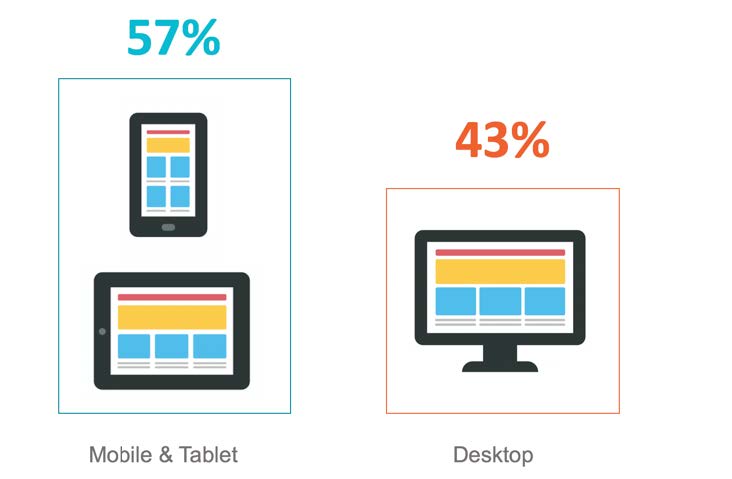
モバイルはますます勢いを増して成長を続けています。2017年に実施されたモバイルに関する調査によると、オンライン トラフィックの57%がスマートフォンやタブレットに由来することが明らかになっています。消費者はもちろんのこと、ビジネス バイヤーもモバイルを活用して企業やサイトとやりとりをしているのです。

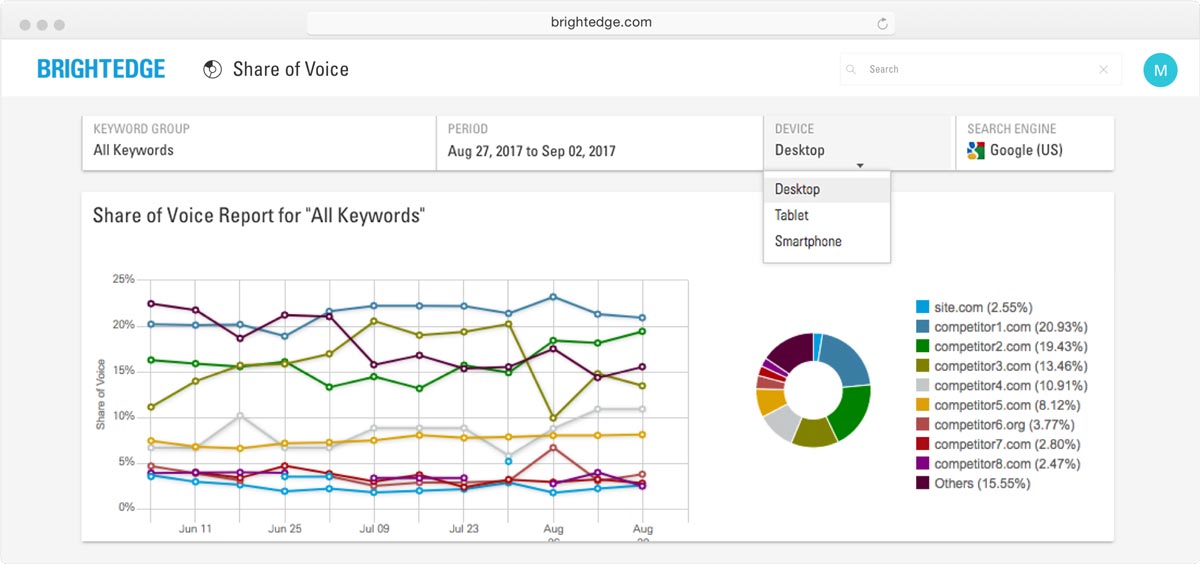
マーケティングでユーザーと接点を持つためにモバイルがいかに重要かという点を考慮すると、自社サイトのページがスマートフォンやタブレットでも問題なく表示できるよう設定することは極めて重要です。またモバイル端末を用いて検索を実施した際に表示される結果ページは、デスクトップを用いた際の結果ページと異なることが明らかになっているため、自社サイトのコンテンツが異なるデバイスのオーガニック検索結果ページでどのようなランク状況を収めているかに注目し、モバイルを意識して最適化 実施することが重要になります。

brightedge mobile research 2017 infographic

これを別の表現で説明すると、マーケターやSEO担当者は、ユーザーが何らかの活動を行いながら見る「オンザゴー コンテンツ」の作成に真剣に取り組むべきであるということです。モバイルで注目すべきは、ユーザーが検索したいフレーズを発音することによって検索を行う「音声検索の使用頻度」が増えている点です。これらの点を踏まえて、マーケターはいくつかの具体的なステップに従うことによって、音声検索に特化したコンテンツの最適化を実施することができます。

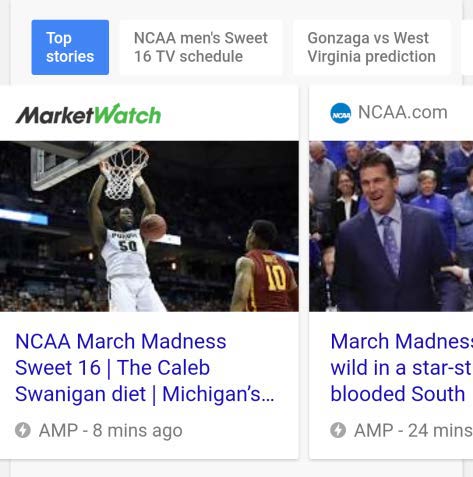
他にもモバイルで顕著に見られる特徴として、AMP(Accelerated Mobile Page) の導入が進められていることが挙げられます。AMP対策を実施すると、モバイル端末でのページのローディングにかかる時間をグッと短縮することができます。AMP対策を行うことによってHTMLページを軽量化することができるため、何らかの活動をしながらコンテンツを読んでいるユーザーのユーザーエクスペリエンスが改善することができます。Googleは独自のコンテンツ デリバリー ネットワーク(CDN)にAMPファイルをホストしているため、ローディングをさらに早めることができます。ユーザーがAMP対応コンテンツを見る際、遠くのサーバーからではなくブラウザのキャッシュからローディングしているような感覚になります。

以前はAMP対策をして得するのはニュース配信関連の通信企業のみだと考えられていました。なぜならGoogleがモバイル検索結果ページの上部にカルーセルでAMP対応のニュース記事ばかり表示していたからです。しかし現在では通信企業だけではなく他の企業でもAMPを導入することによって好ましい変化を得ることができると考えられています。

BrightEdgeでは、モバイルとは別にコンテンツのアイデア作りやコンテンツ作成全般に対するアプローチを再評価するようお薦めしています。弊社ではスマートコンテンツというコンテンツ作成の枠組みを構築しました。スマートコンテンツ作成の枠組みでは、検索エンジンをはじめ、モバイル、ユーザーエクスペリエンスなどを意識しながらコンテンツを作成することによって、コンテンツパフォーマンス強化する後押しをします。

スマートコンテンツとAMPの組み合わせることが理想的な理由

一般的なコンテンツからAMP対応のコンテンツを作成するのは、スマートコンテンツ作成の枠組みの一環だと言えます。スマートコンテンツ作成の枠組みでは、コンテンツライターをはじめ、コンテンツ戦略担当者や、マーケターを対象に、コンテンツ パフォーマンスや投資収益率(ROI)を拡大するためにとるべきステップをチェックリスと形式でまとめ、需要を的確に把握し、マーケターの役割を強化して読み手の期待に応えることを目指します。AMP対策はスマートコンテンツ作成の枠組みでご紹介するチェックリストの内3つ目のカテゴリーに当てはまる項目なのです。

読み手の期待に応えて読み手を喜ばせるため、ページのローディング時間を短くすることが大きな影響を与えると考えられています。スマートコンテンツ作成の枠組みでは、AMPを推奨する前に、ページで使用する画像などの最適化を行うことによって、オンラインとの接続速度が遅い場所からモバイルを使用してアクセスしているユーザーにもページのローディングに時間がかからないようにすることをお勧めしています。

ファイルのサイズが大きいためローディングに時間がかかるページはどれか判別するのは大変かもしれません。とりわけ別のドメインやコンテンツ マネージメント システムで作成した様々なコンテンツを扱うような規模の大きいサイトなら尚更です。このような場合、ページサイズやローディングにかかる時間をチェックし、問題を検出した場合は早急に対処することができるようなサイトオーディット機能 を活用することをお薦めします。

AMP実施時に注意すべき事柄

作成したスマートコンテンツにAMP対策を実施する準備ができたら、何点か注意すべき事柄がありますので、以下でご紹介します。

まずAMP対応コンテンツは一般コンテンツ代わりになるものではないということを覚えておきましょう。AMP対応ページはあくまで一般コンテンツを強化するだけです。モバイル以外の端末からのトラフィックを対象としたHTMLページを作成する必要がなくなったわけではありません。一般コンテンツ ページでもリスポンシブでモバイル トラフィックに対応できるのが理想的です。

amp carousel example

次に注意すべき点として一貫性があります。AMP対策を実施することに決めたら、サイトの一部だけ実施するのではなく、一貫してすべてのページを対象に実施しましょう。サイト上のコンテンツが一貫してAMP対応している方がより大きな効果を得ることができます。大規模なサイトで数えきれないほど多くのページを管理しているようなサイトでは、マニュアルでAMPファイルを作成するのは現実的ではありません。新しいコンテンツが作成されたらAMPバージョンのページも自動的に作成できるようなテクノロジーを活用することをお薦めします。

またAMP対応ページを作成する時には、リンクタグを活用してAMP対応ページと正規ページの両方をつなぎ、検索エンジンのボットが素早く簡単にこれらのページを発見し、状況に応じてどちらのページを参照すべきか決定できるように促しましょう。

正規ページには以下のタグを追加します:

<link rel=”amphtml” href=”https://www.mysite.com/url-of-amp”>

AMP対応ページには以下のタグを追加します:

<link rel=”canonical” href=”https://www.mysite.com/url-of-canonical”>

最後に覚えておきたい点としては、スマートコンテンツ作成の枠組みでは継続的にコンテンツの最適化を行うことを重視していることです。たとえ優れたコンテンツを作成したためコンテンツに関するレコメンデーションが改善したり、新しいSEOのベストプラクティスを導入したりしていたとしても、すべてのコンテンツを対象に定期的に最適化を実施し、自社コンテンツのパフォーマンスが競合サイトのパフォーマンスを上まり、新しいビジターを獲得できるように後押しする必要があります。AMP対応コンテンツでも同様の作業を行いましょう。

コンテンツパフォーマンスを継続的に把握する

AMP対応ページでトラフィックをより多くのトラフィックを獲得できるようになったら、トラフィック、コンバージョン、収益などにAMP対応がどのような影響を与えているのか確認しましょう。AMPページのレポートに限界があるため、必ずAMPページをWebアナリティクスにタグ付けし、ページのビジット数やイベントを把握してください。

企業は、AMP対応ページのトラフィックとそれ以外のページのトラフィックをWebアナリティクス上で必要に応じて統一して捉えましょう。重要なことは、コンテンツの形式や作成方法に関わらず、すべてのコンテンツのパフォーマンスの全貌を把握することです。マーケターの中には、AMP由来のトラフィックとそれ以外のトラフィックを合算して確認したい方もいれば、それぞれのトラフィックの詳細を個別に確認したい方もいるでしょう。それぞれのデータを合算したり個別に確認したり、必要に応じていずれの方法も選択できるようにすることが重要です。

AMP対応の実施は、ユーザーエクスペリエンス、コンテンツのビジビリティー、コンテンツパフォーマンスなどを改善するための対策だと考えてください。デジタルコンテンツを最適化し、読み手のエンゲージメントを高めるために、AMP対策の実施は最終的な段階でとるべきステップなのか、または中期的な段階でとるべきステップなのか、はっきり区別して言い難いのですが、いずれにしてもユーザーエクスペリエンス対策において将来性のあるマーケティング プラットフォームを活用することが重要になります。

How to Become an SEO Expert: 10 Steps

enewton@brightedge.com
M Posted 8 years 7 months ago
t 9 min read

Organic search is the heart of digital marketing because of its focus on and understanding of user intent, making an SEO expert a highly important marketing role. Search engine optimization experts are responsible for more than half the traffic on an average website, bringing in about 51% of all your site’s visitors. Considering that sites which manage to secure the top five positions on the SERPs receive an estimated 68% of clicks, it is clear that earning a top rank can have a tremendous impact on your business growth and revenue.

Earning an SEO expert spots, however, generally requires a strong understanding of SEO, including how to do it, the latest 2019 best practices for SEO, Learn how to become an SEO professional - BrightEdgeand how to measure your results. The idea of becoming a SEO professional can seem overwhelming to many but there are plenty of simple SEO concepts to get you started. The algorithm used to rank search results is regularly changing and the best practices are continually adapting to these adjustments. There are also a variety of conflicting opinions concerning the most effective SEO practices because no one actually knows the algorithm.
Effectively doing SEO also requires practitioners to have a good idea about how to run metrics and analyze sites so they can see the results of their efforts. Developing an SEO strategy is a great first step to becoming an SEO expert. It is no wonder why many people unfamiliar with SEO feel intimidated by the prospect. It is possible, however, to begin the process of becoming a expert from your desk or even your phone with social media SEO. In fact, just a few key steps can help you remain abreast of the latest developments and help you become a competent SEO marketer, benefiting both your organization and your professional aspirations. Know that beginning SEO can be as simple as optimizing title tags.

Organize An SEO Team With This eBook

How to become an SEO expert?

Google offers a great introductory read on the topic of SEO. The search engine’s Search Engine Optimization Starter Guide will offer you tremendous insight into what Google itself says is important for websites that want to improve their rank. This guide will offer you some information about how to organize your website, optimize your on-page content, and measure your results. No matter how long you have been doing SEO, this guide will continue to be a helpful pamphlet to best practices and support your progress from specialist to SEO expert.

It is also a good idea to familiarize yourself with the field by subscribing to a few key online publications as SEO experts keep up with current and emerging trends in the industry. A few expert publications we particularly enjoy are Search Engine Watch, Search Engine Land, and Marketing Land. These publications contain articles written by industry leaders - like our own Jim Yu - about the latest topics and are often among the first to break the news about the latest developments in the industry. They break down subjects and provide analysis about the best ways to react to various Google changes. There are also a number of helpful blogs that can supplement your learning.

You want to focus on blogs that provide a range of SEO tips and advice, particularly those written by SEOs who are regularly performing research and uncovering new best practices for the field. Our own BrightEdge Blog is a great choice for this purpose. Our friends at Adobe also provide valuable insight. The basics of how to become an SEO expert - BrightEdge With such a variety of different publications arriving in your inbox each day, it will be impossible to read every single article.

Instead, to become an SEO expert you should focus on spending about 15-30 minutes each morning reading a minimum of the headlines and selecting a few key articles to explore that seem most applicable to you and your goals. There are also a number of YouTube channels that can also be very helpful for those who learn better visually. Matt Cutts, formerly of Google's search quality team, for example, has a number of different still-useful videos speaking about topics such as snippets, keywords, and backlinks. Learn a succinct 4-step SEO methodology for generating results and returns in How to Maximize SEO ROI.

Dive into the SEO numbers

You cannot do SEO in the modern age without numbers. An estimated 76% of B2C and 88% of B2B marketers say that they use content marketing for their business, which means that competition is fierce for the upper slots on the SERPs. Numbers and metrics are your key to becoming an SEO expert and understanding how people behave on your site, what interests them, and how your SEO efforts are impacting your overall business success.

Google Analytics is the starting point for uncovering many valuable site statistics. This platform will help you uncover behavior patterns, better understand your demographics, and where you need to improve to see some success. Given the value of Google Analytics, it is easy to see why the Google Analytics Academy is such an important asset in becoming an SEO expert. The lessons taught here will help you gain a better grasp of SEO metrics and how you can use numbers to create a more efficient, effective campaign.

Get certified to show you are an SEO professional

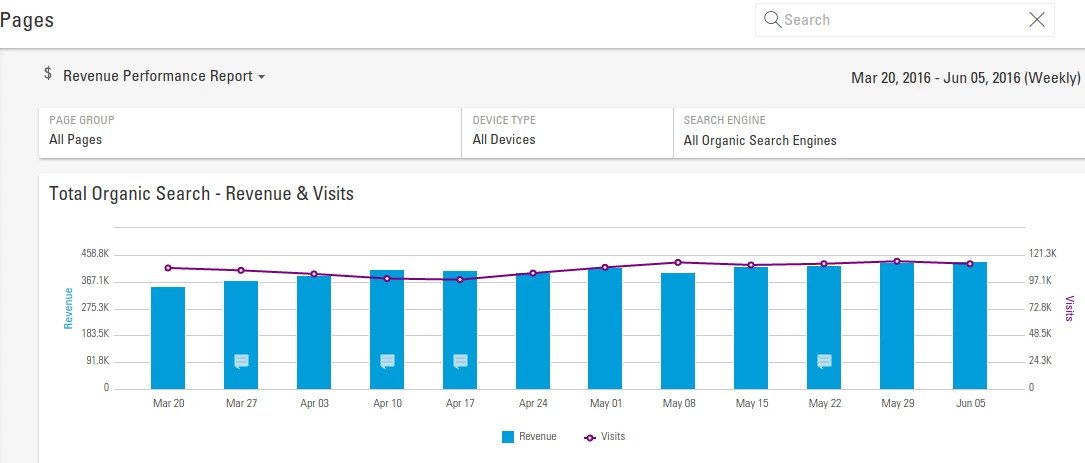
As you progress in your SEO training, it can be helpful to pursue a certification in the field. There are a few different options, including our BrightEdge Certification. Completing these courses can help you considerably professionally. It will offer even more insight into SEO and how to use a platform to further your endeavors. You will also have the credentials to communicate to others within your organization or when you apply for a new job that indicate your understanding of SEO. This will help you move forward and become a more hybrid marketer or find a position in an SEO-oriented field.seo experts can use page reporting - BrightEdge

If you move forward with the BrightEdge certification, for example, you will not only enhance your SEO knowledge, but you will also learn more about how to use the unique BrightEdge SEO platform.

At BrightEdge, we have designed the technology you need to bring all the numbers you could want in SEO into a single place. From keyword or page analysis to easily constructed charts that clearly show business performance in response to SEO efforts, our platform makes it easy to do SEO in the modern, competitive atmosphere in an easy and straightforward manner.

If you're looking for a more entry-level way of assessing your SEO skills interactively, there are a multitude of SEO and digital marketing quizzes and tests out there to cut your teeth on, including our own suite of BrightEdge quizzes in SEO, content marketing, and digital marketing.

BrightEdge SEO Specialist Quizzes

Content Marketing Quizzes

BrightEdge Digital Marketing Quiz

Becoming a master of SEO requires perseverance and dedication, but it is possible to become a comfortable specialist with the material by spending a few minutes a day studying. Rather than becoming overwhelmed by the wealth of information, find a few valuable resources that you can use to gain the knowledge you need to succeed.

Summary of how to become an SEO professional or specialist:

  1. Train yourself in basic HTML editing, especially meta-tagging, H1, H2, and Href commands - it only will take a few hours
  2. Find a web site you can work on freely, many local businesses, like dentists and chiropractors will welcome the help
  3. Train yourself on the major CMS platforms, like WordPress and Drupal - it only will take a few hours
  4. Subscribe to and read SEO blogs, like BrightEdge Blog
  5. Download SEO management white papers
  6. Review the BrightEdge Share presentation content
  7. Watch SEO expert how-to videos on YouTube
  8. Attend SEO industry conferences, like Share
  9. Write a post about SEO in your LinkedIn profile or an SEO related group
  10. Get SEO certified

When you're ready and confident in your skills as an SEO expert, check out this SEO checklist to help get you started on your on-page optimization.

BrightEdge Elevating SEO Webinar Series Event

Event Category
Webinar
Event Date Display
Multiple Dates
Is Share Event
No
Event Location
Online
Event Summary

Join us this spring for our new 4-part webinar series on elevating SEO to a higher level within your organization.

Event Title
BrightEdge Elevating SEO Webinar Series
Event Type
Online
Is Marketo Page
No

Win in SEO on Mobile

Users turn to mobile devices more frequently than desktop to research and complete transactions. Successful marketing includes strategies to deliver an exceptional mobile experience.

As brands look to get more ROI out of their content marketing investments, they’re turning to BrightEdge for advice on how to get their blogs, knowledge center articles, glossary entries, campaign landing pages, and other pieces of content – easily discoverable in organic search and, once found, do a better job at engaging and converting […]

The post BrightEdge Smart Content Ebook Is Now Available appeared first on BrightEdge SEO Blog.

Enterprise SEO and cross-channel performance: Activation and integration

English, British
News Item Title
Enterprise SEO and cross-channel performance: Activation and integration
News Item Author Name
Jim Yu
News Item Published Date
News Item Summary

A strong website is a lifeline for most companies. Contributor Jim Yu recommends using it to push smart SEO content, social agendas, and AI-first technologies.

eBook: How Smart is Your Content?

Use this ebook to make your content smart and perform better

eBook: How Smart is Your Content?

Make your website content outperform the competition and engage and convert your visitors

There’s a lot of content out there vying for your attention - why invest with this one? Actually, content overload is the reason why we decided to write this ebook in the first place. And it’s not that we wanted to add our contribution to the load; we wanted to show you a smarter way to approach content ideation and development.

Every business is aware of the potential power of content marketing, but in the rush to create content many of us have lost our way. Only 50% of B2B content ever reaches an audience, and the B2C picture is bleaker still with only 20% reaching an audience.

None of this diminishes the potency of content marketing as a means of driving revenue. In fact, it just creates opportunities for smart marketers to stand out from the crowd. The more noise there is, the more important the signal becomes.

Download the full report and we'll reveal the current state of the content marketing industry to you.


,