SEOに関するインサイトやスマートコンテンツで最新マーケティングスタックを強化する 【BrightEdge 2018年3月20日】

最新マーケティングスタックにスマートコンテンツを組み込むことによって、バイヤーズジャーニーや各種ファネル(段階)において、オーガニック検索はもちろんのこと、その他のデジタルマーケティング チャネルのパフォーマンスを最適化することができます。

多くの企業が検索結果ページ(SERP)において、従来のコンテンツをオーガニック検索結果ページの上位にランク入りさせるのに苦戦していたため、この現状に対応すべくBrightEdgeではスマートコンテンツ作成のフレームワークを構築しました。現在ではマーケターが抱える本質的な問題として、「コンテンツの過密状態」と呼ばれる状態が蔓延しています。コンテンツの過密状態とは、記事、ブログ、SNS投稿、電子メール、動画、単語集、その他読み手の注意を引くようなコンテンツなど各種様々なコンテンツがひしめき合うように存在している状態を指します。

スマートコンテンツ作成のフレームワークに従うことによって、まるで追い越し車線のような役割を果たすコンテンツを作成することができます。コンテンツを投稿する前からコンテンツに必要なSEOやモバイルフレンドリーな要素を備え、投稿後すぐにSERPで上位を獲得することができるため、結果的にオーガニック検索で強い存在感をアピールすることができます。

スマートコンテンツを活用したマーケティング戦略の画像1

スマートコンテンツを活用したマーケティングスタックを導入する企業が増えるにつれ、このフレームワークを活用することによって、オーガニック チャネルに限らずその他多くのチャネルにおいてもパフォーマンスが改善することが明確になっています。いち早くこのフレームワークを導入した企業がスマートコンテンツを作成して、有料検索や、電子メール、ソーシャルメディアなどのキャンペーンをうまく展開している事例が多数報告されています。

各種あるマーケティング チャネルにおいてスマートコンテンツを活用して成功を収めるための重要なポイントは、ユーザーの意図(インテント)を具体的に把握する能力です。スマートコンテンツ作成のフレームワークでは、コンテンツを作成する際、トップダウン方式で企業からユーザーにメッセージを伝えることを目的としているというよりも、具体的なユーザーのニーズにターゲットを絞り、直接的な対応をする(ダイレクト・レスポンス・マーケティングを展開する)ことを目的としてコンテンツ作成されています。スマートコンテンツは、ダイレクト・レスポンス・マーケティングキャンペーンで非常に効果的であることがわかっているため、ここでいくつか例を挙げてご紹介したいと思います。

有料検索(ペイドサーチ)とスマートコンテンツ

有料検索(ペイドサーチ)とオーガニック検索は検索結果ページ(SERP)を接点として相互的に機能していると考えられています。これまでにはペイドとオーガニックで共通する点はあまり多かったわけではなく、ペイドサーチ担当チームがペイドキャンペーンを展開しランディングページ作成する際には、オーガニック パフォーマンスにほぼ注目していませんでした。

しかし最近のペイドサーチ担当チームは、オーガニック担当チームと密接に連携をとって作業することが多くなっています。例えば、自社にとって非常に重要であるものの、検索結果ページのアバブ ザ フォールドにまだリスティングされていないようなオーガニック トピックを対象にペイドサーチ対策を行うことがあります。

このようなペイドサーチ担当チームの中にはさらに一歩先を行くチームも存在します。このようなチームでは、スマートコンテンツでターゲットにするような「ユーザーが抱く疑問」の内容を特定し、ペイドサーチ キャンペーンを対象にこの内容を売りに出すのです。スマートコンテンツ ページは、ユーザーのクエリの内容に基づいて作成されており、また適切にCTAを活用したり、コンテンツに関する推奨事項に対して適切な対処をとったりしているためパフォーマンス状況がよく、結果的に従来のペイドサーチ キャンペーンよりもパフォーマンスがよくなるのです。

これを実践しているWhiteHat Security社は、弊社のBrightEdge コンテンツ機能を活用しており、スマートコンテンツのPPCキャンペーンにおいて平均品質スコアが約2倍に成長しました。その結果、CPC(クリック当たりにかかるコスト)を下げることができ、予算内でクリック数を増加させ、また150%ものリードジェネレーション拡大に成功しました。

電子メール マーケティングとスマートコンテンツ

スマートコンテンツはEメールマーケティングにも活用することができます。顧客から寄せられた意見を基にトピックが作成されている場合、メールの件名にトピックを使用するだけでターゲット オーディエンスの注目を引くことができ、読み手によるメール開封率も高まります。

スマートコンテンツ作成のフレームワークをいち早く取り入れた企業の中には、Eメールの本文に新しく作成したページコンテンツを組み込んだ例もありました。読み手を意識したキャッチコピーや画像、本文中に適切に組み込まれたCTA、さらにその他のコンテンツを読むよう促すメッセージなどが功を制してEメール由来のクリック数やサイトビジット数が上昇しました。またEメールを読んで興味を持ったユーザーがサイトを訪れた後は、スマートコンテンツ作成のフレームワークに基づいて綿密に作成されたコンテンツをさらに参照することができるため、このトピックに関して企業をオーソリティーとして捉えることにつながるわけです。

スマートコンテンツを活用したマーケティング戦略の画像2

ソーシャルメディアとスマートコンテンツ

最後に、スマートコンテンツはソーシャルメディアキャンペーンにも活用することができます。企業がスマートコンテンツを自社サイトだけにとどまらず、LinkedInやFacebook、Twitterなどの投稿や記事でも展開している例が多く見られます。スマートコンテンツでは顧客の声を反映させているため、ソーシャルメディアのユーザーの共感を得ることができ、結果的にコンテンツのシェアにつなげることができます。スマートコンテンツ作成のフレームワークでは、ソーシャルメディア上でのコンテンツ拡散は非常に重要な要因です。

顧客の声とパフォーマンスを第一に捉えたアプローチにより、スマートコンテンツはマーケティングを効果的に強化することができます。そもそもスマートコンテンツは、検索結果ページ上での存在感を高めるために誕生した技術ですが、時代の一歩先を考える企業はコンテンツ作成に注力することによって、各種あるマーケティングチャネルや顧客との接点において顧客に一貫したユーザーエクスペリエンスを提供することができるため、結果的に顧客のエンゲージメントや信頼度、愛着感なども高めることができるのです。


音声検索におけるSEO:正しく最適化を捉える【Mark Aspillera 2018年4月2日】

<p><b>「音声検索」は、エンドユーザーによる検索の使用方法がいかに変化しているかを表しています。音声検索や、バーティカル検索(垂直検索)、モバイル検索などの普及がさらに広がるにつれて、検索の断片化や、スピーディーさを求める動き、的を絞ったSEOなどの重要性もますます高まるでしょう。</b></p>

<p>オーガニック検索は、これまでと変わらず検索マーケターにとって欠かせない重要なチャネルとして注目され続けます。Googleにおけるペイドサーチ(有料検索)の拡大や修正をはじめ、ナレッジグラフの導入、強調スニペット、ローカル検索の結果表示、<a data-wpel-link="internal" href="https://www.brightedge.com/jp/articles/question-answer-serps&quot; rel="follow">一問一答形式の結果表示</a>など、様々な機能が新たに導入されたり、また改善の目的で廃止されたり、これまでに様々な試みが繰り返し行われてきました。このように様々な要因が最適化作業に関係しているにもかかわらず、<a data-wpel-link="internal" href="https://www.brightedge.com/resources/research-reports/organic-search-st…; rel="follow">オーガニック検索由来のトラフィックは2017年の時点でもまだ、全トラフィックの51%を占めている</a>ことがわかっています。ユーザーは現在でも変わらず検索結果ページのオーガニック検索結果を閲覧し、活用しているのです。</p>

<p>ユーザーが検索エンジンを使用する方法に非常に大きな影響を与えた技術的発展が一つあります。それが音声検索です。ユーザーは検索結果ページを表示し、リスティングをクリックしてサイトを表示するというような一連の作業を行う必要なくモバイル端末やスマートホームデバイスにクエリを話しかけるだけでクエリに対する答えを得ることができます。</p>

<p>これこそがSEO業界で昨今話題になっている「ポジション0」です。音声検索の最適化をいち早く開始すべきであることは明らかですが、音声検索の最適化においてはこれまでの「クイックアンサー対策」などとは一段異なるレベルの様々な要因が関わってきます。</p>

<h2>デジタルマーケティングで音声検索が重要な理由</h2>

<p>音声検索の結果がどのようなものなのか考えてみると、ある意味では、質問形式の検索フレーズに対して検索結果ページの一番上に表示されるようになった強調スニペットがさらに進化したようなものだと言えます。音声検索クエリに自社コンテンツを採用してもらうためには、強調スニペットが役に立つことを<a data-wpel-link="external" href="https://blog.google/products/search/reintroduction-googles-featured-sni…; rel="nofollow" target="_blank">Google</a>も認めており、クイックアンサーはGoogle音声検索やGoogle Homeの音声クエリの情報源として使用されていることが明らかになっています。<a data-wpel-link="external" href="https://searchengineland.com/google-reveals-20-percent-queries-voice-qu…; rel="nofollow" target="_blank"> Google社のCEOであるSundar Pichai氏</a>が述べた通り、2016年にGoogleでモバイル端末やアンドロイド端末を用いて実施された検索の内、音声検索が20%を占めている点を考慮すると、デジタルマーケティング業界にとって音声検索がいかに重要になるか明らかです。</p>

<p>音声検索が使用可能なデバイスは、爆発的に普及しました。<a data-wpel-link="external" href="https://www.nationalpublicmedia.com/smart-audio-report/&quot; rel="nofollow" target="_blank"> NPRやEdison Research社による調査</a>によると、2017年の時点でアメリカ合衆国に住む成人の6人に1人が「スマートスピーカー」を所有しています。また<a data-wpel-link="external" href="https://googleblog.blogspot.com/2014/10/omg-mobile-voice-survey-reveals…; rel="nofollow" target="_blank">Northstar Research社が実施した調査</a>によると、調査の対象となったティーンエイジャーの55%、成人の41%が一日に複数回音声検索を実施していると答えています。</p>

<p>このような経緯もあって、弊社では検索マーケターを対象に<a data-wpel-link="internal" href="https://www.brightedge.com/resources/brightedge-pov-voice-search&quot; rel="follow">「音声検索」という名の大波</a>にいつでも乗れるよう万全に準備することをお勧めしています。当然のことながら、その準備をどの程度行うことができるかは、参照可能なデータ量にもよって変わり、現状では参照可能なデータ量自体が限られているのが現状であり課題でもあります。</p>

<h3>参照可能な音声検索データの種類</h3>

<p>音声検索の最適化を実施するにあたってSEOやデジタル業界が抱える最大の課題は、参照可能な音声検索のデータが非常に少ないことです。</p>

<p>Googleのシニア ウェブマスタートレンド アナリストであるJohn Mueller氏は、音声検索トラフィックに関するデータをGoogle Search Consoleに追加することをGoogleが検討していることを2016年に明らかにしました。</p>

<p><iframe allow="autoplay; encrypted-media" allowfullscreen="" frameborder="0" height="360" src="https://www.youtube.com/embed/Dc3SEjHefk4?start=1393&amp;feature=oembed…; width="640"></iframe></p>

<p>しかしながらMueller氏の発言後、参照可能な音声検索データはまだまだ限られています。その後Mueller氏は、音声検索クエリに関するデータは、従来のGSCキーワードデータとは別に表示される可能性が高いことについても言及しています。これは情報公開を制限するためではなく、Mueller氏自身も述べた通り、この膨大な新データセットをマーケターに分かりやすく解析/表示するのに最適な方法を確立するのが難しいためだろうと考えられています。</p>

<p>このような課題が存在するものの、前述の音声検索と関係が深いクイックアンサーや強調スニペットなどのベストプラクティスを参照に、<a data-wpel-link="internal" href="https://www.brightedge.com/resources/brightedge-pov-voice-search&quot; rel="follow">音声検索で自社コンテンツを採用してもらうために</a>弊社では以下の項目を推奨しています。</p>

<ol>
<li>質問形式のクエリや長いクエリの検索レポートを分析する</li>
<li>自社が属する業界内や、自社サイト、CS、ヘルプなど、各セクションで最も頻繁に使用される質問を100個明らかにする</li>
<li>タイトルに質問を含ませ、本文で質問に対する答えを書く</li>
<li>クイックアンサーで「ポジション1」または「ポジション0」を獲得できるような「答え」を提供できるよう努力する</li>
<li>YahooアンサーやQuoraでベストアンサーを獲得しているような人気の答えをチェックする</li>
<li>構造化したマイクロデータやスキーマの使用を強化する</li>
<li>サイト検索時に音声テキスト変換機能を有効化し、ユーザーがクエリを作成しやすくする</li>
<li>まるで話しているような口調の文章を活用することによって、デジタルアシスタント由来のクエリをマッピングしやすくする</li>
</ol>

<p>BrightEdgeではクイックアンサーや強調スニペットに的を絞った対策を実施することによって、その延長として音声検索対策も後押しすることができます。<a data-wpel-link="internal" href="https://www.brightedge.com/products/s3/keyword-reporting&quot; rel="follow">キーワードレポート</a>内の<strong>ユニバーサル検索結果ビュー</strong>を活用したり、<a data-wpel-link="internal" href="https://www.brightedge.com/products/s3/data-cube&quot; rel="follow">データキューブ</a>で自社ドメインについて調べたりすることによって、すでにポジションを獲得しているクイックアンサーや、クイックアンサー内のポジションは未獲得の場合でも検索結果ページで自社リスティングがどのように表示されているのか明らかにすることができます。</p>

<p><a data-wpel-link="internal" href="https://www.brightedge.com/blog/wp-content/uploads/2018/03/KeywordRepor…; rel="follow"><img alt="Brightedgeのキーワードレポート機能で表示される音声ユニバーサル検索結果に関するレポート" class="alignnone" height="415" src="https://www.brightedge.com/blog/wp-content/uploads/2018/03/KeywordRepor…; width="768" /></a></p>

<p><a data-wpel-link="internal" href="https://videos.brightedge.com/assets/img/website/blog/datacube-screenca…; rel="follow"><img alt="データキューブによるユニバーサル検索結果のクイックアンサーレポート" class="alignnone" height="308" src="https://videos.brightedge.com/assets/img/website/blog/datacube-screenca…; width="769" /></a></p>

<p>また、既存のトラック済みキーワードに基づいて作成した<a data-wpel-link="internal" href="https://www.brightedge.com/solutions/insights&quot; rel="follow">インサイト</a>の機能を活用することによって、クイックアンサーを獲得する可能性を高めることができます。</p>

<p><img alt="brightedgeインサイト機能によるクイックアンサーのオポチュニティーレポート" class="alignnone size-full" height="104" src="https://videos.brightedge.com/assets/img/website/blog/quickanswer-scree…; width="928" /></p>

<p>これ以外にも音声検索の最適化においては、まだまだこれから解明が必要な概念的要素や同時に成長の可能性が多数存在しています。常に進化を続けるバーティカル検索エンジンの世</p>

Taxonomies and Content Silos: UX Strategy - Part 3

mkirchhoff
mkirchhoff
M Posted 8 years 5 months ago
t 9 min read

This is part 3 of a series on semantic search by Michael Kirchhoff. You can read part 1 on Semantics and part 2 on Content Silos.

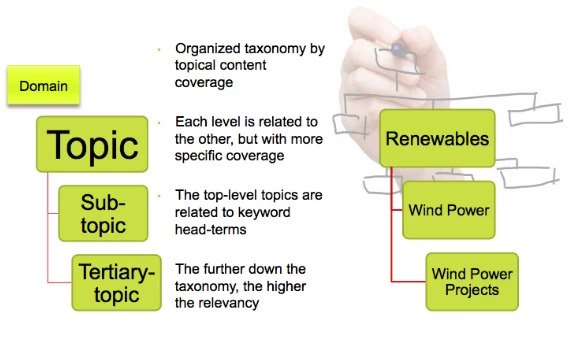
An estimated 50% of sales are lost because people on web sites cannot find what they were looking for. Your UX strategy, site navigation, and how easy it is to find the right information is critical to the performance, reputation, and success of your domain. To create an effective content silo, a website taxonomy is extremely valuable. A taxonomy is a system of classification that helps to organize the ideas and material on your site so that it is easier to understand the subjects and topics covered on your domain. With a taxonomy, live visitors and spiders from search engines are able to find what they seek and therefore appreciate your level of expertise faster and more accurately. Developing a strong UX strategy with a taxonomy structure - brightedge Taxonomies provide good mechanisms for search engines and users to understand the significance of a particular topic and piece of content for your website. Pages at the top of the taxonomy tend to be broader variations of a topic, while diving further into each taxonomy provides refinement. From an SEO standpoint, because the top of the taxonomy funnel is architected closer to the domain, those pages have a higher authority and SEO value for head-terms. On the other hand, subtopics in a taxonomy may have less authority for the head-term but higher relevance for a long-tail target. Both are equally essential for building your SEO and website architecture. The relationship of the taxonomy is tied to the website’s silo structuring and crawl path. When done correctly, it will help both the human audience and search engine spiders understand the relationships within the taxonomy hierarchy and themes for the site.

The types of taxonomy hierarchies

There are four main types of hierarchies that you can use within your content.

  1. You can organize your content based upon categories of related topics in a hierarchical taxonomy.
  2. You can also organize your content in a flat taxonomy, where everything is on one level and there is no depth to the categories. Unless your website is very small, this is generally unfriendly for users and does not provide high value for SEO.
  3. You can create a system that includes both a hierarchy while also using associations between different categories to move people from one area to another in a network taxonomy. These associations are often found when websites make recommendations based upon closely related content or popular or new articles on the taxonomy’s subject.
  4. Finally, you can have a facet taxonomy where you organize your content depending upon how it is used or described. In this system, certain pages can be used in more than one category. For example, a clothing ecommerce site that sells red sweaters for women might have the page appear both under women’s sweaters and under red clothing. With this system, brands have to be particularly careful not to produce duplicate pages within their domain and to ensure a clear and crawlable URL path for both users and search engines to discover the faceted content. Canonicals are also an important part of faceted taxonomies and search.

As there are many technical aspects to a faceted taxonomy, we will examine non-faceted taxonomy content silos in this article. Understanding how to build and manage a taxonomy system for your UX strategy can help you improve the experience you create for your users and therefore your site success.

How do taxonomies align with content and SEO?

The primary benefit of creating a taxonomy is the ability to classify content or products based upon the categories to which they belong. This expands your ability to aggregate and display that content exponentially across your website. When done correctly, a taxonomy also aligns with keywords that reflect search behavior to help readers discover your content and products. Therefore, a taxonomy helps you organize, maintain, display, personalize, and ensure content discovery around your audience's buyer's journey. Taxonomy classification of your content is an important step in creating intelligent content. Organize your content in your UX strategy with the semantic web - brightedge The organization of the content within each of the silo structures helps to improve the rankings of each page. The display of the content assets on the page are all directly related to the taxonomy topic, which helps provide context to the material. These on-page keywords assist with the ranking ability for the page. In a Google Hangout, John Mueller pointed out that the user experience improves because users have landed on a page that is full of content based on a particular topic or taxonomy level. Since they have a better experience, their engagement and CTR improves. In my experience I have noticed an increase in CTR of over 21% by displaying semantically-related content types within a taxonomy page. Google and the other major search engines want to see websites that visitors appreciate and that provide them with value. The importance of the site can therefore be judged based on how people engage with it, such as the bounce rate and the number of people linking back to your material. Improving the silo structuring of your site, including the taxonomy, will boost your reputation and therefore improve your rankings. The search engines also appreciate the UX strategy and taxonomy structure because it makes it easier for them to understand the depth of your knowledge on a particular topic. They can see the links between the different pages you have on the site and thus understand how well you cover various topics. Demonstrating to Google that you offer value and depth will boost your domain authority and therefore your SERP position even further.

How do you create a UX strategy and taxonomy?

As you begin to formulate your taxonomy, there are a few guidelines you should keep in mind. Begin your UX strategy by looking at your content or product subjects. If you don’t have good depth of coverage on a given topic, then it’s best to select a different topic for the taxonomy. For example if your website covers “Renewable Energy” news, a good top-level taxonomy may contain “Solar,” “Wind,” “Geothermal,” “Bio,” “Hydro,” and “Storage.” However if your content and products only contain a few assets for “Storage,” avoid that taxonomy topic until a routine cadence of content can be created for the taxonomy topic. An example of a good top-level taxonomy structure can be found at Renewable Energy World.

In most situations, it is better to create a site structure that is long and shallow, rather than short and deep. This means that you will have more broad topics at the top of the chain and only take the layers down a few levels instead of having only a few top subjects and having numerous layers beneath them. This structure tends to work better because it reduces the number of clicks needed to find certain information, making it easier for people to use and understand.

Try to keep the depth to around 3 levels, a top level, secondary level, and a tertiary level. Secondly, as you create your categories make sure that you use clear names that will be easily identifiable by your users. You want those landing on your site to know instantly the type of information contained within each category. 

Keep the taxonomy names relevant to your content and products. Otherwise, you run the risk of high bounce rates. Finally, although you will be organizing your material in easily-understandable structures, there is always the possibility that some people are going to go looking for particular items in the wrong place. For this reason, if you can have an alternate search function, this can be helpful. Many businesses use search bars. Additionally, sites often find success when their UX strategy includes arranging their content in alternate structures, such as by alphabetical order, so that people can find their topic even if they looked in the wrong area.

How do I classify content to fit within the taxonomy?

When you first start working with a taxonomy and UX strategy, it can be a challenge to know where you should classify your content and the name of the structures you can use. Here are a few methods you can use to get started.

  1. Examine the content and products on your website and try to organize them into no more than 10 top-level themes, which will become the top-level taxonomy.LEDs Magazine example of a UX strategy and taxonomy classification - brightedge
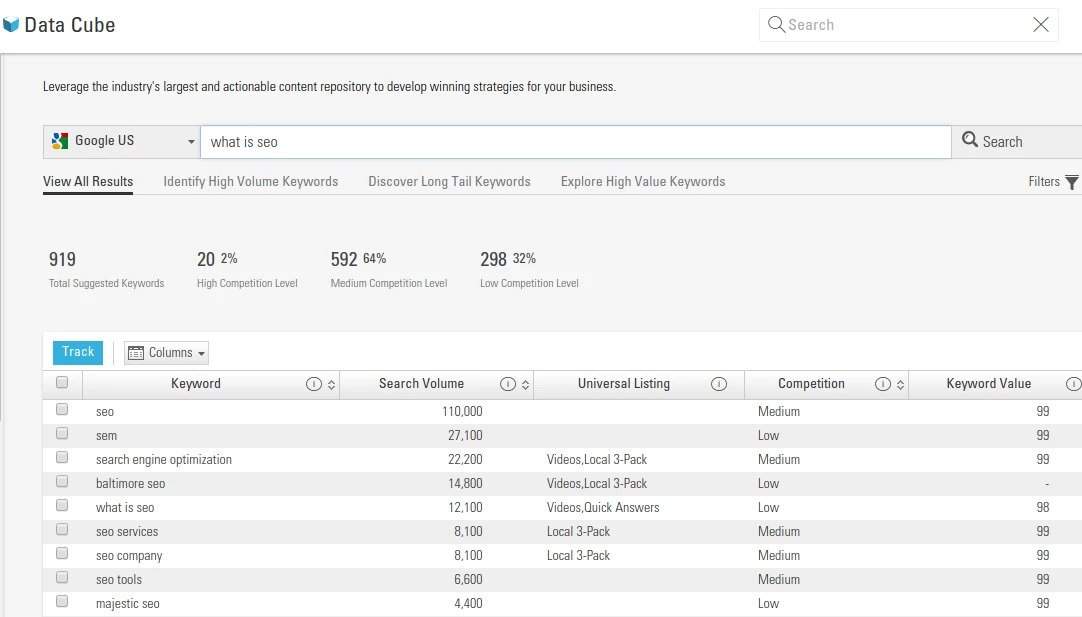
  2. Look at user behavior on your site. Examine the keywords users type most commonly on search engines through tools like the BrightEdge Data Cube. You can also look at how people move around your site to gain a better idea of how people classify your information and what your top topics should be. Don’t forget to examine internal search logs to find the topics your audience looks for while on your website.
  3. Examine your website analytics to see what content or products are most often reviewed.
  4. You can also look at competitor sites to see how they organize their material. Look at the classification systems of the top-performing sites in your industry to uncover insight about what works.
  5. Perform card-sorting tests. You can ask users to create terms and sort cards with various types of content and parts of your domain. This will also give you insight into how other people view your site and how users would intuitively move around.
  6. As you create the top level of your taxonomy, consider what would fall beneath it as a secondary and tertiary taxonomy topic. For example, if “LEDs & Sources” is a top-level taxonomy topic, the secondary taxonomy could be “OLEDs lighting.” In this example, the website LEDs Magazine has four secondary taxonomy topics- “Packaged LEDs,” “OLEDS,” “Plasma,” and “Light Engines.”

Once you have created your taxonomy system, you will want to make sure that any future content fits easily into this UX strategy and the pre-defined criteria. Focus on creating content that is designed for a particular customer persona at a particular point their buyer’s journey. You can then look at the subjects in your categories and have a good idea about where the material should fit. A taxonomy markup can also be a helpful way to make your silo structuring clear to the search engines. Schema.org is a popular markup option because it was created to be understood by the major search engines, including Google, Bing, Yahoo, and Yandex. The markup will label the different parts of your pages and help to classify the different types of content so that the taxonomy system is easy to understand. Using a site taxonomy is a valuable tool to boost your UX strategy and help your site and your business grow. By enhancing the user experience and helping to keep your content organized, you are able to build a strong site that will perform better and help you reap the rewards of an online presence.

Content Silos and Value for SEO - Part 2

mkirchhoff
mkirchhoff
M Posted 8 years 5 months ago
t 9 min read

Content silos are the second part of a three-part strategy. Explore Part 1 and Part 3 of Michael's in-depth series. When people hear that they need to improve their SEO and content marketing efforts, they often jump feet first into blogging. Unfortunately, without a strong website architecture, the potential impact of blogging is greatly diminished. Countless businesses create a flat website structure, which means that they have their website or blog, but they are not organized based on a clear content hierarchy. Often the blog covers a range of different topics, but there is little organization to the posts. They all have completely unique URLs and they have random internal links that take readers all around the blog, haphazardly crossing topic lines. These links are more for the sake of linking, rather than as a part of a useful SEO strategy to provide structure to the blog and improve comprehension. Google states clearly in its Webmaster Guidelines, “Design your page to have a clear conceptual hierarchy.” The establishment of this type of structure makes it obvious to the search engine your level of expertise in the subject and the depth of the experience you are able to provide for a user seeking answers in this particular area. The best way to fulfill this technical SEO criteria is by developing content silos.

What is a content silo?

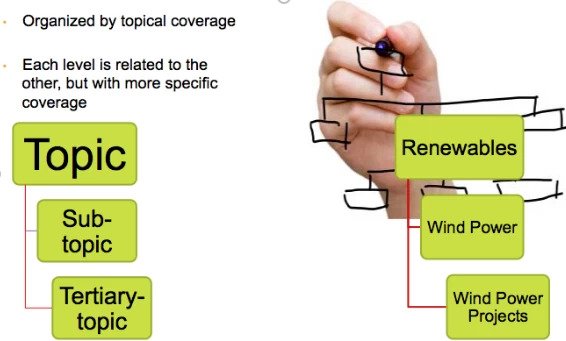
Content silo structuring describes a form of technical SEO that helps you organize your material based on relevant content. In a content silo, you will have several layers of material for a particular topic. At the top you will have a more general page that answers a broad question, for example, “What is SEO?” Each layer below that general topic dives more deeply into related subjects. understanding content silo structure - brightedgeYour “What is SEO?” silo might be divided into “On-Page SEO” and “Off-Page SEO.” On the third level, your “On-Page SEO” might be divided into pages that deal with topics related to keyword research or alt tags, while “Off-Page SEO” will look at topics related to influencer marketing, building backlinks, and social media. A content silo allows you to organize content based upon user needs and search behavior so you can maximize the traffic you capture and your brand reach. You will research the topics that matter the most to your audience and be able to create an organized grouping of content that will explore their topic of interest thoroughly, allowing them to click on different links and learn about related ideas. This will firmly establish your brand as an authority in the field.

The connection between the content silo and the semantic web

The goal of technical SEO is to build a stronger, more efficient site. With content silos, you are able to organize your pages so that users can easily find their way around the domain and learn more about the topics that interest them. Google understands how your site is organized by following internal links, so the silos also help Google see the expertise you have in a particular area. Since the silos help you organize your thoughts and ideas and build categories around topics, you are also able to clearly demonstrate competence in a particular area, which will then help establish your domain authority. It is also important to note that the major Google updates in the past few years, including RankBrain and Hummingbird, have also forced a major shift in emphasis in content development. Prior to these algorithm updates, keywords were the cornerstone of helping Google understand your relevance to a particular topic. RankBrain and Hummingbird, however, are more oriented towards semantic search--the understanding of user intent and context. That means they do not just match keywords in queries to those in text. Instead, the algorithm uses semantics to "understand" text by looking at the language used throughout the material to grasp the meaning and relevance. When you create silos, you will naturally develop text and visuals around the common questions within a particular topic area. Since the content will be connected, Google will be able to "see" that you are an authority on the subject and that your material is highly relevant for the semantic web. A content silo, therefore helps you make your content more appealing to the intent-centered practices of the modern Google algorithm.

How do I use silos in my SEO strategy?

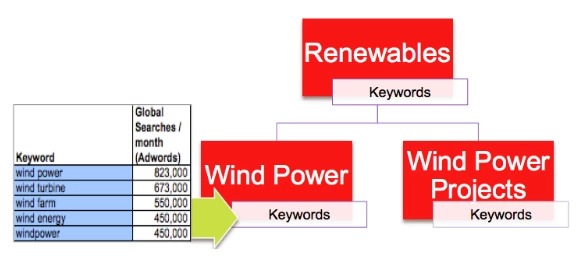
Silo structuring for your content requires breaking down your material into various categories and beginning to rank the pages as the top page for that topic, a secondary page, or a tertiary page. Since these silos are being constructed as part of a technical SEO strategy, however, it is important that you make these categories wisely. Base each category upon search volume, user behavior, and your buyer’s journey--or conversion path. Remember, silos are intended for your visitors first, and are a central part of the UX design. Search engines, and helping them understand the website’s topical and contextual meaning, are the secondary target. Ultimately, the ideal strategy is to closely align your content coverage to high-performing and extremely relevant keyword groupings at each level of the silo. Each topical name should represent a high-performing head-term. The topic will then have a keyword universe that is tightly correlated with the head term and the content coverage found at each level, therefore providing semantically relevant words for the silo. Tools like BrightEdge Data Cube, Google Keyword Planner and BrightEdge Recommendations can make it easy to pinpoint important keywords that can be broken down into the different levels of the silo. You can use the tools to explore the different subtopics that are commonly associated with your main keyword, better understanding the material that users and Google will want to see at each level of the silo. finding content silo keywords - brightedge You can use Data Cube, pictured above, to find related keywords that can help you build your silos. Keep in mind that each level of the silo also serves a very specific purpose in the buyer’s journey. Therefore, many of the top-level and secondary pages may serve as aggregators for that topic’s content. Links within the content will encourage people to move further through the buyer’s journey, further engaging with the brand and guiding them closer to conversion. Think of an ecommerce website that sells clothing. One silo may be Women’s Clothing > Jackets > Winter Jackets. Another example may be a blog covering renewable energy, where the silos represent the various types of renewables. For example: Wind Power > Wind Power Projects. As people progress through the silos, they learn more specifically about the organization’s depth of knowledge and what they have to offer about the different subjects. They build their relationship with the brand and eventually get closer to a website conversion. As you begin to organize the content into these categories, you may also find it beneficial to use your URLs to further emphasize your silos. For example, a URL that says yourexample.com/blog/seo/offpage/influencer-marketing will clearly indicate that this is a tertiary level of the silo and that it is a page under the Off-Page heading, which falls under the SEO category of the blog. Structuring your URL this way not only boosts your UX strategy and helps Google to understand your site, but it also makes it easy for people to see where they are in your site and how they can get to other sections they might be interested in reading. Content pages can be located within a specific URL silo, but often content belongs to multiple silos. For example Women’s Red Puffer Jacket could display in silos covering:

  • Women’s jackets
  • Puffer Jackets
  • Red Jackets

Depending on how your site is architected, you could easily end up with duplicate content. Canonicals can help resolve that sort of problem, but it’s better to address it with clean silo architecture. This issue is discussed further in the taxonomy and semantics parts of this series, but here is an overview. There are numerous approaches to solve this problem. One approach is to have the content reside alongside the top level of the taxonomy. In this example, content would display something like this:

https://www.domain.com/content/name-of-my-new-blog-post.html

This solves the problem of potential duplicate content, while also placing the content higher in the website architecture, which provides greater authority. Furthermore, many SEOs agree that having a page closer to the root domain or home page may provide an authority boost. Including the targeted keyword or latent semantic indexing keywords in the URL can increase that boost. Technical SEO should never be neglected. Building a content silo is an effective means of keeping material organized, helping both your readers engage with your site and Google to understand your authority and expertise. Silos make it easy to organize your site with deep structures and a clear content hierarchy. Brands who want to see genuine results from their content production efforts need to work on developing strong silos to maximize the effectiveness of their efforts.  

Content silos are the second part of a three-part strategy. Explore Part 1 and Part 3 of Michael’s in-depth series. When people hear that they need to improve their SEO and content marketing efforts, they often jump feet first into blogging. Unfortunately, without a strong website architecture, the potential impact of blogging is greatly diminished. […]

The post Content Silos and Value for SEO – Part 2 appeared first on BrightEdge SEO Blog.

Semantics for SEO, Conversions, and UX - Part 1

mkirchhoff
mkirchhoff
M Posted 8 years 5 months ago
t 9 min read

Michael Kirchhoff, one of BrightEdge's top SEO minds, wrote this series of articles on the semantic web and what it means for SEO. It is one of the best set of advanced SEO content we have, so we updated it and are publishing them again for the community. Be sure to read all three:

  1. Semantics and the Future for SEO
  2. Content Silo-Value for SEO
  3. Taxonomies and Technical SEO and UX Strategy

BrightEdge Marketing Since its birth in 1998, Google has been continually evolving and improving its ability to match users with the websites that answer their needs. The Internet has grown from just over an estimated 17,000 websites in 2000 to well over a billion now. This tremendous growth has put an enormous amount of pressure on Google and the other major search engines to be able to interpret what people are looking for and better understand the value and depth of the websites available. This pressure pushed Google to introduce semantic search into its algorithm.

Beginning with the Knowledge Graph in 2012 and the Hummingbird Update in 2013, Google stopped looking at strings of letters in a sequence and trying to match them to the strings of content on a website. Instead, the algorithm began to understand the ‘meaning’ within the query and on the website.

The search engine was working to understand context and intent and then match the idea that the user was looking for with the best website, rather than just matching the words. Semantics, SEO -- BrightEdgeWhile Google has been working on improving its algorithm, there has also been simultaneous growth in the content marketing industry and the number of people who use the Internet when researching products and services.

An estimated 94% of B2B buyers and 81% of customers currently use online research while determining what product they want to purchase. Within the marketing sphere, an estimated 88% of B2B marketers and 76% of B2C marketers use content marketing.

This exponential growth in competition and demand - an estimated 90% of the data available has been produced in the past two years alone - along with the improvement of digital technology has also led to increased expectations on behalf of the search engine users.

People now require sophisticated and user-friendly sites that quickly meet their needs. If you fail in this task, they will just click off and go to the next one on the SERP.

For sites to meet the needs of these users and the modern Google algorithm, we believe that logical organization (taxonomy) and content silos are the key.

This structural system allows you to organize and classify your available content in a way that helps both search engines and users navigate your content and understand the depth of your knowledge on the topic at hand.

Silo Structuring and LSI

Silo structuring ties closely with Latent Semantic Indexing (LSI), which has been around for several years. A few notable resources that can introduce you to LSI and the role it plays in site building can be found on SEOBook’s excellent post on LSI or Bruce Clay’s post. In short, and to paraphrase SEOBook, the benefits of LSI and its ties to semantics and silo structuring are the following:

  • The LSI system will first record the keywords contained within a document
  • It will then record the keywords used throughout the silo
  • It will then compare the keywords used in the document with those used throughout the silo
  • The documents that contain large amounts of common keywords are considered semantically similar, those that do not are considered semantically different.

There is some debate as to whether or not the major search engines directly use LSI in their algorithms; however based on studies and my personal experience, I believe they do. Regardless, silo structuring and LSI work from the audience perspective. Therefore, the question of, “does Google use LSI?” becomes less significant. When you add the value of silos and content organization to your website and products for improved UX, you have created a meaningful and purpose-driven website that aligns content to the audience. This is what Google has been telling us is the key to success from the beginning. Constructing an efficient silo therefore requires a careful look at your user experience, your content coverage, the linking structure between content and pages in the silo, the keywords used in the silo, and your taxonomy. This is just part 1 of a 3-part series that will break down for you the principles of content silos and how you can use this strategy to boost your click-through rate, conversions, and ranking.

How Google is pushing semantics forward

LSI, the Knowledge Graph and Hummingbird laid the foundation, but Google continues to push the issue of semantics forward, calling on webmasters to conform to improve or maintain their rankings. In 2015 they introduced RankBrain, their first leap into the world of artificial intelligence. The engineers for the search engine aimed to create a system that not only would be able to understand how different concepts were related because of manual inputs, but would actually be able to learn how different concepts relate.

RankBrain was specifically designed to help Google return useful results for the roughly 450 million completely unique queries it receives each day. Shortly after RankBrain, Google stopped participating in the announcement and naming of algorithm updates and encouraged the community to focus on quality and relevance with the implication that RankBrain would be able to recognize and reward that focus.

Learn about the impact of SEO topic clusters. Semantics content strategy - brightedge

This push towards semantics has changed the way SEO is done. Now, rather than trying to match the keywords and vocabulary that your targeted audience is using, you want to match to the topics that they are asking about. Suddenly, related vocabulary terms are not only relevant but often important as a way to demonstrate your depth.

Establishing silos on your site takes a little effort, but it will prepare you for the changes Google continues to make to the algorithm. Each section of this series will help you understand the topic on a deeper level and will make it easier to understand how to build your silos yourself.

Here is what we will cover in each section the this blog series. Look for future posts.

Part 2 - Technical SEO and Content Strategy

In this part, we will explore how semantic search helps Google understand your site organization and how site silos influence Google’s idea of your domain authority and competence. As you create your content silos, you will also work on aligning each step to the buyer’s journey and a keyword group. Here we will explore the value of using technical SEO as a part of your overall authority and why it can help influence your rank. Read Part 2

Part 3 - Creating a UX and SEO-Based Taxonomy

In part 3 we will dive deeply into the taxonomy - your classification categories - of your project. We will see how you can use your terms to align your content and then manage your created system. You will look at how to do a taxonomy markup and how create a system that works specifically for your needs. Learn more about SEO technology in the BrightEdge platform.

Read Part 3 Login to the BrightEdge platform to get started today, or request a demo to learn more. 

Digital Marketing Goals: Launching Site Enhancements

maspillera
maspillera
M Posted 8 years 5 months ago
t 9 min read

Among all digital marketing goals the most important one is simple: to help grow business. Accomplishing that is where it gets complicated. Here's an introduction on how to get the internal buy-in and resources that you will need.

Content is the fuel that powers meaningful growth, capturing every relevant moment in search with an engaging and convincing story. If content is fuel, then your website is the engine that needs to be maintained and optimized continually. There’s no sense in pouring in more fuel, expecting phenomenal results, if the engine is leaking oil. We know that every organization is different, and every website is different. It follows that every web team is different too. That said, there are a couple of common traits we see in the community:

  • A backlog of projects that could keep you busy for weeks, if not longer
  • Limited resources to take actions on the items on your backlog
  • Having to collaborate with other specialists, like designers and web developers to accomplish many of your longer-term goals

Therefore, more often than not, many website enhancements can’t be done by a website owner working alone. Significant enhancement projects, like new interactive site features, new page templates, or overhauling information infrastructure, typically require help from web developers. This is an issue near and dear to our hearts. Therefore, BrightEdge put together some of our best practices on how to get the buy-in and resources you need to accomplish your website enhancement projects.

Types of website projects

Not all website projects are created equally. Most of the time you can categorize web projects into two broad categories:

  1. Bugs
  2. Enhancements

Bugs

Bugs are generally any kind of broken or inoperable feature, element, or experience on your site. A drop-down menu that doesn’t render properly in Chrome on mobile devices is an example. Hyperlinks that 404 and buttons that don’t work are also good examples. The turnaround time on bugs is typically (and ideally) short, and the priority for getting them resolved is very high for both the business as well as engineering sides of the aisle. Just about anyone can report a bug, including end users of your site and not just people within your organization.

Enhancements

In contrast to bugs, site enhancements are projects that drive growth for the website and provide new experiences and functions for visitors. These can be things, like new page templates, full site redesigns, and more. Generally though, the level of complexity is much higher than it would be for a simple bug fix and requires a greater amount of resource investment. Because the complexity level varies so much, the delivery time can differ considerably from project to project. Since the necessity of site enhancement projects isn’t always as self-evident as it is for bug fixes, it’s often the web owner’s responsibility to communicate business value to stakeholders and any other involved parties.

Discovering web project opportunities

It’s hard to get buy-in on your projects if you don’t have a prioritized backlog of proposed projects you can point to and articulate the business value of each. Modules like ContentIQ can help you to evaluate your website as it exists today and identify areas of improvement or potential growth. It gets overwhelming very quickly when grooming the website to identify site errors. A sensible way to prioritize these site errors is as follows.

  1. First, fix site-wide performance issues
  2. Then identify key pages, measured by revenue, conversion or website traffic contribution, to fix or enhance first
  3. Fix severe errors on key pages

Secure commitment

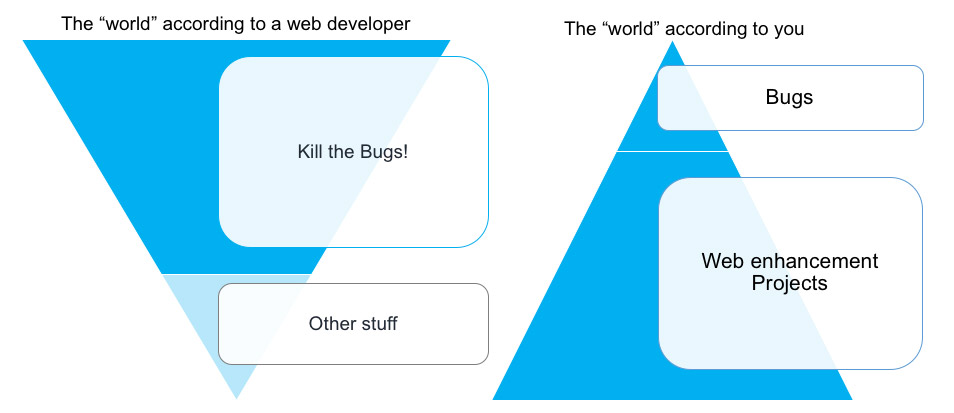
Once you’ve built your backlog of web projects, the next step is to secure resources commitment from your web development team. While many web owners have some degree of technical proficiency in HTML, JavaScript, etc., the reality is that few have the skill level or free time necessary to simply build out, say, a new web page template on their own, much less lay out the wireframes and mocks on their own. We need to collaborate to achieve our digital marketing goals. Sometimes this is easier said than done. Web developers don’t just exist to execute on the enhancement projects that are brought forward by a marketing manager. They have their own set of responsibilities that have to be balanced against, most of which focus around minimizing turnaround time on bugs and working together with a DevOps team to maintain site integrity and uptime. Here is a quick illustration of the “mismatched worlds” of the web developer and you, the web marketing lead. digital marketing goals for companies - brightedge

User stories

A big asset in securing commitment is the user story. The term “user story” is used in Agile development models, but is just a term for the master sheet that catalogs all the information a web developer needs to estimate the scope of a project and proceed with development. Ideally, a user story should also be a reliable reference guide for a QA team when testing proper functionality and for any prospective audience within the organization to read and have an understanding of the ask and its business rationale. Web owners should develop their skill in creating this kind of documentation for their web enhancement projects. The format and layout of these documents can vary based on the organization and team structure, but typically include the following elements:

  • Detailed breakdown of features and intended functions of each
  • Business rationale for the project
  • Criteria for what elements need to be in place for the project to be considered in a “completed” state
  • Digital marketing goals: The metrics you’ll be measuring
  • All related content and design materials

Implement

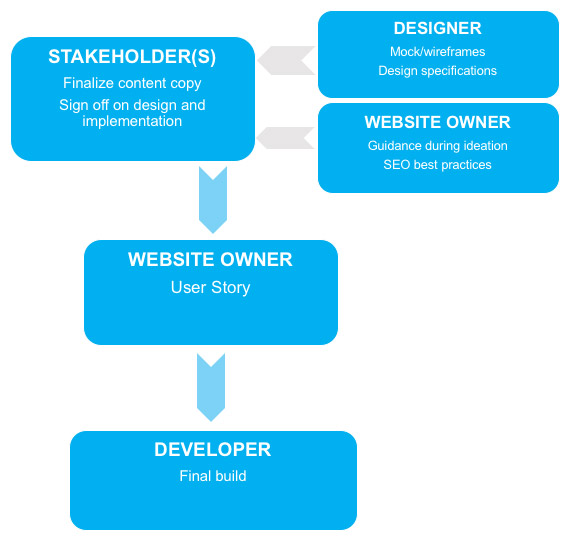
A web owner’s job doesn’t end once a project gets greenlit. Complications can and will arise, and an effective web owner will take the initiative to clear blockers and make sure that their team is equipped with everything it needs to succeed. A common source of blockers is not having all of the necessary materials on hand before development begins. Depending on the project requirements, it’s a good practice to make sure that everything is in order and aggregated in the user story before making the handoff to the web developer(s) to begin their work. Below is an example flowchart depicting the kinds of materials everyone involved in an enhancement project would be responsible for. While the web owner’s responsibility is to make sure that all of those materials flow down to them to incorporate into the user story before developer handoff, this chart highlights the importance to “teaching to fish” - inform your content owners about the full workflows and the importance for them to drive their own project assets to completion before throwing the project over the fence to you. One of the common misunderstanding is unfinished copy deck for the new web page. The reality is: if the copy deck is not completed, the design of the new web page might not look right after it is coded.  

digital marketing goals visual - brightedge

Measure

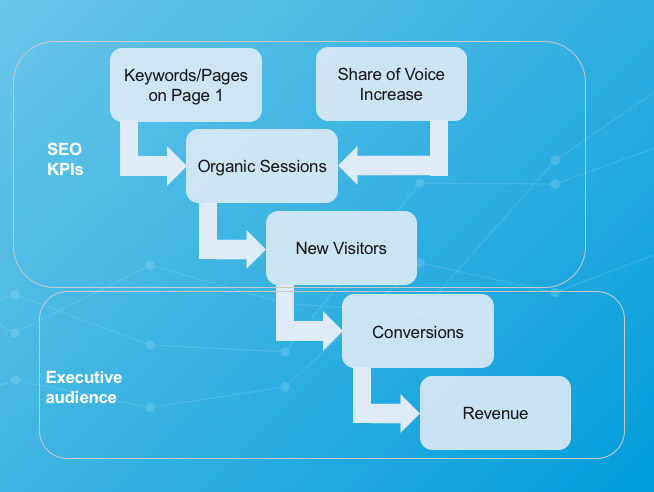
Any web owner knows that an enhancement project doesn’t end with a “Mission Accomplished!” when the work is deployed on the website. Marketers measure success through impact, and a major part of the documentation any web enhancement project is detailing the KPIs you will evaluate. Having this in place from the get-go makes it much easier to track progress towards your digital marketing goals. Monitor impact closely and run analyses comparing post-deployment KPIs to pre-deployment numbers (normalizing the time measures being compared). Additionally, deploy tracking features like page visitor heatmaps, clickpath mapping, and conversion goals to evaluate whether your new features are driving the kinds of user behavior you want. digital KPIs organized in vertical funnel format for digital marketing goals - brightedge

Provide feedback, share wins

This is one of the easiest steps to overlook, but also one of the most important to ensure ongoing successes in your job. Obviously, it’s important to communicate when accomplishment of digital marketing goals vertically to stakeholders, superiors, and subordinates, but it’s just as beneficial to share successes -- such as any of the metrics in the infographic above -- to keep developers in the loop on the business impact of their work and build morale. All of this helps to encourage enthusiasm and future collaboration down the line. You should also take the initiative to share your feedback and get feedback from other team members. Conducting retrospective meetings to compare notes on what went well and what could be improved next time around is an essential part of the Scrum development framework and can be beneficial in virtually any kind of team structure. For an in-depth walkthrough of this 5-step process, be sure to view Launching Site Enhancements That Yield High ROI, part of our Elevating SEO webinar series.

Among all digital marketing goals the most important one is simple: to help grow business. Accomplishing that is where it gets complicated. Here’s an introduction on how to get the internal buy-in and resources that you will need. Content is the fuel that powers meaningful growth, capturing every relevant moment in search with an engaging […]

The post Digital Marketing Goals: How to Launch Site Enhancements and Collaborate With Web Devs appeared first on BrightEdge SEO Blog.

一問一答形式の検索結果表示:検索意図がほぼ明確な場合【Mark Aspillera 2018年3月16日】

【2018年追記:一問一答形式の検索結果ページに関する試験的導入が正式に一時休止されました。同社のDanny Sullivan氏によると、約1週間分のデータとユーザーから寄せられたフィードバックを考慮した結果、Googleは同機能の試験的導入を一時休止することを決定し、「同機能の適切な使用時期と方法をさらに改善する」と発表しました。この発表を見ると、今後も現状からさらに最適化された形式で再度導入される可能性があることがわかります。]

基本的な検索クエリに対して一つの答えを表示する「一問一答(Question-Answer)」形式の検索結果をGoogleが試験的に導入しています。同社のこの動きをみると、ユーザーが求めている内容を可能な限り早急に提供することによって、Googleが「検索」を便利で個人のニーズに応えることができる機能に仕上げようと目指していることがわかります。このような新たな変化が導入されたものの、検索マーケターにとっては最適化作業に直接的に差し迫って悪影響が出るわけではないようです。

何が起こっているのか?

まずはちょっと考えてみましょう。誰かがあなたに何か質問したとします。その質問を聞いて、10個の答えと視覚的な資料をすぐさま用意しようなんてしないのではないでしょうか?普通に考えると、一番もっともらしい答えを教えてあげます。もし質問に対して自分の答えが完全に正確か自信が持てない時は「場合によって答えは異なるのですが…」というような切り返しで、もう少し詳しい情報を集めればいいのです。

人工知能の進化の過程を考慮していみると、Googleと同社のRankBrainアルゴリズムがユーザーの入力した検索クエリを適切に解釈していると自負しているため、たった1つしか結果を表示しないのは当然だと言えます。ある意味ではGoogleはユーザーが最も答えを見やすくなる方法を考慮して、ユーザーにとって簡単で分かりやすい検索結果の方法を取り入れているのです。

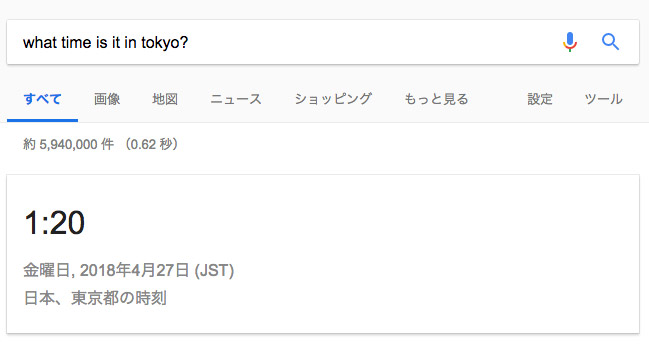
今週Googleは、「What time is it (今の時刻)」のようなシンプルなクエリに対して検索結果ページに1つしか答えを表示しないという試みを大規模に始めました。

一問一答形式の検索結果ページの表示例

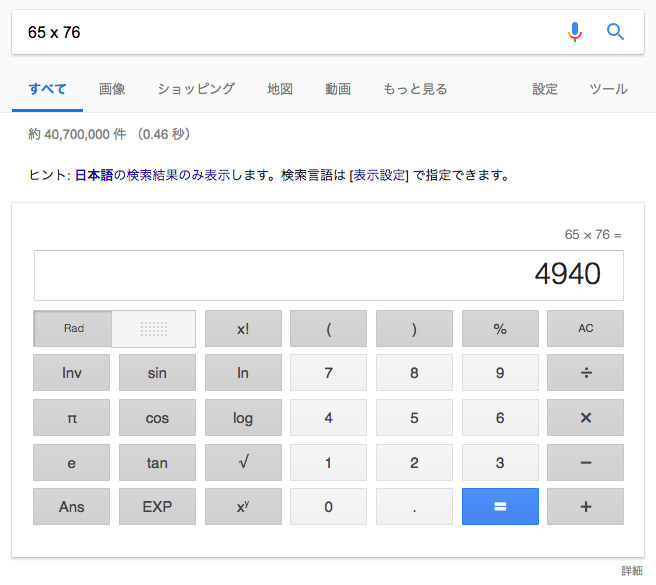
同様の一問一答形式のSERPが表示されるものとして、「温度」があります。また、数学的検索クエリに対する結果も同様に、計算後の答えのみが同様に表示されます。

単純な計算の一問一答形式で単純な計算の答えを表示する例

これが何を意味するのか?

これまでと同様BrightEdgeでは業界のトレンドをいち早く把握し、SEOやデジタルマーケティング業界で活躍するマーケターにこのような新しい現象を熟知できるよう背景や展望をお知らせしています。

このような一問一答形式の検索結果表示方法は、入力した検索クエリの性質が基本的な情報である場合がほとんどであるため、この検索結果表示方法の導入によってインプレッションや、クリック数、ポジションなどのメトリックに大きな減少はないだろうと考えられます。またこの新検索結果表示方法が用いられるキーワードは、現在ランク入りしていないキーワードやコンテンツ作成に注力していないようなキーワードであることが多いでしょう。

検索結果ページの進化の仕方は?

すこし視野を広げて話を展開しましょう。検索結果ページに表示されるユニバーサル検索結果の要素はどんどん増加しています。 BrightEdgeが実施した調査によると、2018年1月の時点で検索結果ページの84.4%にユニバーサル検索結果が表示されていることがわかっています。表示される要因が広告である場合、オーガニック検索結果が表示される場所はさらに下にさがるわけです。ユニバーサル検索結果がGoogle端末にリンクされている場合、さらにオーガニック検索のトラフィックにおけるチャンスはさらに限定的になると考えられます。

弊社が実施した調査では、ユニバーサル検索結果ページとして40種類を特定しましたが、前述の84.4%の内40種類中の6種類が79%を占めています。

BrightEdgeの調査で明らかになったGoogle検索結果ページに表示される強調スニペット配分

ユニバーサル検索結果ページを構成する残りの34種類が表示されるのは、5%程度にとどまり、SEO業界で活躍中のBrightEdgeユーザーの皆さんに大きな影響を与えることは少ないと考えられます。興味深いことではありますが、SEO対策のワークフローやアプローチに変更点を加える必要はなさそうです。

SERP新表示方法導入にどのような対策をとるべきか?

各キーワードに対して表示されるコンテンツの種類を把握することを目指して、BrightEdgeではビジュアルパーシング テクノロジーという技術を開発しました。各キーワードに対する検索結果表示方法として40種類もの可能性を探るのは現実的ではありません。したがって、弊社では全キーワードを「現状維持」、「最適化」、「作成」、「コラボレート」の4種類に分類することをお勧めしています。アバブ・ザ・フォールド(ファーストビュー)にオーガニックコンテンツが表示されているかどうかに基づいてキーワードがこれら4種類に分類されています。

現状維持、最適化、コンテンツ作成などのSEO作業を表すグラフィック

またBrightEdgeではストーリービルダーでご利用いただけるテンプレートを作成し、ストーリービルダーに備わるインテント シグナル ダッシュボードで前述のような分類のようにキーワードを整理することができます。インテントシグナルを活用することによって、各キーワード検索時にアバブ・ザ・フォールドにオーガニック リスティングがあるかどうか、また自社コンテンツがアバブ・ザ・フォールドに表示されているか同課などの情報をデスクトップ、タブレット、スマートフォンなど端末別に確認することができます。このインサイトを参照することによって、最適化やコンテンツ作成を実施すべき最も高価値なキーワードを対象とした最適化作業にさらに磨きをかけることができます。この機能を活用するには、BrightEdgeプラットフォームにログイン後、プラットフォーム左側のナビゲーションパネルから [ストーリービルダー] をクリックし、鉛筆(編集)アイコンの左側にあるテンプレート アイコンをクリックすると、インテントシグナル ダッシュボードが開きます。

最後に、コンテンツマーケティングやSEOマーケティングにおいては、コンテンツ作成にかかるコストを上回るだけのトラフィックを獲得できるような方法を開拓する必要があります。また自社サイトの読み手を意識してコンテンツを作成し、展開するためには、検索結果ページの仕組みを可能な限り詳しく把握してキーワードの優先順位をつけることが最も適切で賢い方法であると言えるでしょう。

Using AI to Drive the Convergence of SEO and Content Marketing

Event Category
Webinar
Event Date Display
Apr 25, 2018
Is Share Event
No
Event Location
Online
Event Summary

SEO and content marketing are converging, and AI is the engine driving that convergence. Find out why.

Event Title
Using AI to Drive the Convergence of SEO and Content Marketing
Event Type
Online
Is Marketo Page
No
,