


Black Friday SEO: Last-minute tips

English, British
News Item Title
Black Friday SEO: Last-minute tips
News Item Author Name
Clark Boyd
News Item Published Date
News Item Summary

Recent analysis of BrightEdge data by Eugene Feygin revealed a very significant increase in the number of rich snippets returned for ecommerce queries over the past year.

Digital Black Friday deals start on Thanksgiving as shoppers look online early

English, British
News Item Title
Digital Black Friday deals start on Thanksgiving as shoppers look online early
News Item Author Name
James Risley
News Item Published Date
News Item Summary

A study from content performance marketing firm BrightEdge found that conversion rates are double the non-holiday sales season average on that day, along with Cyber Monday.

小規模なチームで取り組むSEO (パート2):計画の立て方 【Mark Aspillera 2017年11月3日】

小規模なチームで効果的なデジタル マーケティングを展開するのは非常に大変な作業だという印象を受けるかもしれません。しかし、適切に計画をたて、効果的な訓練やテクノロジーを導入することによって、小規模なチームでも SEO 対策で成功を収めることも可能です。今回のパート2の記事では、小規模なチームが保持する資源を最大活用する方法についてご紹介します。パート1の記事はこちらからご覧いただけます。

小規模のSEO対策チームで作業をする際には、それぞれのメンバーが複数のデジタル マーケティング分野をハイブリッドに担当しているため、「時間」は非常に重要なものとして決して無駄にすることはできません。とりわけ小規模のチームでは、効果的かつ効率的に作業する方法を見出さなければなりません。小規模なチームで効率的な作業形態を構築し、かつ高ランクを獲得して顧客の興味を引くようなコンテンツを作成するためには、効果的な計画の立て方を確立することが欠かせません。

マイクロモーメントが自社ビジネスにどのように関連するか考える

購買行動までの顧客の一連の動きを表すカスタマー ジャーニーでは、主に4つのマイクロモーメントが関係していると考えられています。これらのマイクロモーメントが起きる決まった順番はなく、ユーザーによって体験する時や程度はバラバラです。
Understand the SERPs and content strategy critical for a small team SEO strategy

デスクトップやモバイル端末を用いて、顧客は上記の顧客意図(インテント)に当てはまるような検索をいつでも行うことができます。常にデジタルな環境にいる現在の消費者は、過去のように予想可能な直線型のカスタマー ジャーニーをたどるのではなく、消費者ごとに異なる順番でカスタマー ジャーニーを進み、ほんの数時間の間で購買行動に到達することもありますが、逆に何か月も購買行動に到達しないこともあります。

Understanding the SERP and modifying strategy is critical to small team SEO success
Google ではエンドユーザーにより良いサービスを提供するために、ユーザーが入力したクエリの背景にどのようなインテント(意図)があり、ユーザーの検索クエリが4つのマイクロモーメントのどれに当てはまるのか理解しようと努めています。これに基づいて、Google はユーザーのインテントを反映した検索結果ページを作成します。

マイクロモーメントの種類によって検索結果ページで表示さえる内容が異なることを考慮すると、特定の顧客層において各マイクロモーメントがどのように表れているのか理解し、またそれぞれのマイクロモーメントが自社事業にどのような影響を与えるのか把握することが必要です。例えば、ローカルな事業展開を行うレストランでは、「行きたい(I-want-to-go)」モーメントを重視する可能性が高く、Eコマース系の企業では、「買いたい(I-want-to-buy)」モーメントを重視する可能性が高いでしょう。あくまでも、前述のように特定の企業にとって特定のマイクロモーメントが重要な意味を持つからといって、残りのマイクロモーメントが重要でないというわけではありません。

しかし、顧客によってどのようなマイクロモーメントが関係しているのか、また購買行動を最も後押ししているモーメントはどれかを把握することによって、どの分野に力を入れるべきなのか決定しやすくなるのです。こうすることによって、自社パフォーマンスを最も後押しするようなコンテンツの種類が何かを明らかにすることができ、SEO 対策チームで的確に戦略を立てることができるため、小規模なチームでも効果的に作業を行うことができるのです。

優先順位を立てる

小規模なチームで SEO 対策を行う際には、オンラインでのプレゼンスを高めるためにすべての分野で効果的な作業を行うことは実質不可能でしょう。したがって、小規模な SEO 対策チームで成功を収めるためには、優先順位を明確に立てることが欠かせません。自社に関係するようなマイクロモーメントを把握することができれば、自社に最も大きな影響を与えるようなコンテンツの種類が何かを明らかにすることができます。Google 検索結果ページを分析して、ターゲット オーディエンスの間で人気のあるクエリにおいてどのような結果ページが表示されるのか明らかにすることによって、自社のプレゼンスを高めるためにどのような要素を重視すればいいのか決定することができます。Google では、検索結果ページを作成する上で、動画、画像、テキスト形式のコンテンツ、ペイド(有料)、ローカルなどのリスティングが表示されます。自社がターゲットとするクエリの検索結果ページで、どのようなコンテンツの種類がより表示されているのかを明らかにすることによって、SEO 対策の戦略をより正確に策定することができます。

同様にその他のプラットフォーム(例:ソーシャルメディア)においてどのような対策をとるべきかについても優先順位を立てましょう。現在では数えきれないほど多くのソーシャル プラットフォームが存在するため、見込み顧客に自社をアピールするのに最も効果的なプラットフォームは何か考えてみましょう。例えば、B2B企業では、LinkedInを最優先に考え、Facebook、Twitter の優先順位は二次的に捉える企業が多いと考えられています。同様にファッション関連の企業では、InstagramやPinterestなどの視覚的にアピールすることができるようなプラットフォームを最優先に考え、FacebookやLinkedIn、Twitterなどの優先順位はやや下がることが考えられます。

アナリティクスを導入する

小規模な SEO 対策チームにおいて、コンテンツ作成に費やす労力や時間に無駄が出ないようにするためには、アナリティクス プラットフォーム使用が重要な意味を持ちます。小規模な SEO 対策チームでは、ターゲット オーディエンスにマッチしないコンテンツを作成して時間を無駄にしたり、ターゲット オーディエンスを意識して立てた目標を達成できなかったりすることは相当な痛手になります。自社サイトの分析にアナリティクスを導入することによって、自社で実施しているキャンペーンの成功度や自社の弱点などをはっきりと把握することができ、注目すべき分野を効率的かつ効果的に決定することができます。

アナリティクスを無駄なく効果的に使用するには、ランキングや、トラフィック、エンゲージメント関連のメトリック、キャンペーン実施によって発生した収益など、様々な要因に注目する必要があります。こうすることによって、読み手を意識して、読み手が期待しているコンテンツを作成するために役に立つ情報を手に入れることができます。

自社サイトに限らず、競合サイトのアナリティクス情報をチェックすることでも有益な情報を得ることができます。競合サイトのコンテンツ戦略を参照することによって、業界内で成功を収めているコンテンツ戦略の例や、逆に成功につながっていないコンテンツ戦略の例を今後の自社戦略策定に活かすことができます。

Understanding competitor strategies and weaknesses improve small team SEO success

コンテンツ作成スケジュールを立てる

まずに、検索結果ページを分析したり、自社サイトや競合サイトのパフォーマンス状況をアナリティクスで分析したりすることによって、自社がターゲットとする読み手に最も効果的なコンテンツの種類を明らかにしましょう。その後、コンテンツを作成するペースを決定しましょう。ここで忘れてはならないのは適切なバランスを保つことです。週にブログ記事を2,3件投稿できれば理想的ですが、他の種類のコンテンツに悪影響が出るほどブログ記事だけに力を注ぐのは好ましくありません。限定コンテンツや、各種様々な形式のコンテンツ(インフォグラフィック、動画など)なども作成してみましょう。コンテンツ数だけにとらわれるのではなく、高ランクを獲得できると自信を持てるような高品質なコンテンツ作成に励みましょう。

継続的に熱意をもって努力を続けることができるプロフェッショナルを揃えることによって、小規模なチームでも SEO 対策で成功を収めることは可能です。効果的な訓練を実施し、適切な計画を立てることができれば、成功を収めるために最後に必要なのは的確なテクノロジーの導入のみです。


The Holiday Digital Shopping Journey: Trends for Thanksgiving, Black Friday & Cyber Monday

Holiday Shopping: Trends for Thanksgiving, Black Friday & Cyber Monday

Variations in consumer behavior, device preferences and online holiday traffic provide marketers with clues on how - and when - consumers shop online during the holidays

SAN MATEO, CA (November 16, 2017) – BrightEdge, the leader in enterprise organic search and content performance, today released the BrightEdge Digital Holiday Shopping Research Report. The research, compiled using 2016 data points, provides marketers with insights to make the most of 2017 holiday shopping trends. This eight-week holiday shopping season data provides marketer with valuable clues for reaching the online consumers at the right time, on the right device and when the consumer is most likely to purchase.

Key Findings

The BrightEdge Holiday Report confirms Black Friday and Cyber Monday were the most important digital shopping days last year. However, Thanksgiving Day is quickly becoming as important as Black Friday or Cyber Monday, meaning retailers with the goal of delivering a successful holiday season must be prepared for Thanksgiving too. Some of the findings include:

  • Veterans Day is the unofficial start of the Digital Holiday Shopping Season, with online traffic beginning to spike
  • When it comes to consumer behaviors, different devices matter for different days:
    • Traffic from tablets spikes on Thanksgiving Day but still lags desktop and mobile
    • Mobile traffic dominates Black Friday as on-the-go shoppers research the best deals, locate that perfect gift, and navigate to the store with that product
    • Desktop traffic dominates Cyber Monday as shoppers make their final purchases back in the office
  • Conversion rates peak on Cyber Monday, eclipsing Black Friday by 10%
  • Throughout the entire holiday period, conversion rates are 50% higher, than non-holiday shopping times. However, conversion rates decline to pre-holiday levels roughly one week before Christmas to account for shipping time
  • Bigger screens (i.e. desktop and tablet) equate to bigger holiday orders

“During the busiest and most important time of the year it is essential that marketers make the most of the opportunity in front of them” said Kevin Bobowski, SVP, Marketing of BrightEdge. “Thanksgiving Day is quickly becoming the most important shopping day of the year –– even more important than Black Friday or Cyber Monday. A day of football, family time, and traditional turkey feasts puts consumers in the buying mood. We’ll be tracking the same metrics to monitor the changes in consumer activity from 2016 to 2017.”

The full research report and detailed findings can be downloaded here:

https://www.brightedge.com/resources/research-reports/2017-holiday-shopping-data-new-data-device-trends

In the weeks following Thanksgiving Day 2017, BrightEdge will be analyzing and comparing last year's data with data from the 2017 Black Friday and Cyber Monday to compare year-on-year trends.

About BrightEdge

BrightEdge, the global leader in enterprise organic search and content performance, empowers marketers to transform online content into business results such as traffic, conversions, and revenue. The BrightEdge S3 platform is powered by a sophisticated deep learning engine and is the only company capable of web-wide, real-time measurement of content engagement across all digital channels, including search, social, and mobile. BrightEdge’s 1,500+ customers include global brands such as 3M, Microsoft, and Nike, as well as 57 of the Fortune 100. The company has eight offices worldwide and is headquartered in Foster City, California.

Website: https://www.brightedge.com

Follow us on Twitter: www.twitter.com/brightedge

Follow us on LinkedIn: https://www.linkedin.com/company/brightedge

Like us on Facebook: www.facebook.com/seoplatform

Press Release Date

5 Steps to a Successful Website Audit

koleary
koleary
M Posted 8 years 11 months ago
t 9 min read

Your boss brings in cupcakes on Friday afternoon to celebrate a good quarter of hitting revenue goals… That’s a good surprise. Your boss phoning you at midnight to find why site traffic has suddenly dropped 20%... That’s a bad surprise. The last thing any digital marketer wants is unexpected drops in website key performance indicators (KPIs), particularly when they affect business revenue. These nasty surprises are typically the result of website errors, which are technical issues with your website that have an adverse effect on SEO performance. Site errors can happen at a site-wide level, such as NOINDEX tags that prevent search engines from indexing your content, page load times of more than three seconds, and 4xx errors, which usually mean broken links or blocked content. They also occur on individual pages, if you are missing page titles, H1 tags or meta descriptions, and if you have any duplicate content. Maintaining a healthy, surprise-free website means knowing about all your existing errors, understanding which fixes will have the biggest impact, and ensuring you can get the resources to implement the required changes. An SEO website audit is a critical first step in finding errors and site issues.

Identify and prioritize a website audit and errors with ContentIQ

BrightEdge ContentIQ is a next-generation site auditing solution that brings sanity to the process of reducing website errors that could impact SEO performance. It allows you to identify technical and on-page errors across your entire site, prioritize those errors with the severest impact on SEO performance and user 5 step process for planning website audits infographic - brightedgeexperience, build a business case for allocating resources to these key fixes and showcase your successes to the wider business and executives. ContentIQ works by inspecting your site, whether that’s a few key sections or the entire thing. Depending on the size of your site (ContentIQ can crawl hundreds of millions of pages) and its overall technical health, ContentIQ could highlight thousands of errors. Prioritizing which errors to fix is the key to delivering the biggest impacts up front. Showcasing these wins to the wider business can help you secure additional resources and fix more errors. To help you make the most from your website error resolution work, we’ve collected best practices and insights from BrightEdge users like you as well as our own crack team of SEO experts. The result is a simple five-step process for improving your site and achieving measurable success.
  • Establish a baseline
  • Fix site-wide performance issues
  • Prioritize site errors based on the business impact
  • Communicate your successes

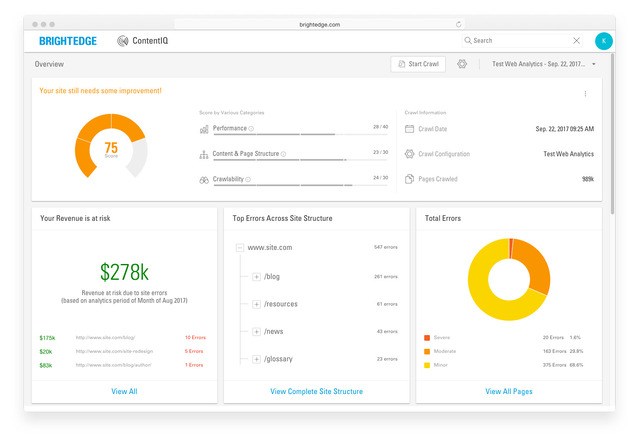
1. Establish a baseline. Before you start fixing errors, it’s important to know where you are. Creating a baseline picture of the current health of your site at the beginning of the process will help you understand exactly which fixes worked best. You can also see how to deliver even better results and tell the story of where your efforts boosted KPIs. First, set up ContentIQ to perform a weekly or monthly crawl of your entire site to create a complete picture. Next, use our reporting product, StoryBuilder, to create a baseline dashboard of charts showing how site errors have impacted website KPIs, using your preferred metrics like traffic, revenue, or conversions correlated to the site errors across your entire domain. A major benefit when you establish your baseline is you can now track any critical deviations using our Anomaly Detection feature. For example, if one of your key revenue-driving pages needs to appear in the top three of search results for optimal performance, you can use Anomaly Detection to alert you by email when it drops position. This ensures you’re all over any potential problems and can resolve them before the impact is too severe. This will allow you time to find the source of the problem and fix it, without having to worry about being caught off guard by frantic phone calls after hours.

contentiq website audit dashboard screen - brightedge

2. Fix site-wide performance issues. With your baseline in place, you’re ready to start fixing errors and seeing positive results. We’ve learned that focusing first on errors that affect your site as a whole is a fast-track to quick and easy wins. These are the kind of errors that prevent people from finding your site in searches or getting a “page not found” or other error when they do click your link. Some examples of errors that you will want to prioritize and correct during this stage are:

  • No index errors

  • Nofollow errors

  • HTTP Status (4xx errors)

  • Slow page load times (above 3 seconds)

3 and 4. Prioritize site errors based on the business impact. ContentIQ integrates with your Google Analytics account, making it easy to see which pages have the greatest impact on your site’s revenue, traffic, or conversions. If ContentIQ reveals errors on these money-making pages, you’ll know that you should prioritize these pages to fix first. In the case of multiple on-page errors, we recommend prioritizing the most severe errors, including:

  • Missing or empty page titles

  • Duplicate page content

  • Missing H1 tags

  • Missing or empty meta description tags

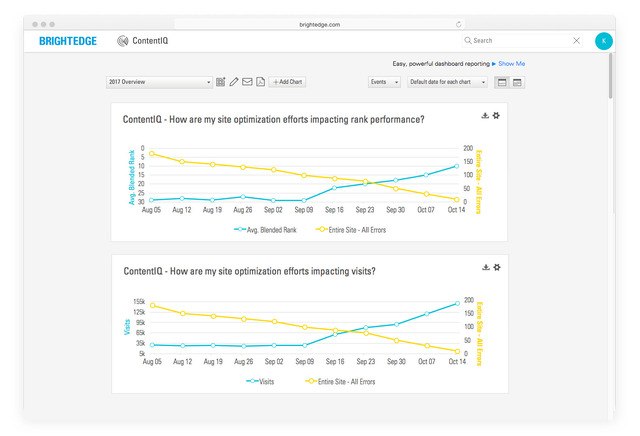
ContentIQ can help when you need to make the business case for more web development resources to fix these errors. Use your baseline dashboard to create charts showing how unresolved errors result in the decline of key site metrics, like revenue, conversion, or traffic, and clearly demonstrate the impact of poor user experience.

5. Communicate your successes. Nothing supports a business case more than proven success, so it’s important to track how your site’s performance improves as your reduce errors. The baseline dashboard you created in Step 1 will update automatically using data from the weekly or monthly ContentIQ crawls you scheduled. This makes it easy to review and chart your progress at regular intervals. When you complete a batch of significant improvements, such as rectifying issues with 4xx errors, it’s easy to create an event tag for that day so you can see how those efforts correlate to traffic and revenue growth. With StoryBuilder, you can create easy-to-understand charts for your executive teams and wider business that showcase how your efforts directly impact business KPIs. This will not only help promote the good work you’re doing, it’ll also demonstrate the continued value of fixing existing site errors and prioritizing further site enhancements.

contentiq website audit trended line plots screenshot - brightedge 

Following this simple five-step process will help you to reduce the number of critical errors on your website and have a positive impact on your business’s results. ContentIQ puts all the information about your site’s page in one place, saving time and providing a more focused and productive approach to fixing site errors and improving SEO performance. Download the ContentIQ Datasheet to learn more about ContentIQ.

Follow this 5-step process to conducting a website audit, from establishing a baseline all the way to communicating SEO success. Your boss brings in cupcakes on Friday afternoon to celebrate a good quarter of hitting revenue goals… That’s a good surprise. Your boss phoning you at midnight to find why site traffic has suddenly dropped […]

The post 5 Steps to a Successful Website Audit appeared first on BrightEdge SEO Blog.

,
