Thank you for registering for this webinar series. You will receive an email with instructions to join the webinar on the day of the event.
To learn more, please visit our Resource Center and read our Case Studies.
Your boss brings in cupcakes on Friday afternoon to celebrate a good quarter of hitting revenue goals… That’s a good surprise. Your boss phoning you at midnight to find why site traffic has suddenly dropped 20%... That’s a bad surprise. The last thing any digital marketer wants is unexpected drops in website key performance indicators (KPIs), particularly when they affect business revenue. These nasty surprises are typically the result of website errors, which are technical issues with your website that have an adverse effect on SEO performance. Site errors can happen at a site-wide level, such as NOINDEX tags that prevent search engines from indexing your content, page load times of more than three seconds, and 4xx errors, which usually mean broken links or blocked content. They also occur on individual pages, if you are missing page titles, H1 tags or meta descriptions, and if you have any duplicate content. Maintaining a healthy, surprise-free website means knowing about all your existing errors, understanding which fixes will have the biggest impact, and ensuring you can get the resources to implement the required changes. An SEO website audit is a critical first step in finding errors and site issues.
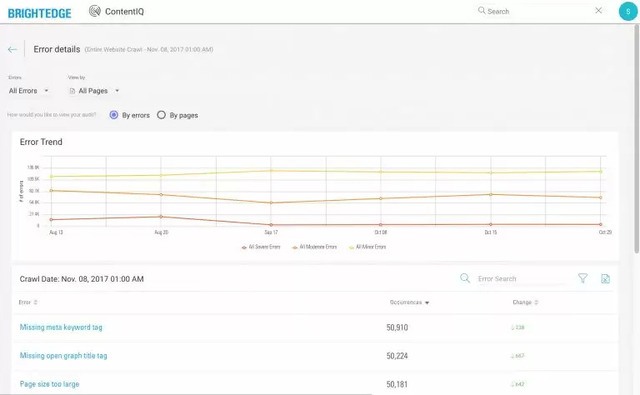
BrightEdge ContentIQ is a next-generation site auditing solution that brings sanity to the process of reducing website errors that could impact SEO performance. It allows you to identify technical and on-page errors across your entire site, prioritize those errors with the severest impact on SEO performance and user
experience, build a business case for allocating resources to these key fixes and showcase your successes to the wider business and executives. ContentIQ works by inspecting your site, whether that’s a few key sections or the entire thing. Depending on the size of your site (ContentIQ can crawl hundreds of millions of pages) and its overall technical health, ContentIQ could highlight thousands of errors. Prioritizing which errors to fix is the key to delivering the biggest impacts up front. Showcasing these wins to the wider business can help you secure additional resources and fix more errors. To help you make the most from your website error resolution work, we’ve collected best practices and insights from BrightEdge users like you as well as our own crack team of SEO experts. The result is a simple five-step process for improving your site and achieving measurable success.
1. Establish a baseline. Before you start fixing errors, it’s important to know where you are. Creating a baseline picture of the current health of your site at the beginning of the process will help you understand exactly which fixes worked best. You can also see how to deliver even better results and tell the story of where your efforts boosted KPIs. First, set up ContentIQ to perform a weekly or monthly crawl of your entire site to create a complete picture. Next, use our reporting product, StoryBuilder, to create a baseline dashboard of charts showing how site errors have impacted website KPIs, using your preferred metrics like traffic, revenue, or conversions correlated to the site errors across your entire domain. A major benefit when you establish your baseline is you can now track any critical deviations using our Anomaly Detection feature. For example, if one of your key revenue-driving pages needs to appear in the top three of search results for optimal performance, you can use Anomaly Detection to alert you by email when it drops position. This ensures you’re all over any potential problems and can resolve them before the impact is too severe. This will allow you time to find the source of the problem and fix it, without having to worry about being caught off guard by frantic phone calls after hours.

2. Fix site-wide performance issues. With your baseline in place, you’re ready to start fixing errors and seeing positive results. We’ve learned that focusing first on errors that affect your site as a whole is a fast-track to quick and easy wins. These are the kind of errors that prevent people from finding your site in searches or getting a “page not found” or other error when they do click your link. Some examples of errors that you will want to prioritize and correct during this stage are:
No index errors
Nofollow errors
HTTP Status (4xx errors)
Slow page load times (above 3 seconds)
3 and 4. Prioritize site errors based on the business impact. ContentIQ integrates with your Google Analytics account, making it easy to see which pages have the greatest impact on your site’s revenue, traffic, or conversions. If ContentIQ reveals errors on these money-making pages, you’ll know that you should prioritize these pages to fix first. In the case of multiple on-page errors, we recommend prioritizing the most severe errors, including:
Missing or empty page titles
Duplicate page content
Missing H1 tags
Missing or empty meta description tags
ContentIQ can help when you need to make the business case for more web development resources to fix these errors. Use your baseline dashboard to create charts showing how unresolved errors result in the decline of key site metrics, like revenue, conversion, or traffic, and clearly demonstrate the impact of poor user experience.
5. Communicate your successes. Nothing supports a business case more than proven success, so it’s important to track how your site’s performance improves as your reduce errors. The baseline dashboard you created in Step 1 will update automatically using data from the weekly or monthly ContentIQ crawls you scheduled. This makes it easy to review and chart your progress at regular intervals. When you complete a batch of significant improvements, such as rectifying issues with 4xx errors, it’s easy to create an event tag for that day so you can see how those efforts correlate to traffic and revenue growth. With StoryBuilder, you can create easy-to-understand charts for your executive teams and wider business that showcase how your efforts directly impact business KPIs. This will not only help promote the good work you’re doing, it’ll also demonstrate the continued value of fixing existing site errors and prioritizing further site enhancements.
Following this simple five-step process will help you to reduce the number of critical errors on your website and have a positive impact on your business’s results. ContentIQ puts all the information about your site’s page in one place, saving time and providing a more focused and productive approach to fixing site errors and improving SEO performance. Download the ContentIQ Datasheet to learn more about ContentIQ.
Follow this 5-step process to conducting a website audit, from establishing a baseline all the way to communicating SEO success. Your boss brings in cupcakes on Friday afternoon to celebrate a good quarter of hitting revenue goals… That’s a good surprise. Your boss phoning you at midnight to find why site traffic has suddenly dropped […]
The post 5 Steps to a Successful Website Audit appeared first on BrightEdge SEO Blog.
As we edge closer to 2018, columnist Jim Yu lays out five martech trends you'll need to monitor to lead your organization to success in the year ahead.
Integrated marketing seems a relatively simple concept at first glance: it means integrating your diverse marketing channels into a coordinated and coherent whole. But if integrated (“cross-channel”) marketing were so simple, all brands would be doing it. It’s only when you fully grasp the magnitude of the order that you realize its challenges.
According to survey data reported by Econsultancy and Oracle in the “Cross-Channel Marketing Report 2014,” the biggest challenges brands face in implementing an integrated marketing strategy are a lack of resources, organizational structure (read “silos”) and understanding of the customer journey.
To phrase it another way, while most businesses embrace the concept of integrated marketing, relatively few are equipped to answer the big data challenge and actually execute and manage it. In this post, we’ll discuss some challenges of tracking integrated marketing as well as the metrics you can start to consider to help make sense of it all.
It’s understandable that those companies that are fully equipped and truly grasp tracking integrated marketing and are able to do it well are among the minority. Perhaps the greatest challenge of cross-channel marketing is the sheer number and variety of channels and media involved, including:
This translates into a “big data” analytics problem. BrightEdge CEO Jim Yu describes it well in his column for Search Engine Watch:
With all this data, the challenge is and has been for many decades harnessing it in a meaningful way. One such way is through data integration. Data integration works to combine multiple sources of data into one place for more significant reporting and information. To better serve the needs of integrated marketers, the BrightEdge S3 platform can integrate data from Adobe SiteCatalyst, Web Trends, Coremetrics, Google Analytics and custom in-house data sources. So if it is tracked in those platforms it can be imported through an API and viewed in the reports and configurable into the custom dashboards alongside the organic search and keyword data. Just like web marketing strategies don't begin and end in one silo, neither do data sets from multiple networks, channels and devices. Together, they represent user behavior across the lifecycle of engagement with a brand online. But it's not just pulling together multiple sources of data in one place that's the answer; it's being able to do so in a way that yields actionable insight. With data coming from multiple places, it needs to be streamlined into a format that's similar and comparable.
That said, streamlining data within integrated marketing campaigns requires a uniform set of components to define and track. Let’s talk about those next.
Regardless of how your analytics packages report data, at the program level, there are six common areas that when defined and measured, can help paint a picture of integrated marketing performance:
As a marketing professional who is taking on the task of running a cross-channel marketing campaign, you’ll want to figure out ways that your research and analytics platform can track metrics within each of the areas mentioned. Fortunately today, enterprise-level analytics platforms have built in the ability to track multiple channels and create a single view of a campaign. Having access to this data should put you squarely on the same path as the leading brands that are paving the way with integrated marketing.
Learn how to organize and operate an SEO team in SEO Management. Discover a succinct four-step SEO methodology in How to Maximize SEO ROI.
THE PROBLEM
Founded in 1998, Delta is an educational services company that is comprised of several career colleges with campuses across the United States. Delta offers degree and diploma programs in some of today's fastest-growing fields, including Business, Legal & Protective Services, Healthcare, Skilled Trades, Beauty & Wellness, Technology, Design & Education, and Commercial Driving License or CDL. Delta's passion is evident in every classroom and department. The faculty and staff of Delta's schools provide students with support throughout their entire educational journeys, with a focus on hands-on learning, small class sizes, and ongoing academic support.
THE SOLUTION
Unkel believes in mapping the right content to the right stage in the customer journey. Within the BrightEdge SEO platform first, she used the BrightEdge Data Cube to identify the attractive keyword opportunities and segment the visitors they represent, based on the intent that each keyword represents. Then she developed content for the topics by considering a few factors.
To make this content creation process scalable, Unkel used StoryBuilder to organize these new content topics along her buyers' journeys. Unkel combines the power of SEO and content to elevate the business impact from the organic channel.
THE RESULTS

Indexed organic keywords have increased 330%, while organic traffic to CDL.com increased by 230%.
BrightEdge helps us identify valuable topics to build content mapped to our customer journey.
Thank you for registering for this webinar series. You will receive an email with instructions to join the webinar on the day of the event.
To learn more, please visit our Resource Center and read our Case Studies.
The Internet evolves at breakneck speed, companies change, technology gets better, and strategies adjust. It’s inevitable that at some point in your marketing career, you’re going to face the challenge of overhauling your website. All of those files, all of that content, all of that technology you and your team has been working on for […]
The post 7-Step Guide to Site Migration and SEO Success appeared first on BrightEdge SEO Blog.
An incredible 50% of local mobile searches will lead to store visits within one day, and 18% of those searches will result in a purchase within that same timeframe. The power of local search optimization to reach customers with the information they want and entice them to try particular local businesses cannot be understated. We have reached a point of near complete digital penetration in the United States. Seventy-seven percent of American adults now own a smartphone - more than double since 2011 - and they use these devices on a regular basis.
Americans now spend an average of 5 hours a day on their devices, and one in ten report that they are "smartphone dependent", meaning that their devices are their primary source of internet access. With nearly every prospective customer for your business now online, the majority of them via mobile device, the era of hyperlocalization and the ultimate personalization has begun. Research indicates that a full 57% of traffic now arrives from mobile devices - a rapid rise considering that mobile only overtook desktop in 2015 - and it shows no sign of slowing down. Customers read and take advantage of what people post online. Retailers estimate that 82% of customers will research products online before making an in-store purchase and 60% of people report that they have used information from local ads. Content created and optimized for local search will be digested and produce strong returns when it is created appropriately and delivered to customers at precisely the right moment.
The key for digital marketers who want to compete in this space is understanding how to speak to customers in their moment of need. They must have a precise understanding of their audience and what they want to see - not just data from the nearest major city - and use that information to generate campaigns that target the micro-moments of consumers on a hyperlocal and hyper-personalized level.
As we already mentioned, mobile search has overtaken desktop. Customers also use their mobile devices for about 5 hours per day, which includes time spent learning about local businesses and finding information about their products and services. Given the rapid rates of smartphone and tablet adoption, along with the rapid increase of mobile searches over desktop, mobile search has begun to drive a considerable amount of marketing innovation and strategy. A large part of mobile strategy also overlaps with local search as customers use their devices to answer their questions and address their needs as they move around their location. This has led to the rise of various trends in consumer behavior and changes in the Google SERPs that marketers must understand to craft an effective location search optimization strategy.
For the past few years, Google has been pushing marketers towards the particular classifications of user intent that they have termed, “micro-moments”. These moments categorize the four main types of queries as categorized by Google:
Google believes that the vast majority of the queries it sees each day fall into one of these categories. It uses this understanding of user intent to adjust the SERP layout accordingly. Google will often include the local-3 pack on the I-want-to-go micro-moment searches, the I-want-to-know micro-moment might include a Quick Answer at the top of the page while the I-want-to-do micro-moment has YouTube videos or step by step instructions depending upon how the search engine interprets the intent. These changes help Google match their users faster with the content they need. In local search optimization, brands need to understand how Google’s emphasis on the micro-moment impacts their content’s ranking and how user intent impacts behavior on the SERP. For example, customers making local mobile searches often look for quick information, such as contact information or phone numbers for the local business. Creating content that emphasizes these particular types of information allows brands to better serve the needs of these users, and thus draw more traffic and engagement from the site visitors. For brands to effectively use local search optimization, therefore, they must be willing to perform the needed research about their targeted keywords to see the likely user intent, as Google understands it, and then begin to create and optimize their content accordingly.
Since 2014, there has been a dramatic increase in the number of "near me" queries on Google. Customers have realized the value of using their mobile devices to find businesses in their exact vicinity and they have been using it at an increasing pace. This has corresponded with a rise in hyperlocal targeting. In hyperlocal marketing, businesses work to reach out to customers based on their exact needs when they are in a precise location. It is not about helping prospects find a pizza parlor within a particular city, it is about helping them find the highest rated pizza parlor that is physically closest to them. To accomplish this, brands need to use a combination of both paid search and organic search to create a presence for those precise customers. They need to have data insights and understanding that relate to their users within exact physical locations. To better accommodate these hyperlocal targeted searches, Google has also been looking for ways to further refine their SERP. Not only do listings change in the local 3-pack depending upon the exact physical location of the user, but there are also generally options to filter the results to help the user find a more exact match for what they seek. This allows consumers to filter based on criteria such as ratings or hours to help them find the locations that best meet their needs. For brands to effectively use hyperlocal targeting, they need to put in the effort to make sure that their content has been pre-optimized and marked up so that it will appear in as many of the filters as possible. They need to also make sure that if they have more than one physical location that each one has representation in Google My Business. This will maximize their chances of showing up in hyperlocal searches for all of their locations instead of being restricted to prospects near their main address.
To understand local search optimization, businesses must also understand how Google constructs their SERP for searches with local intent. Google consistently runs to test to match their SERP with user intent and to make sure they display the desired information to their users. This means that paying attention to what Google focuses on can provide considerable insight into how organizations can maximize their return from their own efforts. On the local 3-pack, for example, Google looks to include information such as ratings, a brief description, and the address. As already discussed, users can then filter their results by factors such as prices or ratings. Google has selected these criteria to display in their local 3-pack because they have found people consistently want to find addresses for businesses to help them determine their proximity to particular options. Not only should this indicate the importance of filling out the Google My Business profile completely, but it should also impact how you construct the rest of the content you produce for the local SERP.
As an example, above most organic query results you will see a series of advertisements. If you want to target particular keywords that regularly carry the I-want-to-go user intent and a local 3-pack, your ad will likely see better returns if you include the same valuable information Google does, including a means to contact you. Similarly, on your other organic content, make sure that customers can clearly find your location, your content information, and other details that would help them if they were interested in shopping at your location at that moment.
When you plug “Seafood in San Francisco” into the search engine, you will likely encounter Anchor Oyster Bar as the first result in the local 3-pack. Given the intensity of the competition for that position, it can help to examine what this business does right. Immediately, you can see that they have nearly 300 reviews and almost 5 stars, indicating their quality. Clicking through to the website and you will see keywords like “seafood restaurant”, “seafood dishes” and “San Francisco” used prominently right in the first paragraph. The site also links to mentions they have received in prominent publications and promotes their address several times.
Old Ebbitt Grill has also demonstrated an excellent local SEO strategy. For anyone interested in having a nice meal after a visit to the White House, the query, “best places to eat near the White House” returns this restaurant right at the top of the local 3-pack. Note that this query uses a local landmark to find a location, and Old Ebbitt Grill delivers. Its physical address is located prominently at the top of the page, clearly indicating its proximity to the famous house address, but the main text on the page also clearly articulates that it is “just steps from the White House”.
If you want to find the best place to play golf in Tucson, Arizona, then the query “best golf course in Tucson” will be helpful. Tucson City Golf, which hosts several of the courses that show up in the local 3-pack has made their way to the top of the listing through cultivating dozens of positive ads and including phrases like, “best courses” on their home page.
For creating an ideal local search optimization strategy, the BrightEdge platform can benefit partners throughout the entire process. Our recently launched local search power enables partners to refine their keyword research to precise local areas, rather than just using the nearest major cities. This platform currently supports overs over 72,000 locations. While you plan your content development, you can also use the platform to uncover insights about the SERP, including the types of content featured such as local 3-packs, videos, or Quick Answers. You can use this to guide the content creation process. As you develop your content, you can then use the BrightEdge Content features to ensure that the material is properly optimized and ready for usage.
Once you begin to implement your mobile strategy, you can then use the tracking features through BrightEdge to see how your content ranks and engages users through mobile devices specifically. Tracking the mobile searches will give you good insight into how your local optimized content performs for users on-the-go, which comprise a significant portion of your local audience. Not only does BrightEdge support tracking your content performance on specifically mobile devices, you can also track the overall performance and look for changes in rankings and traffic to see how your strategy impacts your pages.
BrightEdge partner Direct Agents wanted to improve the local search results for their client. Through keyword research on the BrightEdge Data Cube they were able to find keyword gaps with the key competitors and then optimize both the Google My Business page as well as the client’s website with those terms. They also used the Data Cube to perform research about the rich answers that would benefit them the most and thus optimized for Quick Answers, local 3-packs, and other important parts of the Google Universal Result. Their intensive site comparisons and local keyword research helped them receive a “huge boost” in local, non-branded traffic. Watch the Direct Agents testimonial video.
The WellBiz brands runs dozens of business locations and wanted to help each franchise boost their local results and revenue. To accomplish this ambitious goal, they set up unique dashboards for each location and then paired them with the location-filtered Data Cube for each location along with the local Google search engine for each location. They were then able to generate local Share of Voice reports for each franchise and thus optimize their content for the keywords in each location. Watch the WellBiz testimonial video.
To gauge the effectiveness of your local search optimization strategy, you will want to track a few different metrics.
Local search optimization opportunities abound as an increasing number of customers turn to their mobile devices to find things to see, buy, and do. The better you understand the trends around hyperlocal targeting and how you drive brand success through this personalization, the easier it will be to grow your foot traffic and revenue through the SERP. Learn more about VSO or Vertical Search Optimization.