tvura
M
Posted 5 years 4 months ago
t
9 min read
Search data is an invaluable source of insight into consumer intent and behavior. It’s quite literally people communicating the things that interest them. Taken in aggregate, those insights can point to trends and changing tastes, which can inform content creation both on your websites and in other online channels. Those insights can also provide useful information to support other marketing initiatives.
Generally, as marketers and SEO professionals, when we think about organic search optimization, we tend to think about Google primarily, followed closely by other traditional search engines as the best sources for search traffic and trend data. However, as the world’s most heavily trafficked online video sharing platform, YouTube is one of the world’s largest search engines and should be part of any search insights research effort.
What can we Learn from YouTube Search Trends?
Video is a go-to source for consumers. It encompasses diverse topics and lends itself well to instructional content. Consider a few key facts about video, according to Wordstream:
- “Social video generates 1200% more shares than text and image content combined
- 96% of people have watched an explainer video to learn more about a product or service
- 51% of marketing professionals worldwide name video as the type of content with the best ROI
- Marketers who use video grow revenue 49% faster than non-video users.”
Because video is an effective, favored format by both consumers and businesses, AND accounts for a high volume of searches, it offers valuable perspective to content creators and the brands they represent on which topics, themes, and keywords they can leverage for both long-range brand development content and in-the-moment marketing opportunities. It also provides useful information to SEO professionals to help them optimize existing video metadata to better capture interest from relevant searches.
Indirectly, YouTube search trends – because they reflect consumer intent and behavior more universally – can help inform marketing more broadly, from advertising to social media to event promotion and beyond.
Can you use YouTube Search Trends to Optimize Videos?
Yes, and then some.
Much in the same way you can use Google search trends to optimize copy and graphic content, you can learn from YouTube search trends to optimize videos. For starters, you can see which topics, themes and even search terms are getting the most attention and ranking highest in YouTube search. With that information you can:
1. Plan new video content
Visitors to YouTube watch more than one billion hours of video every day. They come to be entertained, informed, and instructed. However wide or narrow your message or area of expertise, chances are high that someone is looking for what you have to say. But just because you have a message that someone is looking for doesn’t mean that they will find your video or that it will answer the specific questions they have.
That’s where YouTube search trend data can help you. First, by understanding the unique and specific keywords searchers are using to find content, you can better produce video content relevant to the searches. This improves your chances of YouTube surfacing your video in related searches and improves the chances that someone searching for that info will watch a greater portion of your video. This is important, because watch time is a central ranking factor for YouTube search. As your video accrues more watch time, its chances of ranking high in search results improves.
Secondly, YouTube search data gives you key insights to optimize the content surrounding your video: Title, description, still images, embedded graphics and more.
2. Optimize existing video content
Videos can be costly and time consuming to produce, so it’s not unusual to think of an existing video as a static piece of content that can’t be changed. That is too limited a view, though. At a minimum, without changing any of the content of a video, it’s possible to optimize the video metadata to perform better in search. This is not about gaming the system, because the content must be useful and relevant to the audience. By using YouTube search insights you do a better job presenting and describing the video in a way that aligns with the search data and the searcher’s intent. If you have a great video about how to knit a sweater, it might not perform well in the U.K. where a sweater is better known as a jumper. The content is still good, but a change to the title might help it perform better.
At times, the search insights may be overwhelming enough to merit greater changes either to the text elements of the video or to the video itself. They may even merit re-producing the video entirely. YouTube search insights can help you make the business case for making more dramatic changes to an existing video.
3. Prioritize multi-channel initiatives related to the topic or theme
Knowing what people are interested in, how they search for it and what topics they commit time to has value beyond the channel. YouTube search insights – especially because of the critical mass of traffic YouTube attracts – can be indicative of larger trends and behaviors. That information can lend direction to your overall content strategy across other online and offline properties whether it be advertising, organic social media, or educational content, for example.
Is there Seasonality Behind YouTube Search Trends?
Like any consumer trend, there is seasonality to YouTube search trends. In simple terms, we can think of the seasonality on two levels:
1. Traditional Seasonality
Traditional seasonality refers to search trends that ebb and flow based on broad seasons, such as travel seasons, holidays, sports, and events (e.g., wedding or concert season).
2. Micro Seasonality
Micro seasonality refers to short-lived trends tied to current events, such as election day, a flood, or an episode of Saturday Night Live. YouTube search data can help you identify seasons so you can prioritize your content development to better align with the opportunity.
How does the YouTube algorithm Work?
The closest thing to official guidance on how the YouTube algorithm works is captured in the Google publication entitled “Deep Neural Networks for YouTube Recommendations,” but in reality, there is a lot of debate about what factors into a rank and the weight of any one factor in awarding a search rank. Generally, there is consensus on the following:
- Audience Retention. Remember when we said, above, that watch time is an important ranking factor? This is one component of Audience Retention. Google’s retention analysis also looks at “average view duration” or how much of a video does someone watch on average. It does this along four “types of moments” for your videos including intros, continuous segments, spikes, and dips, which measure engagement with the video content
- Engagement. Beyond how viewers engage with the video itself, Google measures related engagement such as video comments, subscribers, video shares, click-through rate, and sentiment (thumbs up or down).
- Channel Authority. Audience Retention and Engagement tell Google how viewers regard your content and are factors in your channel authority. How the video performs in search (both on YouTube and in referral traffic from other search engines), how many authoritative sources link to your content, the age and relevance of your content and other traditional SEO ranking factors also help determine your channel authority.
- Keyword Targeting. Just like with SEO in Google and other search engines, YouTube’s algorithm relies on broad match keyword targeting, and to a lesser extent, exact match keyword targeting. In short, while Audience Retention, Engagement and Channel Authority reflect to what extent users find your content relevant and useful, how you present and describe your videos – title, description, keyword tags – are important to tell YouTube what your video is about and is a key element of how to get your YouTube video seen.
Relevant keywords are very important in the early going with videos; as the video begins to accumulate watch time, keyword importance takes a back seat to watch time. According to Search Engine Journal, YouTube “…continues to use metadata to index your video correctly and rank it initially. To maximize your presence in YouTube search and suggested videos, you still need to make sure your metadata is well-optimized. This includes your video’s title, description, and tags.”
How to Leverage YouTube Search Trends
To make use of YouTube search data, you first need to access and understand the data. Here are a few tools to help you do that.
Google Trends
Google Trends is a great place to start to research YouTube trends. While Google Trends doesn’t show actual search volume for a specific query (it normalizes data to show relative popularity of a search term) it does make it easy to find the most searched topics on YouTube and understand interest in a particular topic.
At the beginning of the pandemic, there was a well-publicized run-on toilet paper. Perhaps you picked up some tips on how to score a roll or two of toilet paper during the lean times and now, as a content creator, you want to decide if it would be worth creating a video to share your tips. In this case, Google Trends indicates that interest in toilet paper has waned since the peak of the shortage, but interest remains high.
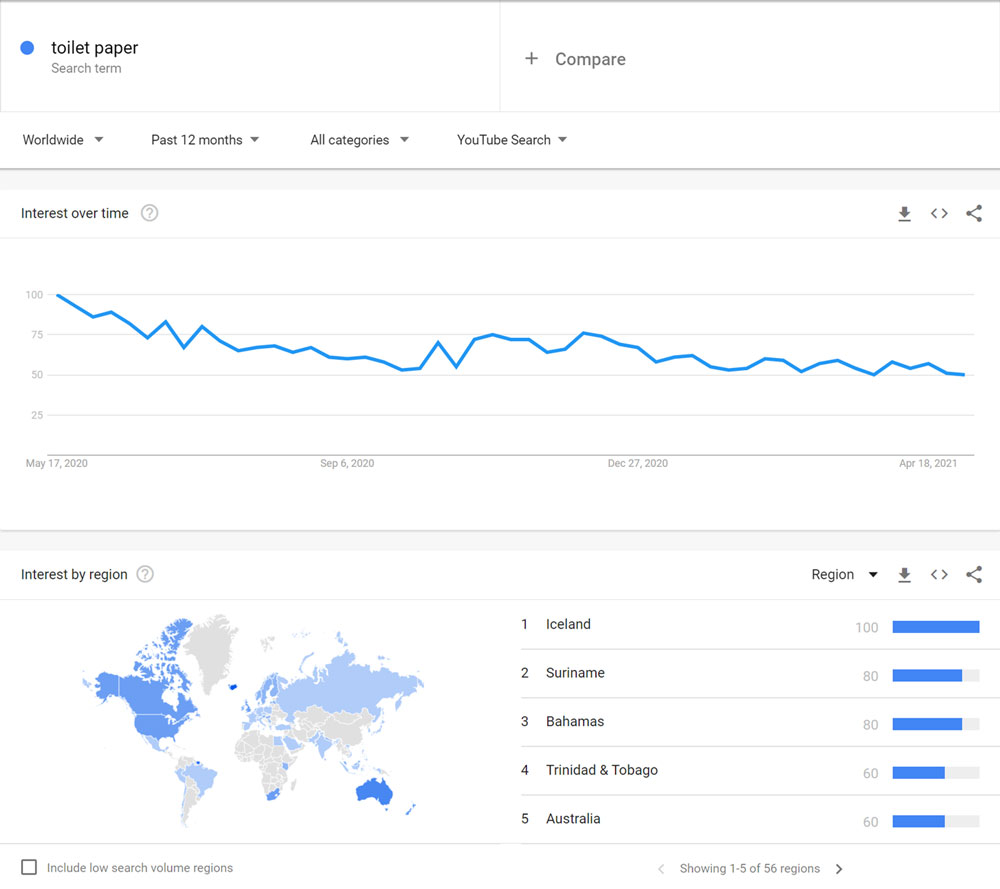
In the example search here, we’ve set the parameters to worldwide search trends over the past 12 months in all categories across YouTube. These parameters can be changed to better suit your particular focus, and you can compare topics to help you settle on the best one to create content around.
BrightEdge and BrightEdge Instant
Built into the BrightEdge SEO platform is the ability to track specific keywords and topics over time or to search keywords and topics on an ad hoc basis. While that basic functionality doesn’t extend to YouTube, specifically, it can be limited to Google Video results, a majority of which are YouTube results.
Whereas Google Trends normalizes the data to show relative topic popularity, BrightEdge tracks an enormous amount of real-time and historical search data, so you can see actual search volumes and other details that Google Trends does not provide. You can track real-time data using Daily Pulse. This insight can be used to both plan the content of your video, and optimize the title tag, description, keyword tags and other metadata for better search ranking.
For tracked keywords within the platform, BrightEdge also provides reporting, so you can be alerted to spikes or dips in important keywords and topics and make necessary adjustments to a given video or content strategy.
BrightEdge Instant, which is an available add-on to the BrightEdge platform, has a YouTube keyword research capability that enables you to track how well your YouTube videos and your competitors' videos are performing for any search in real time giving you, effectively, a YouTube rank tracker. It also supports YouTube-specific topic research so you can see which products, topics, and influencers are taking off, insight you can use to prioritize the marketing of relevant existing videos and to plan new video content.
However, you source YouTube search data, your use of the data should align with your content strategy:
Are you looking to be the go-to source on an evergreen topic? In this case, it will be important to understand how search trends on the topic over time, which terms best capture the intent of consumers and which videos are capturing the most attention. From those sources, you can identify opportunities to improve on competitive content and optimize the video metadata for a higher search rank. You’ll also want to monitor activity, so you can optimize over time.
Is there a high-volume, but short-lived trend you want to capitalize on? You’ve just created a t-shirt of Tom Brady throwing the Lombardi trophy from his yacht and want to maximize sales while the iron is hot among his fans. Your research will want to focus on what relevant terms people in specific geographies are using to search right now.
Are you losing market share to a competitor with an inferior product? You have an objectively better product, but your competitor is entrenched and receives a lot of traffic to its YouTube videos. As part of an overall initiative to steal market share, you’re going to need to understand their audience and how those viewers are finding your competitors’ videos. To do this, you’ll need to go beyond topical search trends and track your videos against your competitors’ videos, as well.
Research and Prosper
YouTube is a powerful marketing channel. Its highly specialized content makes it a go-to-source of information for billions of people worldwide, but remember, it is more than a channel for marketing your own video content. Take advantage of the customer insights and behavior trends you can glean from YouTube search data to plan and execute an effective content strategy and more.













 See By Seth Godin, 2018

 Learning by Magnus Unemyr, 2018

 David Scott, 2017