
BrightEdge Leadership Team

Meet our executives

Cindy Padnos

Board Member, Founder & Managing Partner at Illuminate Ventures

A Guide to Structured Data

brolapp
brolapp
M Posted 5 years 9 months ago
t 9 min read

Marketers, developers and search engine optimization specialists have been talking about structured data since before 2011, when Google, Bing, Yahoo! And Yandex decided to collaborate on and support an open source platform to define entities and their attributes.

This collaboration led to the creation of the Schema.org vocabulary, which has become the backbone for most structured data today. Schema is critical to SEO success, especially during a time where 0 click results are increasing rapidly. Check out this report to better understand the importance of schema and SEO.

Why should I care about structured data?

The landscape of a SERP is busy. Not only do you have to compete with your competitors for top organic listings, you also have ads, images, carousels and myriad new search result features that can keep you from getting your listing to appear in those coveted pixels “above the fold” of your audience’s screens.

Even when new features aren’t competing for your audience’s attention, you could still have problems with getting your content to stand out and grab the attention you are seeking.

This is where structured data can help. Google has been awarding enhanced search result listings, which they are now calling “rich results”, for over 10 years. I am sure you’ve all seen review ratings associated with product pages in the search results by now.

Not only does Google rely on structured data to help power those rating results, Google has expanded on the types of rich result you can get to include video snippets that can be played in the search results, recipe cards, how-to instructions, FAQ results, event details, and highlight job listings.

Studies have also shown that listings with rich results typically get more organic impressions, organic clicks, and see increased audience engagement with more time being spent on the pages.

On top of that, structured data can help you control the information presented in your brand’s Google Knowledge Panel and may even help optimize your website for voice search in Google Assistant.

Some Googlers have hinted that structured data is going to become more important to search over the next several years, if not longer – meaning now is a great time to get onboard and become comfortable understanding and speaking about structured data within our own organizations.

Now that we know why you should care about structured data, let’s start defining what it is.

What is structured data?

Simply put, structured data is any set of data that has been organized or categorized in some way.

unorganized books representing unstructured data

Example of Unstructured Data – books in unsorted piles

organized books representing structured data

Example of Structured Data – books arranged on a shelf by category and author

When we talk about structured data for SEO, we usually are referring to the combination of a specific vocabulary for defining entities and attributes (schema.org is the most commonly used) combined with a syntax for expressing the vocabulary as part of a webpage’s HTML code (JSON-LD is Google’s preferred syntax).

How do I get started with structured data on my site?

When looking to incorporate structured data on a page, I use the following workflow to guide my decisions:

  1. Review the page content
  2. Review entity types on schema.org
  3. Check Google’s Structured Data Developer Guide and Rich Result Search Gallery
  4. Create and deploy structured data code

Review the page content

Open the landing page, or draft if reviewing a page in advance of its publication, to identify the following:

  • What page type is it (homepage, recipe page, product page, blog article, FAQ, etc.)?
    • If it is a homepage, does the website have a site search function?
  • Does the page have breadcrumb navigation?
  • What is the page’s main topic or focus (entity)?
    • What are the most important topic attributes to my audience?
  • Is there a secondary page topic and how does it directly relate to the main topic?
    • Is it an offer (product offer, service offer, special discount, event offer, etc.) or reviews that can be associated to the main topic?
    • What are the secondary topics attributes that are most relevant to the main topic?

I like to compile this information into an unordered list nesting in the attribute details, like this:

  • Page type - product
    • name – ACME Anvil
    • description – The pinnacle anvil for all your needs.
    • price - $99 US dollars
    • url – https://www.example.com/acme-anvils
    • image - https://www.example.com/images/acme-anvil.jpg
    • sold by – Acme Anvil Corporation

This will prove helpful later when it comes time to create the structured data code as it will follow a similar pattern.

Now that we’ve identified the most important information we are looking to mark up, it’s time to review what entity type on Schema.org best matches my page’s main topic.

Review entity types on Schema.org

My next step in the workflow is visiting the full hierarchy of Schema.org types. This list displays the relationship between parent and child types, allowing me to quickly find relevant entity types and identify new additions to the hierarchy.

After identifying an entity type that looks like a good fit for the content I am marking up, I review the entity type documentation to understand how schema.org defines it. Most of the definitions are obvious, but some definitions don’t always align with how we might view our entity.

Credit card, for example, is defined as a specific form of service:

Thing > Intangible > Service > FinancialProduct > LoanOrCredit > CreditCard
Thing > Intangible > Service > FinancialProduct > PaymentCard > CreditCard

Credit card providers might internally refer to a credit card as a product, not as a service offering. This disconnect between how schema.org defines an entity and how we individually or as an organization define the same entity can create confusion and can lead people to select inappropriate entity types that result in less than ideal outcomes.

It also limits some of the attributes that can be used as schema.org defines a “service” differently than a “product” and may provide unique attributes for each entity type.

Remember, it’s a good idea to review the list of available attributes per entity type, even if you are very familiar with the entity type. Schema.org is a “living” vocabulary which means it is constantly growing and getting added to on a regular basis.

Once you have the list of entity attributes for each entity you are defining, it is time to move on to Google’s structured data documentation.

Check Google’s Structured Data Developer Guide and Rich Result Search Gallery

Google’s Structured Data Developer Guide is a useful tool because it gives examples of structured data markup and provides guidelines for rich result eligibility. I want to call out that Google’s documentation only focuses on the attributes used to generate a rich result. On occasion, you may see Google use attribute markup in a different way than on schema.org, which is why I like to review both websites before creating the structured data code.

From here we can also review the search gallery to see what types of content, when properly marked up, can be awarded a rich result. This list is constantly growing as Google adds more support and rich results based off schema.org vocabularies.

Google's Rich Result Search Gallery

Clicking any of the “Get started” buttons in the search gallery will take you to a rich results documentation guide that will show:

  • the required and recommended attributes to be eligible for a rich result
  • JSON-LD code examples for that rich result
  • tips on troubleshooting errors in your code
  • quick links to the Rich Results Testing Tool
  • examples of what the rich results might look like when the structured data is properly implemented.

Before moving onto implementation and writing the code, we need to ask ourselves a question.

Am I creating a “zero-click” listing, and is that okay?

Rich results can be amazing. They make us stand out from the competition, help build a brand’s reputation, and can help improve click-throughs from organic search results.

It’s important to note that there can be a downside to being awarded a rich result – the “zero-click” listing.

This phenomenon is usually a result of being featured in a quick answer at the top of a search result that thoroughly and concisely answers a searcher’s question so well that the searcher decides they don’t need to click on the result to learn more.

As Google expands into Question and Answer and FAQ rich results we could see even more questions being answered in the search result, negating the need to click deeper in the page.

Depending on the type of content your website produces, zero-click results might not be right for you. For example, content publishers could see a reduction in incoming revenue if users no longer need to click into the site to get the information they seek. Likewise, traffic to pages with frequently asked questions about products or services could decrease if people are finding answers in the search result.

Ultimately, your organization will have to determine if the zero-click result could negatively impact business. If the rich result is not a good fit, you should clearly communicate the potential impact to traffic so that everyone involved can make an informed decision.

Create and deploy structured data code

At this point we have:

  • Matched our webpage main topic to an entity on schema.org
  • Reviewed associated attributes and secondary entities
  • Identified the type of rich snippet and required attributes needed to be awarded a rich result

Now we have identified all the entities, attributes and requirements we need to write, test and deploy the structured data into our HTML.

Google’s preferred implementation syntax is JSON-LD. This syntax easy to learn for anyone already familiar with JavaScript, it makes nesting entities easy since it is not interleaved to the page text, it provides a concise block of information for search engines and web agents to consume, is the easiest syntax to troubleshoot for errors, and it is Google’s preferred syntax – so it will be my focus in this article.

JSON-LD, when paired with schema.org vocabularies, can be included in the HTML either in the <head> element of the document (most search engines expect the code to be found here), or near the closing </body> tag if concerned about the extra code negatively impacting page load times.

<script type="application/ld+json">
{
 "@context": "https://schema.org",
 "@type": "WebSite",
 "url": "https://www.brightedge.com/",
 "potentialAction": {
  "@type": "SearchAction",
  "target": "https://www.brightedge.com/search/node/{search_term_string}",
  "query-input": "required name=search_term_string"
 },
 "mainEntity": {
  "@type": "Organization",
  "name": "BrightEdge Technologies, Inc.",
  "@id": "https://brightedge.id.com",
  "logo": "https://www.brightedge.com/sites/all/themes/custom/brightedge_theme/logo.svg",
  "url": "https://www.brightedge.com/",
  "contactPoint": [{
   "@type" : "ContactPoint",
   "telephone": "1 (800) 578-8023",
   "name": "BrightEdge US & Corporate HQ",
   "contactOption" : "TollFree",
   "areaServed" : ["US", "CA"]
   },{
   "@type" : "ContactPoint",
   "telephone": "+44 203 884 0370",
   "name": "BrightEdge Europe",
   "areaServed" : ["UK", "BE", "BG", "CZ", "DK", "DE", "EE","IE", "EL","ES", "FR", "HR", "IT", "CY", "LV", "LT", "LU", "HU", "MT", "NL", "AT", "PL", "PT", "RO", "SI", "SK", "FI", "SE", "IS", "NO", "LI", "CH"]
   },{
   "@type" : "ContactPoint",
   "telephone": "+81 3 5847 8233",
   "name": "BrightEdge Japan",
   "areaServed" : "JP"
   },{
   "@type" : "ContactPoint",
   "telephone": "+61 (0) 289737441",
   "name": "BrightEdge Australia",
   "areaServed" : "AU"
  }]
 }
}
</script>

Example JSON-LD syntax with Schema.org vocabulary

It should be clear now why you should format the entity data before writing the JSON-LD code – it is very easy to create templates that allow me to copy and paste the pertinent information into the code block.

If you aren’t comfortable writing your own code, there are free online generators and third-party vendor pay tools that may be of help to you. If you’ve written your own code, or used a tool to generate the code block for you, your next step is to head over to one of Google’s structured data testing tools:

  • Google’s Structured Data Testing Tool (SDTT)
    This was the first testing tool Google released are still supporting for the time being. The tool allows you to inspect a specific URL or to copy and paste the code directly into the tool, and will highlight any missing required fields, missing recommended fields, and highlight when the code has errors.
  • Google’s Rich Results Testing Tool (RRTT)
    While not officially set to replace the SDTT yet, this tool has received most of the recent updates including providing examples of the rich results your structured data could be awarded. Much like the SDTT, you can inspect an individual URL, or you can copy and paste the code into the tool directly.

*Tip – while both tools do their best to identify syntax errors and tell you where the errors are, they are usually one line off. For example, if the tool is reporting an error on line 38 try looking for the error starting with line 37 and work your way backwards until you find it.

It is worth noting that for organizations using a CMS with plugins it is still a good idea to test your code before publishing if possible.

If you are using a CMS like WordPress or Drupal and you want to test your structured data before publishing live, you can copy and paste the HTML directly into tool. This allows you to test for errors before publishing the page.

Once you are satisfied with the test results it’s time to publish your page and track the performance. Search Console has structured data reports to let you know how many pages and how many structured data errors Google has encountered.

Since Google updates guidelines and attributes often, routinely checking the GSC rich results and structured data reports will help you stay up to date on new features, requirements and opportunities to earn rich results.

Recap

The best way to get started with structured data on your website is to:

  • Review the content on your website you want to:
    • Identify the important entities to define
    • Identify the most important attributes those entities have for your audience
  • Review the entity types on schema.org to find as close a match to your content entities as possible
  • Check Google’s Structured Data Developer Guide and Rich Result Search Gallery to identify what attributes will make your content eligible for rich results
  • Create and deploy your structured data code in JSON-LD syntax and publish your page to the internet
  • Monitor results in GSC

Though structured data is not a silver bullet that will zap you to the top of any search result, it will help search engines better understand your offerings by providing more information about your organization and the products and services you offer. ­­­

This additional information can better connect you with your target audiences by helping you stand out in search results with rich results, better control your brand’s Knowledge Graph listing, and help you optimize your site for voice search which could result in improved organic performance for your brand.

Manulife Singapore Improves Visibility & Keywords Move Into Page One

Learn how they leveraged BrightEdge to increase results on page one

90%
reduction in site errors
38%
increase in organic traffic YoY

Manulife Singapore improves Organic Visibility with 60% of Priority Keywords Moving Into Page One

Learn how they leveraged BrightEdge to increase results on page one

BACKGROUND

Established in 1980, Manulife Singapore provides insurance, retirement and wealth management solutions to meet the financial needs of our customers across various stages of their lives. Globally, Manulife Financial Corporation, is a leading global financial services group providing relevant financial, insurance, and wealth and asset management advice and solutions for our individual, group, and institutional customers.

With a digital team in-house, Manulife Singapore was trying to measure how they fared against the competition in the organic space, spending countless hours consolidating data from various SEO tools in vain. A more structured approach would be critical to their success.  

Manulife partnered with BrightEdge to leverage the SEO platform that they could not only track keywords, improve ranking, but also identify opportunities and detect site errors needing technical ­fixes.

“The BrightEdge team provided us with a value-add by not just providing us with a SEO tool, but they would make recommendations based on data. It was like having an additional SEO consultant with the regular sync-ups,” Alvin Lim, Manager, Digital Marketing of Manulife Singapore.

THE SOLUTION

Prior to partnering with BrightEdge, Manulife was “only scratching the surface” when it came to SEO efforts. While they spent time optimizing meta tags, there was minimal optimization beyond that.

Since partnering with BrightEdge, the Manulife Digital Marketing team is able to prioritize specifi­c SEO strategies and works in-house to implement both on-page and technical SEO such as optimizing meta tags. They utilize ContentIQ - pre and post-migration - to prioritize technical SEO fi­xes to advance the site’s overall health. They also emphasize focus around achieving superior content performance.

With BrightEdge, the Manulife team has been able to reduce 75% of their time spent on data compilation. “Prior to using BrightEdge, we spent days to compile the data to analyze for insights. Today with BrightEdge, we are able to easily glean actionable insights and take action to capture new opportunities in less than a day,” Lim said.

THE RESULTS

With BrightEdge, Manulife Singapore saw a 38% increase in organic visits YoY from 2018-2019 and 60% of Manulife’s priority keywords moved into page one.

Following a Site Audit of Manulife’s URLs, the team was able to reduce 90% of the website errors found following their site migration. Manulife’s SEO team uses Dashboards to report SEO successes to C-level management. “The data and insights are rolled up to our Regional dashboard which is shared with the C-level audience. It helps us to show our growth story from organic search channel,” said Lim.

“Unlike most SEO tools that are disparate and have to be used in conjunction, BrightEdge consolidates all the necessary SEO data and turns them into actionable insights to help focus on continuous performance optimization.”

Use SEO and PPC Together For Maximum SERP Real Estate

gregalbuto
gregalbuto
M Posted 5 years 9 months ago
t 9 min read

While SEO and PPC are unique channels that both work well alone, combining insights and data from the two for greater results and more visibility can help your overall digital marketing strategy and help increase your ranks in the SERPs.

What is the difference between SEO and PPC?

SEO (search engine optimization) is the practice of optimizing your online content to rank your website and content pages higher in the organic SERPs (search engine results pages). In order to improve your organic ranking, consider the basics of SEO which includes keywords, keyword strategy, long-tail keywords, meta data, headings and H1 tags, and more.

PPC, or pay-per-click advertising, is a marketing channel where brands pay every time their ad is clicked on by a user. Brands compete for ad position in a real-time auction with bids (the dollar amount they’re willing to pay) and high-quality ad content. The auction winners will appear sequentially from first (top of page) to last (bottom of page). Because of the dynamics of the real-time auction, ads and ad placements are constantly changing throughout the day.

While SEO and PPC are different and work differently, they also have similarities. While SEO often drives more traffic to a site, PPC is still worth looking into for brands that have a budget for it. An SEO vs PPC survey showed that 70-80% of searchers ignore paid ads and skip immediately to organic results. Both SEO and PPC ads focus heavily around optimizing for specific keywords. You can leverage keyword data produced from your PPC ad to improve your SEO strategy and you can utilize SEO to optimize PPC landing pages.

See How You Can Make SEO and PPC Work Together With BrightEdge

Benefits of PPC and SEO working togetherPPC and SEO working together will drive leads and traffic - BrightEdge

Knowing how to use SEO and PPC together is a critical step in expanding your digital strategy to nurture top-of-funnel leads to the bottom-of-the-funnel. SEO helps widen the top of your funnel as it drives traffic on many terms and many topics while paid can be used to drive bottom-of-funnel conversions. PPC is a great channel to generate bottom funnel leads that are more likely to convert through targeted keyword bids. This can include targeting users that have previously clicked on your ads via retargeting.

One benefit of PPC is that you’re not subject to the shifts of Google’s algorithm updates. Your quality score, budget, and competition all factor into whether your PPC ad is displayed and successful, but these are far more straightforward and easier to optimize.

Additionally, pairing a strong SEO strategy with targeted and actionable PPC campaigns will lead to a greater percentage of the real estate on the SERP, as PPC ads will appear at the top of the page with organic results appearing below. These are great opportunities to create different experiences for your audience off of the same query. The organic results may direct visitors to an informational page, while the PPC landing page is focused on converting visitors via a clear CTA.

Finally, sites can gain immediate brand visibility and targeted clicks for ads focused around high-performing keywords. Testing PPC ads before committing to a long-term SEO strategy, or while your strategy is getting off the ground, can help expand your business and help you determine which keywords are worth going after organically.

When to use SEO and PPC together?

There are many reasons to use SEO and PPC together. Some of them include the following:

  1. You need to own a few specific keywords in the SERPs (often brand keywords)
  2. You’re building brand awareness
  3. You’re promoting a product, services, or location launches
  4. Reputation management
  5. You have the budget to do both SEO and PPC

Combining SEO and PPC isn’t just about gaining the most real estate for your primary keywords. Consider combining SEO and PPC efforts when your brand name is suffering in the organic SERPs and your positive PR or site pages aren’t appearing.

You will find it most beneficial to use PPC and SEO together when you want to maximize your site traffic for a keyword(s) or campaign. For example, if you’re an E-commerce company doing SEO and you want to promote a “red sneakers” campaign, you’d want to create an ad that directly links users to your product categories offering red sneakers. You can link your ad to a page where the filters are already added and send users to all the red sneakers on your site. For SEO in this situation, you’ll want to optimize your red sneakers product or category pages to give them the best opportunity to rank organically underneath your paid ad.

How to use SEO and PPC together?

Running a PPC ad will provide your SEO team with a large source of data and metrics including click-through and conversion rates for better SEO tactics in the future. These steps will help you get started using SEO and PPC in tandem.

  1. Optimize your PPC ads and your pages for the same high-value keywords.
  2. Look at the strengths of both SEO and PPC and combine them.
  3. Track your highest CTRs to see which topics are most popular on your site, optimize their landing pages for SEO, and promote the same topics via advertisements.
  4. Remarket and directly target users who have previously visited your site as they’re more likely to convert.

In short, PPC is more about converting bottom-of-funnel and triggering a conversion event like a sale. Leverage PPC when you want your audience to be well-informed of your brand and products from the organic searching they did during top-of-funnel research. On the other hand, organic is about optimizing all pages on your site, whether informational, transactional, or educational, and to do so with multiple goals in mind including generating top-of-funnel site visits. Use them both together to achieve as much real estate in the SERPs as possible.

Complete Your Mobile SEO Strategy With This Guide

gregalbuto
gregalbuto
M Posted 5 years 9 months ago
t 9 min read
Beginning in September 2020, Google will be switching to mobile-first indexing for all websites. Currently, 70% the sites appearing in Google SERPs are already mobile-friendly. Is your site ready for mobile-first indexing?

What is mobile SEO?


Mobile SEO is the practice of optimizing your site to perform well in mobile search and on mobile devices including smartphones and tablets. Mobile optimization is also making your mobile site accessible to search engine crawlers and optimizing your site to load quickly. 
 
As Google uses mobile-first indexing to evaluate your site, leveraging mobile SEO will create an opportunity for your site to rank higher in the SERPs.

What is mobile-first indexing?


Google switching to mobile-first indexing means that the search engine giant will crawl the mobile version of your site and use that experience for its index. This is a shift that coincides with the times and advancement of technology as the number of mobile users continues to rise. As of 2019, data proved 52.6% of global site traffic came from smartphones. At the same time in 2018, mobile users only made up 47% of global site traffic.
 
Google has been experimenting with mobile-first indexing since 2016 and since then, they have continued to increase the importance of site’s being mobile-friendly. The primary reason for mobile-first indexing is to better a user’s experience. Because more users are searching via smartphones and tablets, a responsive web design is a priority in order to keep users exploring other pages on your site as well as coming back in the future.

How do I optimize for a mobile-friendly site?


  1. Write with shorter sentences that are easily digested on a small screen
  2. Make sure the font on your mobile site is large enough to be legible
  3. Test whether or not your site is mobile-friendly using Google’s Mobile-Friendly Test
  4. Compress images and use next gen formats in order to decrease page load time and keep users on your site

What about AMP?


Brightedge mobile SEO checklist will help you before Google's mobile-first indexing becomes primaryAMP (Accelerated Mobile Pages) was first announced in 2015 as a framework implemented on content-focused sites in order to speed up the time it takes for pages to load, simplify the design of the pages, and provide an overall better UX for site visitors. 
 
There are three main parts of AMP – AMP HTML, AMP JS, and AMP CDN. These frameworks will allow you to successfully install AMP on your site and bring your pages up to speed.
  1. Adding AMP HTML is simpler when you have experience with regular HTML. If you don’t have experience in HTML, here is the AMP HTML markup you should use on your site. 
  2. AMP JS is a JavaScript framework that handles asynchronous loading. However, Google does not allow third-party JS in the critical path.
  3. AMP CDN (Content Delivery Network) that will cache your AMP pages and make immediate performance optimization. 
For e-commerce sites, AMP may not always be an ideal framework to support. Some payment options, recommendations modules, shipping modules and A/B testing could be 3rd party Javascript features that aren’t allowed on AMP pages but are necessary for product pages. If you’re an E-commerce site invested in leveraging AMP, consider testing it on your home page, blog and static pages of your site to ensure speedy load times.
 
AMP can definitely make an impact on news and content sites. Because of the speedy page load times, users can load AMP-enabled news articles to get their information quickly. 

What is the smartphone Googlebot and how do I optimize for it?


The smartphone Googlebot is the spider that crawls mobile websites to find well-optimized, mobile-friendly sites in order to index them or use them in the SERPs. The smartphone Googlebot is one of 17 crawlers used by Google to inspect websites. For Googlebot to successfully crawl your site, you need to make sure it can render your mobile content as this is how Googlebot sees your pages. In order to do so, Google recommends three things:
  1. Use the same content and meta robots tag on both mobile and desktop pages
  2. Don’t lazy-load primary content so Googlebot can load all important content
  3. Let Google crawl your resources and avoid blocking with disallow directives
By making your site mobile-friendly and implementing mobile SEO, Google should have no issues crawling and indexing your site. Take the time to optimize your site for mobile-first indexing, especially before Google primarily uses mobile-first indexing and you fall too far behind. 
 
As more and more users come from smartphones and tablets, it is a good use of time to optimize for mobile as you want to drive as much traffic to your site to increase leads and conversions.

Five SEO content types to power and grow your business through 2020 - SEW

English, British
News Item Title
Five SEO content types to power and grow your business through 2020
News Item Author Name
Search Engine Watch
News Item Published Date
News Item Summary

Search friendly content that is targeted, optimized, and engaging differentiates front-runner brands from the rest of the crowd. Jim Yu shares five content types that add value.

An Overview of HTTP Status Codes

bcoughlin
bcoughlin
M Posted 5 years 9 months ago
t 9 min read
HTTP status codes are easy to understand but the issues that arise they identify can be complicated to fix. Monitoring the status codes and addressing issues are critical to long-term performance of your website.

What is an HTTP status code?

Every time you visit a website, such as this blog page, your device sends a request for that page. Maybe you Googled “HTTP status codes” and clicked the link to this article. That click caused a request, which started with “HTTP” or Hypertext Transfer Protocol. Wikipedia has a great explanation, but it’s technical. Just remember every time you open a webpage you send an HTTP request to that website’s server, and the HTTP status code tells you if that request worked, redirected somewhere else, or failed.

List of the five HTTP status code levels

HTTP status codes are broken into five different levels. The codes will always be three digits and the first number indicates the level:
 
  • 1xx Informational response - You won’t really see 1xx level status codes as they’re only a confirmation of a receipt of your request. I think of these as a server’s way of saying “let me look into that for you.” Generally, is not available to see.
  • 2xx Success - This is what you want to see. You made a request, it was received, understood, and accepted.
  • 3xx Redirection - You requested one URL and the server provided an alternative address for your browser to request instead. These are not necessarily bad, but they need to be handled properly from an SEO perspective. There are 3 main 3xx-level HTTP status codes you’re likely to encounter:
  • 301 Moved permanently - 301 permanent redirects are extremely important for SEO performance, especially during website migrations or restructuring. Any time you’re “moving” or “moving and/or modifying” an important URL from your website, you should implement a 301 permanent redirect for that URL, ensuring that a browser is redirected to the new location or if you moved and/or modified the content in the destination URL that you redirect the browser to the most similar page on your new site. As they are “permanent redirects,” 301 redirects help preserve page equity so your URL still ranks. This happens because a 301 redirect communicates to the search engine that it should update its index to the new URL and to pass on any external links to the old URL to the new URL. 
  • 302 Found/Moved Temporarily - Sometimes a website needs to redirect a page for a short period of time, perhaps to coincide with a promotion, but they don’t want Google to change which page appears in search results. For example, you may have a page which gets a lot of traffic from Google for keywords related to “Specials” or “Clearance”, but on Black Friday you want to send customers to a special Black Friday page. 302 redirects allow this. Remember, the page you’re redirecting to likely won’t be indexed, so don’t leave your redirect up for too long or you may start to see ranking declines or your temporary URL become the new ranking URL. Search engines can and will treat a 302 temporary redirect as a permanent 301 redirect if it is in place for too long. 
  • 307 Temporary Redirect - The 307 redirect is an HSTS Policy. It tells the browser that any and all URLs for the website that you are browsing have been moved from HTTP to HTTPS and that any HTTP link that you encounter should be converted to an HTTPS link. In practice, it prevents browsers from requesting HTTP URLs from your site. A 301 redirect should be used in order to communicate to a search engine that you have moved from HTTP to HTTPS.
  • 4xx Client Error - 400 level status codes can indicate a problem, especially if a large number are discovered. There are three main types of 400-level status codes:
  • 403 Forbidden - 403 response codes signal a “Forbidden” status, indicating that the server can be reached and process the request but refuses to take any further action. There are several possible root causes for 403 responses, including but not limited to ad blocking browser extensions and firewall settings on the user’s computer.
  • 404 Page Not Found - The most common type, 404 status codes can be caused by a wide variety of things, but often a URL either changed and wasn’t redirected, or a link was updated incorrectly. 404 status codes are sometimes an appropriate code for a URL. 404s are typically used when a site no longer wants a page served and the content is no longer valid. An example would be when a company no longer carries a product and there are no related products to redirect the browser to. In cases when a new page could be a replacement, the 404 would be incorrect and you would want to redirect the URL to the new replacement content.
Here is an example of our 404 page:
 
HTTP status code 404 - BrightEdge
  • Soft 404 – Technically not an official HTTP status response, “Soft 404” is a label Google uses for pages that are missing but the server incorrectly responds 200 OK. These are often due to incorrectly configured servers which respond with 200 OK instead of 404 Page Not Found. Fixing Soft 404 errors is often similar to a normal 404 error, by identifying the broken link and either updating it or 301 redirecting the broken URL to a relevant location.
  • 410 Gone - Less common, 410 status codes indicate a page has been intentionally removed. This will remove a URL from a search engine’s index quickly and is considered a permanent removal, so be careful when employing these and always double check with your analytics and SEO specialists to ensure it’s the right option. 410 responses are usually the result of a URL being published temporarily, building little to no value, and not needing of a redirect.
  • 5xx Server Errors - 500-level status codes aren’t issues with the specific URL, but the request to your website’s server. These can cause major problems, when bots encounter 5xx errors they slow their crawl rate automatically as they believe the load being created could be negatively impacting the site's ability to serve your customers. If your site is experiencing large amounts of 5xx status codes it could indicate that your server has a capacity issue or the site consumes a lot of resources and should be optimized. to ensure search engines and people can access your website,:
  • 500 Internal Server Error - This is the generic server error status and doesn’t give you additional information beyond the server error.
  • 503 Service Unavailable - These errors should be deliberate, such as a website being down for maintenance, and indicate the error is temporary.
  • 504 Gateway Timeout - 504 errors indicate your server is responding too slowly. These can be caused by connectivity issues or bugs in your website code.

How to find HTTP status codes and identify problems


There are several ways to check the HTTP status code of individual URLs or lists of URLs. Here are a few of the best:
 
1. BrightEdge ContentIQ Site Audit - BrightEdge users can check for problematic status codes in the Site Audit section of the platform. As websites often have thousands of pages, this is a great way to identify just the problem areas.
Status code error trends using BrightEdge SEO platform

Get a demo of ContentIQ and BrightEdge Today!


2. Google Search Console - Under “Coverage” in the left-side navigation, you can find various error types. Prioritize the errors that Google specifically calls out.
Google Search Console status code error examples - BrightEdge
 
3. https://redbot.org/ - You can get a pretty detailed view of HTTP status codes with this tool, and it isn’t overly technical for the uninitiated.

HTTP Status Code Cheat Sheet

Type Code Details Recommendation
OK 200 The URL opened as intended No action
Redirect 301 The URL is permanently redirected to another location. Good for SEO If internal links are redirecting, update the source links.
Redirect 302 The URL is temporarily redirected to another location.  If redirects have SEO value or will be permanent, update the redirects to 301
Redirect 307 The 307 redirect is an HSTS Policy. It tells the browser that any and all URLs for the website that you are browsing have been moved from HTTP to HTTPS If internal links are redirecting, update the source links.
Client Error 403 The server can be reached and process the request but refuses to take any further action Check the server and URL. Try to not link to forbidden pages on public-facing pages
Client Error 404/Soft 404 Page not found – Either the page was deleted from your website or the link URL is wrong Find the source of the broken link and update it. 301 redirect the broken URL if you can’t find or change the broken link
Server Error 500 Generic server message Check server connection and settings
Server Error 503 Service Unavailable – usually a deliberate period where a server is down for maintenance Try to minimize down time as much as possible, and ensure the site is back online ASAP
Server Error 504 Gateway timeout Check server connection and settings

Rank For Lawyer SEO Terms Relevant To Your Firm

gregalbuto
gregalbuto
M Posted 5 years 9 months ago
t 9 min read

How should law firms do SEO?

The legal vertical is one of the most competitive in search, and for good reason. Paid advertisements and aggregator sites including Avvo, Justia, and Super Lawyers fill the first half of the SERPs for a majority of the industry’s top keywords including specialty terms like “attorney for dui” and “attorney for divorce.” Because of this, it is important for law firms to differentiate themselves from the competition through their organic strategy.

Big law firms can combine PPC and SEO together in order to maximize visibility in the SERPs. This is something we’ll get to a little later.

For smaller local firms, leveraging local SEO is critical. Outranking the aggregators, news sites, and big law firms for industry keywords is difficult. Optimizing pages for local search opportunities, is key to ensuring small firms can compete in organic SERPs.


What are the benefits of law firm SEO?

A whopping 96% of people seeking legal advice use a search engine and 74% of consumers visit a law firm’s website to take action. Because of this, the competition to gain organic ranking for law-related terms is high. Regular optimization, site audits, and technical SEO efforts will result in increased traffic to your site and boost your visibility within the SERPs.

Gaining the top organic rankings while practicing law firm SEO can result in more leads, opportunities, customers and overall growth. It is important and valuable for law sites to be seen as trusted by consumers and search engines. Google has increased its focus on trusted websites. Being recognized by search engines as a trusted site will increase visibility. As organic traffic increases so should potential leads. This is where conversion optimization becomes the primary focus. Optimize your site with a form fill or a consultation request on a home page, at the end of a blog, or near an attorney’s bio in order to get the potential clients’ information. 

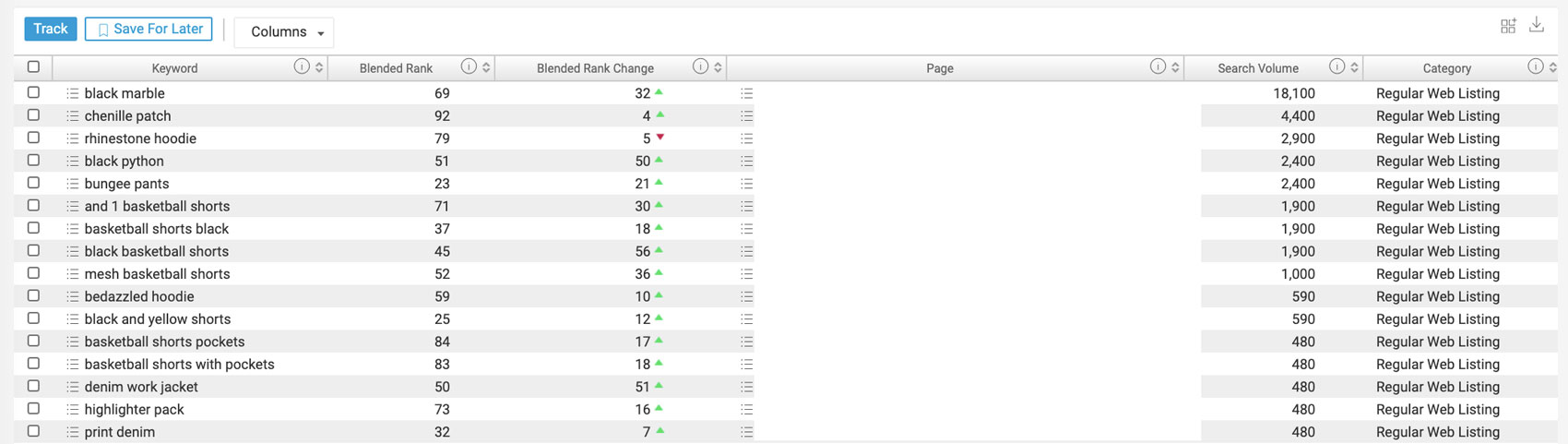
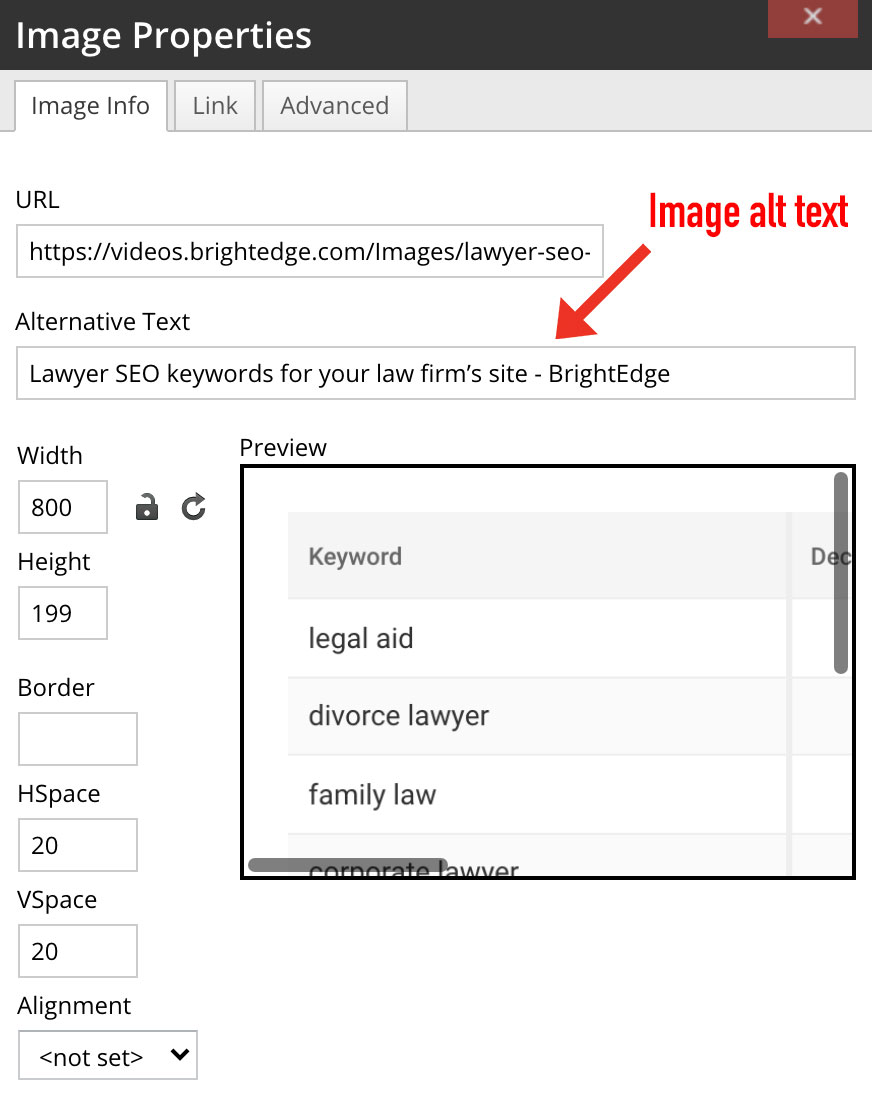
Producing regular content that appeals to your audience, will drive repeated visitors to your site. This will develop a reputation as a thought leader. One way to ensure your content is targeting the best keywords for your firm is by using Instant and Data Cube to conduct your keyword research. You can also leverage Data Cube to research your competition for law keywords to see where they may be outranking your site. Below are examples of law-based keywords with high search volumes found via Instant.

Lawyer SEO keywords for your law firm’s site - BrightEdge

Get a demo of BrightEdge Instant!

Law firm SEO strategy

Since it’s nearly impossible to outrank the aggregator sites, it’s vital for law firms to rank on the aggregator sites. Use the keywords you choose to rank for as headers and in any images you attach on the aggregator site. Write unique content for the aggregator site that isn’t already on your site. 

For small law firms with only one location, focus SEO efforts on local search. Optimize location pages and be sure to have a Google My Business page. Choose specific, long-tail keywords to optimize for that include “near me” or the city where the firm is located. For example, “attorney for dui near me” or “attorney for dui in Miami.”

All law firms should separate services pages, whether you have one or multiple. For each service you offer, detail what your legal teams offer clients and link to other pages on your site that include more information. For example, if you specialize in legal counsel for company-wide benefits for employees, create a landing page for that information and link to another page that offers information on how clients can get started with employee benefits themselves. Separating services pages allows you to expand the layers of your site. You will drive more traffic to your site with multiple pages you have the opportunity to rank for rather than one page with all of your services information.

Law firm SEO also includes client reviews. Offering potential clients a look into how you interact with current or past clients will better help both your SEO and your reputation. Reviews signal to Google that your site has authority and is trustworthy for visitors which can influence your ranking. Additionally, it’s good for users who are considering your services.

Combining PPC and SEO 

Leveraging PPC and SEO will drive more visibility to your site and increase your traffic. Utilizing paid ads while also optimizing for the organic SERPs can help you gain visibility right away and later. PPC is a great way for you to gain visibility right away and SEO is a method to gain traffic overtime. Not only does running ads on search engines work well, but also, running them on aggregator sites will benefit you as well. When an aggregator site ranks, your site ranks, too. You can specify ads based on your geographic area and the categories in which you practice law. 

Paying for advertisements on aggregator sites can help you to avoid the high prices seen in the law vertical on Google Ads. Avvo offers monthly ad subscriptions that can be more affordable than Google Ads. Specifically, for keywords relevant to law SEO, the CPC of a Google Ad can be costly. However, Google Ads have the benefit of being extremely focused – down to the zip code and modified for focused terms – and can benefit your site more so than an Avvo ad would. 

Utilizing Google Ads for visibility on high-ranking, impactful keywords is a marketing tactic big law firms should leverage. If a small law firm has the budget, spending on PPC in order to stay competitive for specific keywords may be a wise approach. Used correctly, Google Ads can help small law firms target specific keywords, in specific areas.

Avvo receives over 1.3 million organic visits each month. While there is huge visibility here, Avvo might not be ranking for the keywords that are important to you. Avvo’s monthly subscription is less costly than Google Ads but leveraging Avvo is likely to show you less of a conversion rate than Google Ads. Google Ads has a 3.75% conversion rate while Avvo only has a reported .0083% conversion rate. 

Overall, Google Ads will provide your firm with more visibility, more leads, and more ROI if you have the funds to spend on paid ads. If you don’t have as much to spend, aggregator ad sites, like Avvo, are a good source of lead generation. However, the best source for high conversion rates is still SEO - leading with a 14.6% close rate. If you decide to invest in paid advertisements, optimizing for organic results with SEO efforts is still very important to your overall strategy. Strive to leverage PPC and SEO together in order to gain as much visibility as possible.

What else can I do to rank for lawyer SEO terms?

Another SEO tactic to utilize is building link authority. Find out where your competitors are linked to and work to gain links on those same sites. Also, work to gain link building opportunities where your competitors don’t have any. 

While guest blogging isn’t as strong of a link building tactic as it was in the past, it is possible to gain audience trust and credibility as a thought leader by writing guest posts on sites that are trusted and respected. Relevant sites may include law school websites, blogs with extensive information on law topics (Attorney at Work), or well-rounded and respected publications like The Wall Street Journal.

Lastly, building citations will be important for any local firm. In order to do so, make sure your NAP (name, address, phone number) is correct and in proper format. Make sure you’re not already listed on the sites before submitting your citation. If you already have a citation listing on a site, double check to make sure it’s accurate and updated otherwise the point of the citation is lost.

SEO strategy for law firms is unique as the competition is high, there are massive aggregators in the space and there is more to consider than the typical product or services site. Ranking for law-related terms is beneficial and worth the hard work to get there. Be sure to regularly create new content and optimize keywords that have strong growth and resonate with your audience.

,