
How Does SEO Fit in My Marketing Mix?

Understand the best fit of SEO to maximize business results and ROI

How does SEO fit in my marketing mix?

Understand the best fit of SEO to maximize business results and ROI

“How does SEO fit in my marketing mix?” is a common question SEOs and marketing departments consider as they try to maximize business results and ROI.

For most companies, SEO has the highest ROI of any of the channels, and that is a fact that continues to grow as search gets better at understanding what the users want.

At BrightEdge we are asked this SEO mix question regularly by our customers, so we decided to formalize our answer with a webinar. We answer the question by considering the two key business factors: reach and results as we explore media mix data and analysis techniques.

The presenter is BrightEdge VP of Marketing Demand Generation and Head of SEO Erik Newton. He lays out a thought framework for addressing the question and then go over some practical how-to on the BrightEdge platform.

Download webinar assets now.


Thank you for your interest in BrightEdge's SEO and Your Media Mix Webinar Assets.

Access the assets by clicking on the links below. For your convenience, we've also emailed you links to the assets for you to access anytime. For more information, please visit our resource center or schedule a demo.


Deck         Video


Share this asset with your network

 Share by email Share on LinkedIn | Share on Facebook | Share on Twitter


People who downloaded this white paper also downloaded:

ユーチューブSEO で成功する方法

<p>ビデオを好む利用者はどんどん増えています。2017年までに<a href="//www.brafton.com/news/2017-74-web-traffic-will-come-video/&quot; target="_blank">オンラインのトラフィックの74%</a>がビデオになると予測されています。<a href="//blog.hubspot.com/marketing/video-marketing-statistics" target="_blank">78%</a>の人が1週間に1回はビデオを見ています。<a href="//www.singlegrain.com/video-marketing/just-stats-science-video-engagement…; target="_blank">ビデオのプロモーション</a>を電子メールの題名に入れることによって、開封率が19%増えて、クリックスルーレートが<a href="//blog.hubspot.com/marketing/video-marketing-statistics" target="_blank">65%</a>増えます。ビデオを見ることにより、お客様は確信を持って購入するようになり、さらに多くの潜在顧客がオンライン店舗や実店舗に来るようになります。ユーチューブは、グーグルに次いで2番目に大きな検索エンジンです。</p>

<p>マーケターは、お客様のビデオへの興味を活用するために、ビデオコンテンツを開発し、ビデオ最適化戦略を実施するべきです。</p>

<h2>ユーチューブの役割を理解する</h2>

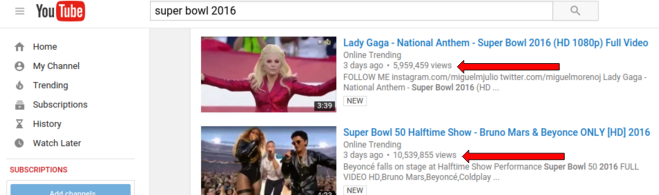
<p>ユーチューブに訪れる人は、一般的に、ビデオを見ることによって、楽しみを得るために、あるいは、何か新しいことを学ぶために来ています。スーパーボウルのビデオがとても人気があり、試合が終わってから何週間もフェイスブックを通じて流されるのも、この理由によります。</p>

<p class="rtecenter"><img alt="youtube superbowl 2016" class="aligncenter size-full wp-image-10180" height="195" sizes="(max-width: 659px) 100vw, 659px" src="https://www.brightedge.com/blog/wp-content/uploads/2016/02/youtube-supe…; srcset="https://www.brightedge.com/blog/wp-content/uploads/2016/02/youtube-supe… 300w, https://www.brightedge.com/blog/wp-content/uploads/2016/02/youtube-supe… 659w" width="659" /></p>

<p>ユーチューブでとても人気がある動物のビデオは別としても、企業にとっては、ユーチューブにはビジネス機会があります。ユーチューブは、とても多くの利用者が見ています。<a href="https://www.youtube.com/yt/press/statistics.html&quot; target="_blank">10億人以上</a> あるいは、世界人口の1/7になります。このことは、ビデオは、企業を人に紹介し、ブランド認知を向上し、興味を持つ潜在顧客を作りだす機会であることを意味します。</p>

<p>ユーチューブのビデオは、埋め込み用プレーヤーコードを使って、それ以外のソーシャルメディアサイトに埋め込むことができます。閲覧者は、ソーシャルメディアのフィードから、ユーチューブのサイトに移動してクリックする必要もなく、直接ビデオを簡単に見ることができます。ビデオを埋め込みすることによって、御社の他のソーシャルメディアのページにおけるエンゲージメントを増やすことができます。御社のデジタルマーケティングを通じて、お客様とのコミュニケーションを強化し、評判を高めることに寄与します。</p>

<h2>ユーチューブに何を掲載するべきか?</h2>

<p>ユーチューブでは、御社が作成したビデオのすべてを掲載すればよいというわけではありません。ここでのビデオは、広いオーディエンスを意識して作成されるべきです。御社のチャネルに来る人は大抵、御社のサイト以外から来るということを覚えておきましょう。視聴者は、楽しみのために、あるいは、学ぶためにユーチューブに来るのであって、購入のためではありません。一般的に御社が掲載するビデオは、単独でも通用するようにしましょう。御社のブランドやビデオ出演者のことを知らない人にとっても完璧に理解可能で価値があるものでないといけません。</p>

<p>企業は、価値の高い、それだけで視聴者が喜ぶビデオを提供することに注力するべきです。御社の産業に関する複雑な話題を理解するのに役立つビデオとか、御社の分野に関連するニュースをさらに細かく解説して理解しやすくするビデオ、新しい理論やアイデアを説明するビデオなどが、とても人気があります。</p>

<p>その他、役立つビデオは、教育関連です。ハウツービデオ、つまり特定の仕事をこなしたり、うまくやる方法を視聴者が理解するのを助けるビデオがこれにあたります。御社のブランドに関する、お客様が興味を持つようなストーリーを語ることによりビデオチャネルを成功させることも可能です。Old Spice 社による事例をご参照ください。</p>

<p class="rtecenter"><img alt="youtube old spice" class="aligncenter wp-image-10181" height="484" sizes="(max-width: 749px) 100vw, 749px" src="https://www.brightedge.com/blog/wp-content/uploads/2016/02/youtube-old-…; srcset="https://www.brightedge.com/blog/wp-content/uploads/2016/02/youtube-old-… 150w, https://www.brightedge.com/blog/wp-content/uploads/2016/02/youtube-old-… 300w, https://www.brightedge.com/blog/wp-content/uploads/2016/02/youtube-old-… 831w" width="749" /></p>

<p>これらのビデオは、同社のブランドについてのお話と、同社の製品がどのようにお客様のお役に立つのかを、ユーモラスに楽しく語っています。このようなビデオは、ユーチューブで有効です。なぜなら、ユーチューブでたまたまビデオを見かけた人に対しても、同社について関係も知識もない人でも、これらのビデオは価値があるからです。</p>

<h2>御社のマーケティング活動におけるユーチューブの役割</h2>

<p>ブランドの認知を向上する他にも、ユーチューブは、御社のマーケティング活動に直接的な役割を演じます。まず、企業は、自社のユーチューブチャネル向けに有料広告を通じてトラフィックをもたらすことができます。グーグル社のTrueView ビデオ広告により、3つの種類の広告が掲載可能です。</p>

<ul>
<li>パートナーのユーチューブビデオの最初、中ごろ、終わりのいづれかを選んで、広告を挿入することができます。これは、インストリーム広告 (in-stream ad) と呼ばれます。</li>
<li>特定の検索への検索結果に広告を表示することができます。これは、インサーチ広告 (in-search ad) と呼ばれます。</li>
<li>ユーチューブの視聴ページで広告を表示することが可能です。これは、インディスプレイ広告 (in-display ad) と呼ばれます。</li>
</ul>

<p>制作する広告ビデオは、長すぎないように、最初の数秒から興味をもたれるような内容にしましょう。これは、特にインストリーム広告では重要です。視聴者は最初の2・3秒でスキップできる場合が多いです。</p>

<p>広告ビデオは、ユーチューブのプラットフォームに即したものであるべきです。ユーチューブに来る人は、購入のために来ているのではないことを思い出してください。何かを学びに、あるいは楽しみのために来ているのです。広告についてもこれは当てはまります。教育的な広告のうちで、キーワードやビジネスに即したもの、推薦の言葉などで人のつながりを織り込んだ広告は成功しやすいです。</p>

<p>ユーチューブでは、これ以外にも広告を出すことができます。たとえば、CTA (Call-to-action) オーバーレイ広告を通じてインタラクティブなビデオを作ることができます。オーバーレイ広告には、御社のウェブサイトへのリンクが含まれており、興味を持ったお客様を直接御社のブランドにつなげやすくしています。<a href="https://www.brightedge.com/blog/using-video-rich-snippets-to-optimize-p…・スニペット</a>を御社のビデオに加えると、インデックスされやすくなったり、ランキングしやすくなります。</p>

<p>最後に、ユーチューブは、御社の検索結果にも影響を与える可能性があります。グーグルはユーチューブを所有しており、時として、検索結果に適切なビデオを表示します。 ビデオのリッチスニペットは、一般的に企業では使われていませんが、関連の検索が行われたとき、<a href="https://www.brightedge.com/blog/using-video-rich-snippets-to-optimize-p…; target="_blank">ユーチューブの結果に表示されます。</a>上位にランキングしているビデオがあると、通常の検索結果でも露出を増やす可能性があります。</p>

<p>人気のあるビデオがあり、これを見た多くの人が御社の会社のウェブサイトへ訪れるようになると、御社のサイトそのもののランキングを間接的に向上させます。このようなトラフィックの増加、特に御社の製品に関心を持っているエンゲージされたユーザによるトラフィックの増加は、検索アルゴリズム中の御社サイトの指標を向上させることがあります。ユーチューブでは、ビデオのコメントセクションでリンク先を記載することを許しているので、これを利用すれば、興味をもったビデオ視聴者を御社のサイトにより簡単に誘導することが可能です。</p>

<h2>御社のユーチューブチャネルを成功させるには</h2>

<p>御社のユーチューブチャネルを成功させるためには、戦略が必要です。ビデオの存在を知らせる必要があります。オンライン・マーケティングではいつもそうですが、出発する前に、どこに向かって行くのか考えを持っておくことが必要です。御社のチャネルのランキングをどうしたいのか、どんな種類のビデオが目標とするオーディエンスに好まれるのか、といったことです。</p>

<p>ユーチューブでの成功は、1発のラッキーパンチで達成されるわけではありません。多くのフォロワーを持ち、会社の売上げに繋げているビデオチャネルは、品質の高いビデオを次から次に作り続けています。デジタルマーケティングは、全体として、高品質の価値を重視する方向に強力に向かって行っています。マーケターは、激しい競争の中にさらされています。ある見積もりによると、<a href="//www.marketingpilgrim.com/2014/12/in-the-next-60-seconds-300-hours-of-vi…; target="_blank">毎分300時間のビデオがアップロードされています。</a>低品質のビデオは、お客様の興味を獲得できないだけでなく、ブランド全体のイメージを損ないます。</p>

<p>御社の目標は、品質の高い、興味を持たれるビデオを作り続けることです。誰かがユーチューブでビデオを見たあと、御社のチャネルページに来たとき、いくつかの役に立つ、価値があるビデオを選べるようになっている、というのが望ましいです。</p>

<p>ビデオで成功するためには、独創性と、訪問者がどのようなものを見たいのかということに関する理解が必要とされるのです。</p>

<ol>
<li><strong>ビデオの長さからはじめます。</strong> <a href="//www.adweek.com/adfreak/infographic-ideal-length-everything-online-tweet…; target="_blank">理想的なユーチューブビデオの長さ</a> は、2分54秒であるとされています。これでお客様をエンゲージするのに十分な時間が得られますし、お客様の興味が途切れるということもありません。</li>
</ol>

<ol start="2">
<li><strong>ビデオの最初で印象づけます。</strong> 最初の<a href="//adage.com/article/digitalnext/optimal-length-video-content/299386/" target="_blank">10秒</a>で視聴者を印象付ける必要があります。そうしないと、最初の30秒で33%の視聴者が、1分で45%、2分で60%の視聴者が興味を失います。時間を最大限活用してインパクトを最大化しましょう。</li>
</ol>

<ol start="3">
<li><strong>サムネールを正しく使います。</strong>サムネールは、タイトルと同様、視聴者がビデオを選ぶ際の要素のひとつです。そのための適切なフレームを選ぶためには、ビデオのコンテンツと感情に焦点を当てましょう。アイコンタクトがあると、選ばれやすくなります。何か、視聴者を見つめているものが入っているサムネールは、良い選択だといえるでしょう。</li>
</ol>

<ol start="4">
<li><strong>最も適切なビデオフォーマットを選びましょう。</strong> フォーマットの選択を間違えると、ビデオがはっきり見えないかもしれません。そうすると、エンゲージする力が損なわれます。ユーチューブの<a href="//www.macxdvd.com/mac-dvd-video-converter-how-to/best-video-format-for-yo…; target="_blank">最適なビデオフォーマット</a> は、一般的にMPEG-4です。レゾリューションは、できれば、1280 x 720 (16:9 HD) または、640 x 480 (4:3 SD) が良いでしょう。</li>
</ol>

<ol start="5">
<li><strong>ビデオがランキングの上位にくるように最適化します。</strong> 他のオンラインのコンテンツと同様、消費者の興味に沿った内容のものを皆さんも作ろうとされることでしょう。これは、価値のあるトピックスやキーワードを見つけ出し、それらのニーズに答えるビデオを制作することを意味します。ビデオのタイトルとディスクリプションにキーワードを使用しましょう。ビデオにタグを使用するのもよいでしょう。タグには、キーワードを記載するほか、ビデオのカテゴリ、コンテンツ情報、ビデオの制作に関して、または、登場人物についての考えを記載するとよいでしょう。ビデオの露出のために最適化するには、次のような項目について、検索されやすいキーワードやトピックス、コンテンツを使って、御社がターゲットする需要に答えます。

<ul>
<li>ビデオのタイトル</li>
<li>ビデオ・デスクリプション</li>
<li>御社のウェブサイトの関連情報への適切なリンク</li>
<li>ビデオ・タグ</li>
<li>御社のビデオ相互間で、関連ビデオのレコメンデーションを提供するため、プレイリストを使用</li>
<li>視聴時間を増やす取り組み:これはユーチューブのランキング要素です。</li>
</ul>
</li>
</ol>

<h2 class="rtecenter"><img alt="YT Single file" class="wp-image-10244 alignright" height="244" sizes="(max-width: 518px) 100vw, 518px" src="https://www.brightedge.com/blog/wp-content/uploads/2016/02/YT-Single-fi…; srcset="https://www.brightedge.com/blog/wp-content/uploads/2016/02/YT-Single-fi… 300w, https://www.brightedge.com/blog/wp-content/uploads/2016/02/YT-Single-fi… 768w, https://www.brightedge.com/blog/wp-content/uploads/2016/02/YT-Single-fi… 1024w, https://www.brightedge.com/blog/wp-content/uploads/2016/02/YT-Single-fi… 1061w" width="518" /></h2>

<h2>御社の取り組みが成功したか、どうやったらわかるか?</h2>

<p>御社のユーチューブ戦略を実施するにあたって、御社の取り組みが成功しているのか、何がうまく行っている要因なのかをモニターする必要があります。この成功度合いを計測する方法がいくつかあります。</p>

<h3>ブランドのトラフィックとシェア・オブ・ボイス</h3>

<p>ユーチューブでの主要な目標ひとつは、ブランドの認知度を上げることです。ブランド名が入ったキーワードからのトラフィックとシェア・オブ・ボイスは、この分野での成長を見るための良い方法です。</p>

<h3>ユーチューブからのリファーラル・トラフィック</h3>

<p>ユーチューブビデオからクリックして御社サイトや御社のユーチューブチャネルにやってくるユーザーの数は、御社のビデオを見るユーザと比較すると、とても少ないです。同時に、この分野での成長をモニターすることにより、制作したビデオが正しいオーディエンスに刺さっているか、オーディエンスがビデオに満足しているかの良い指標となります。</p>

<h2>ユーチューブ・アナリティクスの利用</h2>

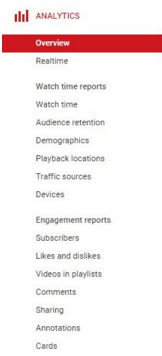
<p>ここでは、プレイリストや個々のビデオのために提供されるアナリティクスのデータを紹介します。ひとつの例が視聴時間に関するインサイトです。これは、エンゲージメントの度合いを測る指標のひとつで、ランキングの要素になります。下に示すものは、日ごとの視聴時間と視聴状況、および、視聴者の人口動態に関する情報です。</p>

<h2 class="rtecenter"><img alt="YT Analytics" class="size-full wp-image-10242 alignleft" height="472" src="https://www.brightedge.com/blog/wp-content/uploads/2016/02/YT-Analytics…; width="216" /></h2>

<h2 class="rtecenter"><img alt="YT Watch Time" class="wp-image-10245 aligncenter" height="226" sizes="(max-width: 495px) 100vw, 495px" src="https://www.brightedge.com/blog/wp-content/uploads/2016/02/YT-Watch-Tim…; srcset="https://www.brightedge.com/blog/wp-content/uploads/2016/02/YT-Watch-Tim… 300w, https://www.brightedge.com/blog/wp-content/uploads/2016/02/YT-Watch-Tim… 768w, https://www.brightedge.com/blog/wp-content/uploads/2016/02/YT-Watch-Tim… 1024w, https://www.brightedge.com/blog/wp-content/uploads/2016/02/YT-Watch-Tim… 1040w" width="495" /></h2>

<h2 class="rtecenter"><img alt="YT Demog" class="wp-image-10243 aligncenter" height="242" sizes="(max-width: 492px) 100vw, 492px" src="https://www.brightedge.com/blog/wp-content/uploads/2016/02/YT-Demog-102…; srcset="https://www.brightedge.com/blog/wp-content/uploads/2016/02/YT-Demog-150… 150w, https://www.brightedge.com/blog/wp-content/uploads/2016/02/YT-Demog-300… 300w, https://www.brightedge.com/blog/wp-content/uploads/2016/02/YT-Demog-768… 768w, https://www.brightedge.com/blog/wp-content/uploads/2016/02/YT-Demog-102… 1024w, https://www.brightedge.com/blog/wp-content/uploads/2016/02/YT-Demog.jpg 1050w" width="492" /></h2>

<p>&nbsp;</p>

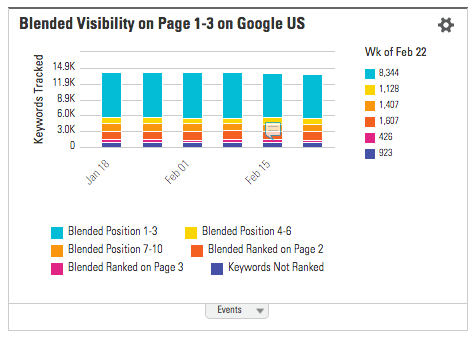
<p>現在のところ、グーグルの検索結果で表示されるビデオのサムネールのうち大多数は、ユーチューブからのものです。ですので、企業としては、ビデオの取り組みは、ユーチューブに集中し、ユーチューブとグーグルの自然検索トラフィックを獲得する必要があります。ブライトエッジでは、<a href="https://www.brightedge.com/technology/universal-search&quot; target="_blank">ブレンドランクおよびユニバーサル・ビデオ・ポジション</a>のレポートを見ることができます。ここで、自社と競合サイトが検索結果でどのようになっているかを把握することができます。これにより、必要な対策を施し、現実を可視化させることができます。</p>

<p>ユーチューブは、経験を積んだマーケターにとっては、パワフルなツールです。このビデオのプラットフォームは、ビデオを通じたエンターテインメントや学習機会の価値を人々が知るようになるにつれ、その人気を増しています。この自然検索のチャネルを活用することを知った企業は、さらにトラフィックやビジネスの成果を上げていくことができます。</p>

<p><a href="https://www.brightedge.com/jp/articles">ブライトエッジブログ記事一覧</a></p&gt;

How Google AMP Will Streamline Content

Default avatar
AnnaFrancis
M Posted 10 years 3 months ago
t 9 min read

People are searching with their mobile devices more now than ever before, so having a good user experience is essential. However, with increased mobile usage (and growing mobile e-commerce) comes an increased expectation for speed and agility, as data has shown that 40% of people will abandon a site after just three seconds if the page they are looking at doesn’t load quickly enough. While a slow load speed is bad enough for the user, it is also bad for the content creator, as it means their content isn’t actually being seen. Google AMP can help. There has been a lot of talk recently about Google’s Accelerated Mobile Pages (AMP) and what it means for search and content marketing. Google first announced AMP back in October 2015, saying that AMP content loaded around four times faster, using ten times less data than non-AMP content. So, what is Google AMP and how will it affect content?

High-speed content

AMP is an accessible framework that creates fast-loading mobile webpages. AMP is designed to easily improve the speed of content displayed on mobile and subsequently enhance user experience. Currently, Google, Twitter, and some other companies have rolled out AMP, and it comes not long after Facebook launched Instant Articles and Apple launched its News service. It basically works by using a new version of HTML, a streamlined version of CSS, and a JavaScript framework for mobile pages – thereby ensuring fast loading times and smooth readability.

AMP HTML

A new stripped-down version of HTML, AMP HTML has a new set of properties and limits existing styles and tags. If you are familiar with HTML, then you will have no problem understanding and adapting your pages to AMP HTML. It’s a good idea to have a look at all the required markup your AMP content will need.

AMP .JS

Third party JavaScript is out when it comes to AMP, but it does offer a JavaScript framework specifically for mobile pages. AMP .JS makes the loading of external resources asynchronous, stopping any external scripts from blocking page rendering.

AMP CDN

This optional content delivery network will cache your AMP-enabled pages and optimize them where necessary, making them instantaneously accessible on a mobile phone. Images only load as they scroll into view and will use the amp-img element, and Google will cache and host your content so it no longer needs to be fetched from your server. Currently, only available to publishers, Google AMP will be available for all content marketers before long, so it’s best to get up to speed on how you can prepare your site and your content for the change.

Examples

Examples of AMP pages live in Google’s search results can be seen when searching for any topical search query on a mobile that is likely to return results from publishers. One such example is a search for ‘Sharapova’, after the tennis star was recently embroiled in a doping scandal. Google AMP News - brightedge The grey lightning symbol indicates an AMP result, and clicking on one of these instantly opens up the result within the browser. The blue bar at the top then gives the user the opportunity to swipe between related articles, all structured around the AMP framework.    

How to use Google AMP for your website

The first thing you need to do is build alternative AMP pages for your site that adhere to all the new specifications. There are quite a few different elements that AMP does not allow, including lead forms and on-page comments, so you may need to completely re-write your site template to accommodate these new restrictions.

Code Implementation

The BBC has been quick to adopt Google AMP across all their news content and are a great example to follow if we want to learn how a page should be structured. The content in the above example is available at http://www.bbc.co.uk/news/business-35751916 as well as http://www.bbc.co.uk/news/amp/35751916 - one for desktop search and one for AMP search. The important element is the <link> tag in the source code of each page that indicates to Google about its respective equivalent. On http://www.bbc.co.uk/news/business-35751916, we find: And on http://www.bbc.co.uk/news/amp/35751916, we see: This allows Google to serve the correct URL dependent upon the query and device, without seeing the two as duplicate content.

And further down, we find this: This is the JavaScript code that makes everything work – loading all custom AMP elements and managing resource loading and prioritization (such as image lazy-loading). In terms of structure, this tag must be the last element before the closing </head> tag.

Schema

In order to get your content to appear for relevant keyword queries, you must include the correct schema markup. This gives further information to search engines about the content and helps them display it correctly in AMP search. On the BBC article, the following schema is applied using the JSON-LD implementation method: There’s a lot of information being presented here, but it all has a purpose. For more information about schema and its implementation, read the official documentation: http://schema.org/. In terms of multimedia, there is a whole separate range of AMP tags that can be employed, including amp-video, amp-carousel and amp-image-lightbox. Extended components can also be used for GIFs (amp-anim) and YouTube (amp-youtube). The main social media networks also have their own extended components.

Plugins

Luckily for WordPress users, there is already an official Google AMP plugin. All you need to do is download it and voilà: all your future posts will be AMPlified. It’s important to remember though that the plugin does not support ‘pages’ or any archived posts. Here are Google’s guidelines to getting your AMP pages to properly display in Google Search:

  • Design: Create webpages in line with the AMP HTML specifications.
  • Discovery: Make your AMP pages discoverable by linking to them from other indexed pages and listing them in your sitemap.
  • Validation: Check your AMP pages are valid so that they work properly for both Google and the user.
  • Structured Data: Your content will be presented more prominently if you have the correct structured data markup.
  • Status: Check the AMP status report to find a list of successfully indexed Google AMP pages on your website and any errors that may have been found.

Benefits of Google AMP

There are several different benefits to using AMP on your website:

  • User experience
  • Speed
  • Increased engagement
  • Publisher control
  1. User Experience. Speed is a crucial element of user experience when it comes to browsing the web on a mobile device. People can quickly lose interest if a page doesn’t load fast enough and studies have shown that pages that are just one second faster experience a 27% increase in conversion rate.

  2. Speed. The speed in which a page loads could also have an effect in terms of SEO. Page speed is one of the many ranking factors Google uses, so if your page loads too slowly, there is a chance it will have a decreased level of visibility.

  3. Increased Engagement. Faster web pages mean higher levels of readership and, therefore, better engagement. Users can quickly search for a blog topic, click on an AMP search result and instantly see a responsive piece of content that is easy to read and share.

  4. Publisher Control. AMP gives publishers more autonomy over their content, increases the reach of content produced, and makes content distribution easier. It also allows for effective advertising across the mobile web by supporting a range of ad formats, networks and technologies.

Does Google AMP Affect Rankings?

In short, no. John Mueller at Google said only recently that AMP is not a ranking signal – yet: “At the moment, it is not a ranking signal. It is obviously one way to make mobile-friendly pages, so that might be an option where you do that. I’ve already seen some websites where they’ve moved the whole website to the AMP format. Obviously, that is mobile-friendly setup, so it kind of picks up the mobile- friendly thing. But just AMP itself is not something that we have a ranking signal at the moment.” Considering the amount of investment that Google is putting into AMP, it would not be a surprise to see this happen in the future, and the words “at the moment” definitely suggest this may be the case. Google is obviously promoting AMP articles within its search interface due to the prominence of the news carousel. The majority of content available in this section of the search results is now AMP, so despite it not being a direct ranking signal, you can achieve greater SERP prominence by adopting the new framework. In the future, AMP could become part of the existing mobile-friendliness algorithm, or it could simply become a ranking factor in its own right.

Conclusion

With mobile search levels continually on the rise, the introduction of Google AMP will give publishers and content creators a flexible platform on which to promote their articles. AMP officially launched at the end of February and is currently being displayed at the top of Google’s search results in a carousel of top stories, but it could move into other areas too. Dave Besbris, Vice President of Engineering at Google, said at SMX West that “everywhere we use content, we want to embrace AMP.” At the moment, only news and editorial content will appear as Google AMP results in the carousel, but the type of content displayed could vary from query to query (and day to day). For brands that want to increase their organic visibility and stay at the front of the ever-changing competitor landscape, AMP is a no-brainer. There is no point in creating amazing content if it takes five times longer than your competitors’ content to load on mobile. Pages that load faster will provide a better user experience and may also have a positive effect on SEO down the line, so Google AMP is definitely something to keep an eye on. Anna Francis is a Content Manager at the BrightEdge agency partner Search Laboratory, based in Leeds, UK.  

The BrightEdge Content Performance and SEO Platform is the only one capable of web-wide, real-time measurement of content engagement across all digital channels, including search, social, local, and mobile. Over 8500 global brands including 3M, Microsoft, Wiley, Whole Foods, and Nike leverage BrightEdge technology.

  • Real-time analytics driven by billions of keywords, pages, search terms, social signals, and rich media
  • The only comprehensive solution to Google's shift to Secure Search
  • Rank and performance separated by mobile, tablet, and desktop
  • 100% Universal Listings support - Videos, Images, Places, Site Links, and Quick Answers
  • Social site audit and actionable social SEO recommendations
  • Local, Global, Mobile, and Social content engagement analysis

Request a demo today to get the complete picture of how BrightEdge can help your company drive results.

BrightEdge Innovation

YouTube Marketing: 8 Steps to Improve Engagement | BrightEdge

enewton@brightedge.com
M Posted 10 years 3 months ago
t 9 min read

YouTube marketing is a great strategy. YouTube is a solid resource for reaching broad audiences and introducing the brand. The platform has an estimated one billion users from around the world. A well-maintained video channel can help brands promote their story and increase their reputation as thought leaders and innovators in the industry. You can see the BrightEdge YouTube channel. Youtube marketing logo black - brightedge For many brands, however, the chief frustration with YouTube comes from taking the engagement that occurs on the platform and translating it directly into measurable results. Countless people browse YouTube videos, stop to watch particular ones that they find interesting and then click away to look at other, related videos. The brand is left wondering the about the amount of influence that video had on the person and their interest in the company. On top of that, video is probably the most demanding content to produce. With a little bit of technical prowess, companies can actually create a clickable overlay for their YouTube videos that will provide easy access for interested visitors to visit the brand website and learn more about the company. Best of all, this process is completely free.

The value of YouTube marketing and free video overlay

When thinking about YouTube advertising or marketing, this system of creating the overlay through Google Adwords now gives you even more insight into your viewers’ behavior while they are on YouTube. Since video watches will be tracked as a part of the campaign, you can see valuable information such as how many people are watching the video all the way through and how many impressions your ad had. This insight will help you understand how well your YouTube marketing strategy is and how your videos are reaching your intended audience on the platform. You will be able to better target your optimization efforts as well as gauge the scripts and actors for your videos to see how well they engage the audience. By creating a clickable overlay for your videos, you will also have the opportunity to further interact with your audience and learn more about them after they finish the video. With the ability to track traffic coming from your videos, you will have a much better picture of which videos are not only engaging customers, but motivating them to learn more about the brand. There is a difference between a video that people find entertaining but then results in little future engagement with the company and one that inspires people to investigate the organization to see if this is the business that can solve their problem. When you bring YouTube viewers to your website, you will be able to track their movements and invite them to convert into leads. This will empower you to collect data about what your video audience is most interested in learning and see how well you are addressing their needs. You can compare the performance of different videos and monitor the behavior of users who arrive from the various links. This will all offer you greater insight into how to improve your YouTube channel and make yourself more relevant to your intended audience.

Video Overlay Directions

Creating a free overlay for your YouTube videos requires a Google Adwords account in addition to your YouTube account. Here is what you will need to do:

Make sure your Google Adwords account is linked to your YouTube account. This is an important step for YouTube marketing. You can do this by logging into your Adwords and looking under the Shared Library section. There will be a Linked YouTube Accounts button you can click.

video marketing for youtube - brightedge

Create a New Video Campaign through your YouTube account. At the bottom of your YouTube page, there is a link that says, ‘Advertise’. Begin a new campaign to get started.

understanding video marketing - brightedge

You will need to mock-set up the ad campaign. Since this is not going to be run like a traditional campaign, it does not really matter what settings you select. Set the bid to the lowest amount.

video marketing advertisements for youtube - brightedge

Link this new video campaign to the YouTube video that you want to use to display the banner. You will need the URL from this video. After you make your pretend bid, click through until you see the button for a new video ad. Click on this, and where it says ‘select a video’, you can put in the URL.

On the next page, you want to select ‘Let me choose’. This will enable you to select YouTube Videos and In-display. Everything else on this page is not needed. You can fill in the rest of the ad attributes with anything you desire. Once this step is completed, save your progress so far.

Pause this campaign by going to the campaign dashboard.

Finally, add your overlay by going to the Videos tab. This will allow you to select ‘add call-to-action overlay’. Here is where you design the ad that you actually want to have appear on your video, so pay attention to your text.

Monitor your campaign to see how well your overlay and your videos are performing.

And as always, you should do proper video on-page efforts: keywords in the title, metatags, and a detailed description to help the video appear in YouTube and search engine SERPs. You can also add a link to your site in the description, but it is a NoFollow. This process of creating a YouTube video overlay is a fantastic way for brands to not only better monitor how their videos are performing and the engagement levels of their audience, but to also see how well those videos are translating into interested customers. By following these simple steps, you can empower your ad campaign and gain the insight you need to reach your YouTube marketing goals.

,