





<p class="rtecenter"><mediawrapper data=""><img alt="BrightEdge Innovations" class="media-element file-default" data-fid="1817" data-media-element="1" height="600" src="http://www.brightedge.com/sites/default/files/BE%20Innovation%20poster_…; typeof="foaf:Image" width="900" /></mediawrapper></p>
How to Perform an SEO Audit for Maximum Benefit

M
Posted 11 years 4 months ago
t
9 min read
Auditing your website's content is much like undergoing a physical exam. You may dread it at first, but it's a smart practice that uncovers focus areas to improve your overall health. It also helps you understand what's working and what's not in your approach. This is the same for SEO.
As a company that devotes valuable time and resources to every marketing channel, you know how essential it is to budget and plan for results. An SEO audit will help you accurately assess the return on your website’s content investment, and formulate an informed strategy looking ahead.
What is an SEO audit?
An SEO audit helps site owners break down the different components of SEO. Audits also pinpoint their weakest points, and eliminate any errors that could be damaging their rankings in the SERPs. As sites improve rankings through SEO, they will naturally receive more organic traffic and position themselves for tremendous growth.
A thorough SEO audit will look at a variety of factors including:
- On-page SEO
- Technical and Accessibility SEO
- Linking
According to a study we conducted at BrightEdge, an estimated 51 percent of all your website traffic comes from organic search. Other factors such as direct traffic, paid search, and social media account for less than half your traffic combined. This means that a site with poor SEO could be missing out on enormous potential for growth and profit. An SEO audit is critical for understanding site performance in search engine rankings and how that position can be improved.
How do I complete an SEO audit?
There are a variety of different tools available to help sites successfully complete an SEO audit. You can use a combination of a few different platforms, such as Google’s Webmaster Tools, to check for a variety of different factors.
To establish your baseline, start from “ground zero” in an initial SEO audit, you need the right tools. Then, you need to define metrics and gather data around those metrics. Once you’ve delved into the data and interpreted what it means, you can set goals for your site’s content performance based on those insights.
BrightEdge offers clients a thorough SEO audit using ContentIQ that can provide them with the results in a single dashboard. This can help them identify clear tasks to complete and assign jobs within the platform for the site to be fully optimized.
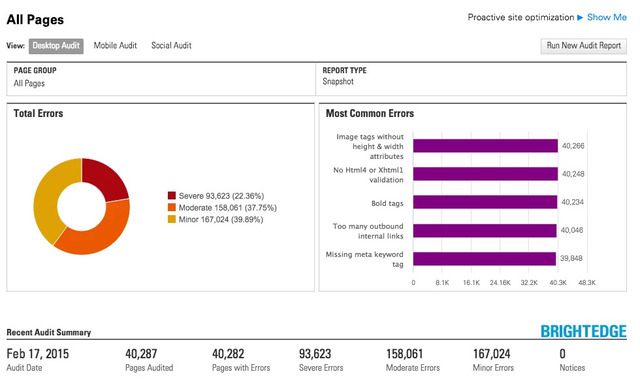
The easy-to-read dashboard makes it simple to keep all errors and progress made in a single place so that the SEO audit can be regularly monitored throughout the process.
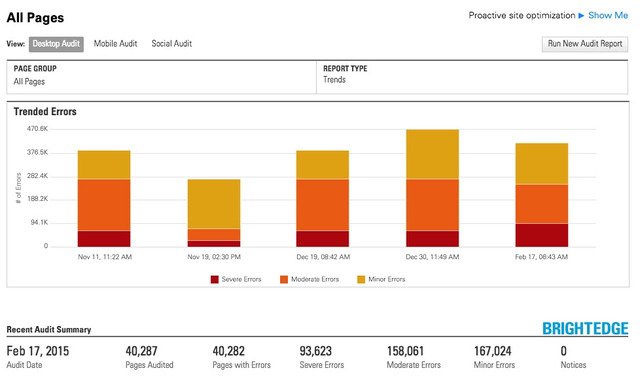
An SEO audit is a critical component to benchmarking, planning, and keeping a website optimized and prepared for the demands of high-ranks in SERPs to generate traffic. Websites should regularly perform an SEO audit and review their sites to ensure optimal site function. When performing an SEO audit, review the major components to ensure that the audit is thorough and maximally useful.
SEO audit for your main web pages
For your main website pages, you’ll want to collect all the data, but focus on the Web pages that are key to your business. On a spreadsheet, you may organize those key pages so they are positioned below one another; that way you can see the metrics for each page and how it fares against other important pages in that group.
The most important pages of your site typically represent the “core” of what you do. For instance, your home page, and key information-rich pages or landing pages likely would be priority for scrutiny in your audit.
That said, your most important pages might not necessarily be the best-performing pages. Findings such as this underscore the value of an SEO audit, informing both your strategy and resource-allocation decisions for the site. By simply knowing which Web pages need bolstering, you can then focus your SEO efforts on them for the coming months.
You may also choose to do a second-tier prioritization of your Web pages. Identify, based on what the data is telling you, which pages you can make small tweaks to that will move the needle drastically. At BrightEdge, these seemingly minor yet quantum content optimization opportunities are referred to as “striking distance”.
SEO audit for your blog pages
While pageviews, bounce rates and time on site are all important metrics to gauge the success of your blog content, in today’s current Web environment, you’ll need to measure social signals. These will indicate how (or if) people are engaging with your blog content.
By examining the number of Facebook shares, tweets, and Google+1s, for example, you can only determine what is resonating with your readers, but also what direction you should take your blog overall. For instance, if you discover your blog is receiving more engagement from how-to pieces versus interviews, you may choose to include more instructional posts.
An obvious “red flag” is if your blog content is not being shared at all. In that instance, you need to examine ways to improve upon that, such as creating a more solid community around your brand or ensuring that the blog is set up well technically for social sharing.
Using BrightEdge, you can get a picture of your engagement metrics in the “page report,” as shown in the following screenshot:
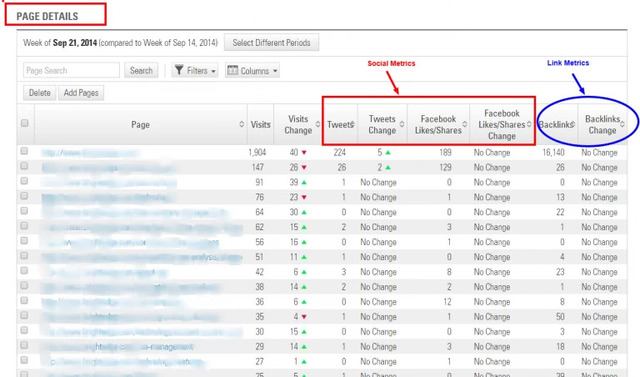
You’ll also want to consider backlinks as part of your blog metrics. These show a vote of confidence that your content is likable and sharable. Blogs with a lot of quality links show “credibility”.
Your own social media metrics can be informed by a relatively quick secondary SEO audit of your main competitors, their backlinks and social engagement metrics. This type of analysis can be used to come up with similar ideas in that niche.
Optimize on-page SEO for your audit
On-page SEO describes the steps you take to ensure that the content itself has been optimized for your audience. This means paying close attention to the page descriptions and tags that communicate with search engines and readers. Although fixing problems with on-page SEO tends to be straightforward, it is important to avoid neglecting details. Below are five on-page SEO factors you should consider for a better SEO audit:
- Title tags: Should be unique and include keywords relevant to the content on the page
- Meta descriptions: Include keywords and be engaging to encourage those reading the description on SERPs to click
- Images: Include alt tags that have keywords as well as image names that give accurate descriptions, such as [BrightEdge Logo] instead of just [Logo]
- Headings: Need to use keywords - particularly in H1 - while also breaking up text and making it more scannable
- Content: Should clearly describe the purpose of the site without keyword stuffing
Regardless of what tools you’ll employ, all data should be organized well and exported into a spreadsheet (such as Excel), with the columns designating the specific metrics tracked and the horizontal rows showing the individual page URLs to be audited.
Here’s an example of what the spreadsheet may look like, with columns showing key metrics like:
- Pageviews: Total number of pages viewed - repeated views of a single page are also counted
- Organic visits: Shows how many visits came from the organic channel
- Bounce rate: How many people came to the page and immediately left without interacting with it?
- Page speed: Gauges how fast or slow a page loads
- Conversions: Whatever your conversion goals are – form fills or product buys – how many are happening as a result of that page?
- Word count: The total number of words on a page
- Code-to-content ratio: How much actual text content exists versus code?
Every metric tells a story. The next step is figuring the “why” behind the metric data, and then putting together some next steps. For example:
- Would adding more content on the page help lower the bounce rate?
- If you have a low word count, does that result in "thin content" that could be deemed "low-quality" content?
- How about images and video - would that help improve conversions?
- What if you’re showing a slow page load time – would that be from the video or images on the page?
Technical SEO for your audit
Technical SEO is optimization that deals with indexing and writing code for crawling robots including Google bot. Technical aspects of the SEO audit will examine the more technical areas of your site. It will ensure that your page can be easily crawled by the spiders from Google. If a website is a challenge for Google to crawl, it will rank much lower. It can also impact how well users can move around your website.
A site that is difficult to maneuver will have higher bounce rates. According to KissMetrics, clear navigation is an excellent way to keep visitors on the site.
The technical part of the SEO audit will check for the following issues:
- The site navigation must be intuitive to ensure that users and spiders can easily move around
- The site should load quickly regardless of device
- The directory structure should be less than three folders deep
- All 302 response codes that are no longer temporary need to be updated to 301 redirects to be more search friendly and to pass the search equity onto the successor page
- All 404 error codes and broken links lead to orphan pages and need to be repaired
- URLs should be rewritten to be user friendly and excessive appends reduced
- Ensure pages have been indexed and that the site ranks well for the company name
- All duplicate content should be eliminated
- The site should be mobile-responsive or redirect at a 1-to-1 ratio to a mobile version of the website
What is linking for SEO?
When sites link to one another, it is the virtual equivalent of giving each other a handshake. Google assumes that when a reputable website links to another site, that site is also reputable. Conversely, if a poorly designed or penalized site has inbound links from other websites, the search engine has, in the past, viewed those websites as similarly low quality. It is important to make sure all websites you link to still exist and are worthy of the link to avoid hurting your own SEO efforts.
- Links should use relevant anchor text and be applicable to the content itself
- Outbound links should open in new windows
- Links should only point to reputable sites
- Any links that are broken should be removed or replaced
To wrap up, regularly checking your site for errors and performing an SEO audit is a must to keep a healthy online presence. Dismissing errors and issues within your technical SEO could result in losing out on organic traffic. This will end in growing less-rapidly than your competitors and generating leads and revenue at a much slower pace. Keep your SEO in check with an SEO audit.