SEO Basics for Increasing Organic Traffic

  1. Carefully choose queries your audience uses to look for your product or service.
  2. Create high quality content around your target personas.
  3. SEO-optimize your content.
  4. Measure results.

Why is it important to focus on organic traffic for conversions?

According to our own research here at BrightEdge, an estimated 51 percent of your website traffic is due to organic search. This information is mirrored by studies which have found that an estimated 94 percent of B2B buyers conduct research online before making a purchase. In other words, people who are most interested in making purchases often start by doing research online. Focusing on providing better quality content for those arrive through organic searches can have an enormous impact on your bottom line.

What is organic traffic? BrightEdge

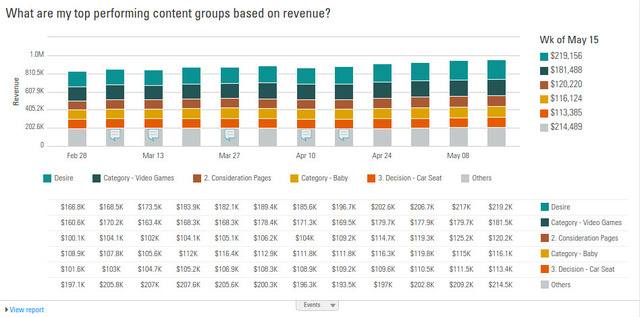
Organic Traffic Channel Performance Graph in BrightEdge Story Builder

How can I improve my SEO traffic?

For your website to turn a new visitor who arrives from an organic search query into a customer, you need to begin by providing content that adds immediate value. These new visitors might not be familiar with your brand or company personally. Even if they have heard of your brand, they likely have not purchased from you before. Your content needs to make your value clear. It needs to encourage your customers to read more and learn what you have to offer.

How do I increase organic traffic to my website?

  1. Start by understanding your buyer personas. This will give you information on of the type of person that you are marketing to and what matters most to them in their purchasing decisions.
  2. Map these personas to their buyer’s journey so that you can identify the type of information these people are going to be most interested in throughout their journey.
  3. Use data research to better understand what your customers want to read and the types of keywords that will help you get the most traffic.
  4. Create high-value content that will inform and engage the reader so they know they can trust you to answer their needs.
  5. Build a strong web presence so this new visitor has ample opportunities to get to know you better, such as accounts on the major social media platforms, landing pages that offer webinars or ebooks and mailing lists that will keep them updated on your brand.
  6. Create personalized content for customers throughout their journey and coax them closer to the conversion point.

Organic traffic is one of the most important factors in your revenue rates. Since customers are now in control of the buying process, they are more likely to perform searches when they need a new product or service. Preparing your content to answer this need will help you grow your company and revenue.

Definition
  1. Carefully choose queries your audience uses to look for your product or service.
  2. Create high quality content around your target personas.
  3. SEO-optimize your content.
  4. Measure results.

Why is it important to focus on organic traffic for conversions?

According to our own research here at BrightEdge, an estimated 51 percent of your website traffic is due to organic search. This information is mirrored by studies which have found that an estimated 94 percent of B2B buyers conduct research online before making a purchase. In other words, people who are most interested in making purchases often start by doing research online. Focusing on providing better quality content for those arrive through organic searches can have an enormous impact on your bottom line.

What is organic traffic? BrightEdge

Organic Traffic Channel Performance Graph in BrightEdge Story Builder

How can I improve my SEO traffic?

For your website to turn a new visitor who arrives from an organic search query into a customer, you need to begin by providing content that adds immediate value. These new visitors might not be familiar with your brand or company personally. Even if they have heard of your brand, they likely have not purchased from you before. Your content needs to make your value clear. It needs to encourage your customers to read more and learn what you have to offer.

How do I increase organic traffic to my website?

  1. Start by understanding your buyer personas. This will give you information on of the type of person that you are marketing to and what matters most to them in their purchasing decisions.
  2. Map these personas to their buyer’s journey so that you can identify the type of information these people are going to be most interested in throughout their journey.
  3. Use data research to better understand what your customers want to read and the types of keywords that will help you get the most traffic.
  4. Create high-value content that will inform and engage the reader so they know they can trust you to answer their needs.
  5. Build a strong web presence so this new visitor has ample opportunities to get to know you better, such as accounts on the major social media platforms, landing pages that offer webinars or ebooks and mailing lists that will keep them updated on your brand.
  6. Create personalized content for customers throughout their journey and coax them closer to the conversion point.

Organic traffic is one of the most important factors in your revenue rates. Since customers are now in control of the buying process, they are more likely to perform searches when they need a new product or service. Preparing your content to answer this need will help you grow your company and revenue.

What is NAP in Local SEO?

NAP is an acronym for Name, Address, and Phone number. The NAP for your business needs to be correct and consistent when optimizing your website and online presence for local search because Google values accurate information for its users.

Local SEO NAP basics - brightedge

Why is NAP important for Local SEO?

Having correct NAP for all your listings across the internet is crucial for local SEO. Google scans all these listings when searching for information about your business. The data is stored and used when determining ranking. Incorrect information in NAP citations can lead to confusion for customers and a poor user experience.

What problems can arise if incorrect NAP listings are published?

Google values consistency in your listings. When all your listings say the same thing, Google can confidently display your contact information to customers on applicable queries. When the search engine finds discrepancies in the listings, then it is not sure of the information. Since incorrect information can lead to a poor user experience, differences in NAP between your listings can cause lower rankings.

A study was conducted by Wesley Young to see how much different factors impacted local search performance. He found that that consistency of the NAP could impact a site’s performance by as much as 16 percent.

How do I create NAP SEO?

  1. Make sure this critical information is displayed prominently on your website so that it can be easily read by your customers and by Google. Make sure the information is text and not an image so that Google can scan the information.
  2. Claim your Google My Business listings and make sure to update it with the correct NAP information.
  3. Use Google to uncover potentially incorrect listings. You can use Google site operators, such as site:yelp.com “my business” to search specific directories or you can search for your phone number, address, or business name.
  4. Use a resource, like this compilation of important listing sites, to get started correcting incorrect listings.
  5. Keep a record of all your listings so you can quickly correct this information if you ever change your business’ phone number or address.

NAP can have an enormous impact on businesses because it gives customers easy access to the most critical information about your brand. Take the time to make sure your listings are accurate to avoid potential problems in local SERPs.

Definition

NAP is an acronym for Name, Address, and Phone number. The NAP for your business needs to be correct and consistent when optimizing your website and online presence for local search because Google values accurate information for its users.

Local SEO NAP basics - brightedge

Why is NAP important for Local SEO?

Having correct NAP for all your listings across the internet is crucial for local SEO. Google scans all these listings when searching for information about your business. The data is stored and used when determining ranking. Incorrect information in NAP citations can lead to confusion for customers and a poor user experience.

What problems can arise if incorrect NAP listings are published?

Google values consistency in your listings. When all your listings say the same thing, Google can confidently display your contact information to customers on applicable queries. When the search engine finds discrepancies in the listings, then it is not sure of the information. Since incorrect information can lead to a poor user experience, differences in NAP between your listings can cause lower rankings.

A study was conducted by Wesley Young to see how much different factors impacted local search performance. He found that that consistency of the NAP could impact a site’s performance by as much as 16 percent.

How do I create NAP SEO?

  1. Make sure this critical information is displayed prominently on your website so that it can be easily read by your customers and by Google. Make sure the information is text and not an image so that Google can scan the information.
  2. Claim your Google My Business listings and make sure to update it with the correct NAP information.
  3. Use Google to uncover potentially incorrect listings. You can use Google site operators, such as site:yelp.com “my business” to search specific directories or you can search for your phone number, address, or business name.
  4. Use a resource, like this compilation of important listing sites, to get started correcting incorrect listings.
  5. Keep a record of all your listings so you can quickly correct this information if you ever change your business’ phone number or address.

NAP can have an enormous impact on businesses because it gives customers easy access to the most critical information about your brand. Take the time to make sure your listings are accurate to avoid potential problems in local SERPs.

What is the Knowledge Graph?

The Knowledge Graph is the mechanism that helps the Google algorithm understand how different people, places, and things are connected. When a user enters a query into Google, the Knowledge Graph gathers information, finds the best sources and presents snippets of content in informational boxes, known as Quick Answers, above the search results. Quick Answers are a way Google easily and conveniently presents information or answers to questions that are 'how to' or 'what is' oriented.

For instance, if you ask “When was the wife of Lincoln born?”, Knowledge Graph is responsible for giving the answer: “Mary Todd Lincoln, December 13, 1818”. Even though you did not mention Mary Todd Lincoln’s name, the algorithm understood that Lincoln meant Abe Lincoln and that his wife was Mary Todd. The graph mechanism was launched in May 2012, reportedly expanded in 2015, and now is included in about 1 in 5 searches.

The Google Knowledge Graph can help improve your rankings - BrightEdge

How has the Knowledge Graph impacted search?

The Knowledge Graph has impacted SEO for businesses and websites in three main ways. Some sites saw a decline in traffic when this new feature was launched. Wikipedia reported a 21 percent decline in page views after it went live.

It complies Quick Answers at the top of SERP for how-to questions and definition queries. In these instances, the Knowledge Graph interprets information from authoritative websites and offers answers to the query in a white box at the top of the search engine results. Many marketers fear that Quick Answers reduce the need for potential customers to click on results. However, it is likely that any traffic Google siphons through the Knowledge Graph were visitors who just wanted a quick answer and would have exited the page after finding this answer. In other words, these users were not likely to convert.

Another area of significant impact has been the creation of sidebar panels, which exist for nearly every business, from major corporations to small businesses. These panels show up in response to a branded query, and they offer quite a bit of information about your brand. The panel often includes a summary, optimized photos, reviews, social profiles, competitors, and even stock prices for applicable brands.

How does the Knowledge Graph work?

  1. Consider the queries that will result in Quick Answers for your industry, such as ‘how to’s’ and ‘what is’ questions. Create content that answers the question sufficiently to improve your odds of being picked as the authoritative source for the answer. Answer customer questions in clear and easy-to-digest ways. Monitor the impage of Google's Quick Answers in terms of traffic and click-through rates. You may see a clear increase for some chosen as an answer. This can boost trust for those scanning the SERP.
  2. The people who want more in-depth replies, the ones more likely to convert, are likely to scroll past these Quick Answers to the results below. Optimize your content to keep your site as highly ranked as possible. You can do this with several SEO best practices including optimizing image alt text, title tags, increasing keyword density, adding backlinks, and so much more. Become a master in SEO to increase your chances of being seen by the Knowledge Graph and becoming a Quick Answer.
  3. Make sure that all the information about your business in the sidebar panel is accurate. Customers trust the information found here. Focus on cultivating positive reviews on Google+, uploading engaging pictures and building a strong social media presence. This will create a positive image for your brand, improving your odds of conversion.

The Knowledge Graph helps users find the information they seek quickly and easily. Marketers can use this feature to their advantage by optimizing their content and writing new content targeting Quick Answers.

<< Back to the SEO Glossary main page

Definition

The Knowledge Graph is the mechanism that helps the Google algorithm understand how different people, places, and things are connected. When a user enters a query into Google, the Knowledge Graph gathers information, finds the best sources and presents snippets of content in informational boxes, known as Quick Answers, above the search results. Quick Answers are a way Google easily and conveniently presents information or answers to questions that are 'how to' or 'what is' oriented.

For instance, if you ask “When was the wife of Lincoln born?”, Knowledge Graph is responsible for giving the answer: “Mary Todd Lincoln, December 13, 1818”. Even though you did not mention Mary Todd Lincoln’s name, the algorithm understood that Lincoln meant Abe Lincoln and that his wife was Mary Todd. The graph mechanism was launched in May 2012, reportedly expanded in 2015, and now is included in about 1 in 5 searches.

The Google Knowledge Graph can help improve your rankings - BrightEdge

How has the Knowledge Graph impacted search?

The Knowledge Graph has impacted SEO for businesses and websites in three main ways. Some sites saw a decline in traffic when this new feature was launched. Wikipedia reported a 21 percent decline in page views after it went live.

It complies Quick Answers at the top of SERP for how-to questions and definition queries. In these instances, the Knowledge Graph interprets information from authoritative websites and offers answers to the query in a white box at the top of the search engine results. Many marketers fear that Quick Answers reduce the need for potential customers to click on results. However, it is likely that any traffic Google siphons through the Knowledge Graph were visitors who just wanted a quick answer and would have exited the page after finding this answer. In other words, these users were not likely to convert.

Another area of significant impact has been the creation of sidebar panels, which exist for nearly every business, from major corporations to small businesses. These panels show up in response to a branded query, and they offer quite a bit of information about your brand. The panel often includes a summary, optimized photos, reviews, social profiles, competitors, and even stock prices for applicable brands.

How does the Knowledge Graph work?

  1. Consider the queries that will result in Quick Answers for your industry, such as ‘how to’s’ and ‘what is’ questions. Create content that answers the question sufficiently to improve your odds of being picked as the authoritative source for the answer. Answer customer questions in clear and easy-to-digest ways. Monitor the impage of Google's Quick Answers in terms of traffic and click-through rates. You may see a clear increase for some chosen as an answer. This can boost trust for those scanning the SERP.
  2. The people who want more in-depth replies, the ones more likely to convert, are likely to scroll past these Quick Answers to the results below. Optimize your content to keep your site as highly ranked as possible. You can do this with several SEO best practices including optimizing image alt text, title tags, increasing keyword density, adding backlinks, and so much more. Become a master in SEO to increase your chances of being seen by the Knowledge Graph and becoming a Quick Answer.
  3. Make sure that all the information about your business in the sidebar panel is accurate. Customers trust the information found here. Focus on cultivating positive reviews on Google+, uploading engaging pictures and building a strong social media presence. This will create a positive image for your brand, improving your odds of conversion.

The Knowledge Graph helps users find the information they seek quickly and easily. Marketers can use this feature to their advantage by optimizing their content and writing new content targeting Quick Answers.

<< Back to the SEO Glossary main page

SEO and PPC Work Together For Search Marketing

Organic SEO and PPC Impact - brightedgeHow do SEO and PPC impact each other for online advertising?

In many organizations, the paid search team that runs PPC campaigns and the SEO team that focuses on organic search are completely separate departments. They run parallel to each other, even sometimes competing with one another. In truth, however, research run by Google itself has found that these two work together.

There have been multiple studies that have demonstrated that SEO impacts how many clicks PPC ads receive. Google has found that when a site has strong organic search results, they will increase their click-through rate for their PPC ads on the same SERP. Another study found that the phenomenon can also work in reverse-- paid search can also boost the results of organic campaigns.

How do I use organic and PPC together for search marketing?

To take advantage of the organic search and PPC connection, you need to bring your two teams together so that they understand how to work towards a common goal. For example, if you want to increase exposure for your organic keywords that do not rank very highly, you can design a campaign like this:

  1. Bring your organic and your paid search teams together and have them set goals for this integrated campaign
  2. Focus on bringing together organic search efforts that have high search volume, but a page ranking between 4 and 10 with PPC keywords for which you generally perform well. If you are a BrightEdge user, you can accomplish this by going to the “Reports” tab on your BrightEdge platform and filtering your keywords for “Ranked on Page 1” for your PPC campaigns and “ranked on Page 4 to 10” for your organic keywords.
  3. Develop a campaign that emphasizes the exposure of both sets of keywords. On BrightEdge, you can use your dashboard to track traffic from your organic keywords with previously little exposure and the success of your PPC campaign.
  4. Throughout your campaign, continue to monitor how well your keywords are performing as well as the progress of your competitors. This will help alert you to new potential keywords that can be used and potential holes in your own campaigns.

The link between organic SEO and paid search campaigns is just another way to demonstrate that a successful marketing department today cannot be siloed. Bring your teams together and see how this link can be put to work for you.

Definition

Organic SEO and PPC Impact - brightedgeHow do SEO and PPC impact each other for online advertising?

In many organizations, the paid search team that runs PPC campaigns and the SEO team that focuses on organic search are completely separate departments. They run parallel to each other, even sometimes competing with one another. In truth, however, research run by Google itself has found that these two work together.

There have been multiple studies that have demonstrated that SEO impacts how many clicks PPC ads receive. Google has found that when a site has strong organic search results, they will increase their click-through rate for their PPC ads on the same SERP. Another study found that the phenomenon can also work in reverse-- paid search can also boost the results of organic campaigns.

How do I use organic and PPC together for search marketing?

To take advantage of the organic search and PPC connection, you need to bring your two teams together so that they understand how to work towards a common goal. For example, if you want to increase exposure for your organic keywords that do not rank very highly, you can design a campaign like this:

  1. Bring your organic and your paid search teams together and have them set goals for this integrated campaign
  2. Focus on bringing together organic search efforts that have high search volume, but a page ranking between 4 and 10 with PPC keywords for which you generally perform well. If you are a BrightEdge user, you can accomplish this by going to the “Reports” tab on your BrightEdge platform and filtering your keywords for “Ranked on Page 1” for your PPC campaigns and “ranked on Page 4 to 10” for your organic keywords.
  3. Develop a campaign that emphasizes the exposure of both sets of keywords. On BrightEdge, you can use your dashboard to track traffic from your organic keywords with previously little exposure and the success of your PPC campaign.
  4. Throughout your campaign, continue to monitor how well your keywords are performing as well as the progress of your competitors. This will help alert you to new potential keywords that can be used and potential holes in your own campaigns.

The link between organic SEO and paid search campaigns is just another way to demonstrate that a successful marketing department today cannot be siloed. Bring your teams together and see how this link can be put to work for you.

How Does Google Hummingbird Work?

Master the updates around the Google Hummingbird Algorithm update - BrightEdgeWhat is Google Hummingbird?

Google Hummingbird is a new search platform introduced in September 2013. This update revolutionized Google search because it helped to bring meaning to the words that people were typing in their queries. Instead of just matching vocabulary in the query to vocabulary in the search results, the new algorithm works to understand the meaning of the query and match it with relevant results.

With Hummingbird, Google took the meaning technology that helped to power earlier advancements, such as the Knowledge Graph, and applied it to the billions of pages available online.

Google gave a few examples of how Hummingbird impacted search. For example, if you searched for “pay your bills through citizens bank and trust bank” before the update, your search would bring up the homepage for the bank. After Hummingbird, you receive the link directly for the page about paying bills.

Latest Google Algorithm Updates

How does the Hummingbird update impact SEO?

The clearest impact of the Google Hummingbird update on SEO was a decreased focus on keywords. It is no longer as important that the words you use in your content directly match the words used in the person’s query.

While some argued that this meant keywords were obsolete, really it just means that their importance has shifted. Now, instead of writing content for specific keywords, you need to create content that addresses particular topics. Keyword research, like the capabilities you have through the BrightEdge Data Cube, remains important because it sheds light on the topics that people search for the most. Performing this research will help you align your content creation process with what your targeted customers want to see.

How do I optimize content for Google Hummingbird?​

With the Hummingbird update, Google made it even more clear that their primary concern is the experience of the end user. To properly optimize your content, therefore, you need to follow these tips:

  • Outline your targeted buyer personas and the journey they take towards a purchase.
  • Use tools, like the Data Cube from BrightEdge, to research keywords and topics that people are regularly looking for online.
  • Create content that uses the keyword naturally throughout the piece, including in the H1 and H2 tags as well as the body. The keyword should also ideally be used in the alt tags for images and in the meta description to make it very obvious to both prospective visitors and to Google that your site is relevant for this particular topic.
  • Use semantically related keywords occasionally in your content as well to further demonstrate your relevance.
  • Track metrics for your piece, including traffic, engagement, and impact on conversions so you gain a more accurate look at how well your piece is reaching your targeted audience and accomplishing your goals. This will help you modify and adjust your strategies moving forward.

The Google Hummingbird algorithm was an important adjustment in the world of SEO because it greatly impacted how the search engine interpreted websites and found the optimal results for users. Brands that want to remain relevant should make sure that they understand how to optimize for semantic search while creating content that adds value for the user.

<< Back to the SEO Glossary main page

Definition

Master the updates around the Google Hummingbird Algorithm update - BrightEdgeWhat is Google Hummingbird?

Google Hummingbird is a new search platform introduced in September 2013. This update revolutionized Google search because it helped to bring meaning to the words that people were typing in their queries. Instead of just matching vocabulary in the query to vocabulary in the search results, the new algorithm works to understand the meaning of the query and match it with relevant results.

With Hummingbird, Google took the meaning technology that helped to power earlier advancements, such as the Knowledge Graph, and applied it to the billions of pages available online.

Google gave a few examples of how Hummingbird impacted search. For example, if you searched for “pay your bills through citizens bank and trust bank” before the update, your search would bring up the homepage for the bank. After Hummingbird, you receive the link directly for the page about paying bills.

Latest Google Algorithm Updates

How does the Hummingbird update impact SEO?

The clearest impact of the Google Hummingbird update on SEO was a decreased focus on keywords. It is no longer as important that the words you use in your content directly match the words used in the person’s query.

While some argued that this meant keywords were obsolete, really it just means that their importance has shifted. Now, instead of writing content for specific keywords, you need to create content that addresses particular topics. Keyword research, like the capabilities you have through the BrightEdge Data Cube, remains important because it sheds light on the topics that people search for the most. Performing this research will help you align your content creation process with what your targeted customers want to see.

How do I optimize content for Google Hummingbird?​

With the Hummingbird update, Google made it even more clear that their primary concern is the experience of the end user. To properly optimize your content, therefore, you need to follow these tips:

  • Outline your targeted buyer personas and the journey they take towards a purchase.
  • Use tools, like the Data Cube from BrightEdge, to research keywords and topics that people are regularly looking for online.
  • Create content that uses the keyword naturally throughout the piece, including in the H1 and H2 tags as well as the body. The keyword should also ideally be used in the alt tags for images and in the meta description to make it very obvious to both prospective visitors and to Google that your site is relevant for this particular topic.
  • Use semantically related keywords occasionally in your content as well to further demonstrate your relevance.
  • Track metrics for your piece, including traffic, engagement, and impact on conversions so you gain a more accurate look at how well your piece is reaching your targeted audience and accomplishing your goals. This will help you modify and adjust your strategies moving forward.

The Google Hummingbird algorithm was an important adjustment in the world of SEO because it greatly impacted how the search engine interpreted websites and found the optimal results for users. Brands that want to remain relevant should make sure that they understand how to optimize for semantic search while creating content that adds value for the user.

<< Back to the SEO Glossary main page

What is thought leadership?

Become thought leader Knowledge based trust What is thought leadership?

Thought leadership describes professionals at the forefront of their industry who regularly publish content that drives their industry. People respect these professionals’ opinions and know they can turn to these professionals to learn more about their field.

Become An Industry Leading Thought Leader

How do you become a thought leader?

Thought leadership pieces help you develop a reputation as a leader in your industry. As a thought leader, you want to provide the best answers to questions that customers frequently ask about your industry. Demonstrate thought leadership using the following methods:

  1. Create studies that offer fresh insight into the field (check out this report). Help people learn new best practices by running tests based on your own technology or case studies using past clients.
  2. Offer a personalized perspective on news and developments. As a thought leader, you will need to have ample experience to offer a unique point of view on the latest news and developments that impact your industry. By calling upon your unique experiences, you should not be regurgitating what others have said online. You should develop your own ideas, which might not always agree with other thought leaders.
  3. Monitor the latest trends about your industry and be the first to break news to your followers. For example, at BrightEdge, we regularly test for changes to the Google algorithm and user interface. When such a change occurs, we quickly publish helpful content for our users, such as this piece we published when the new Google user interface went live in February 2016.
  4. Offer timely advice to your followers when events or changes influence your industry. To be considered a thought leader, you need to help people face any challenges that arise in your sector. Be ready with new advice and guidance when problems arise.

Establishing thought leadership requires dedicating time and energy to building your reputation. 

Thought Leadership BrightEdgeWhere do I publish thought leadership content?

Knowing where to publish your thought-leadership pieces can greatly impact your success with reaching your intended audience. You do not need to publish your piece in a famous magazine to be respected. You can often use your own web properties, particularly if you already have a decent sized readership.

Publish your thought leadership in these places:

  • LinkedIn Pulse: With a potential audience of 400 million, publishing on LinkedIn will help you attract those interested in your industry and can help quickly establish your professional reputation.
  • Guest posts on other blogs. Many popular blogs are well-respected by their audiences. Blog owners want to build this reputation by continuing to publish industry-leading pieces. By writing guest posts on these blogs, you can tap into their audience and form your own reputation as a trusted resource.
  • Write for online publications. There are also online publications in a variety of industries. You can become a regular contributor and share your ideas with the publication’s audience.

Establishing yourself as a thought leader is beneficial for your professional reputation and the level of trust others have for your brand. Consider these guidelines and discover how you can help your brand attract the attention it deserves.

Related materials

<< Back to the SEO Glossary main page

Definition

Become thought leader Knowledge based trust What is thought leadership?

Thought leadership describes professionals at the forefront of their industry who regularly publish content that drives their industry. People respect these professionals’ opinions and know they can turn to these professionals to learn more about their field.

Become An Industry Leading Thought Leader

How do you become a thought leader?

Thought leadership pieces help you develop a reputation as a leader in your industry. As a thought leader, you want to provide the best answers to questions that customers frequently ask about your industry. Demonstrate thought leadership using the following methods:

  1. Create studies that offer fresh insight into the field (check out this report). Help people learn new best practices by running tests based on your own technology or case studies using past clients.
  2. Offer a personalized perspective on news and developments. As a thought leader, you will need to have ample experience to offer a unique point of view on the latest news and developments that impact your industry. By calling upon your unique experiences, you should not be regurgitating what others have said online. You should develop your own ideas, which might not always agree with other thought leaders.
  3. Monitor the latest trends about your industry and be the first to break news to your followers. For example, at BrightEdge, we regularly test for changes to the Google algorithm and user interface. When such a change occurs, we quickly publish helpful content for our users, such as this piece we published when the new Google user interface went live in February 2016.
  4. Offer timely advice to your followers when events or changes influence your industry. To be considered a thought leader, you need to help people face any challenges that arise in your sector. Be ready with new advice and guidance when problems arise.

Establishing thought leadership requires dedicating time and energy to building your reputation. 

Thought Leadership BrightEdgeWhere do I publish thought leadership content?

Knowing where to publish your thought-leadership pieces can greatly impact your success with reaching your intended audience. You do not need to publish your piece in a famous magazine to be respected. You can often use your own web properties, particularly if you already have a decent sized readership.

Publish your thought leadership in these places:

  • LinkedIn Pulse: With a potential audience of 400 million, publishing on LinkedIn will help you attract those interested in your industry and can help quickly establish your professional reputation.
  • Guest posts on other blogs. Many popular blogs are well-respected by their audiences. Blog owners want to build this reputation by continuing to publish industry-leading pieces. By writing guest posts on these blogs, you can tap into their audience and form your own reputation as a trusted resource.
  • Write for online publications. There are also online publications in a variety of industries. You can become a regular contributor and share your ideas with the publication’s audience.

Establishing yourself as a thought leader is beneficial for your professional reputation and the level of trust others have for your brand. Consider these guidelines and discover how you can help your brand attract the attention it deserves.

Related materials

<< Back to the SEO Glossary main page

Google Search Operators for SEO

See an example of Google Search Operators - BrightEdgeWhat are Google search operators?

Google search operators are commands that you can type into the search box on Google to uncover specific information about particular sites. While many people employ these commands to do routine tasks, such as to find information they are looking for on a specific site, these commands also offer considerable value for SEO purposes.

What can you learn by using Google search operators full list?

There are a few popular Google search operators that can be very useful for marketers.

Site:yourdomain.com

Our example: site:brightedge.com

Using this command, you can uncover two very important pieces of information. The first is the number of pages that Google has indexed on your site. If the number that Google has indexed does not line up with the number that you have published, then you can look for problems such as:

  • Robots.txt
  • 404 errors- meaning that the page cannot be found
  • A very low PageRank, so Google will not crawl all the pages
  • Server problems that are preventing spiders from reaching your content

You can also scroll to the bottom after typing in one of these Google site operators to see if Google has posted its duplicate content warning: In order to show you the most relevant results, we have omitted some entries very similar to the ## already displayed.

If you like, you can repeat the search with the omitted results included.

If you see this warning, then you need to pull up the potential duplicate content and rectify the situation immediately.

Here is the Google Search Operators full list of commands - BrightEdgeRelated:yourdomain.com

Our example: related:brightedge.com

This command will allow you to pull up related pages, giving you insight into potential competitors that you can monitor.

Link:yourdomain.com

Our example: link:brightedge.com

This will tell you what sites have linked to your content. This can be particularly valuable if you are working on cultivating a backlink profile, so you can immediately see any potential negative links and check your progress for attracting positive ones.

Site:yourdomain.com keyword

Our example: site:brightedge.com marketing

This command series will tell you what Google views as your most relevant page for a particular keyword. Of all Google Search Operators this command will help you know where to focus when trying to rank higher for specific keywords and sort through the content you have written easier.

If you want to take this type of data beyond just a basic overview, you can always call upon BrightEdge technologies to help you pinpoint and monitor competitors, analyze backlink profiles and determine domain and page authority.

Knowing how your site stands is very valuable and can help brands streamline their marketing efforts. Google’s advanced search operators site commands can be very useful to help you start collecting information, while BrightEdge can help you dig deeper and take action based upon the acquired insights.

<< Back to the SEO Glossary main page

Definition

See an example of Google Search Operators - BrightEdgeWhat are Google search operators?

Google search operators are commands that you can type into the search box on Google to uncover specific information about particular sites. While many people employ these commands to do routine tasks, such as to find information they are looking for on a specific site, these commands also offer considerable value for SEO purposes.

What can you learn by using Google search operators full list?

There are a few popular Google search operators that can be very useful for marketers.

Site:yourdomain.com

Our example: site:brightedge.com

Using this command, you can uncover two very important pieces of information. The first is the number of pages that Google has indexed on your site. If the number that Google has indexed does not line up with the number that you have published, then you can look for problems such as:

  • Robots.txt
  • 404 errors- meaning that the page cannot be found
  • A very low PageRank, so Google will not crawl all the pages
  • Server problems that are preventing spiders from reaching your content

You can also scroll to the bottom after typing in one of these Google site operators to see if Google has posted its duplicate content warning: In order to show you the most relevant results, we have omitted some entries very similar to the ## already displayed.

If you like, you can repeat the search with the omitted results included.

If you see this warning, then you need to pull up the potential duplicate content and rectify the situation immediately.

Here is the Google Search Operators full list of commands - BrightEdgeRelated:yourdomain.com

Our example: related:brightedge.com

This command will allow you to pull up related pages, giving you insight into potential competitors that you can monitor.

Link:yourdomain.com

Our example: link:brightedge.com

This will tell you what sites have linked to your content. This can be particularly valuable if you are working on cultivating a backlink profile, so you can immediately see any potential negative links and check your progress for attracting positive ones.

Site:yourdomain.com keyword

Our example: site:brightedge.com marketing

This command series will tell you what Google views as your most relevant page for a particular keyword. Of all Google Search Operators this command will help you know where to focus when trying to rank higher for specific keywords and sort through the content you have written easier.

If you want to take this type of data beyond just a basic overview, you can always call upon BrightEdge technologies to help you pinpoint and monitor competitors, analyze backlink profiles and determine domain and page authority.

Knowing how your site stands is very valuable and can help brands streamline their marketing efforts. Google’s advanced search operators site commands can be very useful to help you start collecting information, while BrightEdge can help you dig deeper and take action based upon the acquired insights.

<< Back to the SEO Glossary main page

Google+ Local and Business Rankings

Google Local Business Rankings Basics - BrightEdgeWhat is Google+ Local?

Google+ Local is the old name of Google My Business. On Google My Business you can claim pages for your business and create a social media profile where you can promote your business through images, postings and even linking your page with your YouTube channel to advertise your videos.

What does Google+ Local include?

Cultivating local reviews on your Google My Business page can impact your local search results. Additionally, your Google+ profile impacts what people see when they search for your brand and receive the sidebar profile of your business. This sidebar contains a wealth of valuable information, such as a description of your business, your hours, images and reviews. This display helps customers make quick decisions about whether or not your business is worth patronizing.

How do I optimize my Google+ Local page?

A well-optimized Google My Business page can offer a variety of benefits. You will draw the attention of customers with a positive side-bar display for branded queries. You may also be able to influence your overall search rankings, particularly if you have a number of positive reviews.

  1. Claim your business's Google My Business page
  2. Write a quality description about your business that encourages people to learn more about what you do. This description should incorporate important keywords in a natural way.
  3. Upload quality images of your business and the products and services that you provide.
  4. Make sure that your hours, name, address and phone number are all completely accurate-- this is the information that will displayed on the side bar and has to be correct for potential visitors.
  5. Encourage people to leave you a review on the site, such as by reminding them to do so after finishing a transaction
  6. Promote your profile through different means, such as your website and emails, to attract traffic.

Google+ Local, or Google My Business, can provide you with a valuable platform for engaging potential customers and encouraging them towards conversion. It also allows you to custom design the sidebar profile that customers see when they look you up. Take advantage of the platform and see what it can offer you.

<< Back to the SEO Glossary main page

Definition

Google Local Business Rankings Basics - BrightEdgeWhat is Google+ Local?

Google+ Local is the old name of Google My Business. On Google My Business you can claim pages for your business and create a social media profile where you can promote your business through images, postings and even linking your page with your YouTube channel to advertise your videos.

What does Google+ Local include?

Cultivating local reviews on your Google My Business page can impact your local search results. Additionally, your Google+ profile impacts what people see when they search for your brand and receive the sidebar profile of your business. This sidebar contains a wealth of valuable information, such as a description of your business, your hours, images and reviews. This display helps customers make quick decisions about whether or not your business is worth patronizing.

How do I optimize my Google+ Local page?

A well-optimized Google My Business page can offer a variety of benefits. You will draw the attention of customers with a positive side-bar display for branded queries. You may also be able to influence your overall search rankings, particularly if you have a number of positive reviews.

  1. Claim your business's Google My Business page
  2. Write a quality description about your business that encourages people to learn more about what you do. This description should incorporate important keywords in a natural way.
  3. Upload quality images of your business and the products and services that you provide.
  4. Make sure that your hours, name, address and phone number are all completely accurate-- this is the information that will displayed on the side bar and has to be correct for potential visitors.
  5. Encourage people to leave you a review on the site, such as by reminding them to do so after finishing a transaction
  6. Promote your profile through different means, such as your website and emails, to attract traffic.

Google+ Local, or Google My Business, can provide you with a valuable platform for engaging potential customers and encouraging them towards conversion. It also allows you to custom design the sidebar profile that customers see when they look you up. Take advantage of the platform and see what it can offer you.

<< Back to the SEO Glossary main page

Getting the Most Out of Facebook Ads

Facebook AdsWhat are Facebook ads?

Facebook ads appear in two main places on the Facebook page when a person signs in. The carousel arrangement has ads that show up directly in a user's news feed. This ad contains an image, a prominent feature of the brand’s name, a phrase or two of content and a click-through button.

The second type of ads appears on the right hand side of the news feed. These ads are a little simpler, with your content name and your web address.

How do I get the most out of my Facebook ads?

  1. Create different ads for mobile versus desktop. Users on mobile often have different intentions and different browsing habits than they do on desktop. Understand what your customers want to see in each scenario and design the ad appropriately.
  2. Test constantly. The importance of testing to determine the best images, the best text and the best targets cannot be underestimated. Try a few different designs to see which ones receive the most attention and the best returns, then use that insight to guide the campaign.
  3. Target your customers carefully. It is common to target your Facebook audience based upon interests or certain demographics, such as local cities, but it is also possible to target people based upon certain behaviors. Specifically, Facebook currently allows you to target people based upon factors such as their purchase intent and their devices.
  4. Segment your audience. Make sure that for each different group you intend to target, you develop an ad that specifically meets their needs and interests.

How do I determine if my Facebook campaign was a success?

To see how successful your Facebook campaign is, it is important to look beyond the basic click or impression. Here are a few metrics to watch:

  1. What did people do after seeing your ad? How many clicked through? How many visited your website? How many people liked or shared your content?
  2. How much did each conversion cost?
  3. What is your relevance score? This is a new factor that Facebook has recently started sharing with marketers. Now you can see how relevant Facebook sees your ad in relation to your audience. This number dictates how expensive your ads are, how often your ads are shown and the priority they are given.

Facebook ads can be a great way to engage with your audience on Facebook, improve brand reach and encourage people to enter your sales funnel. Start experimenting with your ads to see the value they can offer you.

<< Back to the SEO Glossary main page

Definition

Facebook AdsWhat are Facebook ads?

Facebook ads appear in two main places on the Facebook page when a person signs in. The carousel arrangement has ads that show up directly in a user's news feed. This ad contains an image, a prominent feature of the brand’s name, a phrase or two of content and a click-through button.

The second type of ads appears on the right hand side of the news feed. These ads are a little simpler, with your content name and your web address.

How do I get the most out of my Facebook ads?

  1. Create different ads for mobile versus desktop. Users on mobile often have different intentions and different browsing habits than they do on desktop. Understand what your customers want to see in each scenario and design the ad appropriately.
  2. Test constantly. The importance of testing to determine the best images, the best text and the best targets cannot be underestimated. Try a few different designs to see which ones receive the most attention and the best returns, then use that insight to guide the campaign.
  3. Target your customers carefully. It is common to target your Facebook audience based upon interests or certain demographics, such as local cities, but it is also possible to target people based upon certain behaviors. Specifically, Facebook currently allows you to target people based upon factors such as their purchase intent and their devices.
  4. Segment your audience. Make sure that for each different group you intend to target, you develop an ad that specifically meets their needs and interests.

How do I determine if my Facebook campaign was a success?

To see how successful your Facebook campaign is, it is important to look beyond the basic click or impression. Here are a few metrics to watch:

  1. What did people do after seeing your ad? How many clicked through? How many visited your website? How many people liked or shared your content?
  2. How much did each conversion cost?
  3. What is your relevance score? This is a new factor that Facebook has recently started sharing with marketers. Now you can see how relevant Facebook sees your ad in relation to your audience. This number dictates how expensive your ads are, how often your ads are shown and the priority they are given.

Facebook ads can be a great way to engage with your audience on Facebook, improve brand reach and encourage people to enter your sales funnel. Start experimenting with your ads to see the value they can offer you.

<< Back to the SEO Glossary main page

Getting Started with Marketing Metrics and Content

What are the important marketing metrics for success?

The metrics that will best serve your needs will vary depending upon the purpose of your marketing campaign. For example, if you are running a campaign with a strong social media emphasis in an effort to drive brand awareness, you will focus more on metrics related to traffic, engagement, social shares and new followers that are attracted to your social platforms. On the other hand, if your campaign is going to be focused on the bottom line - revenue - then you will be paying more attention to conversions, the cost per conversion and the cost per lead.

What are the most important marketing metrics?

When you decide to run a new campaign, your team meeting should begin by determining your end objectives. You should not be creating a marketing strategy that is based around putting out content just because that is what everyone else is doing. Instead, your content should focus on performing a specific goal. You should be able to answer the following questions:

  • What do we want to accomplish with this specific campaign?
  • How will we determine success?
  • What buyer personas will this campaign be targeting?
  • What types of content/topics/keywords will best work with this campaign and this target audience?
  • What distribution platforms will help me best reach this target persona?

How can you measure the effectiveness?

  1. Develop your marketing campaign based upon the listed questions above. Keep your efforts tightly aligned with the data so that you can be confident that your marketing efforts are producing the material that this target audience is most interested in reading.
  2. Use your predefined metrics to see how well your campaign is reaching your selected goals.
  3. Revisit the areas where the campaign fell short and examine your marketing metrics. Look closely at each stage of the campaign for the weak step in the chain. For example, if your goal was to increase brand awareness through social shares and building your social communities, you might ask yourself:
    1. Did my audience read this article?
    2. If they did, did they share it?
    3. If they did, how many new people engaged with the article?

Use the answers to these questions to see where you need to make modifications. If your initial audience did not read the article, then you either selected a poor topic, did not engage them with the headline or you targeted the wrong audience. If they read it completely, but did not share it, it must not have appealed to their desire to share.

Using marketing metrics can help you run effective marketing campaigns that are not based on gut feelings, but rather consumer reactions and desires. The better you understand what the customer wants to see, the timelier your content will be and the easier it will be to draw in new customers.

<< Back to the SEO Glossary main page

Definition

What are the important marketing metrics for success?

The metrics that will best serve your needs will vary depending upon the purpose of your marketing campaign. For example, if you are running a campaign with a strong social media emphasis in an effort to drive brand awareness, you will focus more on metrics related to traffic, engagement, social shares and new followers that are attracted to your social platforms. On the other hand, if your campaign is going to be focused on the bottom line - revenue - then you will be paying more attention to conversions, the cost per conversion and the cost per lead.

What are the most important marketing metrics?

When you decide to run a new campaign, your team meeting should begin by determining your end objectives. You should not be creating a marketing strategy that is based around putting out content just because that is what everyone else is doing. Instead, your content should focus on performing a specific goal. You should be able to answer the following questions:

  • What do we want to accomplish with this specific campaign?
  • How will we determine success?
  • What buyer personas will this campaign be targeting?
  • What types of content/topics/keywords will best work with this campaign and this target audience?
  • What distribution platforms will help me best reach this target persona?

How can you measure the effectiveness?

  1. Develop your marketing campaign based upon the listed questions above. Keep your efforts tightly aligned with the data so that you can be confident that your marketing efforts are producing the material that this target audience is most interested in reading.
  2. Use your predefined metrics to see how well your campaign is reaching your selected goals.
  3. Revisit the areas where the campaign fell short and examine your marketing metrics. Look closely at each stage of the campaign for the weak step in the chain. For example, if your goal was to increase brand awareness through social shares and building your social communities, you might ask yourself:
    1. Did my audience read this article?
    2. If they did, did they share it?
    3. If they did, how many new people engaged with the article?

Use the answers to these questions to see where you need to make modifications. If your initial audience did not read the article, then you either selected a poor topic, did not engage them with the headline or you targeted the wrong audience. If they read it completely, but did not share it, it must not have appealed to their desire to share.

Using marketing metrics can help you run effective marketing campaigns that are not based on gut feelings, but rather consumer reactions and desires. The better you understand what the customer wants to see, the timelier your content will be and the easier it will be to draw in new customers.

<< Back to the SEO Glossary main page