AMP Update: The Latest On Accelerated Mobile Pages

enewton@brightedge.com
M Posted 7 years 1 month ago
t 9 min read

Websites that aren't optimizing for site speed are setting themselves up for poor rankings, high bounce rate, and bad user experience. An estimated 40% of people will click off a site that doesn't load in 3 seconds or less. For a business as large as Amazon, a single extra second in load time can therefore translate to loses as high as $1.6 billion per year.

A few years ago, long page loading times on mobile led Google to begin work on a collaborative effort to create AMP, or Accelerated Mobile Pages. These pages are designed to load lightning fast, improving the user experience across the web. In the years since their first development, they have caused debate but also discover amp update - brightedgespread across the digital ecosystem.

The value of AMP lies in its ability to help brands create fast, effective sites. Since this development has been around for a few years now, we thought we would take a look at the evolution and path of this strategy to help our community determine if they should put it to use as well.

What is AMP?

AMP first appeared in 2016 as an open source effort put forth by Google to enhance the site speed of many mobile web pages. The median load time for pages marked with AMP is as quick as 1 second. Pages created in HTML and Javascript can both be properly formatted to work in AMP, and these pages work on most browsers and platforms.

Pages that have been marked up with AMP will be stripped of any unnecessary or slow-loading features. While this does away with some of the functionality of the site--leading to debate about the role of articles optimized with AMP within the buyer’s journey--it does help to provide the page with an optimal position within the SERP.

Google created this markup to improve the user experience by encouraging the creation of web pages that loaded particularly fast. They often place emphasis on these marked up pages, giving them priority positions in carousels at the top of SERPs.

How has AMP progressed?

AMP has been available for marketers for about 3 years now. When this AMP update was first introduced, it caused considerable discussion within marketing circles. People wondered about the role the articles would play for mobile buyers as they would not provide the same opportunities for lead capture as a standard web page. People also wondered about the level of value it would provide for various sectors.

When the AMP upate was initially launched, it focused considerably on media sites with the idea of helping web pages appear in Google’s top news carousel on mobile devices. Since then, it has expanded its focus with brands from a variety of different sectors finding the value of employing it.

Some of the initial problems people had with making webpages AMP-compliant, such as the lack of lead capture forms, have also been rectified. Brands can now place forms on AMP pages. This increases the opportunity for engagement with users and thus generates more enthusiasm from site owners.

Three years out, AMP has become firmly entrenched within the marketing world, with the benefits and drawbacks clearly visible. By the end of just the first 18 months, we saw an estimated 900,000 web domains using AMP within their strategies with 2 billion uses worldwide.

By now, AMP also has made a strong appearance across a variety of industries with entertainment and news remaining some of the largest categories of usage.  Major domains, including Reddit, Ebay, and Pinterest have implemented AMP on their websites.

How do I implement AMP successfully?

To implement AMP, you will want to design a stripped-down page that provides nearly the same feel as your standard website. Your branding and colors should be consistent so that customers do not lose association with the site they are on.

Keep in mind that there are some design limitations on AMP, particularly when it comes to Javascript. AMP has its own library that restricts what you can use effectively. Some more complex elements are also restricted if they might slow down load times.

When do I use AMP?

When AMP was first launched, people focused on the enhanced site speed the markup promised. Its ability to strip web pages down and ensure that they loaded lightening fast for users promised to help create a more positive user experience. While this projection has come to fruition, sites have also experienced other benefits from using AMP.

Notably, Google’s own research indicates that users spend about 2 times the amount of time on AMP sites. The search engine giant also found that ecommerce sites that employed AMP saw as much as a 20% lift in conversions compared to those who did not. When customers are polled, they also  indicate that they are more likely to click on AMP pages than non-AMP pages.

Brands debating the value of AMP should consider a few different factors.

  1. Look at what their competition is doing. AMP pages do provide some advantages, including the opportunity to be featured in some mobile search results. If AMP use remains heavy within your industry, not using AMP could place your pages at a disadvantage.
  2. Consider also your current site speed. Site speed has become an important factor in rankings and user engagement; pages that struggle here will stand out negatively. AMP offers very concrete benefits for brands to increase their site speeds on mobile, making it an excellent alternative for those who need to decrease their load times.
  3. Consider your internal ability with HTML and web development. When using AMP, there can be some challenges and it is important to make sure that the pages are set up correctly. While it can seem simple to just turn on the AMP settings with Wordpress, for example, it will still require some degree of monitoring and customization. It would be better for brands to have a standard web page than an incorrectly established AMP site.

Generally speaking, an AMP update does offer considerable advantages for sites, in terms of higher engagement rates, improved rankings, and better site speed. This means that the average site will likely want to strongly consider the benefits of using AMP on at least some of their pages. For example, using AMP on blog posts will help the pages appear prominently for relevant searches.

Analytics and AMP

Tracking analytics for AMP pages requires adding additional analytics tracking code into the website. You will need to include an <amp-analytics> element to ensure that the AMP update of your page is properly tracked through Google Analytics.

Google reports that with AMP Analytics you can track the following information:

  • Page data: Domain, path, page title
  • User data: client ID, timezone
  • Browsing data: referrer, unique page view ID
  • Browser data: screen height, screen width, user agent
  • Interaction data: page height and page width
  • Event data

You want to make sure that you establish your analytics separately for your AMP page because they provide two different experiences for users. As you create your AMP pages, you will work to maintain a similar appearance and consistent branding, but there will still be differences between AMP pages and standard pages. Tracking your analytics for AMP separately will help you better understand these differences and how they impact customer interactions.

Using AMP analytics will also help you better understand the impact of an AMP update on your site and goals. By running a few test pages, you will begin to gain a clear picture of whether or not the potential benefits of AMP have materialized for you. You will have the information necessary to make an informed decision about using AMP for the rest of your site.

AMP has impacted site development and the mobile user experience as its ability to develop faster pages impacts what people expect from websites when browsing on their devices. As this markup has matured, it has become easier for brands to employ while still capturing leads and encouraging people through their sales funnel.

For more information about whether or not AMP is right for your site, read our POV article on AMP.

BrightEdge Women in Tech Mentorship Program

Thank you for your interest in the mentorship porgram. Please fill out the details in the form to the right so we can pair you with the right 1:1 mentor or group session.

We will do our best ot accomodate as we assess the demand for sessions. Please note that sessions are intended to be focused on personal development topics. In some cases there may be topics that are better suited to discuss with HR or your manager to ensure you get the most accurate information and advice.

CAPTCHA
Solve this simple math problem and enter the result. E.g. for 1+3, enter 4.
This question is for testing whether or not you are a human visitor and to prevent automated spam submissions.

Three Ways to Help Local Customers Find Your Business

koleary
koleary
M Posted 7 years 1 month ago
t 9 min read

Mobile devices surpassed desktop as the main way that people browse the internet a number of years ago, for some industries BrightEdge research found that 62% of all web traffic comes from a smartphone or tablet device.1 For some industries, like food and beverage, the share of searches from smartphones and tablets is as high as 72%.2

The predominance of mobile search has changed people’s behavior and expectations. Previously, if you were going out, you might have researched a restaurant online before leaving home. Today, you’re just as likely to wait until you arrive at your destination, search for “restaurants near me,” and receive hyper-local results that you can act on immediately.  

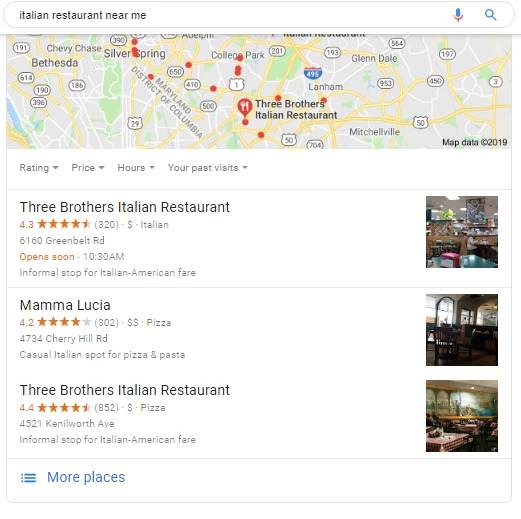
These new consumer expectations and behaviors are relevant to any business with a brick and mortar presence. An incredible 76% of local mobile searches lead to a store visit within one day, while 28% result in a purchase.3 When people search for something nearby, they are often ready to buy.  discover how to optimize for local customers - brightedgeThis is why it is so critical to ensure that your business shows up in Google’s Local 3-pack: the trio of nearby businesses that dominate the search engine results page (SERP) of 23% of local-focused mobile searches, according to BrightEdge research. When a local 3-pack is displayed on mobile, 55% of the clicks are for one of the three listings. If your business is not featuring there, you’re immediately missing out on half your potential audience.   

Here are three ways to make sure your business is easy to find.

1. Have clear, complete, and factual information

Google’s main source of information about your business is from company profiles found on Google My Business. To ensure the correct information is displayed in Google Search or Google Maps results pages, make sure that your company profile page is complete and up-to-date. While Google searches account for nearly two-thirds of all searches,4 it’s also important to update and maintain your business profile on other channels like Yelp for Business, which is where Bing gets its local business information for display on Bing Search and Bing Maps results pages.

Also, it is important to clearly display your business address, contact details, and business hours on your own website’s home page, as this is another source that Google and Bing will check. Having accurate and informative “About Us” and “Contact” pages on your website will also boost your chances of appearing high in search results rankings. Finally, if you have multiple locations, create an individual page for each location with the unique information and content about each one.  

A good tip is to look at existing 3-pack search results for the keywords related to your business’ products or services, and ensure that your company profiles have the same keywords, or read Google’s suggestions for improving your company’s local ranking.

2. Be inventive with the keywords you target

Last year, Google reported a 500% increase in “near me” mobile searches that included “can I buy” or some variant. Knowing which keywords related to your business that people include in these searches is critical to your chances of appearing in that valuable 3-pack near me search result. Don’t be afraid to speak the local language. A long sandwich may be called a “sub” in most of the US, but if you’re targeting local customers in Philadelphia, they are more likely to call it a “hoagie,” in New York City, a “hero,” or in New England, a “grinder.”

learn more about seo for local customers - brightedgeIf your business is near a prominent landmark or location in the area, think about potential variations on “near me,” like “near the ballpark” or “near Times Square.” You should also find out which terms your competitors are successfully targeting and see if they apply to your business. BrightEdge can help you analyze and prioritize which keywords you should create content for by helping you understand which universal results (like a Local 3-pack or Quick Answer) appear on the first page of search results.  

3. Encourage great local customer reviews

Google doesn't display just any three businesses in the 3-pack search results. The search engine wants to give its customers the best three local businesses related to their searched keyword. That’s why businesses with good reviews on Google are more likely to be featured in 3-pack search results. Encourage your happy customers to leave positive reviews on these sites, along with any sites related to your business, whether that’s a food blog or car review site.

If your business has received good customer reviews, featuring them on your website can be helpful. Get permission from your customers to post the review first. Then, mark up the review with optimizing schema in order to claim it as a first-party review. You may see the review on the search engine results page, much like a Yelp listing, except this drives traffic to your website, not Yelp’s. Google can be strict about the use of first-party reviews so it’s worth looking at its rules if you’re using a review.

Whatever your business, having complete factual information, being inventive with your keyword targeting, and getting great reviews will help local customers find your business when they’re searching locally. With Google constantly tweaking what it’s looking for and how it displays search results, BrightEdge will tell you how to optimize keyword targeting and keep you up to date with changing search engine algorithms with the goal of boosting traffic to your site so your business can stay ahead.

Mobile devices surpassed desktop as the main way that people browse the internet a number of years ago, for some industries BrightEdge research found that 62% of all web traffic comes from a smartphone or tablet device.1 For some industries, like food and beverage, the share of searches from smartphones and tablets is as high as […]

The post Three Ways to Help Local Customers Find Your Business appeared first on BrightEdge SEO Blog.

Nailing Your Interview: Tips For A Sales Interview

A BrightEdger
A BrightEdger
M Posted 7 years 1 month ago
t 9 min read

You’re receiving InMails daily from recruiters. You’re busy closing deals. You’re not in the market for a new position. There’s an intriguing InMail in your inbox…What do you do now? Discover these tips for a sales interview.

Schedule the Call. Always take the call. Listening is free and you don’t need a resume. You owe it to yourself to learn about new opportunities in the marketplace where you can develop your career and professionally soar. You’ll learn about the position, the product, the people, etc. Yes, there is validity to the saying that “timing is everything,” but how will you know if timing is right unless you’ve learned all the information before making an educated decision? Give yourself time to assess. Taking the call doesn’t mean you’re committed to the entire interview process; taking the call means a conversation. All of the questions below can’t be answered online; you’ll get your answers on the call.discover tips for sales interviews - brightedge

During the Call. Ask questions that are important to you.

  • Tech: How mature is the product? What key customers use the product? Is there proven ROI? What about the technology separates the company from the pack? You’ll want to know you’re selling or supporting the best product in the market and that it solves a real problem for customers.
  • Company Trajectory: Everyone says they’re the “leader” in the market - is the company truly the leader in the space? What are they disrupting and how big is the market they are disrupting? What are the market share and market cap? Sometimes they will tell you verbally and in person when they are reluctant to disclose on the in email. How many paid clients do they have and what is the client retention rate? Don’t let them fluff their client numbers with beta and non-paid. Who are their competitors? You’ll want to know the company is moving in a positive direction.
  • Management: Who would be your manager and what’s this person’s professional background? Who is on the executive management team? You’ll want to know you’re working with smart, successful and supportive leaders.
  • Role: What is the quota and territory? How are leads generated? What are the average deal sizes and sales cycles? What is the career path? How many folks are on the sales team? Is there formal onboarding and professional sales training? What is the target prospect? You’ll want to know if you would close a lot of deals in the role.
  • Culture: How do they describe their culture? Who is an example of a great cultural fit in their org? Who will you be working alongside? Is it work hard/play hard? You’ll want to know if your peers are smart and fun to be around.
  • Compensation: What is the range? Let’s face it, you’re in sales for a reason. Will you make more money than you are right now? Yes, hearing the numbers is important but remember, making those big bucks is dependent on the answers above. You’re having a conversation with a tech startup, so let’s look at the definition of the word venture: “a business enterprise or speculation in which something is risked in the hope of profit” and the definition of capital: “any form of wealth employed or capable of being employed in the production of more wealth” (dictionary.com). Does your view on changing your career mirror the definition of venture capital?

Listen and Win. If the recruiter passes you to the next round, chances are – you’re solid. The recruiter is the eyes and ears of the hiring manager, which is your potential manager, so you’ll want to win with the recruiter, too. Perhaps there is a real potential here for you, but while you’re still getting more information and assessing - make sure you win on the call. Treat each conversation as if the people you’re speaking with are a prospect you’re trying to close. Win each conversation, even if you need more time to assess. Win as if you’re already sold.

It sounds interesting, but you’re still not sure if you want to take it further.  Now, is the time to reach out to your recruiter to clear hesitations if you have any. Here are more tips for a sales interview.

What do you do now?

what are tips for sales interviews - brightedgePre-Interview

  • Research the company just as you would before a meeting with a prospect. Go on LinkedIn. Who are you speaking with during the meeting? Plan how will you create rapport. Know who you’ll speak with before you walk through the door.
  • Visit the company’s website. What about the company lights your fire? Know what gets you excited and the company strengths and where those passions meet.
  • Use a site like CrunchBase (or other tech info publishers). Which venture capitalists backed the company? Who are the competitors? Does the company have differentiators? Know why the company is special.
  • Read the job description. What is the company looking for in an ideal candidate on paper? Anticipate the questions that may be asked ahead of time.
  • Dress to impress. Dress as if you are going to see a prospect. Know that you will be in a formal setting. Yes, you’re speaking with a startup, but this won’t be your everyday attire.
  • Maintain the athletic perspective. Walk through the door with your head held high and prepare to crush it! The reason a defeated athlete walks through the locker room with their head held low, buried in his/her shoulders – is because they’re defeated. If you’re not feeling confident and good posture isn’t enough, you may be suffering from poor preparation. Do more research and contact your recruiter to ask more questions. The recruiter is your champion. The recruiter has the strongest relationship to the hiring manager (your potential manager) and knows exactly why you are a great candidate.

What’s next?

The Interview

  • Use the information the recruiter gave you. Identify what stood out to you. You’ll want to show you’re excited.
  • Ask relevant questions. What questions do you need answered from your potential sales leader to be successful? What is important to you? Ask the questions that mean the most to you; don’t just ask to ask and to fill up space. The conversation will be richer if you don’t give typical interview responses, and it will mean more if you ask those ‘hard-to-ask’ questions you need answered before taking your next big career move. This is a two-way street.
  • Know your Numbers. What is your quota vs. revenue attainment, average sales cycle, average deal size, etc.? Numbers really do speak louder than words.
  • Sales Process. What is your structure to close a deal? You’ll want to show you’re process-driven and be able to take a hiring manager step-by-step through a deal.
  • Deal Execution. What is your motivation to close? You’ll want to emphasize that you’re hungry and energetic and why.
  • Sales Training. What is your sales training background? Own that you’re a professional salesperson.
  • Sales Techniques. What sales techniques would you use on a prospect? Close each and every person.
  • People do business with people they like. Have fun. Take the time to like the people you meet. The more you’re genuine the better you’re perceived and the better you’ll feel. This is your time to show what you’ve got. Crush it.

Now what?

Decompress but don’t retract. It isn’t over… yet.

Post-Interview

  • Follow-ups. Each person you spoke with during the interview should have a followup the same day as the interview took place. Each followup should be tailored to each personality and should mention at least one specific reason as to why you’re a fit and something that stood out to you in the experience. Resist the urge to send the same email to each person; they will likely compare. You created rapport during the interview and answered important questions; add that content to the email. Think personal and professional. Stand out. Be original.
  • Make a decision. There are a lot of variables to run through when choosing to make a move. Do those positive variables of the company you’ve interviewed with outweigh your current situation? Be decisive and make it happen. You’ll want to show you’re able to react fast just like you would in the sales cycle.

What do you do now?

Have a look at BrightEdge jobs here: http://www.brightedge.com/seo-careers

eCommerce SEO: What to Do When Items Go Out of Stock

maspillera
maspillera
M Posted 7 years 1 month ago
t 9 min read

For eCommerce clients, managing product listings can be a challenge from an eCommerce SEO standpoint. Products often move in and out of stock, and no company wants to regularly delete pages. Not only does that create a terrible user experience, but it would be detrimental to eCommerce SEO.

When products go out of stock, eCommerce vendors have a few goals they need to consider. One, they want to preserve the customer experience. Secondly, they want to make sure their site maintains all SEO rankings they may have earned from this particular page. Finally, they also want to keep their prospective customers engaged, even if the site didn't have the product needed at a particular point in time.learn about ecommerce seo - brightedge

These goals can be largely accomplished when eCommerce brands and retail brands with eCommerce presence pay attention to to the page setup and optimize it to take advantage of opportunities to build relationships with clients.

Frustrations customers encounter on eCommerce sites

Imagine you are shopping for a pair of rain boots. You find the pair you like in terms of color and style. You click on the product page and go to select your size, only to discover that this item is out of stock. For consumers, this situation can be very frustrating. They go through the trouble of finding the product, style, and color they want, but when they get to the final step, they find that they cannot actually purchase the desired item.

Imagine another day and you want to buy a new sweater. You search through Google and find a few results that you like. You click, therefore, directly to the product page. However, when you click on the item you want, you find yourself automatically redirected to similar products, but not the one you had selected. You do not receive any explanation for this redirection. Chances are, you now feel similarly frustrated with the brand and their website.

Brands must carefully balance avoiding disruption for their visitors, maintaining their eCommerce SEO, and encouraging people to continue to engage with the brand even though this particular product has been sold out.

Watch our Industry Focus - eCommerce webinar

Consider what the product line will look like in the future

To determine the best course of action for your page, you will need to first define the future of this particular product. Will this item definitely return? Your strategy will differ depending upon whether or not your product will be restocked.

If your product will not return, think about other products your brand offers. Do you have related products that would fit the needs of many prospective customers?

Once you know how your brand will handle this particular product moving forward, you will find it easier to plan the appropriate strategy.

Optimize product pages for items that will be returning for eCommerce SEO

When you know your product will return, you want to do everything possible to maintain your relationship with your customer. You can do that through clear communication that lets customers know exactly what is going on. Letting people move forward in their product search and only letting them know at the last minute that a product is out-of-stock does nothing to help the brand-client relationship, and it could hurt their user experience. Instead, you should let people know about the item's status as early as possible.

why ecommerce seo? - brightedgeTo efficiently communicate with customers, some brands will find it helpful to keep customers notified as products start to get low. For example, a notice that there are less than 10 of a particular item left not only provides a sense of urgency for people considering a purchase, but it also helps to prevent customers from being caught off-guard when the item is sold out a little while later.

Within your site, on product search pages, make sure you clearly label any products that have gone out of stock. You also want to be as clear as possible regarding why this product is unavailable. This will give customers a better idea regarding what will happen in the future.

For example, if a product is out of stock because of high demand, let people know that it has gone out of stock because of many people interested and that you anticipate having new products as soon as possible. If a particular product is seasonal, letting customers know that it will return the following summer, for example, will also help manage their expectations.

If you can, you should also let customers know your estimated time for when the product will return. This will help them plan ahead to see if they really want this product from your particular brand, or if they will want to look elsewhere.

Watch our Industry Focus - Retail webinar

Note on sizes and out-of-stock SEO

Sometimes, brands have trouble because they run out of stock on a certain size of a product, but they might still have other sizes. In this situation it can be a struggle to let customers know early on in the process that certain sizes are sold out without accidentally discouraging people who might be happy to buy the in-stock sizes.

You may have to experiment with a few different strategies to determine the best course of action in this situation. Some brands may have success letting people know on the product page that some sizes are sold out. Others may choose to simply make the sold out sizes impossible to click with a clear notification.

If clients can filter your products by size, you want to make sure that products with out-of-stock sizes don't show up in the results for searches performed for those sizes.

If your online store ties closely with a brick-and-mortar store, you can also help point customers to potential inventory that might be available in stores.

Maintaining communication with customers

You can also use this opportunity to capture information from these customers. A simple "keep me updated" clickable option lets you capture the interested user's email address so that you can let them know when the product comes back in stock. Generally, this will provide you with the best opportunity to avoid losing a sale on this particular product.

This information, however, will also provide you with highly specific information about this particular prospect and what they want to buy. Therefore, you can target them appropriately in marketing campaigns moving forward.

Once you let customers know that this product is out-of-stock, many brands will also find it helpful to let customers know about related products that may be helpful to them. For example, if you carry the same product in other colors or slightly different styles, many customers may elect to purchase these rather than wait for this particular product to be restocked. Make sure that your recommendations are highly related to the missing product and have a reasonable chance of answering the customer’s needs.

Optimizing for a product that won't be restocked

Sometimes brands determine that certain products, for a variety of reasons, simply do not serve their company well. In these situations, organizations need to let customers know that certain products will not be available without hurting their eCommerce SEO or user experience.

You have two main choices in this situation. One, you can create a custom 404 page and let customers know explicitly that this product is no longer carried by your brand. With a custom page, you can individualize it to the user’s experience, stating the product is no longer available and then offering them alternatives that might fulfill their needs. If you end up removing  a number of products, however, this may not be the best solution as having numerous deleted pages does not work well for eCommerce SEO.

If your product page does not receive a lot of traffic, or if you will continue to stock very similar products, you might also consider redirecting customers to related products. The key to success here, however, continues to be communication. Customers do not want to be automatically redirected to something they did not select without receiving a reason why. Let them know that you no longer carry the product they initially wanted, but that you think these products may help them.

Product page redirect best practices

Before setting up redirects for out-of-stock items you should confirm the final status of the product(s) being redirected. Remember the basics of 301 redirects vs. 302 redirects, if the product is going to be restocked in the near to mid-term future then use a 302 temporary redirect and deactivate it once your inventory is restored.

If the product's being cancelled, will remain out of stock indefinitely, or is being merged into a different product line (the one whose product page you're redirecting users to) then you should use a 301 permanent redirect. Depending on how your CMS handles sitemaps, you may also want to manually update your sitemap.xml to remove the URL of the product that no longer exists.

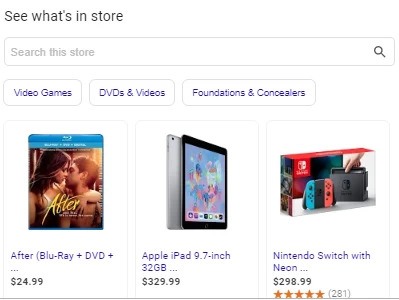
When you no longer carry a product, make sure you let Google know as well. Often, handling internal traffic will be easy - the deleted product will no longer appear in your searches within your website. You need to make sure the product does not continue to appear on Google Shopping pages either.

To protect your user experience and ensure that you keep people engaged with your site, consider the optimization strategies above.


Healthcare Industry Panel Event

Event Category
Webinar
Event Date Display
Mar 12, 2019
Is Share Event
No
Event Location
Online
Event Summary

Join us for a riveting panel discussion with marketers from 2 of the top medical facilities in the entire world.

Event Title
Healthcare Industry Panel with Cleveland Clinic and Stanford Healthcare
Event Type
Online
Is Marketo Page
No
,