What is an SEO Platform?

An SEO platform is an online marketing software solution featuring multiple tools to manage ranking, analysis, research, creation, measuring, and managing content for the purpose of optimizing organic rankings

What is the Difference Between an SEO Platform and an SEO Tool?

Best SEO Platform Agency, seo platforms, seo software, seo platform

An SEO platform offers multiple SEO tools in a suite for more efficient management of tasks relating to organic search optimization. Platforms tend to cater to enterprise SEO needs and are built for end-to-end SEO management. 

There are additional significant differences and understanding the distinction between the two will help you choose the best solution for your business needs.

SEO Platforms

An SEO platform provides a holistic solution to a number of digital marketing and organic search needs through built-in technology to optimize workflow, productivity, user management, and advanced reporting capabilities. Additionally, SEO platforms can integrate data and processes that span departments or teams (often including access to an API) and easily and reliably integrate with the major analytics providers, like Google Search Console, Google Analytics, Adobe Analytics, Coremetrics, and Webtrends, as well as content mangement systems like Adobe Experience Manager, web backlink software like Majestic SEO, and a variety of social platforms. 

Another aspect of enterprise-grade SEO software is seen in the team of support provided to customers. These range from SEO experts to experts on the technology itself and include customer success managers, solutions managers, online support, and professional services consultants. 

See the BrightEdge SEO Platform in Action!

SEO Tools

Most SEO tools serve a single purpose and are designed to help with one specific area of your business or SEO. For example, it's easy to find tools that help marketers with keyword research, link analysis, or analytics, but it's rare that one of these tools would provide more than one function let alone all the functions needed to run a successful SEO practice. SEO tools sometimes have limits restricting their ability to scale up to the volume of keywords and pages an enterprise user might need. This means users will need to toggle between different tools and manually manipulate data from different sources in order to gain a holistic view of the true performance of your website content. 

What Should an SEO Platform Provide?

The best SEO platforms should address the following functionality:

  1. Managing keyword and content discovery
  2. Creating optimized content
  3. Analyzing backlinks
  4. Auditing the site for technical and performance issues that affect SEO 
  5. Measuring SEO rank and business results on a site-wide and page-by-page basis
  6. Creating compelling dashboards that help elevate SEO wins
  7. Forecasting the ROI of tactics and strategies
  8. Enabling collaboration and coordination across teams
  9. On-platform and live human support
  10. Assigning and tracking tasks and events
  11. Self-guided certification
  12. Integration with other software and analytics

Search engines aim to deliver results that best address their audience's needs. Because of this, the SERPs are constantly updating, creating both opportunities and challenges for SEO and content marketers. Successful SEO is the result of proper digital marketing where every element of your marketing strategy is fully optimized. Succeeding in SEO requires that your web pages are relevant, original, and authoritative to satisfy the search engine's algorithms for specific topics. 

Matching your content to search ranking factors and user intent means the amount of data you need to track and analyze can be overwhelming. To be effective at scale requires an SEO platform to decipher the data in a way that allows you to take action. Your enterprise SEO solution needs to not only show your ranking position for each keyword, but also provide actionable insights in an instant given the ever-changing world of SEO.  

key Features of Enterprise SEO Platforms

Enterprise SEO Workflows Built Into the Platform

Modern SEO platforms must support complex enterprise workflows spanning multiple teams.

BrightEdge workflow automation includes:

  • Automated task triggers based on ranking changes or technical issues
  • Custom approval chains for content publication and brand consistency
  • Native integrations with Jira, Asana, and Monday.com
  • Role-based workflows for content creators, developers, and SEO specialists
  • Bulk task assignment across teams and projects

AI-Powered Content Intelligence

AI transforms how enterprise platforms optimize content at scale.

Key AI capabilities:

  • Copilot AI - Generates SEO-optimized content drafts (70% time savings)
  • Performance Predictions - Forecasts content success before publication
  • Content Gap Analysis - Automatically identifies missing topic coverage
  • Real-time Scoring - Instant feedback on SEO potential
  • NLP Intent Matching - Ensures content aligns with search intent, not just keywords

Intuitive Platform Design for All Skill Levels

For SEO Beginners:

  • Guided onboarding with interactive tutorials
  • Pre-built report templates and dashboards
  • One-click recommendations with clear actions
  • Visual SERP previews and drag-and-drop editors
  • Tooltips and help documentation throughout

For Advanced Users:

  • Custom API access for sophisticated integrations
  • Advanced filtering with RegEx support
  • Bulk operations for enterprise-scale changes
  • Custom scoring models and KPI frameworks
  • SQL access to raw data

Comprehensive Training and Support Ecosystem

Included with Every Plan:

  • 24/7 technical support (chat and phone)
  • Weekly office hours with SEO experts
  • 20+ hours of certification courses
  • Quarterly business reviews
  • Online knowledge base and community forum

Enterprise Support Benefits:

  • Dedicated Customer Success Manager
  • Custom team training (onsite or virtual)
  • Priority support queue (1-hour SLA)
  • Beta feature access
  • Direct input on product roadmap


SEO Platform Framework

Every website is different and your SEO strategy will be unique to your business' objectives and goals. However, there is a basic framework you should consider when evaluating SEO platforms. The following 6 capabilities are essential to executing a successful SEO strategy. Ensure the SEO platform you select will help you succeed at each of these critical functions.

1. Technical SEO

First and foremost, an SEO platform should identify and prioritize site errors, so your content outperforms the competition on search engines.

BrightEdge ContentIQ is an advanced site auditing solution that can support site crawls for millions of pages. ContentIQ helps by prioritizing website errors based on how they impact site performance. With the BrightEdge SEO platform, this technical SEO auditing solution is fully integrated into reporting and recommendations, allowing for automated error alerts and direct integration into analytics reporting. 

2. Discover Search Demand

At the heart of every successful SEO campaign is research. Strong SEO platforms help you discover, prioritize, segment and track keywords easily. This is a distinct advantage over SEO tools which may provide one or two of these functions, but rarely all four. 

Data Cube is the industry’s most powerful SEO research solution to help you prioritize and formulate successful search and content strategies. Conduct keyword research, evaluate a website's organic presence and rank and conduct competitive analysis all from one easy-to-use interface. Powered by DataMind, Data Cube reveals which web page URLs and content types are winning the top spots on the SERP (search engine results pages) for any keyword.

The SERP layout is always changing with various content types taking over the precious above-the-fold space on the SERP. Your SEO platform should be able to evaluate the true organic ROI for every keyword and judge whether your content is strong enough to win the top positions. That way you can easily segment your target SEO keywords into smaller groups and build strategies to defend your winning content, optimize existing content, create new content or pull in PPC team to maximize high-quality traffic acquisition for the website.

Additionally, if your business operates in multiple cities you'll need to conduct specific research in each market. This is where Hyperlocal helps differentiate the BrightEdge SEO platform from the competition. The same search query from two adjacent cities will often yield different search results and have different search volume. HyperLocal provides the search volume and ranking data for each keyword in every city or country that Google Search supports. HyperLocal helps you connects the dots between online search behavior and increased foot traffic to your locations.

Finally, your SEO platform should feel like an organic data analyst pulled together everything relevant to your website’s performance and laid out the recommended strategies to improve content, ranking and technical issues so you can improve your website with confidence.

3. Benchmark the Competition

In SEO, it's important to know your competition and stay a few steps ahead of them at all times. A good SEO platform should give you an easy way to understand the search landscape and identify who is winning the top spots for the keywords you want to own. Ideally, it can help you discover high-performing keywords that your competitor owns and provide actionable insights as to how they're outranking you.

Keyword Gap Analysis is an indispensable tool that helps marketers do just that. By comparing the keywords of a domain or a URL of a competing site against your own site, you're able to quickly identify gaps in your content. Use tools like this to create a content strategy and outrank your competition. 

BrightEdge's SearchIQ technology allows you to pinpoint the ranking factors and characteristics of the sites you compete with in organic search results.  Not only can you see what factors matter today, but the Time Machine functionality allows you to see how the characteristics of your competitors have changed over time.  

Another key way to analyze the competition is through Share of Voice. Calculating your organic Share of Voice based on the ranking position of you, your competitors and the total addressable search market can be a daunting task. A robust SEO platform should make this easy by doing the heavy-lifting for you and giving you a snapshot of where you stand amongst your competitors on the SERP. Find your organic competitors for any keyword and content category with a click of a button. In the BrightEdge SEO platform, the Share of Voice tool automatically dissects competitors' web page content to help you ideate content strategies to win back the market share in organic search. 

Backlinks are a useful measuring stick for search engines to grade the relevance and authority of websites. BrightEdge provides page-level backlink recommendations based on the top-10 ranking pages on the SERP, helping you identify authoritative links you might not have. Using artificial intelligence, the BrightEdge SEO platform automatically surfaces authoritative backlinks recently acquired by you or new competitive backlinks for you to target.

4. Create and Optimize Content

Improving the organic performance of an enterprise-sized site can be hard, but with an SEO platform you get prescriptive instructions for every page. This makes scaling content improvements and increasing organic rank easy. As SEO and content operate hand in hand, knowing what content to create or optimize and which technical enhancements to launch will make your organic strategy successful.

In the BrightEdge SEO platform, Recommendations compares each page vs. the top-10 ranking pages in the SERP to give prescriptive page-level recommendations. By pairing multiple keywords per page for the highest impact, Recommendations will help you improve organic visibility and relevance for your content.  In addition, Copilot leverages generative AI to act as your digital assistant to create content briefs and even generate SEO friendly drafts.  Learn more about how Copilot can save you time and scale your SEO and marketing efforts. 

5. Measure Results

An effective SEO platform needs robust reporting. With organic search constantly changing, you need to know where you are winning, where you can grow and what optimization plans worked, so you can scale further. The basic reports should provide key metrics and KPIs for every keyword you track. Sophisticated SEO platforms will go deeper and provide customizable reports pulling from multiple data sets. There should also be dashboards that make it easy to report wins and losses to colleagues and executives.

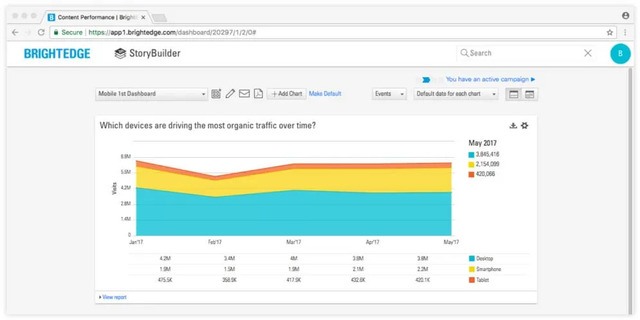
The best marketers are storytellers and SEO marketing is no exception. BrightEdge StoryBuilder has robust and flexible visualization capabilities to help you advocate the importance of the website and the contribution of SEO. Using executive dashboards to showcase the positive impact on brand equity and revenue from website optimization efforts will help you build convincing business cases for additional resources.

BrightEdge Opportunity Forecasting makes it easy to develop projections of SEO initiatives by calculating the total addressable market and your potential gains in revenue or site traffic with the push of a button. Building quantifiable business cases is critical to help secure the resources necessary for organic search success.

6. Workflow and Automation

SEO Platforms must reduce the manual work needed to execute SEO.   Artificial Intelligence (AI) enables platforms to do this at scale, while connecting applications through a uniified platforms makes workflows more efficient.  At BrightEdge, DataMind powers multiple AI applications such as Insights and Copilot.  Insights leverages AI to analyze all the data flowing through the platform to surface the most important ares to focus on, while Copilot leverages generative AI to assist in content creation.  These assets work together to automate repetitive work and empower teams to scale in ways that wouldn't be possible using standalone tools.  

In addition to AI and automation, SEO Platforms should provide a workflow system to easily manage tasks and collaborate with team members.  BrightEdge accomplishes this with the Task system which is a powerful task assignment application that automates task assignment and tracking across teams.  This simplifies project management and ensures that updates and optimizations are documented throughout all the platform reporting.  Furthermore, the Task system seamlessly integrates with popular workflow management tools such as Monday, Jira, Wrike and Asana to ensure SEO work is connected to broader company initiatives. 

Security and User Controls Needed in an SEO Platform

It is critical to have the highest data securtity standards and reliability. It is also important that the platform is easy to use for advanced user management, so each platform user is focused on their areas of work. 

Security - Look for ISO 27001 Certified, audited and confirmed to meet ISO standards. Look for a platform that offers flexible password policies, sophisticated session settings, and trusted IP address ranges.

Integrations/Partnerships -  Web marketing requires a full understanding of the impact of SEO on the outcome of the website. Toggling between SEO platform, web analytics, and Google Search Console or manually attempting to combine data in one place requires significant time and resources. The platform should do the heavy lifting for you by integrating web analytics data, social data, and Google Search Console data into the platform, providing a complete view and single source of truth for your organic programs. 

Enterprise SEO capabilities - If you have global operations or manage a number of domains for a large corporation, you need your SEO platform to also have extensive capabilities to support the needs of enterprise SEO. Capabilities you want to look for include global support, flexible password management policies, custom fiscal year, ability to audit sites with custom rules using RegEx.  

What's Next?

Are you ready to learn more about how BrightEdge could be the best SEO platform for your business?

Schedule Your Demo Of BrightEdge Today!

Understanding Google's Mobile-First Indexing: What it Means and What to Do

Event Category
Webinar
Event Date Display
May 9, 2018
Is Share Event
No
Event Location
Online
Event Summary

In this webinar you will learn the caveats of Google's upcoming global switch to mobile-first indexing, how site speed is becoming even more important, and how to get out in front of this important update.

Event Title
Understanding Google's Mobile-First Indexing: What it Means and What to Do
Event Type
Online
Is Marketo Page
No

Understanding Google's Mobile-First Index: What it Means & What to Do

Presented by Direct Agents and BrightEdge

Understanding Google's Mobile-First Indexing

Learn the caveats of Google's upcoming global switch to mobile-first indexing.

Available on-demand

Google has been pushing for a mobile-first world for a while now. With the recent release of their mobile-first index, brands are now pushed to not only be mobile response, but also mobile "optimized."

In this webinar you will learn the caveats of Google's upcoming global switch to mobile-first indexing, how site speed is becoming even more important, and how to get out in front of this important update.

Key Takeaways

  • The details of Google's mobile-first index
  • Simple solutions to increase site speed on both mobile and desktop
  • Mobile optimization/UX best practices
  • The importance of Accelerated Mobile Pages

Register now


4 Critical Enterprise SEO Scaling Challenges to Overcome

maspillera
maspillera
M Posted 8 years 2 months ago
t 9 min read

The fundamentals of how we do SEO, the framework of Discovery, Creation, Optimization, and Measurement, don’t change very much whether you’re an SMB just getting started or a multinational enterprise with brand presence across several continents. Managing ten pages is very different from managing 100 pages, and managing 100 is much different from managing a 1000.

Attention to detail is critical as well as the ability to manage or at least monitor the activities of multiple content creators and teams across the organization. There are many potential setbacks and BrightEdge looked at a few prevalent enterprise SEO mistakes to be aware of and help keep you from getting caught off guard. Avoid these four mistakes while scaling enterprise SEO.

  • Neglecting enterprise SEO
  • Overexpanding vs optimizing
  • Not doing channel optimization
  • Unoptimizing page templates

Enterprise SEO Neglect

Though it isn’t always the case necessarily, the concept of “enterprise” SEO is typically associated with website size as opposed to just organization size. By this standard, an enterprise SEO site usually has thousands of pages, spread across any number of different categories, such as product pages, blog articles, asset landing pages, About Us pages, and more. Having so many pages presents an issue of scale. In most cases it simply isn’t feasible or economical to pay an equal amount of attention to every page. Instead, enterprise SEOs and digital marketers will focus their time and efforts on sections of the site that drive the most value for the business. visualization of global reach of enterprise seo mistakes - brightedge While there’s nothing inherently wrong with this strategy, it does create a risk of overlooking potential areas of SEO growth and/or risk. An important rule of thumb for SEO is that the rules that apply today may not apply later down the line. If an organization has been around awhile and passed through the hands of more than one digital marketing team, there could be pages, if not entire page sections, of legacy content created at a time when SEO standards and best practices were entirely different from what they are now. At the enterprise-SEO level the need for data-driven insights to help drive decision making - and avoid enterprise SEO mistakes - is clear. An effective and comprehensive site auditing tool can help enterprise SEOs identify and keep track of these kinds of gaps, which a manual review of a sitemap.xml file or Google Search Console might not uncover.

Overexpansion vs. Optimization

Enterprise websites tend to be large sites with a lot of history behind them. “A lot of history” entails years’ worth of content publishing, site redesigns, product launches, product sunsets, site migrations, and more. Over that time the site and its content likely passed through the hands of more than one digital team, introducing a different version of standards and practices each time. At enterprise scale it’s surprisingly easy to lose track. Active management of a sitemap.xml file and keeping track of indexed pages in Google Search Console can help to keep up. That said, it’s not uncommon to have cases, for example, where the need to capitalize on a specific group of high-value keywords arises and significant resources are invested in generating new content when there are older pages on a related topic on existing URLs that could have been rewritten, re-optimized to fit the new keyword targets, and republished. Legacy pages may also have years’ worth of quality backlinks and internal links pointing to them. The resultant domain authority gives them - after a content refurbishment, SEO tune-up, and recrawl from Google - a better chance of ranking. Forming a practice around identifying site sections and legacy content for refurbishing can help to save yourself from reinventing the wheel and avoid contributing to website bloat. Associating target keywords with Preferred Landing Pages in Keyword Reporting can help to keep a record of which site sections are targeting which keyword groups and whether or not you already have keyword coverage that you may not know about.

Not Doing Channel Optimization

At the enterprise level, digital marketing strategy will often be invested in multiple channels. SEO, paid search, social, paid social, syndication, and any other area through which a brand can potentially reach its target audience and draw them to its website. Some of these channels can have a significant cost associated with them, whereas SEO’s cost for acquisition tends to be lower. The reality is that many if not most enterprise-level brands need to leverage multiple channels to scale their efforts properly. It's as much of an enterprise SEO mistake to try to expect organic to carry everything as it is to neglect it. It simply isn’t feasible, nor efficient, in most cases to expect a single channel to meet the demand generation needs of the entire organization. SEO itself has also expanded as the rise of non-traditional search engines, like Amazon has opened up the playing field and emphasized the need for vertical search optimization. Enterprise SEO should be seen as a tool in a larger demand generation toolbox. Opportunity Forecasting helps to identify areas in your keyword strategy where your brand will be able to compete effectively in organic and where a paid search campaign or approach from a different channel might yield the best results.

Unoptimized Page Templates

Effective SEO often happens at the structural level. Having a structurally sound site architecture and well-managed taxonomy for how content on your site is categorized and where different types of content will live is critical. In addition to that, many of the fundamentals of on-page SEO are dictated by the template that the content goes into. A template will determine where the h1 tagged title appears (or if it appears at all), how it looks on the page, and how the end user will input the copy and edit it down the line. Another example is internal linking, a vital on-page SEO practice. An effective template for blog posts or product pages will include an on-page widget that displays links to related content and can even be configured to fill in programmatically based on related meta tagging or semantics. enterprise seo mistakes to correct - brightedge Because of the scope of different content types an enterprise organization may have to have in its catalog, it’s easy to fall into the SEO mistake of not integrating SEO into the design of new templates and also to not go back and review legacy templates to make sure that they are setting up new content for long-term success. In fact, it's often the case that legacy templates were designed and built so far back that now-common template features didn't exist at the time. Enterprise SEO mistakes, as with any kind of SEO mistakes, are inevitable. No SEO or SEO campaign is infallible, and at scale the likelihood of oversights only grows. The true mark of effective enterprise SEO work is identifying those SEO gaps where they exist, elevating them proactively, and taking the lead on resolving them. 

,