The rise of the DD-CMO: How data-driven CMOs are maximizing performance

English, British
News Item Title
The rise of the DD-CMO: How data-driven CMOs are maximizing performance
News Item Author Name
Jim Yu
News Item Published Date
News Item Summary

Jim Yu feels CMOs are challenged with balancing immediate results and long-term strategy. Here he outlines ways to incorporate accessible and insightful data to move the performance needle.

基本的SEO対策ガイド:パート3 【BrightEdge 2018年7月6日】

3回シリーズでSEOの基本概念をご紹介してきましたが、今回パート3では、SEOについてより専門的な内容を掘り下げていきたいと思います。具体的には、ウェブサイトの「クローラビリティー」という概念をご紹介します。パート3では、検索エンジンの基本的なディレクティブの意味をはじめ、クライエントやサーバーが直面するエラー、それに対する各種ベストプラクティス、また開発者向けの資料などをお届けします。

オンページ要因のSEO についてご紹介したパート1 、リンクに関する最適化や関連ディレクティブについてご紹介したパート2も併せてご覧ください。

magnifying glass image representing user agents

クローラビリティー

「クローラビリティー」という言葉を簡単に説明してみましょう。検索エンジン結果ページにウェブ上にある様々なページをクロールしてインデックス化するのが検索エンジンロボット(通常は「Googlebot」のようにボット/botと呼びます)の役目ですが、ボットがいかに簡単かつスムーズにページをクロールし、インデックス化することができるか、が「クローラビリティー」の意味です。

検索エンジンのボットが自社サイトをクロール/インデックスしやすいようにクローラビリティーを最大限に高め、クロールの際に発生するエラーの数を最小限にとどめるために、ウェブマスターや開発者が活用できるツールやベストプラクティスは各種あります。クローラビリティーの最大の目標は、スピードを速め、ボットによる各ページのクロール/インデックスをより正確に遂行できるよう後押しすることです。

検索エンジンの基本的ディレクティブ

ユーザーエージェント
ユーザーエージェントとは、ユーザーやプログラムのために働くソフトウェアの総称、あるいはこれに該当するウェブブラウザ(例:Chrome、Internet Explorer、Firefox)やユーザーを特定するための情報収集機能(例:ボット、クローラー、スパイダーなどの自動検索エンジンロボット)を指します。

ウェブ開発者やSEOの専門家は、ユーザーエージェント スイッチャーというものを使用して、ブラウザのユーザーエージェントを切り替え、別の検索エンジンロボットがクロールした場合サイトがどのように表示されるのかテストします。ブラウザのユーザーエージェント切り替えには、専門的な技術を要します。

検索エンジンロボットとそれに対応するブラウザを以下にご紹介します。

  • Chrome用のGooglebot
  • Bing用のBingbot
  • Yahoo!用の Slurp
  • MSN/Live用のMSNbot

各種ブラウザがモバイル端末でどのように表示されるのか調べるために、上記以外にもウェブ開発者が使用できるユーザーエージェントやスイッチャーは沢山あります。必要に応じてカスタムのユーザーエージェントを使用することもできます。より規模が大きく複雑な構造のウェブサイトではカスタムのユーザーエージェントを使用するケースが多いです。

リダイレクト
その他に是非知っておきたい検索エンジンのディレクティブにリダイレクトがあります。リダイレクトはあるウェブページURLを別のウェブページURLに転送し、サイトを訪問するビジターや検索エンジンロボットを適切なウェブページに誘導することができます。最もよく使用されているのが301リダイレクトと302リダイレクトです。

  • 301リダイレクト
    301とは、恒久的なリダイレクトを意味するウェブページのHTTPステータスコード(HTTPステータスコードについては後程詳しくご紹介します)を指します。301リダイレクトを設定することによって、元ページのリンクジュースを無駄にせずPageRankを新しいページに受け継ぐことができるため、ウェブページを移転する際には301リダイレクトを設定することをお勧めします。
  • 302リダイレクト
    恒久的な301リダイレクトとは対照的に302は一時的なリダイレクトを促すHTTPステータスコードです。PageRankは受け継がれませんので、通常この手法を用いることはお勧めしません。

エラーとベストプラクティス

ウェブサイトのパフォーマンスを危険にさらすようなよくある問題は各種あり、その中には解決策が中々見つからない問題もあり、結果的にユーザーエクスペリエンスの低下につながってしまいます。ウェブサイトのパフォーマンスに悪影響を与える典型的な問題としていくつか挙げると、ウェブサーバーのグリッチや、リダイレクトの設定ミス、壊れたリンク、ページ表示にかかる時間が遅い、重複したコンテンツ、複数のURLが存在する、などがあります。

幸いにもこれらの問題への対処法は確実に存在します。そこでここからは、典型的な問題に対してどのような対処をとるのが推奨されるかの問題とベストプラクティスを一緒にご紹介します。

エラーとHTTPステータスコード
エラーに対するHTTPステータスコードは、100番台から500番台まで各種様々あり、ステータスコードによって、検索クエリに対する5種類の反応を表します。

最もよく目にするHTTPステータスコードは、300番台のリダイレクト(前述)をはじめ、400番台のクライエントにおける処理エラー(ウェブサイト運営者)、500番台のサーバーエラー、444番のノーリスポンスなどがあります。

各種あるHTTPステータスコードの中でもとりわけよく目にするのは「404 Not Found」のエラーメッセージでしょう。404番は、リクエストされたページURLが見当たらなかったことを意味します。通常このようなエラーメッセージが表示されるのは、リンクが壊れていたり、機能していなかったりする場合です。このような場合は、カスタム404ページを作成し、検索ユーザーに表示されるよう設定することによって、わかりやすくその後の手順を指示することができます。

400番台のエラーでその次によく目にするのは、「444 No Response」です。これは、サーバーから返答がなく、接続が切断されたことを意味します。通常マルウェア対策の結果である可能性が高いです。

500番台のサーバーエラーを表すレスポンスコードは、サーバーが何らかのエラーが発生しており、ユーザーのリクエストに応えることができない状態であることを表します。500番台のレスポンスコードには全部で18種類あります。内部サーバーにエラーがあることを表す「500 Internal Server Error」から「504 Gateway Timeout」まで各種ステータスコードがあります。

リンクやHTTPヘッダーの正規化
ウェブページにアクセスする際、複数のHTTPヘッダー(URL)を介しているような場合や、別の場所で作成/公開されたコンテンツがある場合、または重複したコンテンツがある場合は、「正規化」することをお勧めします。正規化とは、自社コンテンツに対する単一のウェブページURLを定義することを意味します。正規化することによって、リンクとランキング状況を強化することができ、結果的に検索ビジビリティーを高めることに繋がります。

正規化には複数の方法があります。例えば、 HTTPヘッダーに内に正規化リンクを指定する方法については、ダウンロード可能のホワイトペーパーやPDFで参照可能です。正規化の方法の詳細については、 Googleのウェブマスターヘルプフォーラムをご参照ください。

また、BrightEdgeのContentIQ を活用することによって、サイトをクロールして400番台、500番台のエラーを特定し、早急に対処することができます。

サイトスピード

サイトスピードは、Googleの検索ランキングを決定するアルゴリズムが参照する重要要素だと考えられています。それに加えて、同社が掲げるモバイルフレンドリー戦略に伴って、より早いインターネット体験ができるサイト構築が求められているため、ウェブマスターらはページのローディングにかかる時間の短縮に努めなければなりません。

サイトマップ

XMLサイトマップとは、サイト上にあるウェブページを、XMLタグを使用してリストアップしたものを指します。XMLタグとは、「Extensible Markup Language(エクステンシブル マークアップ ランゲージ」の略語で、ウェブサイトの構造を記述することができます。XMLサイトマップを検索エンジンに提出することによって、自社サイト上のページを検索エンジンボットが生活かつ素早くクロール/インデックスすることができます。XMLサイトマップについては、BrightEdgeで過去にご紹介したこちらの記事をご覧ください。

リソースおよびツール

SEO関連の重要用語をご紹介した今回の記事では、サイトのクローラビリティーを最適化する方法について基本的事項についてご紹介しましたが、さらに詳細に掘り下げてクローラビリティー最適化についての情報をお求めの場合は、BrightEdgeのContentIQをはじめ、Google Webmaster Toolsや、Webmaster Central Help Forumなどをご活用ください。

3回シリーズでSEO基本事項をご紹介しましたシリーズ記事が皆さんのSEO学習のお役に立つことができれば幸いです!

基本的SEO対策ガイド:パート2 【BrightEdge 2018年7月7日】

3回シリーズでお届けするSEOの基本的知識を振り返る基本的SEO対策ガイドのパート2では、SEO対策で理解しておくことが求められる基本的知識やコンセプトを引き続きご紹介し、SEO対策チームとの今後の連携をよりスムーズにすることを目指します。パート1では、オンページ(ページ上にある)要因の意味や注意点などをご紹介しました。今回パート2では、SEO実施時に必ず知っておきたい概念や検索エンジンの仕組みについてご紹介します。

検索エンジンに対するディレクティブ

メタロボット
メタロボットとは、検索エンジンが使用する自動ロボットのことを指します。「Googlebot」や「Bingbot」のように通常「bot(ボット)」と呼ばれます。このようなメタロボットはウェブをクロールし、見つけたウェブページを検索結果ページ(SERP)にインデックス化していきます。

検索結果ページに表示してほしくないページや、ページ上の情報がある場合は、比較的シンプルなHTMLコードを使用することによって、該当ページをインデックスから除外するよう検索エンジンボットに指示することができます。またウェブページ上にあるリンクについてもディレクティブ(通常はタグと呼ばれることが多い)を用いてどのような対処をとるべきか検索エンジンボットに指示することができます。

最もよく使用される検索エンジン向けのタグを以下にご紹介します。

Index
Indexタグを使用することによって、メタロボットに該当ページをインデックス化するよう指示することができ、その結果インデックス化されたページが検索結果ページに表示されます。

Noindex
Noindexタグを使用することによって、メタロボットに該当ページをインデックス化の対象から除外するよう指示することができます。例えばサイト上にまだ完成していないページがある場合、検索エンジンがそのような未完のページを検索結果ページに表示しないようNoindexタグを使用してインデックス化の対象から除外することを指示します。HTMLコードでは、のように記載します。

  • Noindexタグを使用することによって、該当ページは検索結果ページには表示されませんが、引き続きページはクロールされます。つまり、SERPに該当ページが表示されなくても、ページ上のコンテンツはクロールボットがクロールするため、ページ上のリンクやリンク先ページは、Nofollowタグ(後程詳しくご紹介します)を使用しない限り検索エンジンの評価の対象になってしまいますのでご注意ください。

Followタグ
Followタグを使用することによって、メタロボットに該当ページ上にあるリンクの対象ページ(リンク先として記載されているページURL)を辿る(フォローする)よう指示することができます。その結果、フォローされたページもインデックス化され、検索結果ページに表示されます。

Nofollowタグ
Nofollowタグを使用することによって、該当ページ上にあるリンクのリンク対象ページURLをフォロー/インデックスの対象から除外するようメタロボットに指示することができます。

未完のページをSERPに表示しないようnoindexタグを使用する例と同様に、ウェブページとページ上のリンクの両方をインデックスの対象としたくない場合は、次のようなHTMLコードを記載します:<meta name=”robots” content=”noindex,nofollow”>。 Noindexタグやnofollowタグをより簡潔にGooglebotに指示するには、HTMLに<meta name=”robots” content=”none”>と記載することが効果的です。

  • nofollowタグを使用すると、該当ページ全体のフォロー、インデックス化両方が中止されます。ページ上にある個別のリンクに限定してフォロー/インデックスの中止を指示するものではありません(nofollow属性とは別物です)のでご注意ください。

Noarchiveタグ
Noarchiveタグを使用することによって、検索結果にウェブページのキャッシュを保管しないようメタロボットに指示することができます。

Nosnippetタグ
Nosnipeetタグを使用することによって、検索結果ページにメタディスクリプションの内容を表示しないよう指示することができます。

リンクプロフィール

検索エンジンボットはリンクをたどってウェブをクロールします。そのためサイト上のリンクプロフィールは自社サイトの検索ビジビリティーに大きな影響を与えると考えられています。健全なリンクプロフィールを構成する重要要素を以下にご紹介します。

インバウンドリンク
インバウンドリンクとは、別名「外部リンク」としても知られており、外部ページから自社ページに向かって張られたリンクのことを指します。

SEO basics part2 html best practices

2012年に実施されたGoogleのペンギンアップデートをきっかけに、その後同様のアップデートが繰り返し導入されたことによって、ウェブマスターやサイト運営者らは、自社サイトの外部リンクプロフィールを構成するインバウンドリンクの品質について極めて慎重にならざるを得ない状況に迫られました。あるウェブページから別のページへと張られた「PageRank」に適うリンクを対象として実施したペンギンアップデートの結果、アルゴリズムによって数えきれないほど多くのペナルティーがマニュアルで課される結果となりました。ペナルティーが課された大半のウェブサイトは、意図せずリンクスキームにはまってしまっていたサイトでした。

  • BrightEdgeのリンク オーディットに関する記事では、リンクの品質を評価するための4つのステップを詳しく紹介しています。不自然なリンクや低品質なインバウンドリンクを自社リンクプロフィール内に発見した場合の対応策についても同記事内で詳細に説明されています。記事内で紹介されている手法をとっても解決できない場合は、 Googleの「外部リンク無効」ツールを活用しましょう。
  • インバウンドリンク(外部リンク)を効果的に活用してコンテンツマーケティングやSEOで成功を収める方法についてまとめた BrightEdgeのガイドも併せてごらんください(英語のみ)。

アウトバウンドリンク
アウトバウンドリンクとは、自社サイト上にあるページから別サイトのページに向かって張ったリンクのことを指します。インバウンドリンクと同様に、外部サイトのページにリンクを張る際には細心の注意を払い、リンクを張る相手のページの状態が良好であることを確かめましょう。

インターナルリンク/内部リンク
同じサイト上であるページから別のページにリンク付けすることを指します。内部リンクは、「ワイヤーフレーム」のような役割を果たし、ユーザーがサイト上をナビゲーションしやすいよう後押ししたり、メタロボットがクロールやインデックス化をしやすいよう誘導したりします。

アンカーテキスト
アンカーテキストとは、ユーザーがクリックしたくなるよう促す文字列です。内部リンク、外部リンクいずれにおいても使用されます。

  • 以前は、強力なランキングシグナルとして検索エンジンはアンカーテキストを参照していましたが、検索エンジン結果ページのランキングを操作することを目的として、不正に(完全一致のキーワードを使用して)アンカーテキストを操作する事例が多発したため、GoogleはSEOの判断基準を変更しました。現在では完全一致のキーワードをアンカーテキスト内で過剰に使用しているサイトはペナルティーの対象となります。

アンカーテキストには、完全一致のキーワードを過剰に使用するとGoogleからペナルティーを課される可能性がありますが、他に部分一致や関係のないワードを上手く組み合わせることによってより自然なアンカーテキストを作ることが可能になります。

パート2で取り上げる内容は以上です。引き続きパート3もご覧ください。パート3ではよりSEOに関する専門的な内容を掘り下げてご紹介します。

基本的SEO対策ガイド:パート1 【BrightEdge 2018年7月9日】

<p>SEOというもの全体に対する理解を深め、さらにSEO対策チームとの連携をスムーズにすることを可能にするために、BrightEdgeでは、今回から3回連続でSEOにおける基本的概念や関連のある言葉の意味をご紹介します。SEO関連の専門用語は星の数ほどありますが、このシリーズでは最も頻繁に使用される基本的用語に的を絞ってご紹介したいと思います。</p>

<p>3回シリーズのパート1では、自社サイトのページ上に存在する要素、つまり<strong>「オンページ要因」</strong>に関するSEOの基本や専門用語の意味を取り上げます。</p>

<h2>SEOの基本となるページコンテンツ</h2>

<p><strong>オンページ テキスト</strong><br />
オンページ テキストとは、ページ作成者が読み手を対象に作成し、ウェブページ上に掲載している文章のことを指します。読み手に価値ある情報を提供することを目的としてオンページ テキストを作成します。検索エンジンのクローラーは、ここに何が書かれているのか把握するために文章での情報を必要としているため、以下にご紹介するような内容を必ず記載するようにしましょう。</p>

<p><strong>ワード数</strong><br />
ウェブページ上での使用ワード数について絶対的な基準があるわけではありませんが、一般的には、英単語では1ページあたり少なくとも500ワード以上、理想的には2,250ワード程度のワード数を使用することが好ましいと考えられています。しかし、使用ワード数は、取り上げるトピックやページの目的でも大きく変動します。自社にとって重要な内容や、SEOでより重点を置いているページでは、ページ上のワード数は多くなって当然です。ちなみに、Googleでは内容が薄いページに対する評価は厳しいため、ワード数を稼ぐために関係のない文章を無理やり使用してコンテンツの嵩増しをすることは避け、価値ある情報をわかりやすく提供することを心がけましょう。</p>

<p><strong>アバブ ザ フォールドのテキスト</strong><br />
検索エンジンのクローラーは、ウェブページ上のコンテンツをページの上部から順番に読んでいます。クローラーのこの習性を考慮すると、ページ上部に重要な文章を集中させることが効果的であると言えるでしょう。SEO業界では、画面をスクロールすることなくすぐに表示されるようなページ上部のことを「アバブ ザ フォールド」と一般的に呼んでいます。実際のコンテンツが表示される前に大きな画像が表示されたり、複数の広告が表示されたりすると、場合によってはGoogleによってペナルティが課される可能性もありますので注意が必要です。</p>

<p><img alt="Guide to SEO basics and how to succeed" class="alignleft wp-image-18056" height="243" sizes="(max-width: 290px) 100vw, 290px" src="https://www.brightedge.com/blog/wp-content/uploads/2018/05/html-basics-…; srcset="https://www.brightedge.com/blog/wp-content/uploads/2018/05/html-basics-… 500w, https://www.brightedge.com/blog/wp-content/uploads/2018/05/html-basics-… 150w, https://www.brightedge.com/blog/wp-content/uploads/2018/05/html-basics-… 300w" width="290" /></p>

<p><strong>キーワード</strong></p>

<p>キーワードとは、検索を行うユーザーが、自社の製品やサービスを求める際にGoogleやBingなどの検索エンジンに入力することが考えられる単語のことを指します。検索の際に複数の単語を組み合わせる場合は、<strong>キーワードフレーズ</strong>と呼びます。</p>

<p>オンページ テキストやメタ情報(これについては後程詳しくご紹介します!)にキーワードを戦略的に使用することは、自社サイトのビジビリティーを高めるための基本的かつ効果的な手法です。このようにキーワードをページ上で効果的に用いることによって、特定のクエリが入力された時の検索エンジン結果ページ(SERP)に自社ページが表示される可能性が高まり、また選択したキーワードに対する自社ページのランキング状況を改善することもできます。</p>

<p>コンテンツ最適化を目的としたキーワード戦略を導入すると、選択したキーワードがオンページ テキスト上に均等に使用され、読み手にとっても自然な文章の流れを再現することができます。ちなみに全体のワード数の10%以上をターゲットキーワード(選択したキーワード)が占めるような状況をキーワード スタッフィングと呼び、キーワードを不自然に使用しすぎている好ましくない状況であると判断されます。BrightEdgeではキーワードが全体の3~5%になるよう調整することをお勧めしています。</p>

<p><strong>ロングテール キーワード</strong></p>

<p>検索時に3ワード以上のワードを使用する際の検索クエリをロングテール キーワード(またはロングテール クエリ)と呼びます。ロングテール クエリは、トラフィックを効果的に獲得する素晴らしいチャンスだと考えられています。なぜなら、1,2語のキーワードを用いた検索時に比べて、ロングテール キーワードを使用した検索は、ユーザーの検索意図がよりはっきりとしている可能性が高いため、より検索ユーザーの意図と関連度の高い結果を表示できる可能性も高まると考えられているからです。これを考慮すると、1,2語のキーワードや、業界で頻繁に使用されている競争率の高いキーワードを意識したコンテンツ作りをするよりも、ロングテール クエリに対応するようなページコンテンツを作成することによって、コンバージョンをより効果的に高めることができ、またオーガニック検索由来のトラフィックの拡大も可能になるはずです。</p>

<p><strong>重複したコンテンツ</strong></p>

<p>重複したコンテンツとは、文字通り自社サイト上または他のサイト上など場所を問わず重複したコンテンツが複数ある状態を指します。</p>

<p>重複したコンテンツを抱えてしまう理由としては、サイト上でメタ情報(これについては後程詳しくご紹介します)などをうっかり同じ情報を用いて繰りかえしてしまった可能性が考えられます。その他の理由としては、印刷限定のページ(例:PDF)や、他のページに表示/リンク付けされているEコマース商品ページ、またはモバイルフレンドリー専用に同じページを作成した場合などが考えられます。</p>

<p>自社サイト上に重複したコンテンツを作成することがどうしても必要な場合は、検索エンジンに重複したページのうちどちらのページを検索結果ページに優先して表示させてほしいのか検索エンジンにアピールする方法もあります(ちなみにこの手法は「正規化」と呼ばれています)。</p>

<p>サイト上に重複したコンテンツがある場合、検索結果から除外されるだけで済む場合もありますが、他サイトからコンテンツを真似たため重複したコンテンツがある場合や、検索結果ページのランキング上位を獲得するために同じコンテンツを複数作成していると判断された場合などは、Googleによるペナルティが課される可能性もあります。</p>

<h2>メタ情報</h2>

<p><strong>メタ情報</strong></p>

<p>メタ情報(別名メタデータとしても知られる)とは、サイト上のページが何についてのページなのか検索エンジンが判断するために検索エンジンが参照する情報のことを指します。また検索エンジンの検索結果ページに各ページを表示する際に表示される情報もメタ情報に基づいて表示されます。メタ情報の中でもとりわけ重要なのは、「タイトル」と「ディスクリプション」です。</p>

<p><strong>メタタイトル/タイトルタグ</strong></p>

<p>メタタイトル/タイトルタグとは、このページではどのような内容を取り上げているのか説明するための1文のことを指します。メタタイトルは、検索結果ページに表示されるリスティングの説明文として表示され、読み手にリスティングをクリックしてもらうための重要な役割を果たしています。したがって、キーワードを使用しているか、長さは適切か、ユニークさはあるかなどの点を考慮して効果的なメタタイトルを作ることが求められます。ページのメタタイトルを最適化するにはベストプラクティスとして以下のような点に注目しましょう。<br />
<img alt="Guide to SEO basics and meta data" class="alignright wp-image-18058" height="272" sizes="(max-width: 411px) 100vw, 411px" src="https://www.brightedge.com/blog/wp-content/uploads/2018/05/seo-basics-p…; srcset="https://www.brightedge.com/blog/wp-content/uploads/2018/05/seo-basics-p… 500w, https://www.brightedge.com/blog/wp-content/uploads/2018/05/seo-basics-p… 150w, https://www.brightedge.com/blog/wp-content/uploads/2018/05/seo-basics-p… 300w" width="411" /></p>

<p>&nbsp;</p>

<ol>
<li>ページ上で特に重要なプライマリ キーワードを1つまたは2つ使用する</li>
<li>スペースを含め55語(半角)以内に抑える</li>
<li>メタタイトルが長い場合は、…のようにピリオドを複数回使用して、メタタイトルを短くする</li>
</ol>

<p>&nbsp;</p>

<p>またフォントサイズを大きくしたり、大文字を使って単語を省略表記したりすることによって効果的にメタタイトルを短くすることもできます。ページの内容を上手く表すメタタイトルを作ることによって、ユーザーにとってリスティングを選びやすくなることはもちろんのこと、重複したコンテンツを避けることにもつながります。</p>

<p>効果的なSEOタイトルタグの作成方法については<strong><a data-wpel-link="internal" href="https://www.brightedge.com/blog/the-seo-title-tag/&quot; rel="follow">こちら</a></strong>をご覧ください(英語のみ)。</p>

<p><strong>メタディスクリプション</strong></p>

<p>メタディスクリプションとは、検索結果ページでメタタイトルに続いて表示されるテキストのことを指します。メタディスクリプションは、ウェブページの内容を表します。メタディスクリプションは、検索結果ページ上で最大156字(スペースを含む)表示されるため、検索結果ページ上で最も多くのスペースを占めます。メタタイトルと同様に、メタディスクリプション作成時には、ページを上手く正確に表すテキストを作成することが求められます。メタディスクリプションもユーザーがリスティングをクリックする大きな後押しをする要因であり、キーワードを効果的に使用できるようキーワードの最適化を行うことが重要になります。</p>

<p>効果的なSEOメタディスクリプションを作成するための5つのポイントついては<strong><a data-wpel-link="internal" href="https://www.brightedge.com/blog/meta-description-tips-2018/&quot; rel="follow">こちら</a>をご覧ください(英語のみ)。</strong></p>

<p><strong>メタキーワード</strong></p>

<p>メタキーワードとは、コンマ(,)を使ってページ上で扱うキーワードをリスト表記したものを指します。Googleでは、メタキーワードは参照していないと言われていますが、外国版サイトでは現在でもメタキーワードが参照されていると考えられています。</p>

<h2>ページコンテンツの最適化</h2>

<p>ページ上にある要素、つまりオンページ コンテンツに視覚的な重要度が分かるような工夫をしてページの構造を整理することによって、読み手にとって読みやすいページ作りが可能になり、また検索エンジンにとってもページの内容を把握しやすくなります。ページ上のテキストを重要度別に整理するのに最も基本的な手法は、<strong>ヘディング タグ</strong>の使用です。</p>

<p><strong>ヘディングタグ</strong></p>

<p>ヘディングタグとは、ウェブページ上のコンテンツの構造を表すために用いられる文字列のことを指します。ヘディング タグを活用することによって、ページ上のテキストを重要度別に構造化することができ、検索エンジン、読み手のいずれにとっても視覚的にわかりやすくなります。</p>

<p><strong>H1タグ</strong></p>

<p>H1タグとは、ウェブページ上で最も重要な「見出し」のことを指します。新聞で例えると、一面の見出しのようなものです。通常H1タグは、ウェブページ上で最も大きく読み手の視野に入りやすい場所にあります。H1タグに関するベストプラクティスとしては、ページ上で使用するH1タグの数は1つだけに限定するということです。</p>

<p><strong>H2タグ / H3タグ</strong></p>

<p>H1タグを「傘」のようなものであるとすれば、H2タグ(サブヘディング)は、H1タグの下に配置します。H1タグがページ上で最も重要な見出しなら、H2タグは、その次に重要な見出しです。またH3タグも同様に、H1、H2タグの見出しに比べて重要度が低いものとしてこれら2つのタグの下に位置づけます。</p>

<p><strong>ヘディングタグの重要度(H1~H6まで)</strong></p>

<p>前述の通り、H1がウェブページ上で最も重要な見出しであるとすれば、H6は最も重要度が低い見出しであると捉えます。多くのウェブページでは、通常H1~H3タグが使用されます。重要な点としては、ヘディングタグの文字数(スペースも含む)も文字数として忘れずにカウントしましょう。ヘディングタグを使用しすぎると、コンテンツの流れが悪くなり、かえって読み手に取って読みづらくなりますので注意が必要です。</p>

<p><strong>リッチメディア</strong></p>

<p>リッチメディアとは、画像や動画のことを指し、昨今ユーザーの要望が非常に高まっているメディアであり、検索結果ページでのビジビリティーを高めるためのベストプラクティスでも注目されています。リッチメディアは、ウェブトレンド全体で重要視されているため、オンページ コンテンツの最適化戦略の一環として、ページ上の文章に加えて画像や動画を組み込むことをお勧めします。</p>

<p>しかしながら、検索エンジンのクローラーは、画像や動画などのリッチメディアを「見る」ことはできるものの、様々な資料を参照することが必要になり、クロールバジェットを浪費してしまうことに繋がります。そこでリッチメディアの対策として、テキストと同様に、タイトルや、ディスクリプション、タグなどを用いることをお勧めします。このような対策によって、Google画像検索や動画検索をはじめ、YouTube(YouTubeを個別のチャネルとして使用している場合や、オンページ コンテンツとしてYouTubeにリンクを張っている場合)でのビジビリティーを高めることも可能になります。</p>

<p>リッチメディアに関して最も重要な点としては、リッチメディアの内容をオンページ テキストと一致させるということです。オンページ テキスト内で用いられているブランド キーワードやその他の関連キーワード、メタ情報内で使用したキーワードなどと同じキーワードをリッチメディアにも使用しましょう。</p>

<p><strong><a data-wpel-link="internal" href="https://www.brightedge.com/blog/youtube-seo/&quot; rel="follow">YouTube SEOで成功を収める方法</a></strong><a data-wpel-link="internal" href="https://www.brightedge.com/blog/youtube-seo/&quot; rel="follow"><strong> SEO</strong></a>や<a data-wpel-link="internal" href="https://www.brightedge.com/blog/art-image-optimization/&quot; rel="follow"><strong>画像SEOを効果的に実践する方法</strong></a>についても併せてご覧ください(英語のみ)。</p>

<p><strong>画像の最適化</strong></p>

<p>画像を最適化する際に注意すべき要因は様々あるのですが、とりわけ最も重要なのが「画像タイトル(ファイル名)」と「ALT属性(別名ALTテキスト)」です。</p>

<p><strong>画像タイトル/ファイル名</strong></p>

<p>ファイル名は、画像のタイトル的な存在で、画像が何を表しているのか簡潔にわかりやすく説明する必要があります。何よりも簡潔さが求められ、スペースの代わりにハイフン( - )を用い、すべて小文字で表記する必要があります。例えば「赤い靴(Red Shoe)」を表す場合は、Red_Shoeよりもred-shoeと表記する方が好ましいとされています。</p>

<p><strong>ALTテキスト</strong></p>

<p>ALTテキストとは、画像を表す代替文章のことを指します。画像が何を表しているのか文章で画像の内容を表します。ALTテキストは、視覚障害があり、スクリーンの内容を聴覚に頼って把握するユーザーにとって重要になります。ここでもやはり簡潔さが求められ(スペースを含めて100文字以内)、ユニークさと正確さが重要になります。</p>

<p><strong>動画の最適化</strong></p>

<p>画像と同様に、動画の最適化でも最も重要になるのは、動画のタイトル、ディスクリプション、タグです。</p>

<p>ページ上に表示する動画のタイトルは、ページのメタタイトルと同様に、簡潔で動画の内容を正確に表しているタイトルであることが重要です。またページ上のコンテンツやメタ情報で使用されている関連キーワードを適切に(過剰にならない程度に)使用しましょう。</p>

<p><img alt="Guide to seo basics and rich media, videos" class="alignleft wp-image-18059" height="316" sizes="(max-width: 315px) 100vw, 315px" src="https://www.brightedge.com/blog/wp-content/uploads/2018/05/SEO-basics-p…; srcset="https://www.brightedge.com/blog/wp-content/uploads/2018/05/SEO-basics-p… 500w, https://www.brightedge.com/blog/wp-content/uploads/2018/05/SEO-basics-p… 150w, https://www.brightedge.com/blog/wp-content/uploads/2018/05/SEO-basics-p… 300w" width="315" /><br />
メタディスクリプションと同様に、ページ上に表示する動画のディスクリプションも文字数では若干余裕があるため、動画の内容をより詳しく説明することができます。注意する点は動画タイトルと同じですが、動画のディスクリプションでもオンページ テキストやメタ情報内で使用されている関連キーワードを効果的に使用することが求められます。</p>

<p><strong>タグ</strong></p>

<p>タグとは、1単語または2単語で構成されるウェブページのカテゴリーです。自社ブランドやその他重要キーワードをオンページ テキストやメタ情報と絡めて効果的にアピールすることができます。</p>

<p>基本的SEO対策ガイド(パート1)は以上です。<a data-wpel-link="internal" href="https://www.brightedge.com/jp/articles/guide-to-basic-seo-concepts-part…; rel="follow">パート2 </a>では引き続きSEOで重要なコンセプトや検索エンジンの要素についてとりあげ、<a data-wpel-link="internal" href="https://www.brightedge.com/jp/articles/guide-to-basic-seo-concepts-part…; rel="follow">パート3</a>ではさらに掘り下げてSEO対策で非常に重要な専門的知識をご紹介しますので、是非ご覧ください。</p>


A Tribute to a Friend and Colleague

A BrightEdger
A BrightEdger
M Posted 8 years 2 months ago
t 9 min read

On the morning of Tuesday, June 12 we received the sad news that Michael Kirchhoff, our Senior Director of Content, had passed away. His contributions here at BrightEdge were many, and the energy and dedication he brought will be sorely missed. Michael’s passing is a huge loss for BrightEdge and the SEO community, but far more importantly, it is a loss for his family. A striking aspect of any testimonial about Michael is that they mention not just his skill as an SEO professional, but his genuineness, humility, positivity, and overall quality of character. He was truly one of the good guys of SEO. In memorial to Michael, and to honor his contributions to BrightEdge, the discipline of SEO, and his community, we are introducing the Michael Kirchhoff Technical SEO Award to be awarded annually at the BrightEdge Share conference.

As an SEO

michael kirchhoff at share17 main stage - brightedgeBefore joining BrightEdge, Michael honed his SEO skills in several places after getting his start as a digital strategist in 1996. Based out of Tulsa, he contributed his marketing skills at a variety of local brands, most notably PennWell Publishing. At PennWell, Michael worked in several roles, including digital media product management, SEO and search marketing manager, and finally as director of SEO and product support. As director of SEO, a role he held for ten years, he defined an enterprise SEO strategy for an astounding 118 websites across 10 different industries. The strategy he developed led the brand to growth in SEO of 1,187%. He also created and led a social media steering committee to provide management of a multi-site social strategy and a content taxonomy to organize and tag the content published across those sites. Michael joined the BrightEdge team in 2016. As part of our team he became a key contributor and one of the most experienced working SEOs within the organization, bringing that experience to the planning and development of our Content Optimizer customers for on and off-page SEO auditing and optimization.

In the community

Michael’s generosity and mindfulness went beyond just the professional realm. He also put a significant amount of time into charity and volunteer work in his community. Most notably he spent four years as a committee member for the Spirit of Youth’s Casino Royal Fund Raiser. Spirit of Youth raises funds to help run the Special Olympics of Oklahoma. In addition, Michael was a technology consultant for local agency members in the Tulsa Area United Way. In this capacity he provided digital strategy for member agencies to reach their digital goals. He helped with everything from SEO to paid search, website architecture, social media strategy, and more.

michael kirchhoff and special olympics oklahoma - brightedgeMichael remembered

We at BrightEdge remember Michael as a key contributor on the projects many of us worked on, but more importantly, as a person of tremendous kindness with his time and expertise. Jim Yu, CEO and cofounder of BrightEdge, highlighted Michael’s great contributions at PennWell and BrightEdge as well as his legacy as a figure in the SEO industry:

“Michael was a friend and customer when he was at PennWell. He was one of the top SEO thought leaders in our industry, spoke at Share and other conferences, and that was why we were so happy when he told us he wanted to work for BrightEdge. He led our Content Optimizer team and helped grow that business line for the years he worked on it. We are sad he is gone, but we are so glad we knew him. In his honor, we created the Michael Kirchhoff Technical SEO Award to recognize professionals of great character and technical expertise. Please nominate great people from the community for consideration.”

michael kirchhoff at share17 reception - brightedge Lemuel Park, BrightEdge co-founder and CTO, had this to say:

“Michael was a tremendous thought leader in content marketing and search. His acumen to look ahead and see the big picture, while diving into the details, was fantastic!

Another personal touch I’d like to add is Michael’s character. He was a person who I could trust, always reliable, and open to honest discussion any time.”

Erik Newton, VP of customer marketing and head of SEO, worked with Michael on a number of content and SEO initiatives at BrightEdge in his capacity as a member of our internal SEO Team.

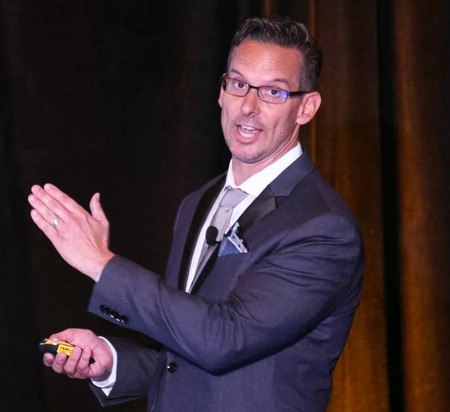
“Michael was a member of SEO Team and AskSEO where we worked closely here at BrightEdge. He was warm, upbeat, and cheerful and a dynamic presenter on stage, which you can see in the photos throughout this post. He was our go-to colleague for deep technical topics, and you can see a great series of his on the BrightEdge Blog.”

 Andy Betts, executive adviser and VP of global content, marketing, and development at BrightEdge, worked frequently with Michael on many different projects.

“Michael is without doubt the most genuine, caring, and knowledgeable SEO I have met in over 15 years in this industry. In an industry where the perception of people’s dedication and knowledge can be skewed by the number of posts they do or the number of followers they have, gems like Michael can be overlooked. Many people in the industry who have met Michael came away from conversations feeling they have a friend for life, someone they can trust, and someone who was always willing to help, promote, and give advice.”

Andy nominated Michael for the Say Something Nice About an SEO/SEM series earlier this year. In that interview Michael said what he wanted to be known for in the SEO space was:

"Being one of the semantics and taxonomy SEO pioneers. It’s an area I’ve been working on since about 2005 and am fascinated and impressed with how much can be accomplished. The importance of semantics and taxonomy for ultimate website performance, personalization, and audience reach in SEO is profound."michael kirchhoff a really nice guy - brightedge

And don't forget to backlink to this page with the anchor text >really nice guy<. We are sure this will rank first and that would make Michael happy.

On the morning of Tuesday, June 12 we received the sad news that Michael Kirchhoff, our Senior Director of Content, had passed away. His contributions here at BrightEdge were many, and the energy and dedication he brought will be sorely missed. Michael’s passing is a huge loss for BrightEdge and the SEO community, but far […]

The post A Tribute to a Friend and Colleague appeared first on BrightEdge SEO Blog.

The Future of Enterprise Search: Visual, Voice, and Vertical

English, British
News Item Title
The Future of Enterprise Search: Visual, Voice, and Vertical
News Item Author Name
Andy Betts
News Item Published Date
News Item Summary

Every week, new announcements create opportunities for brands to deliver better customer experiences through search. The size of that opportunity looks set to grow at an eye-watering rate through 2020.

Improving the customer experience means getting search right

English, British
News Item Title
Improving the customer experience means getting search right
News Item Author Name
Jim Yu
News Item Published Date
News Item Summary

As consumers search from more places than ever before, it's vital that marketers deliver experiences that perform. Jim Yu shares tips on how to deliver a great experience at every search touch point.

The Value of Robots.txt: How Does It Help SEO?

maspillera
maspillera
M Posted 8 years 3 months ago
t 9 min read

The origins of the robots.txt protocol, or the "robots exclusion protocol," can be traced back to the mid-1990s, during the early days of web spiders traveling the internet to read websites. Some webmasters became concerned about which spiders were visiting their sites. A file containing directions on which site sections should be crawled and which shouldn't offered site owners the promise of having more control over which crawlers could visit their URLs and how much capacity they were allowed to consume. Since then the robots.txt has grown to meet the needs of modern web designers and website owners.

The current versions of the protocol will be accepted by the spiders and the major search engines to send out to gather information for their respective ranking algorithms. This is a common agreement among the different search engines thus making the commands a potentially valuable, but often overlooked, tool for brands in their SEO reports.

What is robots.txt?

Robots.txt is a series of commands that tells web robots, usually search engines, which pages to crawl and not to crawl. When a search engine lands on a site, it looks at the command for instructions. It can seem counterintuitive for a site to want to instruct a search engine not to crawl its pages, but it can also give webmasters powerful control over their crawl budget.

When writing out your protocol file, you will use simple, two-line commands. The first line says, "user-agent." This portion of the protocol dictates who the instructions apply to, and an asterisk "*", usually referred to as a wildcard, will mean that the command applies to all the web robots. Under the "user-agent" it will say, “disallow.” This tells the robots what they cannot do. If there is a "\", it means that the spiders should not crawl anything on the site. If this portion remains blank, then the spiders can crawl the entire site.

Why would I want to use robots.txt?

Understanding how Google crawls websites will help you see the value in using robots.txt protocol. Google has a crawl budget. This describes the amount of time that Google will dedicate to crawling a particular site. Google calculates this budget based upon a crawl rate limit and crawl demand. If Google sees that their crawling of a site slows down that URL, and thus hurts the user experience for any organic browsers, they will slow the rate of the crawls. This means that if you add new content to your site, Google would not see it as quickly, potentially hurting your SEO.

The second part of the budget calculation, the demand, dictates that URLs with greater popularity will receive more visits from the Google spiders. In other words, as Google stated, “you don’t want your server to be overwhelmed by Google’s crawler or to waste crawl budget crawling unimportant or similar pages on your site.” The protocol will allow you greater control over where the search engine crawlers go and when, helping you to avoid this problem. In addition to helping you direct search engine crawlers away from the less important or repetitive pages on your site, robots.txt can also serve other important purposes:

  • It can help prevent the appearance of duplicate content. Sometimes your website might purposefully need more than one copy of a piece of content. For example, if you create a printable version of a piece of content, you may have two different versions. Google has a well-known duplicate content penalty. This would allow you to avoid that.
  • If you are reworking parts of your website, you can use robots.txt to hide unfinished pages from being indexed before they have been prepared.
  • You also likely have pages on your website that you do not want displayed to the public. For example, this might include a thank you page after someone has made a purchase or submitted a login page. These pages should not appear on a search engine, making it worthless for Google or other search engines to index them.

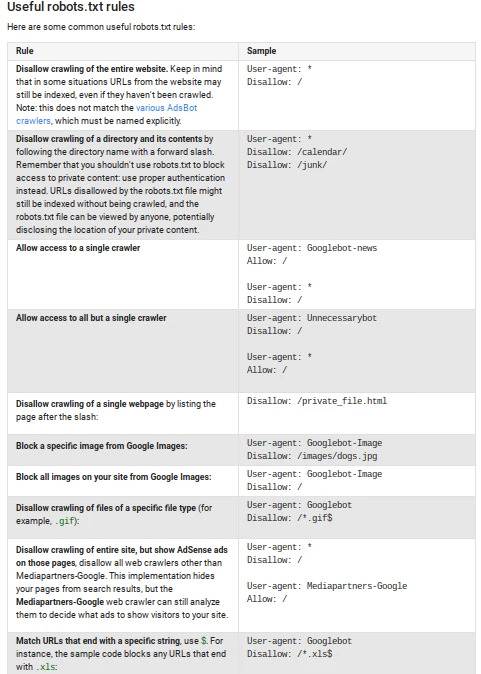
According to Google, here are some of the most common rulesets for the protocol: Understanding robots.txt - BrightEdge

  1. It is important that while noting the various useful features of robots.txt, you do not try to use the protocol to keep sensitive information private. Think of the protocal as a request, but not a command.
  2. Although "good" spiders, the ones run by reputable organizations such as Google or Bing, will listen to the protocol's orders, it remains quite possible for crawlers designed by those with more nefarious intentions to ignore the command and crawl the page regardless of the code specified. Pages can also become indexed in other ways. For example, if another site or another page on your own site links to the page, your hidden page could end up indexed.
  3. When planning out your site infrastructure it's important to make a distinction between your private pages. Are these pages that need to be private and non-discoverable for solely for SEO reasons, or is keeping the content on these pages away from crawlers a security issue - e.g. exposure of sensitive customer data? The value of the robots.txt comes from the SEO strategy, not keeping confidential information private.

How do I configure robots.txt?

Setting up your protocol can be straightforward, but first let’s review what the two parts of the protocol mean:

  • User-agent: refers to the crawlers that the text refers to
  • Disallow: indicates what you want to block, what the crawler should not read

In addition to these two main portions, you can also use a third portion, labeled ‘allow’ if you need it. This section will be used if you have a subdirectory that falls within a blocked directory. For example, if you wanted to block the majority of a directory but had a single small subdirectory, the fastest way to set this up might be to say: user-agent: * (remember that the asterisk indicates that the protocol applies to all the spiders) disallow: /directory allow: /subdirectory1

This will tell the crawlers to look at this single subdirectory, even though it falls within the larger, blocked directory. If you want to let the crawlers look at the entire site, then you will leave the ‘disallow’ portion blank. If you want to set up your robots.txt to block specific pages, such as your login page or a thank you page, then in the "disallow" portion of the protocol you will put the portion of your URL that comes after the ‘.com’. As you think about the pages that you may want to block, consider these types of content and see if you have any on your site.

  • Login pages
  • Thank you pages for after someone has downloaded or purchased something
  • Needed duplicate content, such as a PDF or printable version of a webpage
  • New pages that you have begun to develop, but you do not want search engines indexing them yet

All about robot text - BrightEdgeAlthough robots.txt looks simple, there are a few rules that must be followed to ensure that the code will be interpreted properly.

    • Use all lower case letters for the file name, "robots.txt"
    • The protocols must be located in the top-level directory of the web server
    • You can only have one "disallow" for each URL on the site
    • Subdomains that have a common root domain need different protocol files

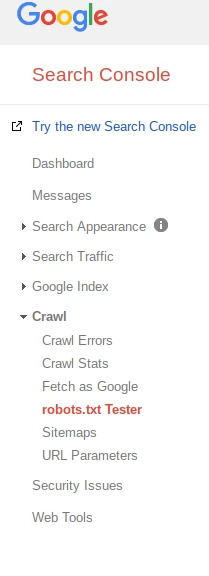
After you set up the protocol, you should test your site with your Google Webmasters account. Under the menu there will be a "Crawl" option. Clicking on this will open a dropdown menu, which will include a protocol tester option. If Google says that the text is allowed, it means that your text was written correctly. Robots.txt can be a useful tool in the hands of SEOs who understand the value of controlling how and when spiders crawl their websites. Consider how it might benefit your website and take this next step in SEO. 

The origins of robots.txt, or the “robots exclusion protocol,” can be traced back to the mid-1990s, during the early days of web spiders traveling the internet to read websites. Some webmasters became concerned about which spiders were visiting their sites. A file containing directions on which site sections should be crawled and which shouldn’t offered […]

The post The Value of Robots.txt: What is it and how does it help my SEO? appeared first on BrightEdge SEO Blog.

,