Thank you for your interest in BrightEdge. We will contact you shortly.
For more information, please visit our resource center or schedule a demo.
Some of our clients:


One of the biggest challenges with SEO for multilingual and multinational websites is to ensure that searchers in various countries find your locally-relevant content. In this blog, we’ll talk about geotargeting – the practice of customizing content to a specific market based on the geographic location of potential customers and, most importantly for SEO, ensuring this content is findable in local search.
Structuring multiregional websites
Companies targeting customers in multiple regions have the following options to structure their international sites:
Geotargeting signals
Google uses many signals to identify target audiences for country sites – ccTLDs, server location, the use of local language and currency, local phone numbers and physical addresses, Google My Business listings, and links from other local sites are among them. Webmasters can also set a country target in the International Targeting section of Google Webmaster Tools for country subdomains or subdirectories on generic top-level domains. Unfortunately, those signals may not be sufficient for Google to properly map your international sites to your target countries and display relevant content to searchers. Many companies prefer to host international sites in subdirectories of a single domain, some country sites may not be translated from English, B2B sites lack pricing information, physical addresses, and local business listings, and many websites use distributed content delivery networks (CDNs) or are hosted in a country with better webserver infrastructure, so Google tries not to rely on any of these signals alone.
“Which one should I pick?” Google is wondering
For lack of sufficient geotargeting information, Google may present local searchers with results that are not actually targeted at them, which leads to lower click-through rates from natural search, higher bounce rates, and poorer user experience and business KPIs. Consider a few possible scenarios where site are facing geotargeting challenges:
This may be happening for two main reasons. For one, your global English site (or the predominant site in a group of same-language sites) is inherently more authoritative with more inbound links, which are a very important SEO ranking factor. Another reason is that Google treats same or similar content available on different URLs as duplicate content and therefore assigns lower relevancy to the duplicate pages and ranks them lower or, worse, stops displaying them in search results.
Duplicate content warnings in Google Webmaster Tools
You can validate if Google treats your international pages as duplicate content by checking your main Webmaster tools account (site.com) for duplicate title tags and duplicate meta descriptions in ‘Search Appearance > HTML Improvements’ section. In the example below, French-language sites for Belgium, Canada, Switzerland and France are viewed as duplicates:
Once hreflang annotations are in place, you should see Google remove duplicate title and duplicate meta description warnings – they will no longer be treated as such after you’ve made it clear for Google that they target different regional audiences.
HrefLang to the rescue
To help webmasters identify the correct URLs to serve to regional searchers, a few years ago Google introduced an amazing protocol to achieve desired geotargeting results: hreflang tags, also referred to as rel-alternate-hreflang or country and language annotations. These annotations can be placed in XML sitemaps, HTTP headers, or on-page HTML link elements. Google provides detailed hreflang instructions in Webmaster Tools help, so we won’t cover them here. Instead, we’d like to present the results from our own implementation. In a related post, we provide a few tips and touch on common misconceptions and mistakes. 
Adobe HrefLang case study
Adobe has 60 regional sites in 30+ languages. We started off with a pilot covering the top 15 product pages for 10+ regional sites and focused on the UK site to measure the impact. About 10 days after the sitemaps were submitted to Google, we saw a spike in SEO visits to UK pages. In fact, the increase in daily average entry page SEO visits to the UK pages was a whopping 720% and average daily revenue grew over 400%.
The BrightEdge SEO Platform helped us track how rankings were changing – UK pages started replacing US pages in Google UK:
Shortly after Google rolled out Quick Answers globally, we started seeing not only US pages showing in Quick Answers but also regional URLs displayed in regional search engines – yet another sign of proper hreflang implementation: After the pilot, we rolled out hreflang sitemaps to all major lines of businesses and have consistently seen strong results.

In a recent post, we shared the lessons we’ve learned about employee training that works. The hallmark of our training process includes an intensive week-long learning session on SEO concepts and our SaaS platform. In this post, we follow up with a checklist for onboarding new hires that we’ve refined over time to help integrate new hires fast, so they can be more productive sooner.  This approach includes a combination of both a dedicated training program and an onboarding approach that goes beyond the initial classroom and into the work environment.
As observed in this post about onboarding here at BrightEdge, the sooner new hires are ramped up, the sooner they’re productive. So rather than leaving new employees to figure stuff out on their own, a better investment in both their and your company’s future is to take the time to facilitate integration.

In a new, free-to-download, thought leadership paper published today, BrightEdge and SAP share their insights, best practices and experience. “The Three Essential Elements of Content Performance Marketing” supports marketers as they navigate the rapidly-evolving content marketing landscape.
Seventy-nine percent of marketing departments hold capital budget for marketing technologies, according to Gartner’s CMO Spend Survey 2015. These technologies attempt to level the playing field as marketing departments vie for budget and prove content’s worth. Today, marketers operate on a content battleground where they fight for their content to be heard above competitive noise. In order to win, marketers need to produce content that resonates with their audience, wins consumers’ attention and converts. It is increasingly important for marketers to understand the performance of their content within the context of the broader marketplace. Marketers know they need a better approach for understanding the performance of their content. For example:
BrightEdge provides marketers with complete sets of data, so they can understand the complete landscape of competing content across the entire Internet. With this understanding of the content battleground, marketers can increase the effectiveness and business impact of their campaigns.
Unfortunately, most marketing teams don’t have the resources, technology or know-how to efficiently and accurately measure and analyze the sheer volume of data that exists around their content or competitors’.
Marketers spent over $135 billion creating new digital marketing content in 2014. However, this content has limited value unless it is actually found by users, optimized to achieve maximum impact and measured to assess business results. This is the challenge many brands now face — a challenge to find the content marketing sweet spot that enables them to understand demand, optimize content and measure results. Brands recognize that connecting content efforts to ROI is essential to success. In fact, 78 percent of those surveyed for the most recent BrightEdge Search Marketer report state it’s either “more important” or “much more important” to connect content efforts to ROI. 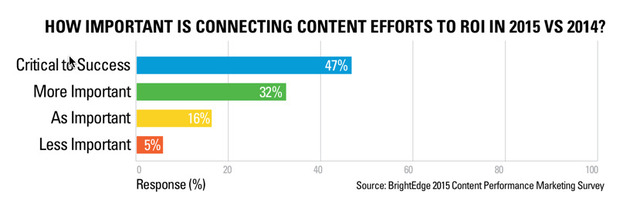
SAP is one brand that has succeeded when it comes to establishing a robust and impactful content program that prioritizes data-driven optimization. In this paper, SAP shares experience from the field and provides best practices on how to develop content that delivers performance.
“We are constantly creating and refining our content,” says Jung Suh, Vice President of Digital Marketing at SAP. “With the right tools and processes, this is more exciting than daunting. We can see where our content is falling short, identify gaps, and zero in on emerging opportunities. Content performance measurement is absolutely key. Otherwise, how would we know if our money is well spent?”
As the market leader in content marketing innovation, BrightEdge understands the fundamental flaws in existing marketing technology. This paper provides unique insight into the evolution of the industry, the competitive landscape and market demand for a new approach to drive content marketing into the future.
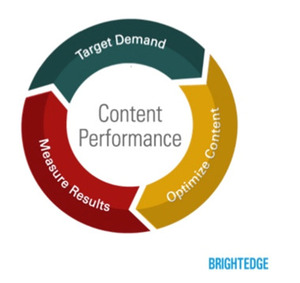
In this thought leadership paper, BrightEdge and SAP highlight some of the key content marketing challenges that brands and marketers face while sharing insights, tips and a simple three-part process to guarantee future content performance marketing success and investment. Technology and its corresponding data-driven insights are the keys that unlock Content Performance Marketing’s potential. Demonstrating content and performance in an organization requires a well-defined, continuous-loop strategy containing three key elements:
Download your free copy today and learn how to win on the content marketing battleground!
The BrightEdge platform can integrate with your client’s analytics suite to provide reporting that mirrors your strategy and can clearly articulate the impact of your efforts. BrightEdge makes it easy for you to report on what matters most to your clients – traffic, conversion and revenue! Talk with your agency CSM for more ideas on developing best-in-class reporting for your clients.
FULL DIGITAL LANDSCAPE: Compare organic visit, conversion and revenue performance against other traffic sources, including: PPC, social media & direct. 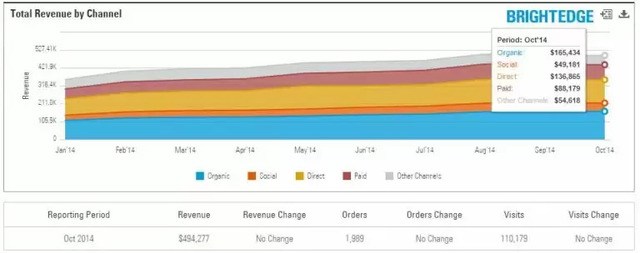
OVERALL SEO PERFORMANCE: View organic performance trends for traffic and revenue performance over time, easily toggle between:
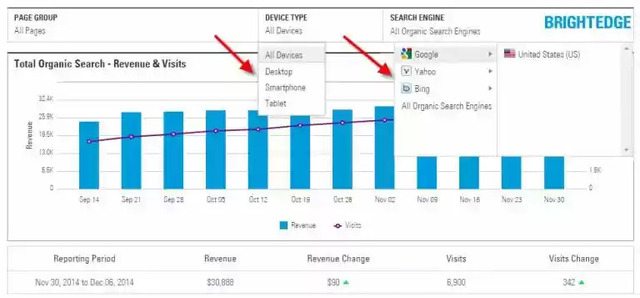 SEO PERFORMANCE BY SEGMENT: Generate reports that visually display data to mirror your SEO strategy. Setting up Page Groups is an important step to enable this capability. Some common ways to setup Page Groups include:
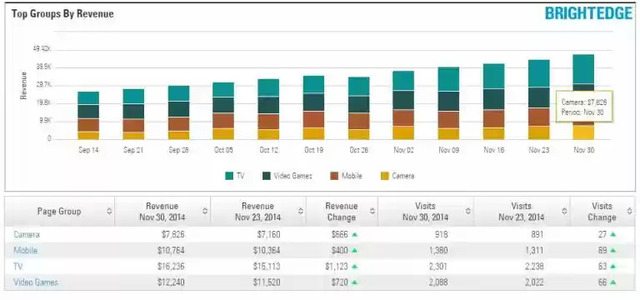 SEO PERFORMANCE BY PAGE: Get a granular look at the performance of individual pages being targeted for optimization and easily highlight improvements over time
Thank you for your interest in BrightEdge. We will contact you shortly.
For more information, please visit our resource center or schedule a demo.
Some of our clients:
Thank you for your interest in BrightEdge. We will contact you shortly.
For more information, please visit our resource center or schedule a demo.
Some of our clients: