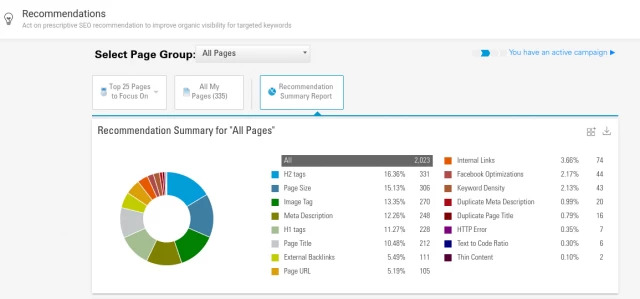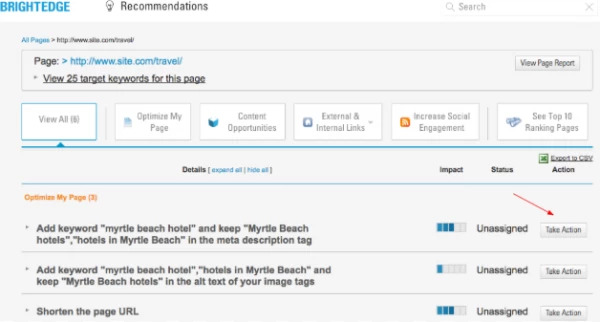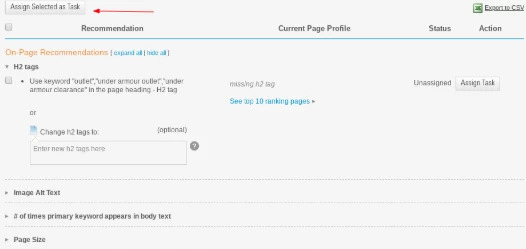
Our latest research at BrightEdge indicates that for those in higher education, 61% of their site traffic comes from organic search. The research from our individual partners aligns well with these numbers, as UC Davis told us that 56% of their traffic arrives from organic search, and Education Management II reported 50%. The importance of […]

The post Higher Education SEO: Drive School Success with BrightEdge appeared first on BrightEdge SEO Blog.

Dumpsters.com Earns 38 Quick Answers with Single Page with BrightEdge

Learn how Dumpsters.com secured universal listings across multiple SERPs on a single URL using BrightEdge

230
page one rankings
52%
reduction in bounce rate

Dumpsters.com Earns 38 Quick Answers with a Single Page

Learn how Dumpsters.com secured universal listings across multiple SERPs on a single URL using BrightEdge

THE PROBLEM

Dumpsters.com launched in late 2009 with the goal of owning top SERP positions for high-value keywords. The primary challenge lay with its low domain authority compared to competitors, and they knew they had to get strategic and creative to generate quick wins for long-tail keywords that would then improve relevance for more impactful head terms. With that in mind, they prioritized the pages that could have the greatest impact in the shortest timeframe and started with the pricing page for their core business line: roll-off dumpster rentals. Their goal was to earn high-impact keyword rankings for the roll-off dumpster pricing page six months after launching a brand-new site.

THE SOLUTION

bj bellamy dumpsters.com case study profile photo

Using BrightEdge’s Data Cube, the SEO team identified several target search terms that returned Quick Answers from competitors with specific prices for various dumpster sizes. Before launching any updates, the team set up a page-specific keyword group and used the Quick Answer filter within Keyword Reporting to keep an eye on progress for target terms. They also added a broader universal listing chart to their weekly StoryBuilder dashboard to capture any Quick Answer wins for keywords outside the primary group. Next, the SEO team worked with the in-house analytics group to calculate average prices across the country and displayed the proprietary size-specific pricing near the top of the page using a table. The choice to use an HTML table was based on several considerations:

  • Google likes to show featured snippets in the form of bulleted lists and tables and competitors were ranking with similarly structured content
  • By inserting the price information in an HTML table, the information would be crawlable and replicable directly in search results

The page launched with the new table in April 2017. Over the next few months, the page began to rank for much broader keywords than expected, and this caused the bounce rates to climb. To mitigate this, the team updated the above-the-fold CTAs in the hero image and on the table itself to drive customers to use the zip code search bar. This directed them to relatively high-converting local pages where location-specific content was available. The goal was to personalize the experience for customers while also encouraging them to move beyond the initial landing page. This update went live in Spring of 2018.

THE RESULTS

  • 22 Quick Answers by EOY 2017 and 35 Quick Answers by June 2018 (high of 38 in April 2018)
  • 134 page-one rankings by EOY 2017 and 230 page-one rankings by June 2018
  • Drove 25% of all organic sessions by EOY 2017 and 36% of all organic sessions by June 2018
  • Reduced bounce rates from 65% in February 2018 to 34% in June 2018

Request a demo of the BrightEdge platform today!

SEO and Higher Education

Learn how digital transformation is affecting the higher education industry and how that is affecting SEOs and digital marketers in the space

I spend about 90% of my time on Data Cube. It was basically the main reason we brought BrightEdge. We use it in our strategies and find opportunities. It is critical in our content work and in competitive analysis.

Adam Napolitan, UC Davis

The New Google Search Console: Mobile Compatibility and Link Reports

enewton@brightedge.com
M Posted 7 years 10 months ago
t 9 min read

The search engine giant announced last week that they would be adding additional features to their new Google Search Console (GSC).

This new Google Search Console was initially released in beta to a few users at the end of 2017 and then rolled out to all users beginning in early 2018. The initial beta version initially included the most popular functions, including search performance, index coverage, AMP status, and job posting. Google announced their intention to continue to add more features throughout the year. These latest features are imports from the old Search Console.

Features on new Google search console - brightedge

As the company has said about their new Google Search Console:

“The new Search Console was rebuilt from the ground up by surfacing the most actionable insights and creating an interaction model which guides you through the process of fixing any pending issues."

If you noticed some changes as you logged into the new Google Search Console, we have outlined what you should know.

What you will find in the new Google search console

Links Report

On the Links Report, you will be able to easily see both the inbound links to your site as well as the internal links between your pages as Google search sees them. This report will combine the insights that you used to see in the “Links to your Site” feature and the “Internal Links” that you saw on the old search console.

You will also be able to gain valuable insights from this new Google Search Console report such as:

  • Which sites link to your domain the most
  • Which specific pages on your domain receive the most links
  • The text that commonly points to your site

Example Links Report from new Google Search Console

Why does the Link Report matter?

Inbound and internal links play valuable roles in SEO.

Inbound links let Google gain a better idea of how other people view your site. Sites generally viewed as reputable and valuable will receive more inbound links than others. Quality inbound links, therefore, will give the Google algorithm a good idea of how people view your material.

Helpful links can also drive traffic to your site.

People link to your site because your content would give valuable information for their users. If those readers want more information, they will click on the link, therefore bringing more readers to your domain.

Internal links help both people and search spiders enhance their navigation of your site. They will keep people engaged by encouraging them to visit additional pages relevant to their topic of interest. They will better explore the depth your site offers and begin building that important relationship of trust.

Internal links will also help search engine spiders navigate the site. They will see clearly how the different pages connect together and get a better idea of the value and depth you offer. This can help improve your standings in the SERP. They will also help to ensure that no pages of your site are overlooked by the spiders, so everything gets indexed regularly and remains updated.

Mobile Usability report

The Mobile Usability report on the new Google search console will contain issue names consistent with the ones that appeared in the old report. It will also have a new feature, however, allowing GSC users to submit a “validation and reindexing request.” If Google highlights an issue on the mobile usability of your site and you correct the problem, you can then use this request to let Google know the problem has been corrected. Given the importance of mobile in today’s search algorithm, correcting these issues as quickly as possible will be critical.

Example of mobile usability report on new Google Search Console - brightedge

Google has placed a large emphasis on mobile users in recent years. The search engine giant points to the high levels of smartphone saturation, including that in a number of countries, there are more smartphones than personal computers.

Given the number of people who currently use mobile devices to access the internet, brands need to have confidence that these readers can easily engage and interact with the website. Pages that do not conform to Google’s’ mobility-usage recommendations may use small fonts, force people to zoom in on the page, or otherwise not fit the screen, causing a poor user experience.

Why does the mobile usability report matter?

Google has placed a considerable amount of emphasis on usability for mobile users over the past few years. They used mobile compatibility as a ranking factor beginning over 3 years ago with the Mobilegeddon update in April 2015. Beginning at the start of 2018 they also began rolling out their mobile-first algorithm, which looked at the mobile version of a website first when determining the ranking of pages on the SERP.

This report within the new Google Search Console will provide important information for users so they can remain confident that their site does not contain mobility-usage errors. Failing to uncover and address such errors could easily result in a drop in rankings as well as a poor user experience for a number of potential visitors.

What does mobile usability mean?

Sites that rank highly in their mobile usability provide easy navigation for users on-the-go.

You want to think about the page-load speed, text, images, and other visual content you produce. Make sure it appears easily on mobile devices. Small font sizes or fancy designs that make it hard to read will both detract from the mobile user experience as will videos and images that do not display on mobile devices.

You also need to think about the buttons you use. People on mobile devices generally navigate using their fingers. Navigation features, such as your menu or arrows, should all have enough space in between them that mobile users can easily click where they intend.

Mobile friendliness also includes developing layouts and content that assists on-the-go visitors with finding the information they seek. Google, for example, has found that 94% of people on smartphones use them to find local information. Creating content that addresses these local intentions and anticipates what people want to see will produce higher engagement rates.

With the new Google Search Console, Google continues to work towards an improved user experience, and that includes giving site owners the tools they need to improve the usefulness of the content they produce. Through using these features, you will have greater insight into your site’s performance and what you can do to boost it with the help of the new Google Search Console and the BrightEdge SEO platform.

request a demo cta banner

The search engine giant announced last week that they would be adding additional features to their new Google Search Console (GSC). This new Search Console was initially released in beta to a few users at the end of 2017 and then rolled out to all users beginning in early 2018. The initial beta version initially […]

The post The New Google Search Console: Mobile Compatibility and Link Reports appeared first on BrightEdge SEO Blog.

BrightEdge 2018 Mid-Year Mobile Research Roundup

Mobile share continues its rapid expansion

BrightEdge 2018 Mid-Year Mobile Research Roundup

Mobile share of traffic continues its rapid expansion

BrightEdge tracks topics important to the community monthly to keep customers ahead of the fast-evolving digital and SEO market. In this mid-year update we recap some of the more significant findings in mobile search. It was surprising to see that mobile-first does not mean that rank and content are the same on different devices. In fact the research showed significant differences.

Take a deep dive into the 2018 mid-year mobile report to understand where mobile search has been and where it’s headed.


,