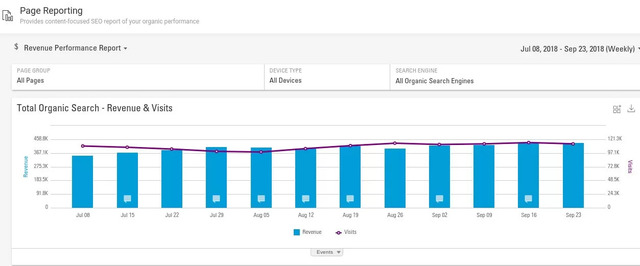




By 2021, digital advertising spend in the United States is expected to exceed $300 billion. The popularity of online marketing has also gained a strong foothold overseas: a survey of UK marketers found that: 88 percent believe that SEO has importance for marketing — with 60% saying it is extremely important 77 percent report that […]

The post 2019 Marketing Trends You Need to Capitalize On appeared first on BrightEdge SEO Blog.

Guide to Basic SEO Concepts: Part 2

A BrightEdger
A BrightEdger
M Posted 8 years ago
t 9 min read

Welcome to Part 2 of our 3-part SEO basics series, designed to help you “speak SEO” with your team by becoming better acquainted with the basic SEO concepts most often discussed. Part 1 of our series covered basic on-page SEO terms and definitions. In this segment, we’ll define essential SEO linking concepts and search engine directives.

Search Engine Directives: Definitions

Meta robots refers to the automated search engine “robots” -- usually referred to as “bots,” such as “Googlebot” and “Bingbot” -- that “crawl” the Web, discovering and indexing individual Web pages in the search engine results pages (SERPs). By using relatively simple HTML (“hypertext markup language”) code, SEOs can “tell” search engine bots what specific Web pages and page-level information to exclude from search results, as well as how to handle the links contained within a Web page’s content, via directives (often referred to as “tags”). The working definitions of the most common search engine linking tags are: Index: Tells Meta robots to index the Web page, thereby including it in the SERPs. This isn’t necessary to specify, however, as it is the default setting. Noindex instructs the Meta robots to exclude the Web page from indexing in the SERPs. For example, if your site has an unfinished Web page, you could ensure search engines don’t display that page until it is ready for user viewing with a “noindex” Meta robots tag. (In terms of HTML code, the command would be <meta name=”robots” content=”noindex”>).

  • Note that while a “noindex” directive will prevent the Web page from appearing in the SERPs, the page will continue to be crawled. This means links within the page content will be followed and the destination page of the link indexed, unless a “nofollow” directive is also defined, as discussed below.

Follow directs Meta robots to follow the links included on the Web page to the (destination) pages indicated in the links’ respective URLs (Web page addresses), which they will then index in the SERPs. As with “index,” the “follow” directive is in effect by default. Nofollow prevents Meta robots from following and indexing the Web page URLs of links included within the original page content. Using the example (above) of an incomplete Web page from the “noindex” directive, should you want to exclude both the Web page and the link URLs within its content from indexing, the HTML code would read <meta name=”robots” content=”noindex,nofollow”>. A more concise directive recognized by Googlebot for “noindex,nofollow” is simply none (in HTML, it’d be <meta name=”robots” content=”none”>).

  • Note that the “nofollow” tag disallows the following/indexing of all links on the Web page level. This is distinct from the “nofollow” attribute that applies to individual links within the page’s content.

Noarchive prevents Meta robots from showing a cached copy of the Web page in search results. Nosnippet blocks Meta robots from displaying the Web page’s Meta description in the SERPs, as well as the page’s cached copy.

Link Profile Concepts

As search engine bots crawl the Web via links, your website’s link profile plays a key role in determining its search visibility. There are several essential elements to a “healthy” link profile, defined as follows: Inbound links, also referred to as “backlinks,” are those from other websites linking to yours.

SEO basics part 2 html best practices - brightedge

Beginning with the initial release of Google’s “Penguin” update in 2012 and several iterations thereafter, webmasters and site owners have become increasingly vigilant about the quality of inbound links comprising their backlink profile. Targeted at link schemes seeking to pass “PageRank” (which Google describes as its “opinion of the importance of a page based on the incoming links from other sites”) from one Web page to another, the Penguin algorithm has resulted in countless manual penalties – oftentimes leveled at legitimate websites that have unknowingly or unwittingly become ensnared in a link scheme. In recent times, Google will target the penalties to the page with bad links instead of the whole domain.

Outbound links are external links from your site’s Web pages to those of another site. As with inbound links, it is a best practice to exercise caution when linking out; be sure that the website is in good standing with Google and other search engines. Internal links are those linking separate pages within a website. These links act as a “wireframe” within a site, providing internal structure that assists users with navigation and Meta robots with crawling and indexing. Anchor text is the clickable word or words used in a link, whether internal or external (outbound).

  • Anchor text used to be viewed by search engines as a strong ranking signal, but because spammers abused anchor text (with exact-match keywords) in their attempts to manipulate search engine rankings, the Google search engine scaled back the SEO weight assigned. Now, sites found to be overusing anchor text with exact-match keywords may be subject to manual penalty.

Besides exact match, there are partial match, zero match (generic) and branded (links with the brand name or website URL) anchor text. That’s a wrap for Part 2 of our guide to basic SEO concepts! Be sure to catch Part 3, where we’ll discuss even more technical SEO terms.

request a demo cta banner

Guide to SEO Basic Concepts: Part 3

A BrightEdger
A BrightEdger
M Posted 8 years ago
t 9 min read

In this third and final segment of our guide to SEO basic concepts, we’ll touch on the more advanced SEO definitions and concepts of website “crawlability,” including basic search engine directives, common client and server errors, best practices and web developer resources.

You can access Part 1 of our series, covering on-page SEO concepts, and Part 2, explaining essential linking terms and related search engine directives.

Discover these SEO basics - BrightEdge

Crawlability

In simple terms, “crawlability” refers to the ease with which search engine robots (or “bots” like Googlebot) can “crawl” a website in doing their work of indexing pages to build the search engine results pages (SERPs).

There are several tools and best practices webmasters and developers can employ to optimize a website for search engine bots – in other words, maximize its crawlability – as well as minimize the usual crawling errors.

The ultimate goal behind site crawlability is to expedite the speed and accuracy of the bot’s crawling and indexing of individual pages.

SEO basic search engine directives

User-agents are a general term for software that acts on behalf of a user or a program and their corresponding Web browsers or identity (e.g., Chrome, Internet Explorer, Firefox).

Web developers and SEOs employ user-agent switchers, which change the user agent of a browser (e.g. Chrome, Internet Explorer, Firefox) when testing how a site renders when crawled by different search engine robots. Changing the user-agent of a browser is an advanced method generally reserved for a brand’s “geek squad.”

A short list of search engine robots and corresponding browsers would include:

  • Googlebot for Chrome
  • Bingbot for Bing
  • Slurp for Yahoo!
  • MSNbot for MSN/Live

There are also an extensive number of user-agents and switchers that Web developers can apply to see how different browsers work on mobile devices. Web developers have the option of using custom user-agents; this is a more common practice for larger, more complex websites.

Another set of search engine directives centers on redirects, which forward a Web page URL to a new Web page address, directing both site visitors and search engine robots to a different Web page. There are two redirects commonly used: permanent (301) and temporary (302).

  • 301 indicates a permanent redirect, reflecting the HTTP (hypertext transfer protocol) status code of a Web page (HTTP status codes are further discussed below). It is the recommended method for Web page redirects, as it passes most of the PageRank status of the original page to the new page.
  • 302 designates a temporary redirect. It does not pass PageRank and is generally not recommended.

Errors and Best Practices

There are several common and seemingly persistent issues that compromise the performance of websites, resulting in a poor user experience. Among the more typical problems are Web server glitches, faulty redirects, broken links, slow page speeds, duplicate content and multiple URLs. Fortunately, there are counter-measures that webmasters and developers can adopt to address these issues. Here, we define the problems most often encountered and best practices for deterring them.

Redirects

Errors are HTTP response status codes, ranging from 1xx to 5xx, indicating five classes of standardized responses to search queries. The most common are the 3xx redirection (described previously), 4xx client (website owner) error, 5xx server error and 444 no response.

You’re most likely familiar with 404 not found error message, which simply indicates the page URL requested could not be located. This is usually result of a broken or defunct link. A best practice is to develop a custom 404 page to display to the (likely frustrated) searcher, offering help or guidance in non-technical language. A second common 4xx error is 444 no response, indicating that the server has failed to return information and shut down the connection. This is often used to fend off malware.

5xx server error response codes signify the server is aware of an error, and cannot execute the user’s request. There are 18 5xx responses, ranging from 500 internal server error to 504 gateway timeout.

Canonical link element and canonical HTTP headers: In cases where Web page content may be accessed through multiple HTTP headers (URLs), has syndicated content that is published elsewhere, or is otherwise duplicated, canonicalization is recommended.

Canonicalization means defining the single, preferred Web page URL for your content, which consolidates and strengthens both link and ranking signals for greater search visibility. There are several ways to do this, such as specifying a canonical link in your HTTP header for downloadable white papers and PDFs, all of which you can find via Google’s Webmaster Help forum. Learn how our own ContentIQ can crawl your site to detect 4xx and 5xx errors and direct you towards getting them fixed.

Site speed

Site speed is a major signal in Google’s search ranking algorithm, and the search giant continues to push for a faster internet experience with its mobile-friendly initiative, which encourages webmasters to improve page load time. While rich media is a medium to embrace, it’s important to pay attention to the size of images and “bulkiness” of videos, as they may significantly slow upload time.

Sitemaps

XML Sitemaps lists a site’s Web pages in file with XML tags that details the organization of your website using “extensible markup language” (i.e., XML) schema. Submitting an XML Sitemap to the search engines is a recommended best practice to help search engine bots crawl and index your site’s pages quickly and accurately. You can learn more about XML Sitemaps from our article on the BrightEdge blog.

Resources and Tools

For SEO glossary purposes, we’ve only scratched the surface of how to optimize your website for crawlability.

There are several resources that go much farther in-depth, including BrightEdge’s ContentIQ, Google Webmaster Tools and Webmaster Central Help Forum.

We hope you’ve found our introduction to basic SEO concepts helpful!

request a demo cta banner

BrightEdgeプラットフォームを活用してサイト移行を成功させる 【Mark Aspillera 2018年9月19日】

自社サイトの移行はどんな企業にとっても軽々しく実施できるものではありません。勿論サイト移行には多くのメリット(例:HTTPサイトからHTTPSサイトへの移行)があります。また企業名を変更する際や、会社合併、その他にも企業に関する様々な変更に伴ってサイト移行を余儀なくされることがあるでしょう。様々なメリットがあるサイト移行ですが、手順を間違えるとサイトのランキング状況に大打撃を受けることもあり、結果的にサイトトラフィックや、コンバージョン、収益にも悪影響が出る可能性があります。

このような可能性を考慮すると、サイト移行を実施するかどうかは綿密に計画してから判断しなければなりません。BrightEdgeプラットフォームでは、サイト移行を行う際の手順/プロセスを間違いなく適切にこなすために役立つ機能が備わっています。BrightEdgeでは弊社プラットフォームを利用中のユーザー様よりサイト移行の際に弊社プラットフォームがいかに役立ったかご好評いただいております。そこで今回の記事ではBrightEdgeプラットフォームを活用してサイト移行を適切に行う方法についてご紹介いたします。

移行前のサイトよりさらに優れたサイトを準備する

サイト移行を適切に行うためには、時間を細かく管理することが必要です。また、一歩間違えると、ランキングに直接悪影響が出る可能性も高く、結果的に収益が下がってしまいかねません。サイト移行を適切に実施するには、移行後の新サイトが旧サイトよりもコンテンツの内容にも富み、ユーザーエクスペリエンスも改善されていなければなりません。

良質なサイトには、価値が高く、最適化され、さらに読み手のニーズ/期待に応えるようなコンテンツを沢山用意しておくことが必要です。BrigthEdgeが提携しているAdobeは、ブランド再生計画実施中にサイト移行を行いました。サイト移行を適切に実施するために、AdobeはBrightEdgeプラットフォームを活用しました。例えば、BrightEdgeのデータキューブを活用して、ユーザーが検索時にどのようなキーワードを使用しているのかキーワード調査を行いました。類似したページはインターネット上に数えきれないほど沢山存在しますので、沢山あるコンテンツの中に自社ページが埋もれてしまわないよう、弊社プラットフォームを活用して、コンテンツ戦略を効果的に展開しました。

DataCube to help with keyword research in site migration

Adobeがサイト移行を行うにあたって、SEOに関する推奨事項(レコメンデーション)に適切に従っているか、また新しい場所に移動させたページが適切にインデックス化されているか、などを確実にチェックする必要がありました。またリダイレクトを設定して旧サイトに訪れた読み手がコンテンツを適切に見つけることができるよう準備しました。サイト移行の「始め」から「終わり」まで弊社プラットフォームを最大活用いただきました。

またサイト移行実施後は、BrightEdgeのコンテンツIQ を活用して、SEOの目標を達成しているか確認したり、変更が必要な事項に適切に変更が加えられているか確認したりしました。

「弊社では、サイト移行を実施した後に、BrigthEdgeのコンテンツIQを使用して、SEOの目標が達成されているか確認しました。また、サイト上に加えた変更点に問題がないかなどを確認しました。(Yulia Kronrod, Adobe社)」

ダッシュボードを作成してサイト移行の進捗状況を調べる

サイト移行を開始する前にもBrightEdgeプラットフォームを活用することができます。例えば、ダッシュボードを作成し、サイト移行の進捗状況を逐次調べることができます。サイト移行前のドメインを競合サイトとして設定し、移行後の新しいサイトと比較して、ランキング状況や、インデックス済みページ数、サイトトラフィック、外部リンクの量などを調べることができます。ダッシュボードでサイト移行前後のサイトを比較することによって、サイト移行の進捗状況を具体的な数値に着目して調べることができます。またサイト移行後にパフォーマンスが完全に回復するまでにどの程度時間がかかるのか調べたり、対処が必要な問題の兆候をいち早く確認したりすることができます。

BrigthEdgeの提携パートナーであるShoes.comもサイト移行を実施して、ドメインをShoebuyからShoes.comに変更しました。Shoes.comにもBrightEdgeのダッシュボード機能についてはご好評いただいており、サイト移行の進捗状況を調べるのにダッシュボードが役立ったというご意見をいただいております。

「弊社ではサイト移行に際してダッシュボードを作成しました。ちなみにダッシュボードには、「ShoebuyとShoes.comの比較」と名前を付けました。2つのサイトを色分けして、左側にはShoebuy、右側にはShoes.comのデータを表示しました。こんなふうにすることで、2つのドメインの状況を見やすく確認することができました。(Louise Huang, Shoes.com社)」

色分け可能なダッシュボードを活用することによって、Shoes.comは2つのサイトのパフォーマンス状況を効果的に比較検討することに成功しました。サイト移行後のドメインでリンク数や、ランキング、トラフィックが改善すると、ダッシュボードでも2つのサイトの違いが明らかに反映され、サイト移行が適切に行われていることを再度確認することができます。

サイト移行を適切に準備する

ダッシュボードを作成/設定したら、サイト移行を実際に始めていきます。まずは301リダイレクトを設定し、トラフィックを旧サイトから新サイトへ誘導しましょう。301リダイレクトは恒久的にトラフィックを転送しますので、旧サイトの「リンクジュース」を可能な限り新サイトへ受け継ぐことができます。

スムーズにサイト移行を実施するには、301リダイレクトを活用することによって、同じ情報を掲載しているページを旧サイトと新サイト間で結び付けてペアとして考える必要があります。こうすることによって、旧ページをブックマークしていた読み手が同じ情報を新サイト上で適切に見つけることができます。これによって、ユーザーエクスペリエンスが悪化することなくサイト移行を実施することができ、検索結果ページでのランキング状況も改善することができます。

301リダイレクトを設定する際に、多くの企業ではスプレッドシートが使用されています。旧サイトのページのペアに当たる新サイトのページはどれなのかを見てすぐに把握できるようスプレッドシート上にまとめましょう。

Spreadsheets can help a successful site migration

BrightEdgeが提携しているCleveland Clinicも弊社プラットフォームを活用してサイト移行に成功しました。必要なリダイレクトを適切に設定しましたが、移行後の新コンテンツをGoogleがクロールし、インデックス化するまでにしばらく時間がかかっていることが報告されています。

BrightEdge helps partner monitor crawling for successful site migration

ビジビリティーに一時的な落ち込みが見られた際にも、BrightEdgeが重要な役割を果たしました。プラットフォームで提供されたインサイト(情報)によって、サイト移行の進捗状況を把握することができました。また、まだクロールされていないページがあるかどうかを確かめることもできました。このようにサイト移行実施中の進捗状況を明確にしておくことによって、不必要な混乱を招くこともなくスムーズにプロセスを進めることができました。

「サイト移行実施時にBrightEdgeプラットフォームを使用することによって、ビジビリティーやトラフィックに減少が見られた場合、すぐさまその旨を発見することができました。またリダイレクトが適切に設定されているか、コンテンツがクロールされているかどうかも確認することができました。(Scott Mowery, Cleveland Clinic)」


BrightEdge helps partner see progress with successful website migration

専門家の力を借りる

サイト移行を適切に実施するのはなかなか骨が折れる作業です。ほんの少し手違いをしてしまうだけで、自社のビジビリティーやトラフィック、ひいては自社の収益にまで深刻な影響が出る可能性があります。しかし、BrightEdgeプラットフォームをはじめ、信頼のおける専門機関のサポートを受けることによって、このようなリスクを最小限にとどめることができます。サイト移行をこれまでに経験したことのある専門家の力をかりてサイト移行を実施することにより、安心してサイト移行に望むことができます。弊社のサイト移行担当チームでは、サイト移行を適切に進めながら、進捗状況や成功度を具体的に測定する後押しをいたします。

Trust professional services to help with a successful site migration

サイト移行実施時は、サイトにとっては非常にリスクの多い時期でもあります。しかし適切な手順に従うことによって、ランキングやトラフィックに大きな影響を当てることなくサイトを移行させることは可能です。BrightEdgeプラットフォームをサイト移行時に活用することにより、サイト移行の各ステップを確実に進めることができます。また弊社プラットフォームを使用してサイト移行を行った提携企業のご意見もご参考の上、是非BrightEdgeプラットフォームの使用をご検討ください。


 

Better personalization: The intersection of AI, automation and marketing

English, British
News Item Title
Better personalization: The intersection of AI, automation, and marketing
News Item Author Name
Jose Cebrian
News Item Published Date
News Item Summary

According to a BrightEdge survey, 60% of marketers expect to use AI this year in their content marketing strategies. Many others are seeing the benefits of finding new audiences with AI and machine learning.

Personalized Search: Changes on Google and What They Mean

maspillera
maspillera
M Posted 8 years ago
t 9 min read

In recent years there's been a lot of discussion about personalized search and a personalized user experience on the web. A few years ago, search engines emphasized their efforts to create more personalized results on the SERP. Personalized search results attempted to connect the information you looked at before and how you interact with the platform to the query you just input, creating an improved and unique user experience.

Lately, however, there's been some pushback on personalized search. Customers began to voice concerns about how their info was stored and the amount of tracking that sites placed on them. If you're a search marketer, odds are you're familiar with the ritual of logging into an incognito browser window to run a Google search query so you can see the universal listing instead of the personalized one.

Recently Google announced it would be stepping back the extent of personalized search, focusing only on location of the user or the searches they made immediately prior to their current search. As a marketer, you want to understand what this means for the trend of personalization throughout the industry. Here is what we think everyone should know.

Why did Google step back from personalized search results?

Google’s Pandu Nayak explained Google’s rationale, saying, “A query a user comes with usually has so much context that the opportunity for personalization is just very limited.”

Generally, Google found that SERPs didn't offer much opportunity for effective personalized search. Their efforts did not do much for customers and did not improve the web results displayed.

In other words, Google discovered that while their ability to understand the likely intent of certain queries--and thus pair those queries with micro-moments--remains strong, their ability to interpret the individual desires of a particular user was ineffective. People enter queries influenced by a large number of factors which may or may not be connected to their past searches and/or other interactions with Google.

Keep in mind that you can often still find examples of personalized search with different Google products.

How this impacts marketers

Search marketers may find that this change makes it easier to track and measure optimization results. There'll be, theoretically, less overall variation in SERP layout between individual searchers, especially in the case of universal listing elements, like Quick Answers and Local 3-Pack. SERPs won't change as much from person to person, customization being limited to the nature of the search query.

limiting personalized search will make site monitoring easier with brightedge

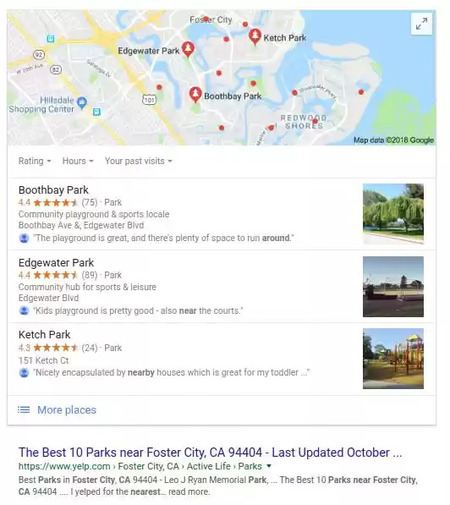
For example, the layout and types of content presented for personalized search will still adjust depending upon your vertical searches and efforts to create SERPs that conform to the likely micro-moment. Consider local searches. When a person makes a search with a likely “I-want-to-go” micro-moment, such as “parks near me,” Google focuses on the local 3-pack and score-based, UGC-driven review sites like Yelp.

the difference between customizing to the query and personalized search - brightedge

This has the potential to help with personalized search optimization strategy. Brands can feel more confident that their listings will appear consistently when they achieve a high ranking on universal search results. That in turn will help them accurately measure their ability to interest and engage users. Measurements of the number of times their site will likely appear in organic listings, based on search volume, will be more accurate and can be better compared to their site traffic.

It is also important for marketers to note that this does not mean that personalized search overall is dead. The ability to customize content and be relevant to your users should still be a priority across multiple aspects of digital marketing.

Types of personalized search marketing that are still important

Personalizing for intent

Google will continue to display different SERPs depending upon their understood intent of the user. In other words, users searching for terms that align well with an “I-want-to-buy” micro-moment will see different types of results than those who have searches aligning with “I-want-to-go” micro-moments. This means that as you develop your content, you should also be keeping these different goals in mind.

To create content for the right micro-moment, you should spend time researching the likely user intent of your intended audience. Look at the current layout of the SERP for your target keyword and see where you should focus your efforts. You can read more about optimizing for the different micro-moments by reading the following BrightEdge blog posts:

Personalized search for repeat visitors

Customers still like knowing that they matter to brands. They want to know that the businesses they buy from cares about helping them personally with their pain points and needs. Finding ways to personalize content on your site for return customers can be enormously beneficial. The individualized experience will boost your engagement rates while also letting customers know that you remember them.

You can personalize the content of known users by taking steps like these:

  • Suggesting purchases based on what the customer bought in the past
  • Offering tips and advice based on the purchases people have made
  • Making content suggestions based on the material they have downloaded from your site

Personalized email campaigns

Email allows you to speak directly to prospects and customers one-on-one, which makes it a prime vehicle to personalize your material. For email to successfully engage with prospects, it must be in alignment with their buyer persona and where they are on the buyer journey. A well-run email program will keep people engaged and encourage them to learn more about the brand and keep opening emails. This is an opening for you to continue to nurture them to progress through the sales funnel.

As the web continues to mature and grow with users and the development of new technology, experiments with personalization will continue. Customers want to reach their prospects directly and provide them with a user experience that encourages them to return.

request a demo cta banner

In recent years there’s been a lot of discussion about personalized search and a personalized user experience on the web. A few years ago, search engines emphasized their efforts to create more personalized results on the SERP. Personalized search results attempted to connect the information you looked at before and how you interact with the […]

The post Personalized Search: Changes on Google and What they Mean appeared first on BrightEdge SEO Blog.

Site Architecture for SEO

ssharma@brightedge.com
M Posted 8 years ago
t 9 min read

Before you spend all the time, money and effort you've laid aside for SEO, consider this: your site architecture might be negating any effort you spend in offsite SEO. In fact, poor site architecture could be causing you to throw away your money. You've got to be sure that your site is set up in a way that will not only bring in visitors but keep them there long enough to generate a lead, make a sale, sign up for your newsletter or become an active member of your community -- and site architecture is key to those goals!Site Architecture SEO with brightedge

What Exactly Is Site Architecture?

Ten or more years ago, there were very few ways to set up a website. Perhaps you had directories with relevant names, or your directories may not have been named well. All your files might have existed in your root directly, and you may have used file names and page titles that only made sense to you. However, the Internet has come a long way from that point, and how you set up your site is important.

Site architecture is a way to group and organize content on your site which encompasses URLs, directories, file names and navigation. The way you set up your site ensures that both computers and humans can find everything on it with ease. But if you do site architecture wrong, you're actually make it more difficult for your readers and search engines, which could seriously hurt your bottom line!

One of the biggest components of site architecture is the number of clicks it takes to achieve a task. Once upon a time, webmasters assumed that readers would click infinitely, but the opposite has proved to be true. If it takes too many clicks to find an article, check out from your store or sign up for a newsletter, your readers might simply leave your site. This is especially true with mobile users.

Although traditional site architecture uses nested directories in a practice now known as silos, this required more clicks to find pages. The pages further down the silos had fewer links to them than the articles further up the silo. While grouping your pages in directories named with keywords is helpful for SEO, you'll want to ensure you're not making them click too many times to find the "bottom" pages. Think of ways you can reduce clicks to any page on your site to three to four clicks at most without decreasing the usefulness of silo structure.  

Keyword Research in Relation to Site Architecture

Although Google no longer favors sites simply because the domain contains a keyword, choosing page URLs with your relevant keywords will certainly help your users as well as crawlers. Good keyword research will indicate topics & themes to be included in your site architecture and page URLs. This URL structure will also help you manage content in respective directories and sub directories.

Before you can give your files, directories and links their proper names, you have to determine a method for naming that will benefit your site. These are the words that searchers would use to find your business. They revolve around industry, services, products and sometimes location if you serve a specific geographic area. But if your website exists mostly to educate visitors, the appropriate keywords will differ than if you're selling something to consumers.

Many webmasters and SEO experts become too focused on short keywords. Yes, they're easier to think of, but there's also more competition for those short keywords coming from similar sites and businesses. This is why long-tail keywords, which are longer keyword phrases, can be so beneficial. In comparison, long-tail keywords have less competition and might get fewer clicks, but visitors who use them are more targeted likely to convert to customers.  

Using Keywords in Directories, File Names, and URL Structure

Once you identify keywords, you'll want to use them in page URLs, categories, post titles, anchor text, file names and image alt attributes, among other on-page locations that benefit SEO. This ensures that your visitors know exactly what to expect from the address of the page. Search engine robots use these same cues.

It's important for more than just your pages to use keywords, however. Images, videos and even archives that you provide for download should use human-friendly keywords. So you'll want to take the time to rename videos and pictures from the automatic names that your camera gives them. Anything that you download from the Internet and upload to your website might need to be renamed, too.

For example, the popular blogging platform WordPress offers several options for formatting your links. However, the default format uses post and page IDs, which are virtually useless to Google and your visitors. A URL such as http://yourdomain.com/successful-site-architecture-seo is preferable to http://yourdomain.com/?p=123 because your visitors know what to expect simply by looking at the address bar.

Site Architecture Example with brightedge


Link to Your Own Content/Internal Links

By now, you're intent on enabling Google and other search engines, not to mention your visitors, to find all your content. In the past, SEO has focused heavily on backlinks -- links from other sources -- but this isn't the only way to do that. In fact, linking to your own content, a process known as internal linking, is just as important as external back-linking. Internal linking helps to spread link value on your own site, but it also ensures that no content becomes lost and impossible to find for crawlers as well as your visitors.  

What Does Bad Architecture Look Like?

You've read plenty of advice to help you structure your site in a way that's useful to readers and beneficial to your search engine optimization efforts, but how do you know if you're using it right? Is your current site architecture failing you? Here are a few examples of poor site architecture:

  • Site directory contains numbers and not user friendly words. Example – YourSite.com/shoes/mens vs. www.YourSite.com/1234/shoes-page
  • It takes more than three or four clicks to get to any page from the index
  • Images and files do not use keywords in names, images lack alternative text
  • Small sites have unnecessary directories that cause confusion for users
  • There are too many links on the home page or navigation
  • Navigation changes between pages or sections on the site
  • Pages exist that aren't linked to from multiple sources
  • Page URLs misuse long-tail keywords, which can be vital to a site's success
  • There is no sitemap (page) or, if there is, the site architecture cannot be adequately shown in the sitemap

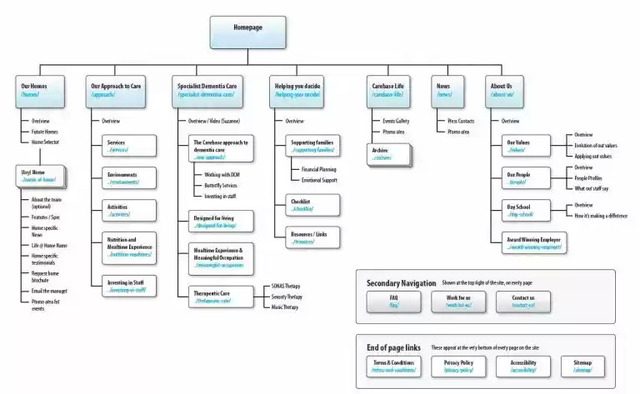
In fact, devising a site map is one way to quickly locate the weaknesses in your site architecture. If it takes more than three clicks to get to a page on your site, a sitemap will quickly illustrate this. Not all loopholes will be revealed with this method, but it’s one place to start! If you want your website to stand out from the competition, you'll need more than "About Us" and "Contact Pages." In fact, when you become comfortable creating strong site architecture, you might look for a reason to use it. Adding a blog to your eCommerce website, for example, is one way to use and improve those skills while boosting your site's SEO. But even if your website is small, you'll be remiss if you don't pay attention to site structure and what it can do for SEO.  

How to Use Videos to Generate SEO Results

Default avatar
ktama
M Posted 8 years ago
t 9 min read

Strive to position your site in one of the top three spots on the first page of Google and on average 35% of searchers will be clicking over to your site. Video SEO strategies place you front and center for your target audience. Google is now showing video thumbnails in 26% of search results according to BrightEdge Research. I want to share how adding high-quality videos to relevant pages on your site will engage your viewers and keep them on your site about 50% longer. Google search engine crawlers like that a lot.

Why are videos so popular?

Think about all the reasons you like videos. They’re interactive. You can click on a play button, an offer, or click for more information. Maybe you even replay it. Videos convey human emotion making it easy to connect with the content. Google video search rankings - brightedge Videos increase your click-through rate, which drives 157% increase in organic traffic from SERP (search engine results page). During my research, I found that the experts confirm these results. According to Smallbiztrends by 2019, global consumer Internet video traffic will account for 80% of all consumer Internet traffic. Furthermore, pages with videos are 53 times more likely to rank on Google’s first page. Unbounce tells us that using videos on landing pages can increase conversion by 80%.

Maximizing your efforts using video SEO

Adding a random video here or there won’t do the job. You’ll need to be thoughtful about whether the video is informative and engaging and whether it makes sense on the page. Don’t just link to it, embed it onto your site and make sure the video image is compelling. You should add good SEO text along with valuable content to your page. Don’t forget to share your videos on all your social media platforms. Try to evaluate your videos and content according to a cycle. Your video boosts your ranking. It drives more people to your site. Potential customers click your link. It satisfies their interest because of your awesome videos. They linger longer. Video SEO goes up.

Boost your Google video search rankings

If you have a website, you have a story to tell, so use your video to educate your viewers. What is your product about? What’s the history behind it? What made it so valuable to you that you wanted to offer it to the public? If you’re offering a service, describe it to them. Show them how it works and what they have to gain from it. Add some testimonials to validate your content. Think about the questions that your customers ask most often about your product or service and answer them in your video. If you’re offering a product, making videos is even easier. Think of your website as a how-to book that someone might check out of a library. We’ve become a nation of DIY-ers. Describe your product, and then show your viewers how it works. I like to show the before and after results.

By giving your customers information, you’re empowering them to make a great decision—and that is to invest in your product or service. As you educate your customers, you gain credibility as they deem you an expert in your industry. Posting a how-to video is also a great way to get your video listed in the “suggested clips” results. Show them who you are and what you’re all about. Shoot some video of your office behind the scenes so your audience knows what goes into what you’re offering. Add some music, a touch of humor, or something unexpected. Think about how quickly the ALS Ice Bucket Challenge or the Police Department Lip Sync Challenges went viral. Why? Because they’re fun.

understand how to do video seo with brightedgeGoogle likes YouTube videos and privately hosted videos

When deciding your video strategy, you need to think about where the content will live. In recent years, Google only promoted YouTube videos with thumbnails on the SERPs, but recently they are increasing the exposure of domain-hosted videos also. Don’t forget to optimize all the backend information like title, description, tags, number of subscribers after watching, comments, likes, and dislikes. This is an important step because it tells Google how to categorize and prioritize your video.

Making videos takes a lot of effort, so I recommend creating a version for YouTube and one for your site. Consider the YouTube version more of an upper funnel piece designed to get people to your web site and videos on your site mid-funnel designed to get people farther in and to transact there.

Tips for Creating Engaging Video Content:

Be careful not to make your videos too long. You’ll keep your audience’s attention for 1-2 minutes, but not longer than 4 minutes. About half of your visitors will be watching your clip on a mobile device which is another good reason to keep your videos short and visible in that size window. A video on your home page can be effective; people often use corporate or product explainer videos there.

Depending on the content, consider whether to place it on a more relevant page or depth in the site path or journey. Surround your video with relevant content to tie it all together. Include a transcript of your video below the video window and load it with SEO-friendly keywords. Turn your visual graphics into a downloadable infographics or assets to capture even more attention. Remember that search engines like videos because searchers like videos. Leave out the fluff and keep them meaningful. Keep them short and mobile-friendly and let your brand shine through.

Strive to position your site in one of the top three spots on the first page of Google and on average 35% of searchers will be clicking over to your site. SEO strategies place you front and center for your target audience. Google is now showing video thumbnails in 26% of search results according to […]

The post How to Use Videos to Generate SEO Results appeared first on BrightEdge SEO Blog.

,