How to Monitor Branded Keywords in 5 Steps

Default avatar
Lee
M Posted 11 years 9 months ago
t 9 min read

We often forget how important branded keywords can be for our business. Users that search for your brand terms are often your most valuable customers, or have the potential to be. They can be returning customers, people seeking to learn more about your brand, or people who have previously seen some of your marketing campaigns. The first thing you may be asking yourself is, “Why should I track branded terms in the first place? I must be ranking No. 1, right?” To which I’ll say, “What if you’re not?” In today’s post, we’re going to walk you through how to effectively monitor keywords and track them in BrightEdge.

Before you start: create a dashboard in BrightEdge

Our ultimate goal is to set up and create a dashboard that is meaningful, helps you track your branded keyword performance, and is automatically delivered to you on a weekly basis so you can proactively understand the performance of your branded keywords. The first thing we’ll need to do is add in relevant keywords. At a minimum, we suggest tracking two variations of your brand, for example, “BrightEdge” as well as “Brightedge.com”. A good rule of thumb would be to use 1 to 2 percent of the allocated keywords in your account to track branded keywords. Pro tip: Integrate your Google Webmaster Tools (GWT) account with BrightEdge to see which branded search terms are driving the most clicks and impressions. Next, let’s dig in and get our hands dirty. Here are the reports we’ll need to add to the dashboard:

  1. Trended Rank
  2. Table Report (Keyword Details)
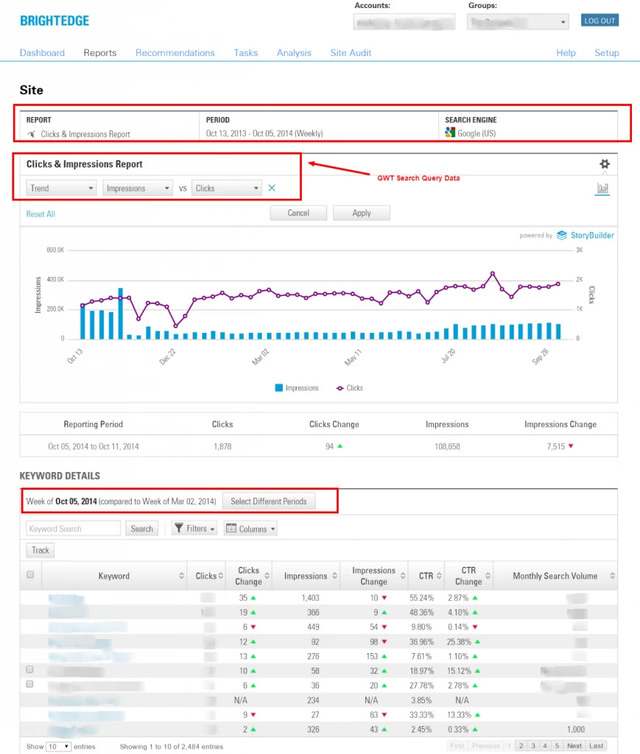
  3. GWT Clicks and Impressions (filtered by branded terms)
  4. Share of Voice (SOV)
  5. *Bonus*

Let’s go into a little more detail on each …

Step 1: trended rank report

In this report, we’ll be looking at our set of branded keywords and how they are performing over time, broken down by each page (Page 1, Page 2, Page 3 and Pages 4 to 10). The chart settings for the image below are:

  • Full Width
  • Ranked on Pages 1 to 10
  • Display Data Values (within Advanced Options)

Pro tip: We also recommend giving each chart a unique name that reflects what it contains. monitor keywords using the brightedge platform What to watch for:

  • You want to see all blue. If not, start to drill into the keyword details from the Table Report.

Step 2: table report

In this report, we’ll be looking at the keyword ranking details for your branded keyword set in both Google and Bing. The chart settings for the image below are:

  • Select Google U.S. and Bing U.S.
  • Show Search Volume
  • Sort by Search Volume, Descending

here is how to monitor keywords in brightedge What to watch for:

  • You want all of your keywords to rank in position No. 1. If they’re not, do a quick search and see why not.

Step 3: GWT clicks and impressions report

In this report, we’ll be looking at the clicks and impressions from Google Webmaster Tools. We need to first create a “Branded” filter by going to Reports -> Sites -> Clicks and Impressions Report, where you’ll input your brand name or a partial match if there a lot of variations or misspellings. From there, you can add this chart directly into the dashboard we’ve already created, by hovering in the top-right of the data table. These filters will persist once you add this report into a dashboard. If you prefer to sort by something other than clicks, such as impressions or click-through rate (CTR), click the relevant column header to sort by that metric. This setting will also persist. Sample image below: understanding how to monitor keywords in brightedge Pro tip: Save your filters to save you time in the future. What to watch for:

  • Any CTR that is significantly different from the norm. If so, do a quick search and see why that may be the case.

Step 4: Share of Voice (SOV) report

In this report, we’ll be adding in our Share of Voice charts, which will help us understand what other websites are ranking for our brand terms. This can be very valuable from a brand reputation management standpoint. The chart settings for both images below are:

  • Calculate the SOV measuring your domain against the complete competitive landscape.
  • Select the appropriate branded keyword group.
  • Use the default half-width chart.

this is how to monitor keywords in brightedge What to watch for:

  • Make sure there isn’t any negative websites ranking (i.e., pissedoffconsumer.com).
  • Monitor which of your other (social) profiles are ranking.
  • Look to see if any of your link-building or PR campaigns are showing up in the Top 10.
  • There could also be opportunities for external outreach with these domains (partnership development or link-building)

Make sure to save your dashboard, and then close it. From there you can schedule an email for weekly delivery. 

Step 5: bonus reports

There are a few other keyword combinations you can track (Setup -> Keywords) that could be helpful to monitor, such as:

  • Brand name + reviews
  • Brand name + coupons
  • Brand name + careers
  • Brand name versus competitor
  • Any prominent employee that works for your company, such as the CEO
  • Keywords that would be unique to your business, such as a product that only you make

And that’s all there is to it. Enjoy your peace of mind when you monitor keywords for one of your most important SEO assets for on-page copy and video, your branded keywords.

Share15: The Future of Organic Content Performance

Jim
Jim
M Posted 11 years 9 months ago
t 9 min read

Share15: September 21 to 23, Westin St. Francis, San Francisco

Following the outstanding success of Share14 and a record-breaking year of growth and marketing innovation at BrightEdge, I am delighted to announce Share15. This year, the industry’s leading, brand-driven, peer-to-peer content marketing and SEO event takes place on September 21 to 23 at the Westin St. Francis, right in the heart of San Francisco. 

Share15: the brand-centric, must-attend event of the year

This year at Share15, we are setting the industry bar even higher with a larger venue, multiple tracks, visionary keynotes and numerous networking events and opportunities that only a Share conference can provide. We expect more than 1,000 people to attend this year, and already have speakers lined up from the world’s largest brands. The organic content marketing industry is booming, and at Share15, global brands, qualified practitioners, and market thought leaders will join forces with technology pioneers to exchange insights into performance marketing strategies that shape the industry.

Building on the success of our peer-to-peer community at Share15

Share14 set a new standard in the industry event space. Over the course of 2 days, a community of more than 1,000 digital thought leaders, search and content marketing practitioners, and technology titans shared insights, case studies and visionary tales while making invaluable peer-to-peer connections to help power their success. At Share14, more than 60 experienced professionals from leading brands such as Macy’s, Adidas, 3M, Hilton, Marriott, Time and Experian shared the stage with search powerhouses Google, Microsoft and Bing, technology leaders like Adobe, and social titans Twitter and Facebook. Attendees and speakers discussed topics ranging from content to global and mobile marketing, scaling SEO, understanding the future of search, and much more.

“It’s confirmed my decision on pushing my company in this direction. Inspired to deliver performance for my company” -Thomson Reuters

Announcing the Share15 program

This year, Share15 will bring together the brightest minds, the biggest names and the best brands alongside the industry’s largest technology innovators. Over the coming weeks, we will be announcing key speakers, sharing key themes, adding new innovation-led tracks and unveiling some A-list keynote speakers. Share’s program content is developed in conjunction with our partners, client brands and industry thought-leaders. Our focus is not only delivering inspiring content, but also ensuring that every session is jam-packed with information, case studies, best practice guidance and actionable takeaways for peers.

Why Share15?

The Share program is built around three core principles that are fundamental to BrightEdge:

Inspiration and Innovation

Keep pace of change, stay ahead of the curve and help shape the future of your industry. From the latest trends to industry and product announcements, be the first to hear from an A-list of inspirational speakers at Share15. If you want to stay one step ahead of the innovation curve, then Share15 is a must attend.

  • At Share15 practitioners learn not just from their peers, but also from leading search and content platforms like Facebook, Google, Twitter and YouTube.
  • Share15 is where news is made and shared. Leading analysts, publications and reporters across the digital, content and technology space come to Share to hear the latest from the BrightEdge community. Check out this event coverage here:

VentureBeat: BrightEdge Offers Free Plug-In Access to Its Data Repository  ClickZ: How Can Brands and Agencies Succeed Together? 

Community and Collaboration

Share15 brings together the highest concentration of brand marketers, thought-leaders and technology executives in this industry, and is the only event in the industry that focuses 100 percent on peer-to-peer learning and collaboration. Our networking events are where valuable conversations are had, business alliances are formed and new, innovative ideas are shared. Share15 is an investment that BrightEdge makes in the community. We are committed to delivering insights at scale, and with quality top of mind.
"The passion of the speakers plus the great networking conversations brings value you're hard pressed to find at some of the broader industry conferences" -Lauren MacPhail, Director of SEO and Organic Content, Macys.com

Insights and Action

No other event in the industry offers this level of insight for brands to implement ideas right away at their own companies. That’s because Share focuses on practical, hands-on insight, not theory, targeted to the challenges that your brand faces. You’ll get tips from big brands just like you that have experience and results implementing strategy. This is different from other events that put just “personalities” on stage. All content created at Share15 is objectively driven with a “zero tolerance” policy for subjective material. All content must be backed by results, data and valuable tips for practitioners in the audience. Only the best brand speakers are accepted to speak at Share15 with zero sales pitches allowed.

"I really like how Share provides real examples and stories that anyone in this industry can either leverage or relate to." -Ngia Vang, Senior Digital Marketing Manager, Experian Consumer Direct

You can find out more about the information you’ll learn from our live coverage of sessions in 2014, and our interviews with speakers, here. And check out videos and presentations from Share14 here.

Stay tuned!

Over the coming weeks, we will be sharing further information with regards to:

  • Registration and pricing
  • Sponsorship opportunities
  • Speaking submissions
  • Speaker announcements

Venue Details September 21 to 23, 2015 Westin St. Francis, Union Square, San Francisco Find out more about Share15, here. Hope to see you there.

A Guide to Staying Safe from Google Penguin 3.0

ssharma@brightedge.com
M Posted 11 years 9 months ago
t 9 min read

Hummingbird, Panda, Pigeon, and Google Penguin. If these words speed up your heart rate and get your blood pumping, you're probably an SEO. Every Google update strikes some fear into the hearts of SEOs and digital marketers, and Google's most current update is no exception. The current threat is Google's Penguin 3.0 algorithm, which rolled out mid-October and has been targeting sites that violate Google's guidelines about linking. Staying safe from Google Penguin 3.0 means, for the most part, sticking to quality link-building aka “link earning,” and shying away from anything that even could be in violation of Google’s guidelines.

understand the google penguin update with brightedge

While digital marketers purchasing links in the not-too-distant past have been hard-hit by the Penguin updates, many of them have cleaned up their acts by cleaning up their backlinks. However, digital marketers sometimes aren’t even aware that they are participating in bad linking practices, because sites can be hit simply by linking to the wrong websites, unbeknownst to them.

As the dust left by the 3.0 update has settled and started to clear, certain sites, including Ebay.com and quite a few Australian domains, have come out as winners. What seems a little funny, however, is that these sites were barely hit by past Google Penguin algorithm updates, so why is it that they are seeing increases in rankings when they weren't hard hit in the first place? Some speculate that one reason could be that this is a slow-rolling update, and that the after-effects will continue to manifest themselves for days and weeks after the initial update release.

Another reason could be that Google is testing the effectiveness of this update and is planning to refresh one more time before the end of the year. It's also possible that as SEOs and digital marketers worked to get rid of bad backlinks, they also got rid of some good ones, thereby losing overall link profile value..

here is what to know about the google penguin update - brightedge

Staying safe from Google Penguin 3.0 and future Penguin updates means the following:

  1. Build only high-quality links. Buying, renting, or trading links, whether publicly or privately within a network risks getting hit and penalized big time. Using networks to exchange links or content—or influencing ratings in some other similar way—is also frowned upon.
  2. Diversify your tactics. Using only press release marketing, article marketing, and/or guest blogging to get links could penalize your website.
  3. Spread out the amount of you links you build in a given time. Controlling how many links you build in given time period can be seen as “working the system,” and Google will hit you for it.

The bottom line is that Google rewards quality link building and frowns upon anything even remotely spammy or Black Hat. For more information on how to deal with Google Penguin, check out this post on backlink analysis.

Using Google Webmaster Tools for SEO Efficiency

ssharma@brightedge.com
M Posted 11 years 9 months ago
t 9 min read

Understanding and incorporating analytics in your search engine optimization strategy is integral for getting the most out of your efforts. One of the best ways to do this is by making good use of Google Webmaster Tools for SEO, a free tool that helps users make smart, informed decisions for the best possible performance in search results. In this post, we’ll discuss pro tips for making good use of GWT to improve your SEO efforts. For help in setting up Google Webmaster Tools, see our article on Google Webmaster Tools Best Practices.

Google Webmaster Tools for SEO

SEO, content, and digital marketers who use Google Webmaster Tools for SEO know how invaluable of an analytics tool it is. Brands ultimately have a better chance of increasing rankings in the search engine results pages (SERPs) by using a tool that is aimed at search results performance. GWT helps in the following SEO areas:

  • Optimizing keyword SEO by relaying data on the most-searched keywords in Google for whatever industry you choose to search. Use this information in your inbound and outbound SEO marketing.
  • Analyzing valuable SEO metrics relevant to your marketing campaigns.
  • Understanding the crawl and indexing of your site.
  • Increasing link building's efficacy for both incoming and outgoing links.

Search query data

There are certain things you'll want to pay attention to as you optimize your Web pages to get more traffic for search queries. GWT can help by showing which keywords are driving impressions for your site’s Web pages in the results. You can use this information to optimize your Web pages for keyword SEO. To access this tool, go to Search Traffic > Search Queries. The click-through rate section shows percentage of clicks made to your content from the SERP based on overall impressions. If the data here indicates a low number of clicks, you'll want to review and improve your meta descriptions as a first step.

Rank tracking

Want to discover ranking information about the keywords you're already implementing? Put your target keywords into the Rank Tracking Tool. You'll see data about your keywords' competition and traffic. With this tool, you can find out which keywords have the greatest chance of driving traffic to your site, and then you can optimize your Web pages with high-performing key terms. Use Google Webmaster Tools for SEO to make informed decisions based off real data. And to gain really valuable insights from GWT, incorporate BrightEdge Page Reporting to gain powerful data about a Web page’s performance.

Blended Rank: Your True Rank for All Results

ssharma@brightedge.com
M Posted 11 years 9 months ago
t 9 min read

Back in May of 2007, a sea change swept the search engine world with Google’s introduction of Universal Search. No longer were search results displayed only in text format; now, other types of search-relevant content including images, news, social, videos, blog posts and local listings would be blended together on the same search page.

Soon the other search engines came out with their own versions of Universal Search—referred to collectively as “blended search”—all in an effort to deliver a rich and relevant search experience to the user. But as happy as users are with an all-encompassing search that delivers a smorgasbord of search results all on one page, blended search presents a number of challenges for online marketers. the blended rank game is changing - brightedge

Before May 2007, back when search results pages were all about URLs neatly arranged in text format, marketers had a fairly clear picture of how sites were ranking. They also knew what areas they needed to focus on in order to boost rankings, such as providing fresh, engaging and relevant content, and building quality links.

With blended search, the ranking game changed

With the addition of images, video, local search results, etc., courtesy of blended search, the standard listings can drop on the results page. In order to counter this rankings drop, Web marketers must now focus on optimizing, not just text content, but also video, image, blog, local, news and other content as well.

While large businesses may already be employing a number of these content types, or at least have them at their disposal, a majority of businesses do not. Even so, industry experts caution that optimizing varied content, such as video, for search engines is difficult to do.

Another challenge of blended search for marketers is that visual images appearing on a search results page tend to break the page up, causing the searcher’s eyes to wander and become distracted by non-relevant or competing engagement objects, because they stand out more.

In addition, more types of results in a search mean more information on the page. But more information does not always mean more relevant information for the user. learn more about blended rank with brightedge

Of course, there are benefits to blended search for marketers, as each type of content presents new opportunities for high-profile exposure and market penetration that did not exist before May 2007.

In order to leverage blended search, businesses will need to create and optimize those media formats that both the search engines and customers will respond to. And those companies that can successfully optimize for the different media types stand to gain a competitive edge.

With all of these different types of content results, the challenge for digital marketers will be to determine which areas to focus on and which areas are ranking.

That’s where blended rank, BrightEdge's proprietary technology, comes into play

As part of BrightEdge's suite of features in its SEO platform, the “Blended Rank” report gives online marketers powerful insights into keyword rankings through the ability to measure true SEO performance in the rankings for all search results—including text, image, video and social, and local results.

Armed with accurate SEO performance information, marketers can then set goals and devise targeted strategies to achieve higher blended rank among all search results. To carry out these strategies, organizations require “Big Data” processing power like BrightEdge’s SEO platform to provide comprehensive insight into true blended rank in the search results. understanding blended rank with brightedge

Finally, as the proliferation of mobile continues, Blended Rank allows marketers to measure true rank in mobile devices with respect to blended search results—image, video, social, and local results—to gain a more accurate picture of digital marketing performance.  

The introduction of blended search back in 2007 presented digital marketers with a whole new set of challenges. Blended Rank is a powerful reporting feature that marketers can use to turn those challenges into golden opportunities.  


SEO Marketing and Marketing SEO in Your Org

Default avatar
Andy Betts
M Posted 11 years 9 months ago
t 9 min read

Ever look back on your younger years, and long for the simple decisions? Many of them were easily made using “decision tree” analysis.

seo marketing budget for your business - brightedge

You have to admire the decision tree’s simplicity. The theory is that with each “yes” or “no” choice on any major decision, you are taken to a branch, each with its own “yes” or “no” choice. Even today with more complicated choices, the decision tree seems a relatively straightforward model for making informed, carefully considered and reasonably objective decisions. After all, we use decision-tree analysis in our everyday lives, whether it’s deciding between car purchase X or Y or moving to Place A or Place B.

However, in business, when it comes to marketing budget allocation, it’s a bit more complicated than a decision tree, right? Maybe not so much as you’d assume. When it comes to marketing dollars, if you consider your SEO initiatives as a branch of the CEO’s decision-tree, then the funds allocated represent the end-point of several weighted decisions.

So the question becomes: How do you shift the weight to your SEO branch of the tree?

Making your case for the SEO marketing money

Whether you’re the CMO pitching to the CEO, or the SEO pitching to the CMO, there’s a veritable soup of acronyms standing between you and your SEO marketing budget – especially at enterprise-level businesses. The issue isn’t a matter of just PPC vs. SEO in the decision tree when competing for marketing dollars; rather, it’s a matter of building a case for the value of your channel of choice – in this case, we’re talking organic search. How valuable is organic search? Pretty valuable to most marketers. In fact, 83 percent of marketers responding to the BrightEdge 2014 Search Marketer Survey stated that increasing content performance by optimizing for organic search in 2014 is “much more important” or “more important” than it was last year.

One of the simplest ways to support your case for SEO is to put on the CEO or CMO hat and school yourself on the following:

  • Economics: Identify those website pages that have the greatest potential to perform well with minimum investment in optimization, based on things like conversion rate and ranking potential. This is the low-hanging fruit.
  • History: Benchmark where the business and website is today with little to no investment in SEO marketing. Then, look at where it could be in the future with no effort versus what an investment in SEO and content marketing could bring in terms of traffic and leads. Don’t forget to think about how far ahead your competition will be if you do nothing and they do something.
  • Mathematics: Today, there’s a seemingly endless stream of search marketing data, and you can take advantage of that by showing the numbers to support your case. For instance, you could show the decision-maker what the projected lifetime value is of a single customer if SEO marketing brought more leads and conversions.

When all is said and done, CEOs care about mapping budget to business outcomes. When building a case for your slice of the marketing budget pie, the decision tree is simple: Will it impact the business’s bottom line – yes or no? For more detailed information on how to make the SEO case to your CMO or CEO, check out how BrightEdge can help.

Thank you for your interest in BrightEdge's
Industry SERP Report.

Download your resource now by clicking the button below. For your convenience, we've also emailed you a link where you can download this resource anytime. For more information, please visit our resource center or schedule a demo.


Share this asset with your network

 Share by email Share on LinkedIn | Share on Facebook | Share on Twitter


People who downloaded this white paper also downloaded:

Industry SERP Report

Leverage the right data to know what your travel and leisure customers want

Industry SERP Report

Provide content marketers with predictive, data-driven content guidance.

Using BrightEdge Data Cube technology, this study focuses on providing content marketers with predictive, data-driven content guidance for this year’s holiday season.

With this unique knowledge, marketers will be able to:

  • Understand and allocate content efforts to meet consumer demand
  • Understand which industry SERPs are dominated by brands and which by aggregators
  • Leverage data and insights to know exactly what your customers want

Don’t let your content fall by the wayside. Successfully tell your company’s story and better reach your target market before the year’s end.

Leverage the full report to better market to travelers this season.


Lessons in SEO and Site Migration: A Case Study

enewton@brightedge.com
M Posted 11 years 9 months ago
t 9 min read

The importance of ensuring that you have a detailed SEO strategy in place as part of any site migration cannot be underestimated. As an SEO, and from my own personal experience, the results can be catastrophic. Let me show you why with the following case study.

The beginning: SEO success

Consider this scenario: Company X had a well-structured SEO campaign running very successfully. Among the results, they had a first- or second-place ranking in Google U.S. on the following keyword phrases:

  • video over mobile
  • low latency video
  • wearables and training
  • guide to wearables
  • wearable areas
  • in-body wearables
  • field service video
  • streaming video field service
  • streaming video manufacturing
  • reduce AOG

Rankings were earned and key C-level stakeholders were very pleased with the results. These results were achieved by focusing pages on topics, writing blog posts on the topics, on-page optimization, internal linking, and some external linking with another domain run by the company, which had good domain authority. All rankings were tracked for Google U.S., but traffic came in from Google and Bing on those pages from all over the world, including India, Korea and the Middle East. Over a dozen industry-focused topical datasheets, which were provided in pdf, were indexed and ranked. A dozen videos were created, which were also indexed, and showed up in Universal Search results. Traffic was several hundred well-qualified B2B visitors per month, which must have generated a decent volume of leads. And keep in mind that buying the clicks with PPC would have cost $3 to $9 per click.

The loss: a site migration

In early October 2014, the company redesigned its website without the help of an SEO or an SEO platform. Of the keywords listed previously that the company was ranking for, none of the words rank today. In fact, none of them are even indexed because they took the topical blog pages down. The blog is gone and has been replaced by another press-focused blog, which does not have the same topical value or SEO value. The industry pdfs are gone, the videos are gone, and so is the traffic. In this case, Company X may have wanted to move away from the positioning strategy that led them to produce the original content about those topics. However, the content pages ranked and generated traffic and now the pages are traffic are gone.

Can You Have a Totally Successful Site Migration? The answer is yes. Keep in mind that in any site migration, even when done well, there’s a chance of a slight traffic dip for a period of time, or at best, everything stays the same initially, and then results grow from there. Mark Munroe of Trulia, director of SEO and a BrightEdge customer, shared an interesting site migration case at the Share14 conference earlier this year. In this instance, it was an integration of two sites, where one existing site became a subdomain of another. After carefully moving the site, the result was a 129 percent increase in traffic – a total success. You can watch a video of his session here, which illustrates the power of a strategic website migration.

Bottom line: you need the right people and tools in place for a site migration

Companies undergoing site migrations or redesigns must have an enterprise SEO platform and a success manager in place. Companies that are likley to lose traffic opportunities. Company X that we spoke about earlier could have refocused the website and still maintained the SEO value they developed through proper implementations, like 301 redirects. But today, any links they had now generate a 404 "not found" message. This haphazard approach to site migration destroyed any content equity, rank, link equity and free traffic that the company had. In sum, you would not consult an architect after you rebuild your house, so don’t forget to include an SEO manager and appropriate benchmarking and tracking resources when you plan your site updates, redesigns, and migrations.  

7 Simple Ways to Discover Long-Tail Keywords

ssharma@brightedge.com
M Posted 11 years 9 months ago
t 9 min read

Keyword research and discovery is the fundamental first step towards optimizing your website content so it ranks for keywords, captures organic search share and generates leads. When conducting keyword research, it may be tempting to focus on those highly competitive one- or two-word terms used by most in your industry’s vertical. While these terms definitely should be part of your long-term SEO content keyword strategy, they should also be balanced with less competitive, “long-tail” keywords built into your site’s content. Long-tail keywords are more likely to capture searchers’ specific intent – yielding greater search visibility for your optimized content and higher conversions. I explain the rationale behind using long-tail keywords in another post on the BrightEdge blog:

Marketers spend a lot of time dreaming up the perfect piece of content, and then try to incorporate keywords. To be more effective and use your content to its potential, this strategizing should really be done the other way around. Research long-tailed keywords first, and incorporate them from the beginning of the process, so that your content is shaped around the keywords you need to use. Deciding on which long-tailed keywords to use before producing the content helps to ensure that the content gets seen by the right audience.

So, creating site content with long-tail keywords “baked in” signals search engines that your content is most relevant to your target user’s query, creating greater search visibility and conversions. In this post, we’ll go over si simple ways to discover long-tail keywords.

Resources for long-tail keyword research

1. The BrightEdge Data Cube

If you have access to the huge repository of data stored in our Data Cube, then you’re already a step or three ahead of your competitors in accessing competitive long-tail keywords. By leveraging its “SEO X-Ray” technology (similar to a search engine with a massive data bank of keywords from all the major search engines around the globe), you can readily view your competitors’ SEO management and strategies, including the keywords that are generating results for them that you should pursue as well. Specific to long-tail keywords, you can use the BrightEdge platform for keyword discovery by entering your site’s Web address (URL) in its search box, followed by those of your competitors. This will give you not only a list of long-tail keywords and their respective search performance, but also invaluable competitive intelligence. (Refer to my guide on performing keyword research, noted above, for more details on leveraging the BrightEdge Data Cube). finding long-tail keywords using the brightedge platform

2. Google trends

Google Trends and its related searches feature are free Google resources that give insight into how any given keyword is trending on the Web in terms of search volume, as well as related searches that, when explored, can offer more long-tail keyword terms to add to your keyword portfolio. Google’s 2012 U.S. presidential election example illustrates the data you can glean: using google trends to help you find long-tail keywords that work - brightedge Looking at Google’s example, you’ll notice “top” and “rising” stats. Top searches represent the popular search terms similar to the keyword term entered. The “rising” percentages are those searches related to your original keyword term that have shown a significant growth in popularity over a time period that you specify (such as month-over-month). Also notable are the “breakout” terms reflected in the election example (which, in this example, indicate the related search terms experienced a search query growth of more than 5,000 percent over the specified time period). In this way, Google Trends and its related searches can help you optimize for long-tail keyword terms that are immediately relevant, and those that are trending in organic search.

3. Google Webmaster Tools (GWT)

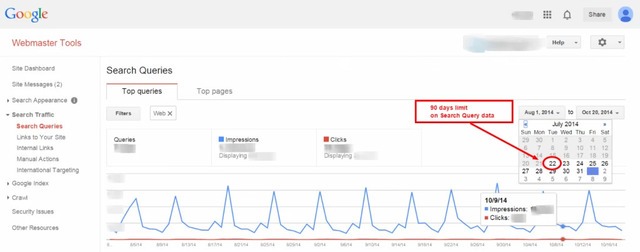
Using GWT search queries, you can see the top search queries that return your site pages in Google SERPs. You can also glean insights into your site’s content performance within a set time period of up to 90 days with parameters that include comparative page impressions and click-through rates (CTR). Google provides a video describing its search queries function, here: Note: The 90-day limit on GWT’s historical keyword data can be problematic when creating an informed, long-term keyword strategy. I discuss how the BrightEdge SEO platform solves this analytical gap further on the BrightEdge blog.

4. Google Ads keyword planner

For culling data on long-term keywords, you can also set up a Google Ads account to gain access its Keyword Planner tool. (Note: you don’t have to an ad campaign to use this resource). By simply entering your website’s URL into the first field of the Keyword Planner and selecting “get ideas,” you can readily discover more long-term keyword terms.

5. Google Analytics site search

Connecting your site’s search functionality to your Google Analytics is an effective way to gauge site-specific search intent and identify the long-tail keywords used by visitors. This article by Google’s Avinash Kaushik outlines five key insights you can gather from site search, like what info users are seeking and conversions resulting from on-site search. He elaborates on how you can deepen your understanding of search intent with internal site search analysis in this YouTube video.

6. Google’s autocomplete

Besides the resources describe above, Google also has an “autocomplete” capability built into its predictive algorithm that “suggests” search query terms for users. Drawing on the example of the “2012 U.S. presidential election” above, before completing the query into Google’s search engine, it displayed the following: brightedge can assist you in finding long-tail keywords So by experimenting with Google’s autocomplete feature, you can see long-tail keyword suggestions that might be of interest to your target market.

7. Google’s related suggestions

A second, related functionality of Google search that can offer long-tail keyword ideas is its “Searches Related to…” information at the bottom of its SERPs. (Note: this is distinct from its trending and related searches resource described above). Using the same search query of “2012 U.S. presidential election,” here is what Google lists at the bottom of its SERP: finding long-tail keywords is simple - brightedge Again, viewing the auto-generated related searches on Google’s SERPs – this time, at the bottom – you can discover other long-tail keyword terms that are closely related to yours. When it makes sense, they can be added to your keyword portfolio. Happy hunting!


,