Thank you for your interest in BrightEdge's SEO and Site Migration Webinar Assets.

Access the assets by clicking on the links below. For your convenience, we've also emailed you links to the assets for you to access anytime. For more information, please visit our resource center or schedule a demo.


Deck         Video


Share this asset with your network

 Share by email Share on LinkedIn | Share on Facebook | Share on Twitter


People who downloaded this white paper also downloaded:


Thank you for your interest in BrightEdge's Mobile Algorithm Change Webinar Assets.

Access the assets by clicking on the links below. For your convenience, we've also emailed you links to the assets for you to access anytime. For more information, please visit our resource center or schedule a demo.


Deck         Video


Share this asset with your network

 Share by email Share on LinkedIn | Share on Facebook | Share on Twitter


People who downloaded this white paper also downloaded:

Thank you for your interest in BrightEdge's How Many SEO Keywords Should I Manage Webinar Assets.

Access the assets by clicking on the links below. For your convenience, we've also emailed you links to the assets for you to access anytime. For more information, please visit our resource center or schedule a demo.


Deck         Video


Share this asset with your network

 Share by email Share on LinkedIn | Share on Facebook | Share on Twitter


People who downloaded this white paper also downloaded:

「ファントム3」: 2015年11月19日に起こったことは、品質改善アップデートか、順位操作か、バグだったのか? (2016年1月25日 Sudhir Sharma)

<p>2015年11月20日、<a href="https://www.besthostnews.com/was-there-a-google-update-this-week-around… Engine Land</a> の Barry Schwartz は、インターネット上で、19日ごろに始まったGoogle のアップデートについてレポートしました。このレポートで、自身のサイトページのランキングへの影響が報告されて、SEOやウェブサイトの運営者から、この変更について肯定的な意見と否定的な意見が寄せられました。</p>

<p class="rtecenter"><img alt="google_Phantom_III" class="aligncenter wp-image-8418 size-full" height="350" sizes="(max-width: 754px) 100vw, 754px" src="https://www.brightedge.com/blog/wp-content/uploads/2015/03/google.jpg&q…; srcset="https://www.brightedge.com/blog/wp-content/uploads/2015/03/google-300x1… 300w, https://www.brightedge.com/blog/wp-content/uploads/2015/03/google.jpg 754w" width="754" /></p>

<p>最初のころに寄せられた意見は、ランキングの向上の原因をモバイル・フレンドリーなサイトやコンテンツの充実にある、としていました。しかし、同じくらいの人数から、バックリンクの品質が悪い競合サイトの方が自社のサイトよりも上位にランキングしているとして、批判しています。Schwartz 氏は、これらのコメントからアップデートがあったのではないかと考えました。氏は、これらのコメントだけを根拠にしたのではありません。Algaroo やその他の検索結果トラッカーの図表を公開し、最近のランキングの不安定さを示しました。何かが変わったようなのですが、Google からは、誰もこの説明をしませんでしたし、アップデートがあったかどうかも公表していません。</p>

<h2>11月19日のファントムアップデートとは何か?</h2>

<p>アップデートは本当にあったのでしょうか? ペンギンアップデートやパンダアップデートの変更でしょうか? あるいは、Google の重要なアルゴリズムの変更でしょうか? Google のウェブ・マスター・トレンド・アナリストであるJohn Mueller氏は、19日の時点でTwitter での質問に対して返答しています。 この時点では、氏は、何も報告するような重要なことは無いし、もし何か変化が感じられるとすれば、それは、検索エンジンの大手が実施する年間に数百あるマイナーアップデートのひとつではないか、とのことでした。20日までにMueller氏は、Google の重要なアルゴリズムに変更があったことを質問への答えで明らかにしました。</p>

<p>12月のはじめに、サーチエンジンのブロガー達は、このアップデートのことを<em>Phantom 3 (ファントム3) </em>と名づけました。この名前は、Schwartz 氏によると、2015にあった2つの予期しないアップデートがPhantom 1, Phantom 2 と呼ばれていたからだとのことです。後に、<a href="//searchengineland.com/evidence-of-an-unconfirmed-google-update-happening-on-november-19th-237452">Search Engine Land</a> の2つ目のこのアップデートに関する記事によると、Google は、Phantom 2 が5月に起こったことを認め、品質改善のためのアップデートと呼びました。Schwartz 氏は、Phantom 3は、おそらく、これも品質改善のためのアップデートだろうと結論付けました。しかし、まだ、Google からの確認はありません。</p>

<h2>Provocative Updates to Mobile Navigational Searches</h2>

<p>いずれにせよ、Google は、アップデートを実施しました。このアップデートの正確な意図はまだわかりません。毎年、検索エンジン会社が実施する重要なアップデートについて、証拠が示されて、確認されているにもかかわらず、Google は、これまで詳細を公表してきませんでした。もし今回もそういうことなら、この件に関する興味は消えていったことでしょう。しかし、今回はこの件は、モバイル端末におけるナビゲーショナル・サーチが問題になるにつれ、より複雑になっていきました。</p>

<p><em>ナビゲーショナル・サーチ</em> とは、ユーザがウェブサイトやページのURLを直接タイプせずに、検索を行うことをいいます。例として、tripadviser.com に直接行くのではなくて、”Tripadvisor hotels” と検索ボックスにタイプする場合が挙げられます。モバイル端末では、より多くのユーザがこのナビゲーショナル・サーチに頼っています。なぜなら、完全なページアドレスを小さな端末で入力するのは難しいからです。また、モバイルのブックマークはラップトップやデスクトップのそれと比べて、使いにくいということもあります。</p>

<p>検索エンジン会社は、このナビゲーショナル・サーチから利益を得ているという事にも触れておくべきでしょう。これらの検索に対して、広告を表示するチャンスが得られるからです。インターネット・ユーザが直接ウェブサイトにアクセスする場合には、広告を表示することができません。</p>

<h2>Google のOneBox がローカル検索の競合サイトよりも優先された</h2>

<p>このようなナビゲーショナル・サーチの検索結果を表示するページのトップに、オーソリティの高いウェブサイトが表示されると皆さん考えることでしょう。Google は、これまでユーザの意図に焦点をあてることに注力する旨、常に言明してきました。また、ユーザの意図を推量するのにかなりうまくやっているように見えます。しかしながら、Mark Bergman が<a href="//recode.net/2015/11/24/google-says-local-search-result-that-buried-rivals-yelp-tripadvisor-is-just-a-bug/">RE/Code</a>で報告したところによると、11月19日のアップデート以後は、こうではなくなったとのことです。</p>

<p>実際に、TripAdvisor のCEOは、11月22日にTwitter でこのアップデートに関して苦情を申し立てました。彼は、”Tripadviser Hilton” の検索結果の例を挙げています。ここでは、サイト内検索の入り口を検索結果の下のほうに表示して見えないようにしています。Yelp のページに関する多くのナビゲーショナル・サーチの結果も同じ状況でした。これらの会社の重役たちは、自社のウェブサイトが検索結果の下位に表示されるようになったためだけで怒っているのではありません。Google は、これらの権威のあるサイトへのリンクに代えて、自社のOneBox欄を大きく表示するようにしたのです。Yelp やTripAdviser のほかに、FourSquare やZocDoc などもGoogle の自社の表示のためにランキングを下げています。</p>

<p>この問題の背景として、TripAdvisorとYelp は、EUのGoogle への不正競争の提訴にかかわっていることが挙げられます。このような苦情は、検索エンジン会社が自社の製品の販売促進を行っており、自社と利益が競合する場合に、公平な検索結果を表示していないと訴えています。</p>

<p>Re/Code はその記事で、Google のアルゴリズムにおけるコオカランス (co-occurrence) シグナル、つまり同時発生時シグナルの使用についてのGoogle の社内資料を<a href="//graphics.wsj.com/google-ftc-report/img/ftc-ocr-watermark.pdf">FTC</a>が公開していることに触れています。これらのシグナルは、通常のアルゴリズムで競合サイトのウェブサイトが表示される場合に、検索エンジンの自社製品を表示するというものです。今回のアップデートの懸念は、このコオカランス・シグナルのの実際の製品環境におけるあからさまな事例である、というものです。OneBox リスティングは、自然検索の結果に代えて明らかな広告を単純に挿入するというものとは、かなり異なります。</p>

<p>Google の広報担当者は、これが単純なバグですぐに修正する旨、報告しました。Yelp のCEO, Jeremy Stoppelman氏は、この説明を疑い、行動パターンであって欠陥ではない、といいました。TripAdviser の Kaufer氏も、これに呼応しています。これらの議論にもかかわらず、Google は翌日に修正を行い、モバイルとローカル検索の結果は元に戻りました。Re/Code は、Google が問題を解決したことを確認する記事を公表しました。</p>

<h2>モバイル検索アップデートはバグだったのか、テストだったのか、メッセージだったのか?</h2>

<p>バグだったのでしょうか? 影響を受けた企業のCEOは、これは過誤によるものではないと言っています。Google は、過誤だったと主張しています。陰謀説を信じる人たちは、単なる失敗とか、年末の繁忙期を狙った一時的な検索結果の操作とかではないといっています。これは、検索会社による独特な方法で、もし本気で検索結果を操作使用と思ったら何ができるか、競争会社や一般の人々、あるいは、政府に対して知らせようとしたのではないかと、考えています。</p>

<h2>ファントム3は、品質向上アップデートのようだ</h2>

<p>12月の後半、SEMRush は、11月19日のアップデートについて、一般的なウェブサイト検索に関する独自のトラフィック分析を公表しました。その結論は、アップデートの結果は実在し、かなり大きなものだったとのことです。調査されたうちの40%のサイトは、10%以上トラフィックを増やしたか、減らしたかしています。この記事では、このアップデートは、実際に品質改善アップデートだったとしています。また、順位を下げたサイトは、重複やコンテンツの品質などで問題があったとのことです。</p>

<p>どのようなサイトでも、ウェブサイトのオーナーは、そのページのコンテンツを分析するべきです。<a href="https://www.brightedge.com/technology/recommendations/site-audit">ブライトエ…; は、問題をあぶり出し、将来の品質アップデートやアルゴリズムアップデートによるトラフィックの減少からサイトを守ります。</p>

<h2>関連資料</h2>

<p><a href="https://www.besthostnews.com/was-there-a-google-update-this-week-around…; target="_blank">Was there a Google update this week around 19th November?</a></p>

<p><a href="//searchengineland.com/evidence-of-an-unconfirmed-google-update-happening-on-november-19th-237452" target="_blank">Evidence of an unconfirmed Google update happening on November 19th</a></p>

<p><a href="//recode.net/2015/11/24/google-says-local-search-result-that-buried-rivals-yelp-tripadvisor-is-just-a-bug/" target="_blank">Google says local search result that buried rivals Yelp and TripAdvisor is just a bug</a></p>

<p><a href="https://www.semrush.com/blog/was-googles-new-phantom-3-update-real/&quot; target="_blank">Was Google’s new Phantom 3 update real?</a></p>

<p><a href="https://www.brightedge.com/technology/recommendations/site-audit&quot; target="_blank">BrightEdge Site Audit – Assess your website and take action</a></p>

<p><a href="https://www.brightedge.com/jp/articles">ブライトエッジブログ記事一覧</a></p&gt;

Create a Robots.txt That Offers SEO Efforts

enewton@brightedge.com
M Posted 10 years 6 months ago
t 9 min read

Search engine optimization revolves around helping your content rank highly in search engines so that potential customers can find it. There are some moments, however, when you do not want the bots to crawl and rank your pages. In these instances, robots.txt can be a useful resource to help you guide the site crawlers towards the pages you deem more useful.

Create Robots.txt

The earliest form of the robots.txt was developed in the mid-1990s as a way to help site owners control the spiders that visited their websites. It has since been refined and expanded to ensure that it meets the needs of modern website designers. The instructions given in the code will be accepted by the web crawlers from the major search engines, including Google and Bing.

Robots.txt and SEO

Since robots.txt is used to tell search engine bots to not crawl parts of sites, it can sound like the opposite of SEO, but properly using these files can sometimes help the rest of the site rank highly.

For example, some sites generate two pages with identical content, such as a printable version of a web page. Google, however, frowns on duplicate content. To avoid any potential negative marks against your site, it can be helpful to block the Google robots from crawling the printable version of the page.

Robots.txt can also be useful when you are developing a new site. The amount of time it takes Google to index websites can vary widely, from a few days to a few weeks. The timetable is influenced by several factors, such as the popularity of the site. Given the unpredictable nature of how long it takes to get a website indexed, most people want to get their new websites or new web pages fully prepped before they go live. This can help them maximize their SEO capabilities before the Google bots crawl the new content.

Some people will also use the files to help keep personal information private. Since the pages will not be crawled, it will not be displayed to the public on the search engines. It is very important to note, however, that using Robots.txt files does not make the information secure. Think of the Robots.txt as a request-- a closed, but not a locked, door. Google bots will not crawl the information because it will respect the request. There are plenty of malware and spam bots, however, that will completely ignore the request and force their way onto the page. This can result in the publication or theft of this information.

It is also possible for Google to come across the information on the page through other measures, such as when the blocked page is linked to by other websites. Sites that have very sensitive information should make sure it is protected by much more secure measures, such as a firewall.

Using the Robots.txt

Creating a robots.txt file is not a complicated process, but it does have be done precisely to avoid errors. Simple typos in the coding can easily nullify it and you will end up having pages unintentionally crawled. Fortunately, Google has developed a testing tool that allows you to at least check how the Google bots will respond to your robots.txt. There are a few important rules that you need to remember when using this system:

  • all the letters of ‘robots.txt’ must be written in the lower case
  • the file must be placed in the top-level directory of the web server
  • there is only one “Disallow” that can be used for each URL on the site
  • subdomains that share a common root domain need to have separate robots.txt files
  • you cannot use spaces to separate the parameters of the query.

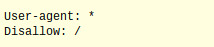
When one of these rules is broken, then the file will not work as intended. A basic robots.txt file will look like this:

creating a robots.txt basic file with brightedge step 1

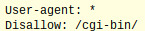
By listing the user-agent as ‘*’, the file tells the spider that this rule applies to all web crawlers. The ‘/’ after the disallow means that this rule applies to all the pages on this particular site. In certain situations, however, you may need to use the file to block a particular portion of the website, such as a directory. In this situation, you will need to replace the ‘/’ with the name of the directory, such as:

creating robots.txt disallow file - brightedge

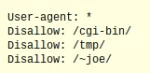
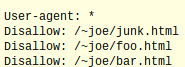
If there is more than one directory that needs to be avoided by the spiders, then the file might look like this:

create robots.txt disallow multiple - brightedge


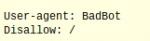
Notice in the above example that there is only one ‘Disallow’ and one directory folder listed on each line. There may also be times when you want to only block certain bots, but the spiders from other sites can come through the page. If that is the case, then the file will have to name a specific bot:

brightedge - create robots.txt specific bots

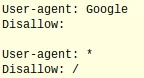
It is important to know that it is also possible to achieve the reverse. If you wanted to allow only one web crawler onto the site but block the rest, then you will need two parts to your file.

create robots.txt to allow one bot - brightedge

The first part of the file above tells Google that it is allowed to explore the whole site. Since there is nothing after the Disallow, then Google interprets it as open to crawling. The second part of the equation tells the rest of the robots that they cannot enter the site. It is important to note that you can also prevent the robots from exploring specific pages-- it does not have to be entire directories. For example, you can include this in your site code.

create robots.txt disallow pages - brightedge

The above example tells all spiders to avoid specific pages. Robots.txt is a valuable resource for those interested in minimizing the exposure of certain parts of their website. Learning how to use these codes can help people optimally construct their sites.

request a demo

,