
United SEO Uses BrightEdge to Make the Case for SEO

SEO Manager Jerome Harvey uses BrightEdge to resolve technical errors from site migration, praises Dashboards and Community for SEO insights and support

Transcript of United Airlines' SEO Story:

Right now, we're working on a massive content migration to a new CMS. We have a lot of technical issues right now with our website. We're also building a lot of the new pages in the React JavaScript framework. That's been a big challenge for us. We have about 180,000 pages indexed right now. And about 1000 of those are content pages and those are the ones that we're focusing on with this migration.

We're working on international SEO, as part of our content migration and our new CMS has the capability to translate in nine different languages. We're in the process of getting all the hreflang tags set up. Getting site maps set up for every different language version.

I'm a big fan of the BrightEdge dashboards. I'm able to log in, look at the dashboards, find the data that I need rather quickly. I can go in with data and show the leaders of our company, how much money they could potentially be getting from SEO and it's really caught a lot of people's attention at United.

But in March of this year there was a core algorithm update, and we lost 17% of our traffic. Without BrightEdge I wouldn't have the data I need to make a case for SEO.

Request a demo of the BrightEdge platform and see how you can utilize Recommendations for your company!

7-Step Guide to Site Migration and SEO Success

enewton@brightedge.com
M Posted 7 years 4 months ago
t 9 min read

The Internet evolves, companies change, technology gets better, and strategies adjust. It’s inevitable that at some point in your marketing career, you’re going to face the challenge of overhauling your website and site migration. All of those files, all of that content, all of that technology you and your team has been working on for the past few years needs to get picked up and moved, upgraded or merged. Site migrations are tricky and no two play out exactly the same. It could be that your company acquired another and now you need to move someone else’s website into yours. Maybe you need to rebrand and start using a new domain name to match. Sometimes Google comes along and says: “Hey, guess what, everyone should be on secure servers and you need to update to get with the times and move your site over to HTTPS”. Often, all of that happens all at once, and your task is to get current with the industry and your customers expectations without damaging the progress you’ve made over the years. Either way, you’re now facing one of the most dangerous tasks in digital marketing: the migration.how to begin a site migration - brightedge

What is Site Migration?

Site migration, as the name suggests, is the process of migrating a website from one domain to a completely different one. There are a number of cases where the extent of migrating a website goes deeper, including switching servers, CMS platforms, and the creation or consolidation of various branded subdomains, but quite often refers to a switching over of site domains. For the purposes of this discussion we will focus on the concept of the domain migration--in this case migrating from an HTTP domain to the more secure HTTPS. Despite being considered one of the more "basic" types of migration, it is still fraught with potential SEO dangers for those who are not sure what they are doing while migrating a website and do not have the right SEO platform and operational support.
Site Migration Risks

Screw up migration and you could lose large swaths of your organic traffic overnight. At BrightEdge, our professional services team has run case studies on more than 15 sites that went through some kind of migration in the last two years, and we saw that it only takes one or two missteps to tank a site’s keyword rankings and drop organic search traffic to near-zero for extended periods of time. It’s not pretty but you can protect your content during while migrating a website. Now that you’re sufficiently scared of the risks of migration, let’s talk about the ways you can mitigate them. We’ve seen worst case scenarios play out, but there’s still hope. If everything goes well, a site migration can be a boon for a site’s performance, not only for organic search visibility but for a number of marketing channels. After months of work compiling the data from our case study research, we’ve figured out all of the precautions you should take and even some best pro tips to ensure that your site migration goes well and manages to exceed expectations.

For a more technical breakdown of how to pull off a successful migration and keep your SEO equity intact, be sure to look at our SEO's Guide to Successful Site Migration. Additionally, if you'd like a guided punch chart guide for everyone involved in a migration project, download our HTTPS Site Migration Checklist. If you're looking for something even more simple to learn the basics of migrating a website with BrightEdge, check out our Infographic on Successful Site Migration.

7 Steps for Coming Out on Top with Your Migration

1. Start Small to Test the Waters

A migration isn’t something you want to rush into. It’s a process that requires excellent coordination across a number of teams that don’t always speak the same technical language. The best thing to do is run a small test on a sub-directory or sub-domain to make sure you have everyone on the team on the same page. That way, if there are breakdowns in the chain of command or communication meltdowns you only damage a small portion of the site and your next meeting won't be with your red-faced CMO demanding to know why traffic plummeted during migration.

2. Make Sure the New Site is Better than the Old One

This one should be a no-brainer, but sometimes designers and Web developers get a little over eager when migrating a website and all of that flashy programming ends up in a tangled mess of source code and slow load times. If you’re going to go through the process of moving the content from an old site to a new one, make sure the new one is faster, cleaner, and generally more SEO-friendly than the one you’re leaving behind. Otherwise, even if you do everything perfectly, you might still end up with poor performance. Basically, don’t make unnecessary rework for yourself.

3. Set Up Tracking Prior to Migrating a Website

Before you touch anything on your old site, make sure you have the metrics to track the migration progress before, during, and afterward. You can build a “migration” dashboard in BrightEdge to see the impact and progress. All you need to do is list the destination domain as a competitor, and build a dashboard that compares rankings, indexed pages, backlinks, and organic search traffic against your old domain.

4. Establish a Thorough 301 Redirect Map

I’m going to repeat the sub-heading here for emphasis: make sure you’re thorough with your redirect mapping while migrating a website. This is the most crucial step of your migration and I’ll tell you why: the search engines need to be told that you’ve moved your site to a new home and they need explicit change of address instructions. Otherwise, all of that link equity you’ve acquired over the years, all of those profitable keyword rankings you’ve earned, all of them will vanish. Take every URL on your site; map it to a corresponding URL on the new site as best you can. Every URL should map to a relevant new URL during migration based on what’s on those pages. Put that into a spreadsheet and it will look like this:
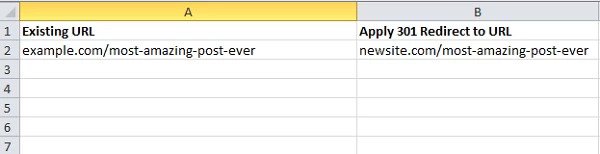
site migration example - brightedge

You’re going to use this document to apply 301 permanent redirects on all of the old pages, so that they send both users and search engine robots alike to the new and improved version of the page. Warning: your tech team may want to try using 302 temporary redirects as those are often easier to implement. Don’t let them! 302 redirects will tell the search engines that you want to keep all of the rankings and links going to the old pages, and you only want to send traffic to the new ones for a little while. This is important during migration. That’s not what we’re going for here. A 301 redirect will basically assure that all of the keywords the old pages rank for will swap out the old landing page for the new one. Mapping your URLs this way also ensures that you won’t accidentally leave pages out and serve up 404 “not found” errors on them. At the end of the site migration, none of the pages on the old site should 404, 302 or 5XX. They should all 301 redirect to a specific URL on the new one. Otherwise, you won’t retain your old rankings, and you’ll have to start from scratch on the new domain.

5. Get a Jump Start on Promoting the New Site’s Location

The challenging part of a site migration is getting the Internet to understand you’ve moved. People have linked to your old site, they’ve bookmarked it, they’ve shared it on Facebook, and they talk about it with their friends -- but you need to get them to stop talking about the old URL and start talking about the new one. This is where your PR and social media team come into play and is crucial before, during, and after migration. They need to help get the word out that your site is going to move soon. They should reach out to anyone linking to the old site and warn them that they may need to update their links. Don’t get me wrong, when a 301 redirect is applied the links will still technically work, but they’re going to lose some of their impact and their going to create a bit of confusion for visitors using those links. The best migrations we saw all started with a pre-launch promotional campaign. They built a “coming soon” style landing page on the new domain while they worked on the technical stuff in the background, and they worked hard to promote the new site to the press, their business partner, and any other fan of the old content. Doing this helped them retain as much authority as possible, and started building buzz for the site migration early, so when they finally did flip the switch, it resulted in a rankings boost.

6. Don’t Dilly-Dally on the Final Execution

You’ve done your test, you’ve got your monitoring tools and dashboards set up, your teams are all aligned and you’ve been telling everyone for months how awesome your new site is going to be. Now it’s time to get the job done. The worst thing you can do is slowly roll out the new site launch. We’ve seen from case studies that the ideal situation is to flip the switch as fast as possible and get the migration over in less than a day or two. Take any longer, and the search engines start getting confused and start serving up a mixed bag of URLs in their index. Don’t miss out on heaps of organic search traffic by being slow to act. Move that site migration fast and move it right. Here’s what you need to do:

  1. Apply the 301 redirects based on your mapping document.
  2. Update all of the rel=canonical tags on your sites so that they point to the new URLs.
  3. Update all of the internal links on your sites so that they point to the new URLs.
  4. Reach out to anyone still linking to the old URL (at least the people with influence), and ask them nicely to update their links.
  5. Update your XML Sitemap, and submit it to Google Search Console and Bing’s Webmaster Tools.

Do all of those things as fast as you can so that the search engines make the adjustments quickly and start indexing the new URLs. Once you’ve finished all five of those steps, you should start to see the new site’s landing pages replace the old landing pages in the SERP in a week or two, depending on how often search engines crawl your pages.

7. Don’t Forget Quality Control and Performance Monitoring

The new site is live, the site migration is over, but you’re not out of the clear just yet. We’ve seen migrations go swimmingly, only to have traffic nose dive a month later because Google noticed a couple of redirect loops in the internal linking structure. Don’t get caught off guard. Make sure you establish benchmarks for pages indexed and keep an eye on the backlinks, keyword rankings, and organic search traffic coming into the old site for at least 6 months. Ideally, you should see all of those numbers gradually drop to 0 on the old site and balance out as the new site rises. Make sure to check all of those internal links, 301 redirects, and watch search console for any server errors or poor indexation indicators. … Phew, that was a lot of work, but the site migration went off without a hitch and your traffic remained steady. Congratulations, you’ve successfully completed a migration! Now, please get back to publishing amazing content on your new site and marketing your brand.

The BrightEdge Platform and Successful Website Migration

maspillera
maspillera
M Posted 7 years 6 months ago
t 9 min read

No brand will make the decision to do a website migration lightly. These changes can benefit your SEO, such as if you go from an HTTP website to HTTPS, and they may be necessary in instances of renaming a company, a merger, or other company changes. Small missteps during the process, however, can cause site rankings to plummet, which in turn will impact your site traffic, conversions, and revenue. Performing a successful website migration, therefore, should only be done after careful consideration and planning. The BrightEdge platform includes a number of valuable features that can help our partners navigate this multistep process. A number of our partners have spoken to us about how the platform helped them succeed with the migration. Here are few ways you can use understanding basic website migration best practices - brightedgeBrightEdge to guide your next website migration.


Prepare the new site to be superior to the last site

A proper website migration is time intensive and includes numerous potential minefields where brands could easily end up losing rankings, and therefore revenue. To undertake a migration, it is vital to ensure that the new site has superior content and a better user experience. A quality site should be populated with high-quality, well-optimized content that aligns well with customer needs. BrightEdge partner Adobe underwent a site migration during some rebranding initiatives. To make their process a greater success, they turned to the BrightEdge platform. They used the Data Cube to uncover keywords that aligned well with the language their customers used. They did not want their content to get caught up in sales jargon, so they relied on the platform to inform and guide their content development strategies. Throughout the website migration, Adobe had to check to ensure that SEO recommendations were in place and that the pages moved to new locations were indexed. They also had to set up redirects to ensure that site visitors easily found the content they sought. Throughout this process, they relied on the BrightEdge platform for guidance. Adobe trusted BrightEdge ContentIQ following their site migration to make sure that they achieved their SEO goals. They also verified that all the necessary changes were properly in place.

“I use BrightEdge ContentIQ following website migration to make sure that our SEO objectives are met and the changes we have applied on the website are in place” - Yulia Kronrod, Adobe

Establish dashboards to track your website migration progress

Before you begin the process of migrating, you can also use BrightEdge to set up a dashboard that will allow you to monitor the progress from the start. By setting up one domain as a competitor, you can see how your new and your old domain lineup with regards to rankings, indexed pages, site traffic, and even external links to the site. This will help you gauge your progress, note how long it takes your site to recover, and will let you know at the first sign of trouble that you may need to fix something. BrightEdge partner Shoes.com migrated their site from the old domain of Shoebuy to Shoes.com. They speak highly about the ability of BrightEdge dashboards to monitor progress during a website migration.

“So [...] we created a dashboard, it’s called The Comparison Between Shoebuy and Shoes.com. There are different colors. On the left-hand side is Shoebuy and on the right-hand side is Shoes.com. So in this way, it is pretty clear to compare different domains.” - Louise Huang, Shoes.com

Using a color-corded dashboard allowed Shoes.com to monitor their sites’ performance throughout their site migration. As the new domain earned links, rankings, and traffic, they could easily compare the two domains and ensure that their process moved smoothly.

Set up the successful site migration

how to do website migration - brightedgeOnce you have your dashboards set up, you can then move forward with the migration. You will need to use 301 redirects to permanently send your traffic from the old site to the new one. You want to use 301s specifically because the redirect will live on the site permanently and you want to transfer as much "link juice" as possible.

To ensure a clean migration, you need to pair each page on your old site with a page that holds about the same information value on the new site. This ensures that customers who have bookmarked that page or follow a link looking for specific information will find the right content. This improves the user experience, which also adds value to your Google ranking.

Most brands will find it helpful to keep a spreadsheet to track their 301s. They can track which pages were paired together for redirects to ensure consistency throughout the site migration.

BrightEdge partner Cleveland Clinic completed a successful website migration with the help of our platform. They were able to complete the necessary redirects, but found that it still took a while for Google to crawl their content and understand their content and redirects. BrightEdge was a critical part of measuring the areas where there was a dip in their visibility. The insights they gained from the platform allowed them to see their progress. They could also see where the content still needed crawling. This clarity made the process significantly less painful.

“What we did find, when we worked with BrightEdge during this migration was they were very instrumental in helping us measure, where were there areas where we noticed a significant dip in our visibility and traffic and then identifying those so we could make sure that the right connections were made for redirects and that the content is being crawled.” - Scott Mowery, Cleveland Clinic 

Ask for help

Completing a website migration is a challenging, involved process where simple missteps can have serious consequences for brand presence and traffic, and therefore the company’s income. Working with trusted professionals, like the BrightEdge Professional Services team can help mitigate this risk. Just having a second set of eyes, particularly when those eyes belong to experienced professionals who have worked through site migrations before, can be very helpful. Our Professional Services team can help brands plan and execute their migration while monitoring progress and success the entire time. A website migration can be a dangerous time for websites, but when done correctly, it does not have to seriously jeopardize rankings or traffic.

Understanding how to use your SEO platform throughout the process can offer you assurance and give you the support you need to complete the process smoothly. Take the advice from our partners who have successfully gone through a website migration in the past. To learn more about how they, and others, have used the BrightEdge platform, visit our testimonials page.

Cleveland Clinic Succeeds in SEO and HTTPS Migration

Scott Mowery, director of digital marketing for Cleveland Clinic, leveraged BrightEdge to accomplish a successful HTTPS site migration for medical care provider

Maximizing Your Site Migration with BrightEdge Content Optimizer

mkirchhoff
mkirchhoff
M Posted 8 years 6 months ago
t 9 min read

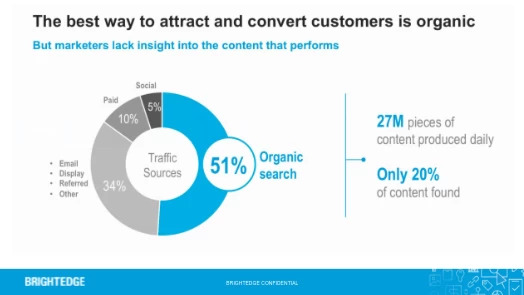
A site migration is the moving of a site from one domain or url structure to a new one. This migration might be a simple shift in domain name, or it could involve factors such as a new CMS or a complete restructuring of the website. Although a site migration is required in particular situations, it can be a perilous time. Mistakes can result in drops in rank and loss of traffic. This in turn can cause revenue losses as well as reduced brand reach and share of voice. Our research at BrightEdge has shown that an estimated 51 percent of a site’s traffic arrives from organic search-- so your position on the SERPs for important keywords will directly impact how your site succeeds overall. Consider also that 93 percent of online activities begin with search, and it is clear why brands need to take considered steps during a site migration.

Organic is key to attract and convert customers, so maximize the role of the site migration

Site migrations can be an important and necessary part of growing brands for a variety of reasons, such as merging one brand with another or changing the name of a company. When completed correctly, it can actually enormously benefit companies. Those interested in maximizing their opportunities throughout this process should pay particularly close attention to the BrightEdge product offering and how, especially BrightEdge Content Optimizer, can help ensure a productive and efficient site migration. Content Optimizer integrates with Adobe Experience Manager and helps makes the process of preparing site migration content for SEO straightforward and easy to follow.

At Best Western we really use content optimizer with our individual property websites.  Each of these websites features an About Us section and a Latest News section. It’s really these sections in which we use learnings and the scoring models of content optimizer to ensure that we’re delivering very effective content. - Felipe Carreras, Best Western

Considerations to keep in mind during a successful site migration

Brands that are interested in doing a site migration need to keep a few key aspects in mind throughout the process to minimize the potential errors while also ensuring that they harness the potential benefits of the move.

Check the redirects

You should verify that your new page and your old page are connected through 301 redirects. These redirects are designed for permanent moves. They let the search engines know which site is the one you want ranked and they help you preserve most of your rank and ‘link juice’. Ideally, your pages should be connected in a 1:1 ratio. You do not want to have multiple pages from your old site linking to a single page on the new one.

Verify your pages’ keywords and website optimization

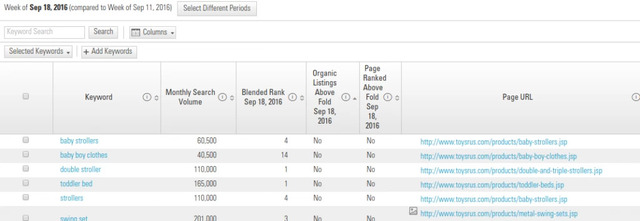
Optimize new pages for the same keywords and concepts as the old pages. Failure to do so can result in a loss of traffic and therefore revenue and reach. The BrightEdge Keyword Reporting and Page Reporting capabilities can help you identify keywords and success rates of the various pages. This will provide guidance as you begin to build the pages of your new site as well as giving critical benchmarks for ranking performance before and after the site migration.

Uncover which pages rank for which keywords to prepare for a site migration - brightedge

Ensure that you know the statistics of your old site and your expectations of the new one

Before you begin any site migration, you should know exactly what your brand hopes to accomplish during the move. This will help you establish the importance of the process and where your focus will lie.

You also want to know the statistics of your old site, such as the traffic to make sure that your new domain and servers can handle what you expect the new site will bring. You do not want to go through a site migration more than absolutely necessary, so verify that your new site can handle your expected growth and development.

Use the opportunity to build optimization efforts

When you migrate a website, you open up the code, re-create the content, and rewrite features such as HTML titles, meta descriptions, and alt text. Take the opportunity to boost your website optimization efforts. Neglecting to take care of content optimization promptly, before the site goes live, can have a serious impact on the overall rankings and power of the site.

Google’s crawl rate for your website is based on the content velocity, among other factors. Therefore, having to make adjustments after the site has gone live is detrimental to your content’s ranking positions in the SERPS and to achieving your business goals. Preparing for high rankings from its initial launch will prevent companies from missing valuable days, or even weeks, after the transfer when the site is not SEO optimized. Instead of trying to recover rankings after the launch, the site will start as strong as possible.

Completing optimization as a separate step will also waste additional valuable time. Members of the IT and marketing teams would have to go back through the site to make sure everything is optimized, forcing them to redo many of their past processes. Completing the website optimization steps during the site migration avoids wasting this time and ensures that the site ranks as highly as possible from the moment it goes live.

Using BrightEdge Content Optimizer to maximize your site migration

Working with BrightEdge Content Optimizer will allow your brand to build a site that is ready for the competitive digital ecosystem. Your material will send the right signals to the search engines and readers to demonstrate its value, helping you to attract a greater audience and a larger portion of the share of voice within your industry.

A huge benefit BrightEdge Content Optimizer brings to the SEO team is scalability. By providing SEO governance, and then embedding step-by-step instructions into the workflow, the tool allows those responsible for migrating existing or creating new content to progress easily.

Additionally, Content Optimizer was developed to simplify and streamline the content creation workflow process. To accomplish that task, a number of BrightEdge’s core technologies, such as keyword research, keyword management, and competitive analysis technologies have been incorporated directly into the Content Optimizer widget. This allows content teams to create data-driven content without ever leaving the CMS.

Step 1: Map the keywords for which your existing site already ranks

BrightEdge Content Optimizer empowers site owners to prepare each of their pages to rank on the SERPs by walking them through the process step-by-step. To maximize the potential that the website optimization guidelines provide, brands must first input a list of primary keywords for which they want their site to rank.

Brands should begin the site migration by determining the primary keywords that attract attention to their current site. This list, called the “Managed Keyword List,” is a repository of up to 100,000 keyword targets that the business has deems high value. The Managed Keyword List supports all languages and characters, providing localization optimization opportunities for those businesses with geo-located content.

The Managed Keyword List in the Content Optimizer will guide the content team to properly build the pages of the new site. Within this first step to optimizing content, creators begin by selecting one primary keyword for each new page.

Remember that as you build a new site, it is considered ideal to have a 1:1 correlation with the old site. Thus, create pages that line up with your old domain architecture and select the same primary keyword for both.

Step 2: Use BrightEdge Content Optimizer and Data Cube to find secondary keywords

In addition to identifying the primary keyword for each page, you also want to add secondary keywords to show the depth and relevance of your material. This helps to build a topical theme for the content, which provides improved natural linguistics in your content and expands the ranking power simultaneously. Including secondary keywords, particularly those that are semantically related, helps to demonstrate to search engines and users that your material has the answers that the users seek.

Without semantically-related keywords, your material may appear thin and thus will not attract the attention you want to see. A site migration, since you are rewriting your content, is the perfect opportunity to make sure that your content has the depth and keywords needed to help it stand out in the search results.

BrightEdge Content Optimizer and Data Cube functions within the platform make it easy to find secondary keywords. Content Optimizer will suggest related keywords based upon the keywords included in the list for the site. If you have other ideas in mind, you can also search using the Data Cube function to gauge value.

Step 3: Make sure your pages are fully optimized

Content Optimizer will make it easy for you to check how optimized you are for various pages. Content Optimizer provides an intuitive step-by-step instruction format to help guide content teams and SEOs on how to improve each on-page element. Specific instructions and detailed information is provided directly within the workflow, streamlining the content creation process.  

The platform also tracks your website optimization progress through gamification and point accumulation, so you can help keep your team members focused on their tasks and quickly check progress.

As you build your new pages with your site migration, you will already be working with page titles, descriptions, URLs, and related elements. Using this BrightEdge function, you can be confident that you are not overlooking any aspect before you launch your website.

Step 4: Compare your pages’ elements to your competitors

It is important to remember in SEO that not only are you working to boost the rankings of your own site, but you are also fighting to overcome your competitors. You can only rank higher by forcing other brands to drop in rank. The competitive insights offered by the Content Optimizer are therefore invaluable. Using this BrightEdge product, you will be able to see how competitors have optimized their sites for the same keywords.

For example, as you develop your own page title, you can look at the page titles utilizing the same keywords on the sites of your main competitors. This will help you maximize your appearance. You can use the competitors panel to see URLs, other SEO elements, and relevant social data for your primary topics for others in your industry. This can help guide your strategy and can offer insights into competitor weaknesses that you can exploit to raise the ranking of your own content.

During a site migration, it is also important to remember the value of comparing your old site to your new site. You want to make sure your new site is ranking for the same terms as your old one. Thus, you can even add your old site as a competitor. As you optimize the new site, you can compare your optimization on your old site to make sure that you are improving your SEO efforts on the new page.

Step 5: Build internal links between related pages

BrightEdge Content Optimizer will also offer you insight into pages you create that might be related to other pages on your domain. For example, if you are running an ecommerce site and you are building a page for a red women’s puffer jacket and optimizing it for ‘women’s puffer jacket’, then the system will suggest that this page might be related to another page on your site- the page you built for green women’s puffer jackets. Creating these types of internal links can help build your authority on your topic.

It will also make it easier for you to encourage people to remain engaged with your content. If they are interested in puffer jackets, for example, they can move from page to page exploring different colors and options. Your brand will provide a positive user experience and do a better job of building the consumer-brand relationship. Creating these links for existing content can sometimes feel tedious, so building them during a site migration is the optimal opportunity to ensure that the site is fully optimized.

Step 6: Monitor progress to see how well pages performing

The moment when a site goes live can be a nerve-wracking one, but fortunately, BrightEdge Content Optimizer has built-in metrics to help ensure that the entire process goes smoothly. You can monitor the success of the pages that you have optimized through this process to ensure that your post-migration SEO is ready to compete in the SERPs. You can see how well your pages rank, attract traffic, and drive revenue while comparing those numbers to your original site. This will give you confidence that the site migration has gone smoothly while also alerting you to any potential problems to fix as quickly as possible.

[L]everaging the BrightEdge platform as well as Adobe experience manager we were able to create over 16,000 pages of unique content.  2,056 individual property websites with well over 16,000 pages of content. We rolled this out in three months again with just a team of five individuals.  We really couldn’t have done that without the scalable nature and the seamless integration between content optimizer and the Adobe experience manager platforms. - Felipe, Best Western

A site migration can be a stressful time for any brand and website owner. While there are often huge opportunities to improve your website experience and traffic, a site migration is as much about risk mitigation as it is about opportunities. Mistakes loom, threatening to be the downfall of a successful website, while the group must move forward to receive the benefits of the move. Rather than becoming paralyzed with the anxiety of something going wrong, site owners should instead have platforms and instruments in place to help them make the transition as smoothly as possible. The BrightEdge platform, can play an enormous role in maintaining strong SEO during the process.

request a demo

Introducing BrightEdge Marketing and SEO Checklists

maspillera
maspillera
M Posted 8 years 6 months ago
t 9 min read

BrightEdge receives numerous questions from both clients and non-clients on a daily basis. These come in from a number of different places including customer support, social media interactions, and our BrightEdge Certified community forum. One of the most common asks we get is for guidance on how to perform any number of complex tasks related to SEO, content, and digital marketing disciplines.

The reality is that many of these tasks are dependent on internal and external factors that are unique to your brand. That said, there are certain guiding principles that can any organization can adopt. Integrating these into your process can help ensure that they're adopting and implementing these SEO and digital initiatives effectively.

In response to this challenge we've created a new series of BrightEdge SEO checklists designed to walk marketers through many of these complex SEO, content, and digital processes. Below is a selection of a few of the SEO checklists we've rolled out this year.

Content Funnel Mapping

BrightEdge checklist content funnel mapping logo

Sometimes simply getting content finished and out the door is the greatest challenge. For organizations who have already reached a higher level on the SEO maturity model, however, the hard part is not establishing content cadence.

Instead, the difficulty is in fitting all those disparate types of content into a conceptual model that speaks to various audiences based on where they are in the sales funnel.

Top of funnel (TOFU), middle of funnel (MOFU), and bottom of funnel (BOFU).  These SEO checklists help readers to get started learning which content types best align with certain sections of the funnel.

View the BrightEdge content funnel mapping SEO checklists

"Why SEO?"

The power of SEO is self evident to the people who work on it on a daily basis. That's not the case for everyone else, however. SEO evangelism can become and often is a necessary part of the SEO's role within the enterprise.

We put together these SEO checklists as a guide to structuring your argument in favor of SEO strategy in a way that will resonate with your stakeholders.

View the BrightEdge "Why SEO" SEO checklists

Webinar Marketingwebinar marketing seo checklists - brightedge

Webinars have become one of the most potentially powerful ways for brands to establish a direct connection with both customers and future sales prospects. They're also one of the most challenging asset types to get the ball rolling on, though, requiring a whole host of content ideation as well as technical and logistical coordination.

Our webinar SEO checklists is designed to help you wrap your head around the baseline requirements for an effective webinar campaign and let you take it from there.

View the BrightEdge webinars SEO checklists

Site Migration

Hosting your site on an HTTPs domain is not a nice-to-have feature, it's one of if not the most important baseline SEO initiatives for any brand moving forward. Not only do a number of search engines favor HTTPs sites in search results, Google has publicly stated that sites not on HTTPs will be labeled as "not secure" in the SERPs.

If you're a brand whose business in some way relies on the exchange of customer data through your website and you're not on an HTTPs domain, this is a do-or-die moment. The BrightEdge HTTPs site migration SEO checklists will guide you through this highly complex process.

View the BrightEdge HTTPs SEO checklists

Shoes.com Prefers BrightEdge to Competing Solutions

Louise Huang, SEO Coordinator, discusses BrightEdge's ease of use in executing a comprehensive site migration

Adobe Manages Major International Site Migration With ContentIQ

Yuliana Kronrod, Global SEO Manager for Adobe, leads a major migration following comprehensive product rebranding

Red Wing Drives 20% Increase in Organic Traffic

Stephanie Elsen leverages Tasks to keep a handle on SEO work across 6 highly diverse software products

SEO Manager Uses BrightEdge to Build Major Ecommerce Site Designed for SEO

Carlos Spallarossa leverages BrightEdge for ecommerce success

,