Optimizing For The Google Answer Box

Kirill Kronrod
Kirill Kronrod
M Posted 5 years 5 months ago
t 9 min read

What are Google Quick Answers?

Google Quick Answers are highly-visible text snippet answers and links placed at the top of the Google SERPs and were observed to provide a huge boost in organic traffic. Quick Answers appear up to 40% of the time for some types of queries.

In September 2014 Google introduced a new method of presenting content relevant to “how to…” or “what is…” queries, where Google answer box takes content from specific web pages and features it in the “Quick Answers” box just above the first organic result in SERP and just below paid listings. 

In addition to the content, Google Answers also provides a link to the page with this content. In its 2018 reintroduction to featured snippets, among which it includes Quick Answers snippets, Google defined them as a tool to "help people more easily discover what they’re seeking, both from the description and when they click on the link to read the page itself." When users click on a featured snippet such as a Quick Answer, Google will take the user right to the answer text on the page.

In some instances, the answer box also adds an image or several images from the page.

Find How You Rank For Featured Snippets
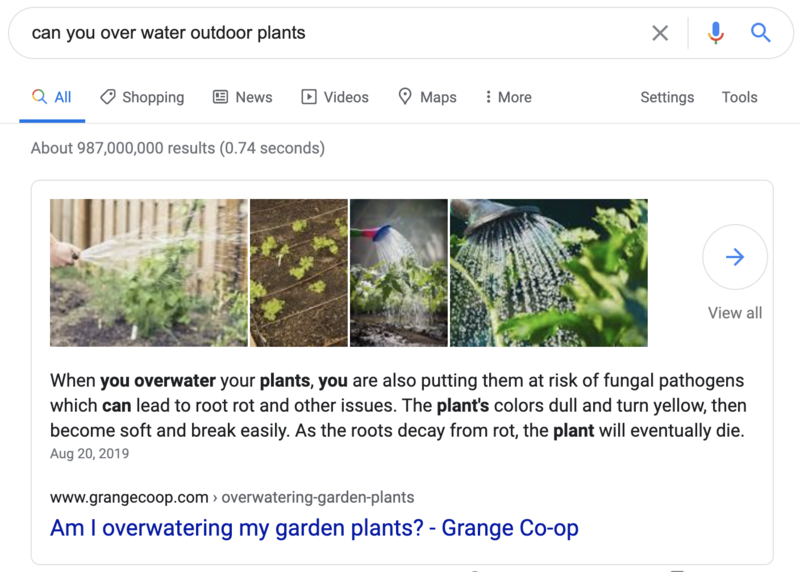
Example of quick answer search result - brightedge

Appearing in Google Quick Answers

Pages that Google finds and selects for Quick Answers on our site are high authority pages with quality, well-structure content that is theme-relevant and optimized for a great user experience and answer specific questions closely matching the query for the Google answer box. Below is a sample page that is featured in Google Answers.

This page was created to answer specific questions that users might have about a particular feature and has variety of quality content relevant to the theme of the query. The page was optimized for a great user experience: a well-structured “How-To” guide (marked in red), a video tutorial, detailed explanation of the feature and its applications, links to related features, PDFs and other resources like help and support.
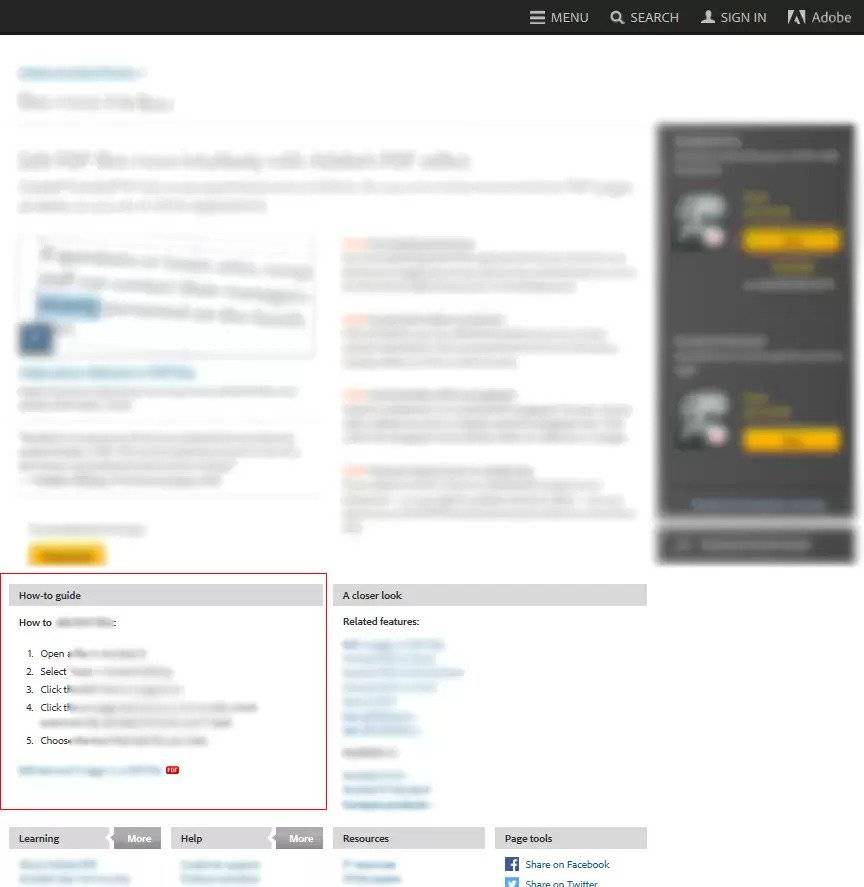
optimizing for google quick answers - brightedge

From the technical SEO standpoint, we need to ensure that page is a part of a site structure, is referenced from other pages with theme-relevant linking and is included in XML Sitemaps for better crawling (use HrefLang XML Sitemap if pages are present in multiple geos).
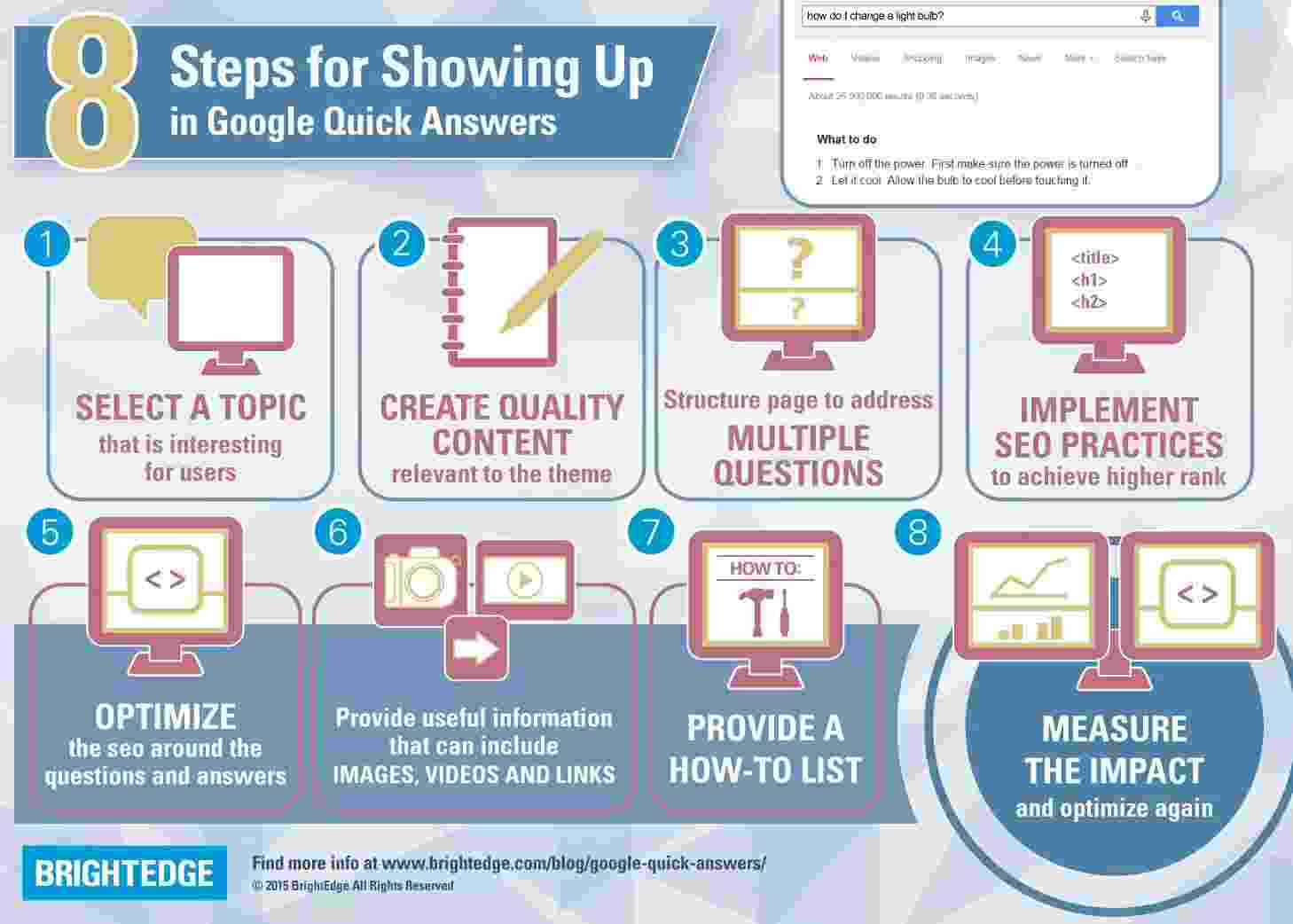
google quick answers infographic - brightedge

How high does the page need to rank in order to be featured in Quick Answers?

Usually a page that is ranking in the first position in organic results would also be featured in Quick Answers. However, we also observe instances when our pages are in the Google Answers box, even when these pages are not top ranking pages in Google and ranking on positions two to four.

In such cases our pages are preferred for Quick Answers listing when they compete with authority pages that don’t have theme-relevant content and are not well-structured. Google has recently noted that it plans to change the way featured snippets like Quick Answers work by introducing more than one featured snippet on a single SERP. This could potentially shift the strategy, as certain Quick Answer SERPs may now have several slots in which to appear, instead of just one. 
how to get google quick answers box - brightedge

Google Answers Geo targeting

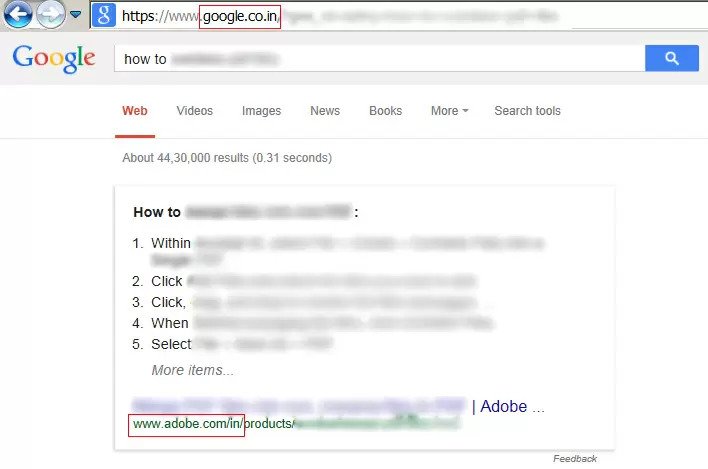
Google Answers is making its way to Geos. Thus far we saw a rise in answer box appearing in countries with English as a primary language, for example, Canada, UK, India, Australia.

It’s interesting to note that when pages are positioned well for Geo targeting (with implementation of HrefLang Sitemaps and localization for local English), Quick Answers features content and local URLs in corresponding Geo SERPs.
how do i optimize for google quick answers - brightedge

Measuring the impact of Google Answer Box in BrightEdge

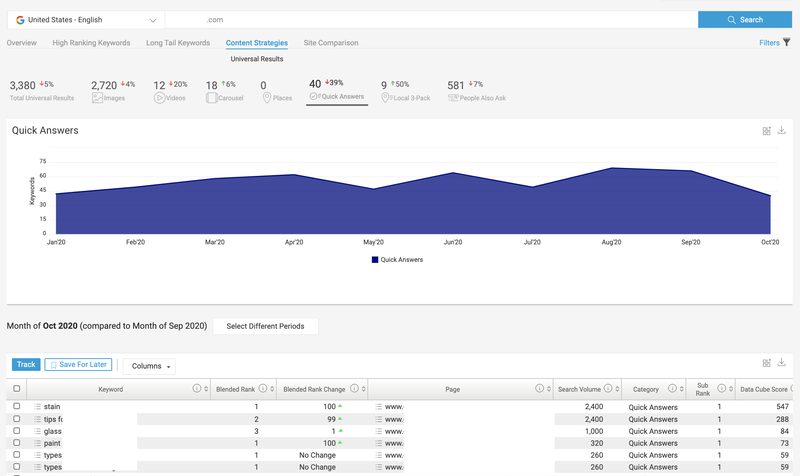
When Quick Answers were just introduced and we started to see our pages appearing there. We measured the impact in terms traffic and CTR from SERPs using Adobe web analytics and Google Webmaster Tools, and, not surprisingly, we saw solid increase for Google Answer box. What we needed to add was a more formal and easier tracking method that would allow us to understand how many of our keywords in the “how to” theme are ranking in Google Answers.

BrightEdge platform is now enabling us to do just that to score a Google Answer box or two. Quick Answers ranking report is now a part of the Keyword report, where we can measure aggregate rankings of a particular keyword group. The same report also provides details for each keyword in the group.
Google quick answer data from BrightEdge

How to optimize for and rank in Google Quick Answers:

  1. Select a topic that is interesting for your users. You can use Data Cube and Instant to find keywords with high search volumes that your audience is interested in learning more about. 
  2. Create quality content relevant to the topic. If your content doesn't answer the question the user is looking for, you're likely to miss out on the answer box.
  3. Structure the page with user experience in mind. If your page isn't easily accessible or doesn't load quickly, users will leave your page and move on. This is a signal to Google that your page isn't a quality page.
  4. Implement SEO best practices to achieve higher rank for Google Answers box.
  5. Provide useful information that can include videos, PDFs, details and links to other relevant topics. Don't leave your visitors hanging on one page. Offer other information throughout your page to drive them to remain on your site.
  6. Add a how-to list, a numbered list or bullet points. If your audience is searching how to complete a task, be sure to make the answer easy for them to understand with a short list of steps to take. An example is the list you're reading right here, right now!
  7. Measure the impact. Track your page rank with Page Reporting.

For more information, download the free BrightEdge white paper on Quick Answers.

SVS SEO Revenue up 200% with BrightEdge

Keenan Davis, Sr. Director of Marketing at SVS, advocates for BrightEdge's ease of use and deep, actionable insights

Transcript of SVS's SEO Story:

SVS is a home audio brand. We try to create immersive audio experience. Imagine watching your favorite shows--Game of Thrones--in surround sound.  We try to produce products that allow people to experience some of their favorite movies, music, streaming TV in such a way that it's just a much more enjoyable experience.

I've been a BrightEdge customer for going on nine years now, since 2011. So, I'm a bit of a lifer.

As I move roles, move companies, I always wind up going back to BrightEdge, bringing them on board. For me, the level of insight that you get through Data Cube initially. There's a lot of innovations coming up now; but all these various tools in my toolbox, at my disposal, to help me evangelize SEO in my companies; it's just super-powerful.

There's one thing with me by myself saying this is important. It's a completely other thing, when you can bring the numbers and the data to support you behind it. And the way the BrightEdge dashboard presents things in such a user friendly in way, that even the highest execs of my company can get it in an instant. That’s the part of our BrightEdge is just really strong.

From a research standpoint, for instance like the BrightEdge Recommendations is probably a really good example of that. Where if you're trying to implement technical SEO, instead of digging around and rooting around trying to find the right thing to do, it just serves up to you on a platter. But all that research aspect of it is not taken off our plate, all we have to do is execute.

A year and a half ago we had no quick answers whatsoever. We’re now at quick answers that are approaching 100 quick answers.

Everyone knows video is important, but we didn't realize how important it was for the universal search listings, so we started getting video popping up as well.

I've been with BrightEdge at SVS for four years now and have consistently grown by double digits every single year. Its peak was, I believe, two years ago when it was something like 60 or 70%. But it's no matter what it’s still consistent growth.

The revenue brought in by organic search prior to me working with BrightEdge at SVS since; it's up to 200%. It's really amazing how they were able to hone in using BrightEdge tools, how much I can run up traffic, and turn traffic into revenue.

As BrightEdge continues to innovate and add more and more resources, introducing products, it allows me to walk away from some of the other things that I have to use. The user experience of the dashboard itself, night and day when you compare the two different platforms. Those two things in particular, the user experience one is really important because I have the younger, less experienced people on my team who are trying to understand SEO. BrightEdge presents the data in such a way that it's like a light bulb goes off. And that aspect of it becomes really easy for me to evangelize SEO throughout the organization.

Google Adds Multiple Quick Answers to SERPs

maspillera
maspillera
M Posted 8 years 2 months ago
t 9 min read

Google has begun displaying multiple Quick Answers on certain search engine result pages (SERP). How does this impact optimizing for the Quick Answer box and featured snippet placements?

Buried in a January article on Google's The Keyword webmaster blog was a mention that the search engine giant was going to start displaying more than one Quick Answer featured snippet on a single SERP. The article stated:

"Another format coming soon is designed to help people better locate information by showing more than one featured snippet that’s related to what they originally searched for... Showing more than one featured snippet may also eventually help in cases where you can get contradictory information when asking about the same thing but in different ways."

By displaying more than one Quick Answer on certain SERPs, Google hopes to expose searchers to a wider array of information sources, especially in cases where an authoritative answer to the query is under contention. Of course, for SEOs and digital practitioners this change presents a lot of questions: Does this affect the process for going after placement? Will it lower the click-through rate for sites that hold the Quick Answer spot on a key SERP?

SEO benefits of having the Quick Answer

It might be hard to remember now, but there was a brief time when some SEOs viewed the featured snippets, and the Quick Answer box in particular, with mixed feelings. Early on there were worries that being in the Quick Answer position, especially for query-based keyword phrases, would actually lower the CTR to a brand's site from that SERP. After all, if the user's query is answered right there on Google's page, why bother clicking through to the site that Google is citing in its featured snippet? A 2015 case study by SearchEngineLand columnist Glenn Gabe noted a loss of more than 39,000 clicks for a site that lost the featured snippet placement for a competitive keyword. The following year HubSpot published a study that was even more conclusive: In looking at SERPs for high-volume keywords it found that sites in the featured snippet position enjoyed a CTR increase of over 114%, even when the same site already ranked #1 in the organic listings. We also know that Quick Answers, along with other featured snippet types, is playing a large role in voice search results, as noted by Danny Sullivan of SearchEngineLand back in 2016:

While not the same kind of direct impact as a click, the source attribution provided by Google Home still provides a marketing touch that connects the searcher with your brand, encouraging them to explore further if your content resonates. Having that position also prevents your competitor from getting the mention and branding. It's clear now that the Quick Answers box is a desirable place to be. But what happens when there's more than one?

Do multiple Quick Answers hurt SEO impact?

Your first inclination might be to think that this will reduce the CTR boost provided by holding the Quick Answers position. If the Quick Answers box, "Position 0" on the SERP, provides X amount of CTR boost then it should follow that introducing a "Position -1" would reduce that boost to X/2, right? (or maybe that's just if you're a pessimist like me). It's still too early to make any definitive statements, but we are not necessarily convinced that a reduction will be the case.

What is Google saying about multiple Quick Answers?

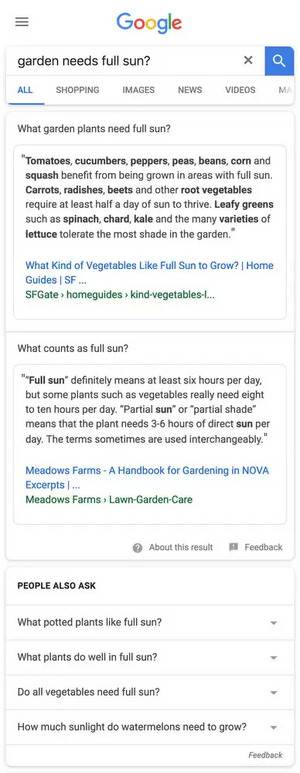
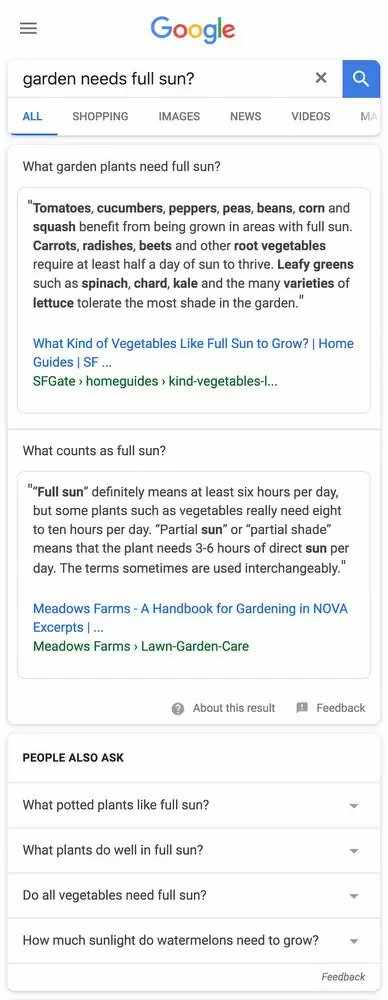
As noted earlier, Google said that it is rolling out multiple Quick Answers on a single SERP as a means of presenting additional data sources and/or points of view, especially for queries where the answer is in contention and contradictory answers exist. In another blog post, Google stated that it intends to start with what it calls "multi-intent queries" where there could be several potential intentions associated with the question being asked. For example, the query below, "garden needs full sun?": example of a featured snippet box with multiple quick answers present - brightedge The query isn't in written in full sentence structure, so Google has gone out on a semantic limb to present answers for associated queries "what garden plants need full sun" and "what counts as full sun?" in addition to a People Also Ask box underneath.


Why multiple Quick Answers won't likely affect CTR

By its own admission, Google is still in the experimentation stage of having multiple Quick Answers for a single query, so it isn't prudent to make too many predictions until there's been time for more user data to come in.

Google has said, however, that its aim in the near future is to expand the feature from multi-intent queries to also cover "guidance-seeking queries." This would entail multi-faceted queries like "is it worth aggregating smaller SEO tools?"

Theoretically, the Quick Answers section of the SERP would present you with answers covering various facets, such as cost-benefit analysis, IT compliance, onboarding, integration requirements, etc.--all of which pose a variety of new and potentially interesting opportunities for organic search marketers and SEO to get their content in front of the eyes of low-volume, high-intent audiences who are asking highly specific questions about a product or service.

In short, it doesn't seem like multiple Quick Answers will create a global drop in CTR for lower-placed answers because Google's intent is to provide different types of answers, not simply a flat architecture of competing answers.

What it likely will create, however, is a need for additional focus on optimizing the query-answering sections of your ranking content to provide the best possible answer versus competitors within the Quick Answers grid. Ascertaining the customer intent behind keyword phrases that have featured snippets on them will be more important than ever.

Effect on optimizing for Quick Answers box

Because of how Google has rolled out this change to featured snippets, we don't anticipate that the best practices for appearing in Quick Answers will change either. We suggest that for the time being, SEOs and digital practitioners stick to the Quick Answers optimization practices we detailed in a variety of places, including our comprehensive white paper on How to Get Into Quick Answers.

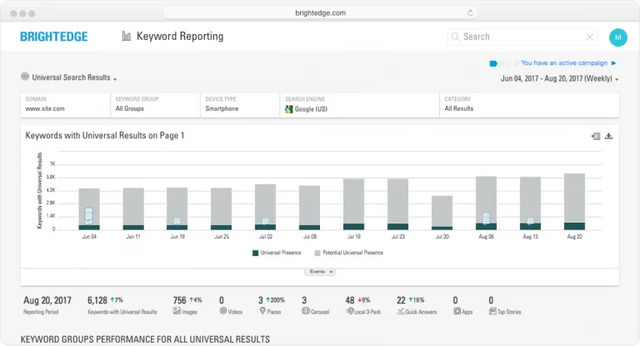
If your site ranks in Quick Answers for keyword phrases that you've identified as valuable to your brand, begin monitoring those results over time to see if multiple Quick Answer boxes begin appearing on the SERPs. You should also continue to monitor two other basic metrics:

  • Total number of Quick Answers positions you rank for
  • Total number of tracked keywords that have Quick Answers featured snippets, but you don't rank for them

Knowing the Quick Answers you do rank for will help you to narrow down your search for SERPs with multiple Quick Answers. You can create a keyword group to monitor the progress, and make sure you defend those positions. Additionally, knowing the keywords with Quick Answers presence will help you to identify and isolate ones to pursue in the near future. Once you have identified these keywords you can optimize and create content to rank for those Quick Answers. And now with this change in Google, you can run a Data Cube analysis to find all semantically related terms to make sure your content covers all major areas for that one topic. For example, keyword phrases containing more nuanced, multi-faceted queries like "benefits of marketing automation" could now possibly be opened up to many more ranking opportunities as opposed to the simple binary win-lose of having a basic Quick Answer featured snippet on the SERP. You can easily track both of these metrics by using the Universal Search Results view in the Keyword Reporting module of BrightEdge.

universal listing for multiple quick answers - brightedge

The caveat to all of this is that, as most SEOs working within a smart framework know, any amount of hypothesizing isn't nearly as valuable as real data. Observe the SERPs for the keyword phrases you care about, monitor your CTR both globally and on a per-page basis, and adjust tactics dramatically only when the data supports it and/or a Defend/Recover crisis seems imminent. For an in-depth walkthrough of how to optimize for Google Quick Answers, be sure to download our collection of 20+ best practices. 

The Google Algorithm Likely Changes Depending on the Query

enewton@brightedge.com
M Posted 8 years 7 months ago
t 9 min read

Google confirmed that its search algorithm automatically alters its weighting depending on the type of search query the user enters.

Over the past few days, Google representatives have participated in a series of conversations that reveal a bit more about the Google algorithm, confirming what many people had already suspected. It is likely that the Google algorithm actually changes how much it weights different ranking factors depending upon the nature of the search query.

Understanding what the representatives exactly said, and how this impacts marketers, can help our community craft their digital strategies.

What did Google actually say?

Google representatives Gary Illyes and John Mueller have made it clear that there are no concrete "top three" ranking factors on the Google algorithm. John Mueller also says it "makes sense" to have the Google algorithm weigh factors differently depending upon the nature of the query.

To hear the full conversation, watch the Google Webmaster Central office-hours hangout below.

It is important to note that this seems to be in opposition to what Andrey Lipattsev said about 18 months ago. At the time, Andrey had listed content and links as being the top two important criteria in the Google algorithm, with RankBrain being quoted elsewhere as the third most important ranking factor. In our opinion, however, these two conversations don't have to be mutually exclusive.

For example, take the criteria of "content." Even if the Google algorithm weighs factors differently, the quality and value of the content will likely always be a top factor. Other content factors, such as freshness, likely vary in weight depending upon the query. With backlinks, although the importance to individual pages might vary, it's reasonable to assume that the Google algorithm still looks at the number of backlinks to the domain as a whole, bringing the concept of domain authority into the front.

The importance changing weights among Google algorithm factors makes sense when you consider the different types of search results people expect depending upon the type of query they input. For example, someone interested in current events will likely want to find sources that have been published within the last day for up-to-date and accurate information. Thus the freshness of the page will be taken into account to determine the rankings.

On the other hand, a person looking for scholarly research topics will want to find sites that have greater longevity, backlinks, and other authority markers that indicate the trustworthiness of this individual page.

What does this mean for marketers?

Google weighing factors differently depending upon the exact query and intent behind it is another manifestation of Google’s desire to promote optimal user experience. For example, if backlinks were weighed heavily for every search result it might be difficult to get updates on the latest in current events. On the other hand, if they were never considered, it would likely be too easy for sites promoting incorrect academic studies and insight to gain a foothold in the search engine. 

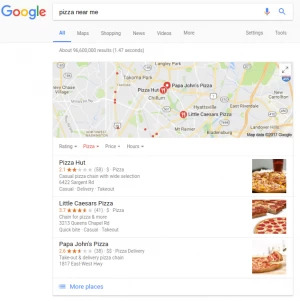
local serp with brick and mortar reviews after google algorithm change - brightedge


For website owners and search marketers, it continues to be impossible to tell exactly what Google weighs heavily for a particular industry, but we can make educated guesses based on what customers likely want to see when making queries. We do know that Google likely considers content, links, and RankBrain to be among the top considerations, and thus SEO strategies should consider these factors. Within each category, however, considerable variability remains. 

You should focus on the factors that make the most sense for your individual content, such as reviews and local SEO for brick-and-mortar businesses or fresh, regularly updated sites for news companies.

We recommend that our partners and other members of the BrightEdge community focus on understanding the user intents applicable to their site. Analyze the SERP for queries that drive traffic to your site to better understand how Google interprets the user intent for those questions. Use those insights to determine the optimal types of content for your customers and 

the factors that will be the most important in the rankings.

You can also use the BrightEdge platform to find keywords that relate to Quick Answers and other rich answer displays on Google to create a stronger, more intent-driven strategy. As you create content, monitor your progress in BrightEdge to see how well you rank and drive traffic that actually drives revenue.

Google's end goal is to ensure that they're matching users with the content that has the greatest relevance and value for their needs. Though we now know that Google doesn't have a "top 3" ranking factors that applies uniformly to all SERPs, we can make educated estimates about what Google prioritizes for particular user intents. Brands that align themselves well with a positive user experience will increase their chances of earning a strong Google ranking.

5 Tips for Search Engine Optimization in Australia

cbao
cbao
M Posted 8 years 11 months ago
t 9 min read

The complex, constantly changing world of search engine optimization can feel a lot like standing on the golden beaches of Australia: the sands of SEO never stop shifting under your feet. Google’s algorithm updates continually change the game, requiring SEOs and content marketers to remain light on their feet and adapt their strategies to remain competitive. In fact, 82% of Australian marketers surveyed by Content Marketing Institute say that they are investing in content marketing. Yet, only 28% report that their usage of content marketing is effective.

In this dynamic landscape, it’s crucial to have an integrated content and SEO technology that can peek behind the curtain to reveal the true search intent of your target audience. It’s also important that your keyword research solution allows you to go beyond the domain and analyze your site -- and your competitors' -- at the page URL level, so you can effectively target specific topic and content strategies for your full spectrum of products, services and business objectives.

Here are five tips to help you maintain your sanity and success in the Australian SEO game. 

1. Know Where Your Search Engine Optimization Stands

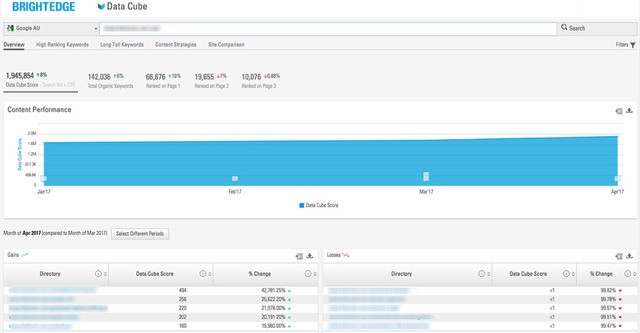
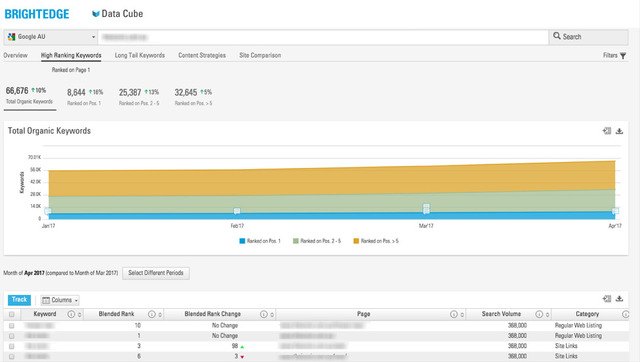
Creating a successful SEO strategy begins with a clear understanding of where you stand today. Search marketers in Australia now have unfettered access to real-time and historical research for topic and content trends via BrightEdge’s Data Cube. As one of the best SEO platforms, BrightEdge arms marketers the essential means to research and report on key SEO insights. The BrightEdge Data Cube now gives you insight into how your site is trending – and that of your competitors – at both domain and page URL level.

search engine optimization australia using brightedge data cube 1

2. Identify Your Biggest Opportunities

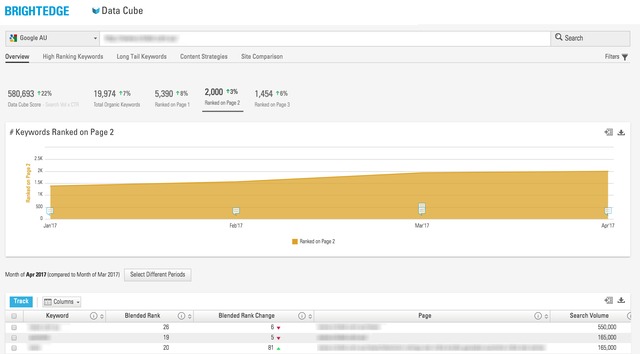
Now that you know where your SEO stands, you’ll want to identify what are the low-hanging-fruit topics that can provide you with easy wins. These are the keywords for which your site is currently ranking on Page 2. BrightEdge Data Cube can help you research into that.

Even better, you can identify exactly what types of content will help you target these keywords to deliver the greatest SEO benefits, including images, videos, carousels, places, local 3-pack, and Google Quick Answers.

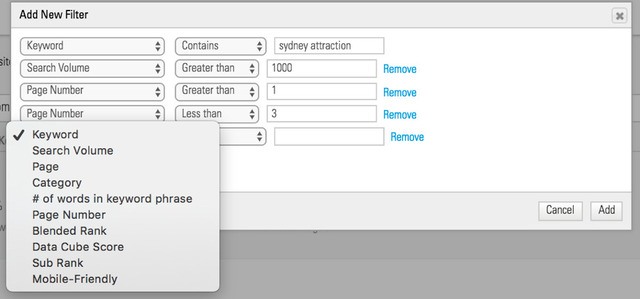
Furthermore, Data Cube has advanced filtering capabilities that allow you to narrow your research with a number of parameters. For instance, you can focus your research to only look at keywords with 1000 more searches per month. To make it even more specific: you can search with several conditions all at once, such as “show me only keywords that contain certain 'sydney attraction', with more than 1000 searches per month, and currently rank on Page 2."

search engine optimization Australia using BrightEdge Data Cube 3

3. Win With Data Trending 

Immediate information, right down to the hyper-local or micro-moments, are indispensable to adjust content strategy and meet the needs of consumers in a specific place or time. However, changing the course of your campaign by making quick assumptions can also take you off-track from a winning strategy. For example, maybe you’ve noticed that your overall Page 2 listings are growing. Your alarm will be set off immediately...but do these changes indicate content decay or new opportunities? Trended data allows you to step back and examine the bigger picture. Then you’re able to take informed actions to adjust your SEO tactics for sustainable wins.

search engine optimization australia using brightedge data cube 2 

4. Analyze Competition

Good search engine optimization always includes a focused competitive strategy. Data Cube can shine a light on keywords that are delivering big wins for your competitors, but for which you may not even be ranking. Trending data also gives you insight into how and where your competition is winning or losing, not just in the moment, but over time.

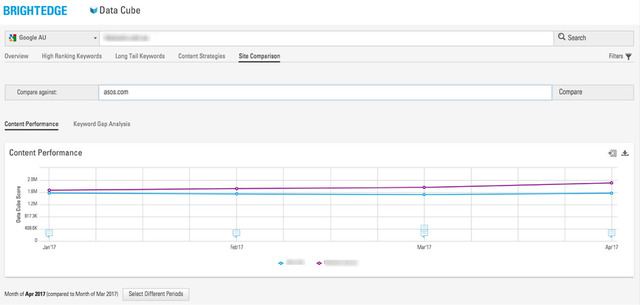
Additionally, Data Cube can show you how your competitors are approaching content strategy overall. Are they learning and improving over time? Are there distinct patterns in their strategy that you can exploit? Do they lack a methodical approach altogether, indicated by the trended data that they’re all over the map, and trying to find something that sticks? Site Comparison within Data Cube gives you all of this powerful competitive knowledge to enable you stay agile and informed.

search engine optimization australia using brightedge data cube 6

5. Protect Your SEO Equity During Site Migrations

Imagine you've successfully implemented a winning SEO and content marketing program, and are ready to hit the surf: the last thing you want, is any damage to your SEO equity. Even led with "First no harm" rule, any redesign, or migration to your website might deliver a hit to your SEO rankings.

BrightEdge ContentIQ is a powerful product that will give you detailed information about the key site metrics before and after a site migration. For a quick spot check, you can use Trended data in Data Cube to see if your overall Data Cube score is increasing or reducing after the site migration.

Get Started Today

Hope you find these 5 tips helpful. Now, if you want to learn more about how to organize and operate an SEO team, read our other blog about SEO Management.

Demo to maximize organic search

Webinar: The Power of SEO and Content and the Customer Journey Q&A

A BrightEdger
A BrightEdger
M Posted 9 years 3 months ago
t 9 min read

By Kevin Bobowski and Erik Newton

On 1/31 BrightEdge SVP of Marketing Kevin Bobowski and VP of Demand Generation Erik Newton hosted a webinar that generated a lot of interest from the BrightEdge community. You can view an on-demand version of the webinar.

We did not have time to answer all the questions, so we will address them in this blog post. The webinar topic was using customer journey analysis and micro-moments to approach and succeed in the Universal Content area of the Google SERPs.

The webinar explained the thought process and then went into detail on 4 micro-moments: I want to know, I want to go, I want to do, and I want to buy.

We combined a use case with a sample SERP, showed the BrightEdge reporting that gives insight, and then did several quick how-tos to help achieve those positions. We followed that with a review of competitive analysis and assessment.

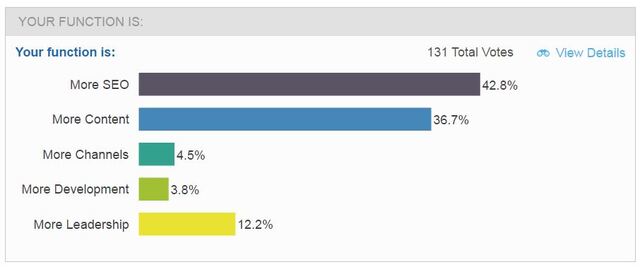
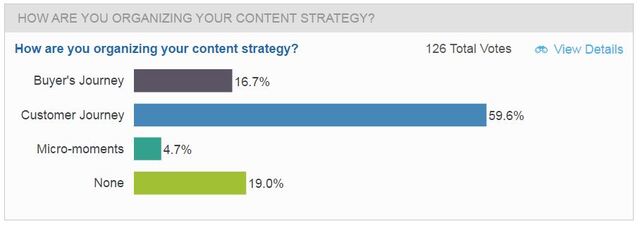
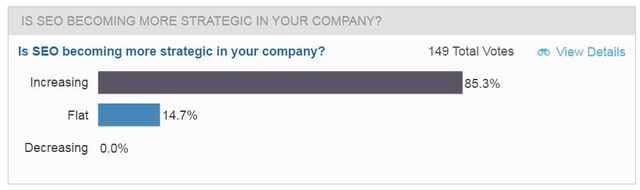
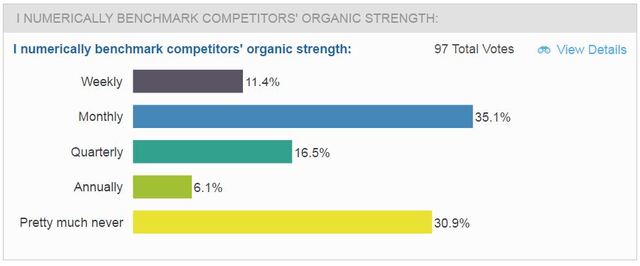
There were 6 live polls during the webinar, the results of one included below:

brightedge customer journey analysis webinar poll on function

What is the best way to show revenue growth from SEO initiatives targeting Quick Answers?

The Quick Answer pages you rank for are likely to be specific and longtail style, meaning you will have a unique landing page for each topic. As you earn the Quick Answers, add them to a Page Group in BrightEdge Page Reporting to assess total traffic. Subtract the traffic to that page from before you had the Quick Answer and that will indicate the lift.

Here is the URL for the Quick Answers white paper we mentioned in the webinar.

How do I view my Quick Answers performance?

Go to BrightEdge Data Cube, type your URL, click on Content Strategies, select Quick Answers.

I see my competitors (personal injury law firms) listed in our local place listings as well as in other local searches in google, but they don't have a local office here at all. Why do they rank in so many local searches and page-one results of organic as well?

It is possible they are paying for the position in Local - look for the ad mark. It is also possible they have a shell office in your area and have done the footwork to register that location with Google My Business. As to why they rank well in general, I would have to guess that they are doing a decent job of content marketing, SEO, and generating backlinks.

What are the B2B stats regarding micro-moments? and Do you find the Local 3-Pack or the "I Want to Buy" or the Google Places queries are relevant for nationwide B2B firms?

This blog from Greg Sterling lists the data and the sources.  While B2B data for Local and Places may be less relevant in B2B, the Quick Answers opportunity is highly relevant as customer journey analysis shows B2B buyers are doing extensive research online before even contacting providers.

Secondly, B2B buyers often use desktop for their queries, but peer-based reviews and recommendations or even social-targeted ads or account based marketing could cause them to make mobile queries. Younger generations are more mobile and sometimes entirely mobile, so micro-moments are an opportunity in all segments.

Do you have an example of good B2B content marketing?

Yes, there are many within the BrightEdge community. The asset types are: site, blog, white paper, research paper, e-book, case study, infographic, images, and audio. Take a look at the BrightEdge Resources Center for ideas.

brightedge asks how brands are organizing content for customer journey analysis

How would a national or regional service provider compete with local providers?

If the national provider has local locations, the customer journey analysis says that you would optimize the location pages of the site aggressively. If it is an online national then I suggest content marketing to rank well generally and go for How-to as we showed in the Home Depot example in the presentation.

What if you're national with many local locations?

You will need to track and optimize each location separately to get those local store pages to rank.

What's a best practice for using real search queries for web or blog content?

Targeting demand is the best first step for content generation. Target high demand queries to "fish where the fish are". It increases your chance of generating traffic that impacts your business. This process is why more than 22,000 users love BrightEdge and the Data Cube.

brightedge customer journey analysis webinar poll on seo strategy

Our web site is horrible. We sell nearly 100mm via Home Depot.com, Amazon, wayfair, etc. How can SEO up rankings inside those portals?

Well, congratulations on doing such great volume through your channel partners. Channel strategy and execution are always tricky. We are planning to cover shopping platform optimization in a future webinar, so watch for the webinar invites.

What kind of recommendations do you give for the existing content that is ranking - if you've done meta data/headline changes as well on-page?

If your meta data, H1 and H2 are tuned, then work on content depth and density. We are guiding to 1500 words and 2-4% keyword topic density. Then consider schema data. If that is on target then it is backlinks.

On the Share Insights Roadshow, we had audience members advocate for their cities.

The 4 cities we have announced are New York 5/8, Chicago 6/8, San Francisco 6/21, and London 10/5. We plan to add many more events across the US and internationally, so check back on the Share page.

Is there a suggested dashboard or report in BrightEdge that can display overall impact from applying some of these recommendations?

There is not a pre-formatted template, but the Data Cube is easy to view and from there you can save the reports to a dashboard. If you would like help with that, please let your CSM know. We will pass along your idea to the product management team.

I recently got access to BrightEdge. Do you have a webinar or recorded training for learning on how to use BrightEdge?

Yes, we do! Please contact your Customer Support or Onboarding Manager to view this.

What is AMP?

AMP is accelerated mobile pages, a markup defined and supported by Google to make content appear more quickly in mobile devices. Kirill Kronrod from Adobe sent all of us these links about AMP.

I would like to do a blog with BrightEdge on an AMP case study.

Great, customers are always welcome to propose and deploy blogs and case studies with us.

Is AMP just for news pages and local pages for now? Or do you see other possibilities?

Google is advocating for AMP strongly and has indicated it will become a factor in other types of content ranking. We believe the community should keep an eye on it by tracking AMP Preferred pages in BrightEdge and consider using BrightEdge Content to find and create content because it automatically creates AMP-enabled pages for our customers.

Thanks for the comprehensive presentation! Do you still consider Striking Distance terms, terms in positions 3-20?

Thanks for joining us. Yes, we think that is a good range because positions 3, 2, and 1 get disproportionate exposure and traffic, especially in mobile. Given the mobile-first push, we are recommending customers to track mobile and desktop separately as we are seeing different results on 73% of queries already and rising each month.

brightedge customer journey analysis webinar poll on competitor benchmarking

The care micro-moment is for the moment that a customer has the product and is using it. I think this is a really important.

Good point. At BrightEdge we see marketing as a vertical function across the whole customer lifecycle, and SEO plays a role all the way along. We focused on know, go, do, and buy in this webinar and could expand the micro-moments in a future webinar.

What else did Kevin buy at The Home Depot besides the dimmer switches?

I picked up light bulbs, grass seeds, and fertilizer with my 3 dimmer switches. Nice add-on sale from their successful I-want-do micro-moment how-to video.

request a demo

Wellbiz Brands Succeeds in SEO in 4 to 8 Hours a Week


CPM google serp layout changes

Adobe Drives Double Digit Growth in Trials from Organic with BrightEdge


CPM google serp layout changes

97th Floor Agency Wins with BrightEdge and Quick Answers Reporting


CPM google serp layout changes

I Want to Know: The Original Micro-Moment - Part 2

A BrightEdger
A BrightEdger
M Posted 9 years 10 months ago
t 9 min read

This is part two in the micro-moments series. Last time we talked, we focused on “I want to go,” and how it closely connected to the local three pack. Towards the end of the post I mentioned how to apply it to other micro-moments as well. Today, we'll shift focus to the "I want to know" micro-moment.

The "I Want To Know" Micro-MomentI want to know micro-moment - brightedge

This is one of the most common micro-moments that we see in the search landscape. In fact, “I want to know” spurred the original search intent since the days of ten blue links and even before. This micro-moment represents users who are looking for information on a topic without a specific business related intention. These users search to find content that answers their question clearly and accurately. Once they have this information they can progress from "I want to know" and to the next micro-moment where they can use the answer they got to decide what to do next. "I want to know" is a very strong mobile micro-moment as well as a traditional type of desktop search. Use of mobile phones to find answers to questions or to pull up additional information to support a conversation has become commonplace. The board room, the park bench, and the dinner table make up locations that see heavy use of mobile search and the "know" micro-moment in particular.

SERP Features

Google seeks to provide users with clear answers to their questions. It might seem that this micro-moment is the catch-all for keywords which don’t belong to another micro-moment. However, Google's strategy indicates otherwise. A number of distinct SERP features indicate that Google believes a given keyword belongs to the “I want to know” micro-moment. If Google provides distinct and different SERP features, they see different user intentions on those keywords. Here are some of the SERP features that Google uses to provide information in response to "know" search queries.

Quick Answers

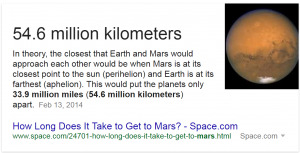
Quick Answers is a very popular SERP feature that does what it says on the tin - answers a question with a short blurb of content. You have probably seen it before even if you weren't aware of it a the time. Here's what it looks like:I want to know mars quick answer - brightedge

This is probably the most intuitive feature of all for this micro-moment. Google answers the user's question directly. It doesn’t carry any additional context besides the answer to the question and an attribution link to the page which provided the content. This shows that Google understands that users searching this keyword are looking for a piece of information.

Knowledge Graph

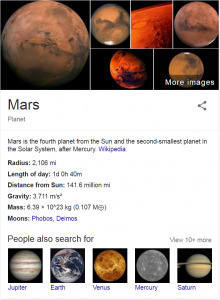
Knowledge Graphs help Google provide critical information about a specific object. They have become more common lately as Google has built out their understanding of different object. Here's what a Knowledge graph card looks like as a quick example. mars I want to know knowledge graph - brightedge Knowledge Graphs are provided when the query identifies a specific object (usually a person or a place). This SERP feature differs as it doesn't always have such a clean mapping to the source website as this example does. The example pulls from Wikipedia, but Knowledge Graph cards focused on brands are often not sourced from the brand website directly and don't have a clear link to the site. Knowing this, Knowledge graph is a bit more difficult to deal with in the context of digital marketing. However, it does clearly serve the purpose of answering user questions and providing information aligned with the "know" micro-moment.

Conclusion

The "I want to know" micro-moment is a huge and very common micro-moment. Google does their best to identify these situations, and provide specific result types that will provide the best experience for their users. This helps simplify the marketer's job. Using the SERP features as a guide, it is possible to understand what micro-moments a keyword belongs to. Then you can create and execute a content strategy that allows you to build better content based on what users seek in any situation.


,