How Your Content Audit Can Help You Digitally Mature

enewton@brightedge.com
M Posted 9 years 11 months ago
t 9 min read

For brands to see genuine success from their digital marketing strategies, they need to develop mature practices. They must grow from their early, rudimentary efforts that yield little success and become a highly efficient and effective content-production organization. Brands that reach these upper levels of maturation are able to scale their content production across their business, accurately measure their progress and results, and provide innate value to their customers. A recent survey of B2B businesses, however, found that only 8 percent viewed themselves as being at this late stage. Before looking at content audit, let's dive a little deeper into the survey results. More than half of the surveyed categorized themselves as being at the middle stages, described in the above survey as the adolescent and mature phases. These brands see some success and are beginning to delve into accurately measuring and integrating their processes across the organization. A correctly-run audit can provide brands with the positioning they need to progress further in marketing maturity and begin to build a content production system that will advance their organizations online. Here is how to take your content audit, and your business, to the next level.

What is a content audit?

A standard content audit is the process of categorizing the content you currently have to better understand your strengths and weaknesses. Armed with this information, you can then move forward and fill in any gaps, strengthening your online presence. The basic audit will follow these steps. Content Audit BrightEdge

1. Take an inventory of current content

You want to look at all the current content available on your website, including your main site, blog, and gated content. You need to have a complete list so you can accurately determine where any gaps in your content creation exist. You will also need to be checking for any duplicate content.

2. Evaluate if content is accurate and useful

Not only do you need to know what types of content you have available for users, but you also need to know if that content is accurate and useful. Content that needs to be updated because it now contains incorrect information, for example, should be addressed. You can provide visitors with better information by including links to updated posts. Develop a rating system that will be able to help you quickly gauge how important a piece of content is. Look for the value it offers users and how well it meets the guidelines you want to establish for your brand. Grade your content based on how much it needs to be updated. Feel free to test your knowledge with BrightEdge Digital Marketing Quiz or SEO Quiz.

3. Measure traffic and engagement rates for content

You also want to see how well your content is drawing traffic and if it is capturing the attention of your visitors. Note the types of content that seem to be resulting in the highest engagement rates. Look for patterns in styles and topics that can help you better understand the needs of your audience.

4. See how well the content is organized on the site

Successful content marketing also requires taking a careful look at how your material is organized on the site. Customers and Google alike want to see sites that they can easily navigate to find what they seek. This means making URLs easy to understand, labeling features on the page clearly, including inbound links that are useful, and making it simple for people to return to the homepage.

5. Check the optimization of the content and see where weaknesses lie

Have a checklist prepared of optimization features that you want for every page of your content. This should include the basics such as:

  • The keyword in your H1 and H2 tags
  • Alt tags
  • The keyword in your URL
  • An engaging, customized meta description
  • Internal links to relevant pages

content gap for content audit - brightedgeAny pages missing these features should be edited to help them rank higher.

6. Determine what content is missing

Once you know exactly what content you have published and how well it is helping you to meet your business objectives, you then need to determine which gaps you should fill. Look for trends in your content-- such as blog posts that are missing images or posting multiple pieces related to your product and fewer pieces pertaining to the top of the sales funnel.

Taking your content audit to the next level of marketing maturity

Although this basic content audit can be helpful for your marketing efforts, those who want to mature in their content marketing strategy can also use this opportunity to amplify their efforts and start to see improved results.

1 Map all your content to the buyer’s journey for specific personas.

For you to mature in online marketing, you need to know exactly who you are addressing and what they want to see from your brand. You do this by understanding your targeted customers’ pain points and concerns. You also understand where they are on the path towards a purchase and the type of information they need to encourage them to move forward. Once you have this information, you can align your current content to this path and gain a clearer picture of what you need to produce and where you need to focus your efforts to better move people towards conversion. You will also be able to produce more effective calls to action.

2. Use more in-depth metrics.

The more information you can gain concerning the impact of your content, the better you will be able to develop an effective and scalable strategy. Look at statistics related to your backlink profile for the pieces of content, noting the topics and styles that seem to attract the most high-quality attention. Measure the impact of different pages and funnels on sales and conversions. For example, on the BrightEdge platform, you can create groups for different types of pages, such as those related to specific topics or those targeting specific customers, and then monitor those groups compared to sales and conversion data. You can also watch month-over-month and year-over-year data to see the impact of your efforts to improve the success of your pages.
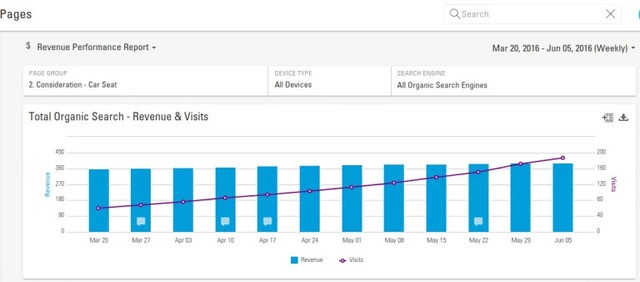
Content audit example with brightedge

3. Make sure your content efforts stretch across specialty and departmental boundaries.

One of the focal points of the marketing maturity model is making sure that your content development efforts become integrated across the organization. This means that content should play a role in a variety of business functions, including customer service and PR. Monitor how much content has been developed to fill these roles and how well they are helping to improve the customer experience and the brand reputation. You also want to check how well your marketing efforts stretch across the different specialties within the marketing department. Your content experts, SEO specialists, paid search professionals, and social media contributors should all be collaborating on the creation of effective content and means of distribution for specific pieces. A content audit can be an effective, helpful means of boosting your content marketing effectiveness and providing the lift your entire organization needs to mature in their marketing efforts. Take this opportunity to go beyond the minimum and instead enhance your content production effectiveness and efficiency by becoming a more integrated, data-driven, and content-oriented organization. 

How to Perform an SEO Audit for Maximum Benefit

Default avatar
Lennon Liao
M Posted 10 years 11 months ago
t 9 min read

Auditing your website's content is much like undergoing a physical exam. You may dread it at first, but it's a smart practice that uncovers focus areas to improve your overall health. It also helps you understand what's working and what's not in your approach. This is the same for SEO.

As a company that devotes valuable time and resources to every marketing channel, you know how essential it is to budget and plan for results. An SEO audit will help you accurately assess the return on your website’s content investment, and formulate an informed strategy looking ahead.

What is an SEO audit?

An SEO audit helps site owners break down the different components of SEO. Audits also pinpoint their weakest points, and eliminate any errors that could be damaging their rankings in the SERPs. As sites improve rankings through SEO, they will naturally receive more organic traffic and position themselves for tremendous growth.

A thorough SEO audit will look at a variety of factors including:

  1. On-page SEO
  2. Technical and Accessibility SEO
  3. Linking

According to a study we conducted at BrightEdge, an estimated 51 percent of all your website traffic comes from organic search. Other factors such as direct traffic, paid search, and social media account for less than half your traffic combined. This means that a site with poor SEO could be missing out on enormous potential for growth and profit. An SEO audit is critical for understanding site performance in search engine rankings and how that position can be improved.

How do I complete an SEO audit?

There are a variety of different tools available to help sites successfully complete an SEO audit. You can use a combination of a few different platforms, such as Google’s Webmaster Tools, to check for a variety of different factors.

To establish your baseline, start from “ground zero” in an initial SEO audit, you need the right tools. Then, you need to define metrics and gather data around those metrics. Once you’ve delved into the data and interpreted what it means, you can set goals for your site’s content performance based on those insights.

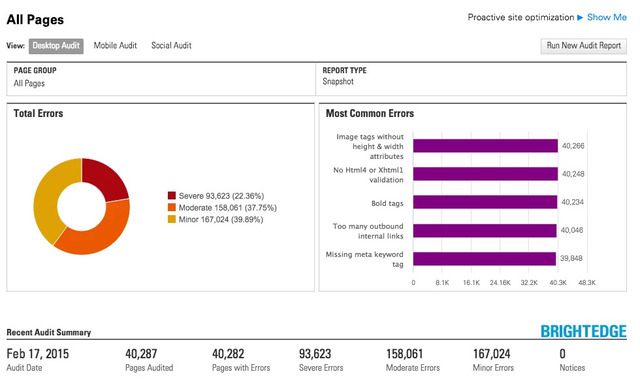
BrightEdge offers clients a thorough SEO audit using ContentIQ that can provide them with the results in a single dashboard. This can help them identify clear tasks to complete and assign jobs within the platform for the site to be fully optimized.

BrightEdge SEO Audit page review

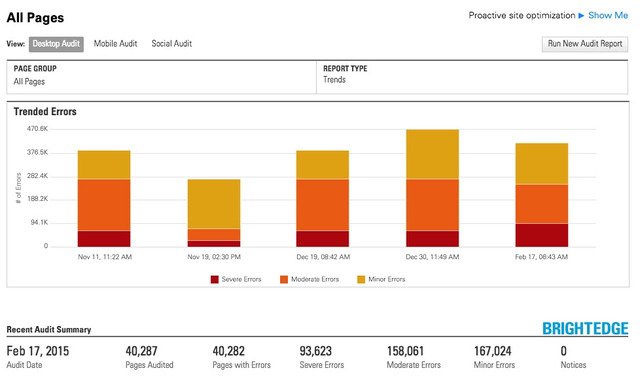
The easy-to-read dashboard makes it simple to keep all errors and progress made in a single place so that the SEO audit can be regularly monitored throughout the process.

BrightEdge SEO Audit Trended Errors

An SEO audit is a critical component to benchmarking, planning, and keeping a website optimized and prepared for the demands of high-ranks in SERPs to generate traffic. Websites should regularly perform an SEO audit and review their sites to ensure optimal site function. When performing an SEO audit, review the major components to ensure that the audit is thorough and maximally useful.

SEO audit for your main web pages

For your main website pages, you’ll want to collect all the data, but focus on the Web pages that are key to your business. On a spreadsheet, you may organize those key pages so they are positioned below one another; that way you can see the metrics for each page and how it fares against other important pages in that group.

The most important pages of your site typically represent the “core” of what you do. For instance, your home page, and key information-rich pages or landing pages likely would be priority for scrutiny in your audit.

That said, your most important pages might not necessarily be the best-performing pages. Findings such as this underscore the value of an SEO audit, informing both your strategy and resource-allocation decisions for the site. By simply knowing which Web pages need bolstering, you can then focus your SEO efforts on them for the coming months.

You may also choose to do a second-tier prioritization of your Web pages. Identify, based on what the data is telling you, which pages you can make small tweaks to that will move the needle drastically. At BrightEdge, these seemingly minor yet quantum content optimization opportunities are referred to as “striking distance”.

SEO audit for your blog pages

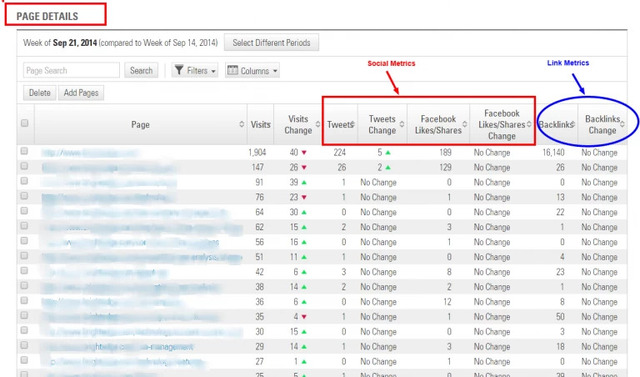
While pageviews, bounce rates and time on site are all important metrics to gauge the success of your blog content, in today’s current Web environment, you’ll need to measure social signals. These will indicate how (or if) people are engaging with your blog content.

By examining the number of Facebook shares, tweets, and Google+1s, for example, you can only determine what is resonating with your readers, but also what direction you should take your blog overall. For instance, if you discover your blog is receiving more engagement from how-to pieces versus interviews, you may choose to include more instructional posts.

An obvious “red flag” is if your blog content is not being shared at all. In that instance, you need to examine ways to improve upon that, such as creating a more solid community around your brand or ensuring that the blog is set up well technically for social sharing.

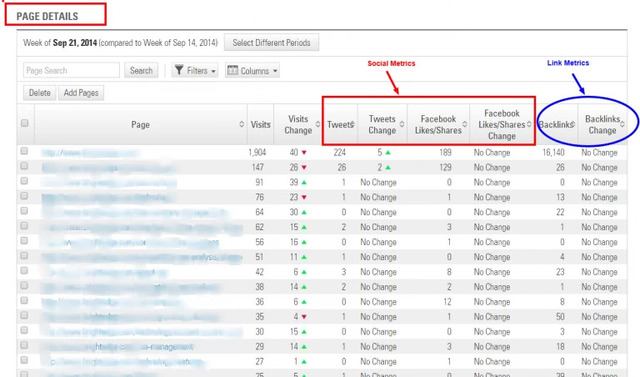
Using BrightEdge, you can get a picture of your engagement metrics in the “page report,” as shown in the following screenshot:

social media seo audit with brightedge

You’ll also want to consider backlinks as part of your blog metrics. These show a vote of confidence that your content is likable and sharable. Blogs with a lot of quality links show “credibility”.

Your own social media metrics can be informed by a relatively quick secondary SEO audit of your main competitors, their backlinks and social engagement metrics. This type of analysis can be used to come up with similar ideas in that niche.

Optimize on-page SEO for your audit

On-page SEO describes the steps you take to ensure that the content itself has been optimized for your audience. This means paying close attention to the page descriptions and tags that communicate with search engines and readers. Although fixing problems with on-page SEO tends to be straightforward, it is important to avoid neglecting details. Below are five on-page SEO factors you should consider for a better SEO audit:

  • Title tags: Should be unique and include keywords relevant to the content on the page
  • Meta descriptions: Include keywords and be engaging to encourage those reading the description on SERPs to click
  • Images: Include alt tags that have keywords as well as image names that give accurate descriptions, such as [BrightEdge Logo] instead of just [Logo]
  • Headings: Need to use keywords - particularly in H1 - while also breaking up text and making it more scannable
  • Content: Should clearly describe the purpose of the site without keyword stuffing

Regardless of what tools you’ll employ, all data should be organized well and exported into a spreadsheet (such as Excel), with the columns designating the specific metrics tracked and the horizontal rows showing the individual page URLs to be audited.

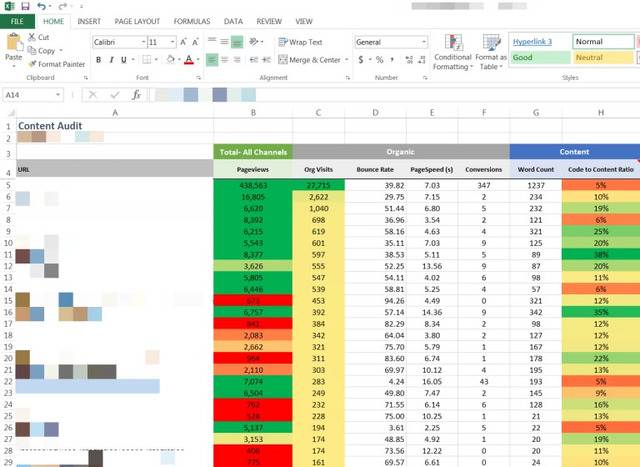
Here’s an example of what the spreadsheet may look like, with columns showing key metrics like:

  • Pageviews: Total number of pages viewed - repeated views of a single page are also counted
  • Organic visits: Shows how many visits came from the organic channel
  • Bounce rate: How many people came to the page and immediately left without interacting with it?
  • Page speed: Gauges how fast or slow a page loads
  • Conversions: Whatever your conversion goals are – form fills or product buys – how many are happening as a result of that page?
  • Word count: The total number of words on a page
  • Code-to-content ratio: How much actual text content exists versus code?

Every metric tells a story. The next step is figuring the “why” behind the metric data, and then putting together some next steps. For example:

  • Would adding more content on the page help lower the bounce rate?
  • If you have a low word count, does that result in "thin content" that could be deemed "low-quality" content?
  • How about images and video - would that help improve conversions?
  • What if you’re showing a slow page load time – would that be from the video or images on the page?

Technical SEO for your audit

Technical SEO is optimization that deals with indexing and writing code for crawling robots including Google bot. Technical aspects of the SEO audit will examine the more technical areas of your site. It will ensure that your page can be easily crawled by the spiders from Google. If a website is a challenge for Google to crawl, it will rank much lower. It can also impact how well users can move around your website.

A site that is difficult to maneuver will have higher bounce rates. According to KissMetrics, clear navigation is an excellent way to keep visitors on the site.

The technical part of the SEO audit will check for the following issues:

  • The site navigation must be intuitive to ensure that users and spiders can easily move around
  • The site should load quickly regardless of device
  • The directory structure should be less than three folders deep
  • All 302 response codes that are no longer temporary need to be updated to 301 redirects to be more search friendly and to pass the search equity onto the successor page
  • All 404 error codes and broken links lead to orphan pages and need to be repaired
  • URLs should be rewritten to be user friendly and excessive appends reduced
  • Ensure pages have been indexed and that the site ranks well for the company name
  • All duplicate content should be eliminated
  • The site should be mobile-responsive or redirect at a 1-to-1 ratio to a mobile version of the website

What is linking for SEO?

When sites link to one another, it is the virtual equivalent of giving each other a handshake. Google assumes that when a reputable website links to another site, that site is also reputable. Conversely, if a poorly designed or penalized site has inbound links from other websites, the search engine has, in the past, viewed those websites as similarly low quality. It is important to make sure all websites you link to still exist and are worthy of the link to avoid hurting your own SEO efforts.

  • Links should use relevant anchor text and be applicable to the content itself
  • Outbound links should open in new windows
  • Links should only point to reputable sites
  • Any links that are broken should be removed or replaced

To wrap up, regularly checking your site for errors and performing an SEO audit is a must to keep a healthy online presence. Dismissing errors and issues within your technical SEO could result in losing out on organic traffic. This will end in growing less-rapidly than your competitors and generating leads and revenue at a much slower pace. Keep your SEO in check with an SEO audit.

Demo-Banner

How to Perform an SEO Content Audit

ssharma@brightedge.com
M Posted 11 years 7 months ago
t 9 min read

Auditing your website’s content is much like undergoing a physical exam. You may dread it at first, but it’s a smart practice that uncovers where you need to focus in order to improve your health, and helps you understand what’s working in your approach and what isn’t.

As an enterprise-level company that devotes valuable time and resources to every marketing channel, you know how essential it is to budget and plan for results. An SEO content audit will help you accurately assess the return on your website’s content investment, and formulate an informed strategy looking ahead. In this post, I’ll discuss how to benchmark your site’s content based on key SEO metrics for both your main Web pages and your blog.

The SEO content audit: getting started

Starting from “ground zero” in an initial content audit, you need the right tools, then you need to define metrics and gather data around those metrics. Once you’ve delved into the data and interpreted what it means, you can then set goals for your site’s content performance based on those insights.

The tools

There are several resources available to assist you in extracting all the data you need from your website to perform website audit and SEO content audit, including BrightEdge’s SEO platform, Screaming Frog’s SEO Spider and Majestic. Each of these resources has their own set of features designed for different needs. For those operating at scale, BrightEdge’s SEO platform offers analytics and reporting tools measuring organic search and revenue performance at the individual Web page level and for groups of pages.

Creating your SEO content audit

Regardless of what tools you’ll employ, all data should be organized well and exported into a spreadsheet (such as Excel), with the columns designating the specific metrics tracked and the horizontal rows showing the individual page URLs to be audited. Here’s an example of what the spreadsheet may look like, with columns showing key metrics like:

  • Pageviews: Total number of pages viewed -- repeated views of a single page are also counted.
  • Organic visits: Shows how many visits came from the organic channel.
  • Bounce rate: How many people came to the page and immediately left without interacting with it?
  • Page speed: Gauges how fast or slow a page loads.
  • Conversions: Whatever your conversion goals are – form fills or product buys – how many are happening as a result of that page?
  • Word count: The total number of words on a page.
  • Code-to-content ratio: How much actual text content exists versus code?

see the results of an seo content audit with brightedge

Every metric tells a story. The next step is figuring the “why” behind the metric data, and then putting together some next steps. For example:

  • Would adding more content on the page help lower the bounce rate?
  • If you have a low word count, does that result in "thin content" that could be deemed "low-quality" content?
  • How about images and video -- would that help improve conversions?
  • What if you’re showing a slow page load time – would that be from the video or images on the page?

SEO content audit: main web pages

For your main website pages, you’ll want to collect all the data, but focus on the Web pages that are key to your business. On a spreadsheet, you may organize those key pages so they are positioned below one another; that way you can see the metrics for each page and how it fares against other important pages in that group. The most important pages of your site typically represent the “core” of what you do. For instance, your home page, and key information-rich pages or landing pages likely would be priority for scrutiny in your audit. That said, your most important pages might not necessarily be the best-performing pages. Findings such as this underscore the value of an audit, informing both your strategy and resource-allocation decisions for the site. By simply knowing which Web pages need bolstering, you can then focus your SEO efforts on them for the coming months. You may also choose to do a second-tier prioritization of your Web pages. Identify, based on what the data is telling you, which pages you can make small tweaks to that will move the needle drastically (at BrightEdge, these seemingly minor yet quantum content optimization opportunities are referred to as “striking distance”).

What about your blog?

While pageviews, bounce rates and time on site are all important metrics to gauge the success of your blog content, in today’s current Web environment, you’ll need to measure social signals. These will indicate how (or if) people are engaging with your blog content. By examining the number of Facebook shares, tweets and Google +1s, for example, you can not only determine what is resonating with your readers, but also what direction you should take your blog overall. For instance, if you discover your blog is receiving more engagement from how-to pieces versus interviews, you may choose to include more instructional posts. An obvious “red flag” is if your blog content is not being shared at all. In that instance, you need to examine ways to improve upon that, such as creating a more solid community around your brand or ensuring that the blog is set up well technically for social sharing. Using BrightEdge, you can get a picture of your engagement metrics in the “page report,” as shown in the following screenshot:

use an seo content audit to see what you need to work on - brightedge

You’ll also want to consider backlinks as part of your blog metrics. These show a vote of confidence that your content is likable and sharable. Blogs with a lot of quality links show “credibility.” Your own social media metrics can be informed by a relatively quick secondary audit of your main competitors, their backlinks and social engagement metrics. This type of analysis can be used to come up with similar ideas in that niche. For example, during a recent SEO content analysis of UPack.com, I noticed that this content had a lot of backlinks as compared to the site's other pages. If you were a competitor, or even as UPack.com, you might want to create similar content around something like an “ultimate checklist for after you move.”

Every SEO content audit tells a story

Consider your SEO content audit as the outline for a story. The more you dive into the data, the more rich the plot and honed-in the characters become. Slicing and dicing this data is one of the important jobs of a technical SEO, and one of the ways technical SEOs inform a brand’s organic search content strategy. Once you’ve established your own site’s “once upon a time,” you can continue to use content audits to provide a feedback loop to the content strategy that has been implemented, as well as testing out those tweaks and changes you’ve made as part of your optimization plan.  

Understanding Google Webmaster Tools

Mark Mitchell
Mark Mitchell
M Posted 11 years 10 months ago
t 9 min read

Google Webmaster Tools for is a free service offered by Google that helps users monitor and maintain a site's presence in the Google Search results. Setting up Google Webmaster Tools for SEO can help you understand how Google views your site, so you can optimize its performance for the search results.

Today, we’ll go over best practices for configuring GWT, and what you need to look for in the settings and reports to boost your SEO performance.

10 reasons to use Google Webmaster Tools for SEO

In its help files, Google gives 10 reasons to use Google Webmaster Tools for SEO:

Monitor your site's performance in Google Search results:

  • Make sure that Google can access your content
  • Submit new content for crawling and remove content you don't want shown in search results
  • Create and monitor content that delivers visually engaging search results
  • Maintain your site with minimal disruption to search performance
  • Monitor and resolve malware or spam issues so your site stays clean

Discover how Google Search—and the world—sees your site:

  • Which queries caused your site to appear in search results?
  • Did some queries result in more traffic to your site than others?
  • Are your product prices, company contact info, or events highlighted in rich search results?
  • Which sites are linking to your website?
  • Is your mobile site performing well for visitors searching on mobile?

Setting up Google Webmaster Tools for SEO

Getting started with webmaster tools for SEO is fairly simple.

Log in to Google, and go to: https://www.google.com/webmasters/tools/

The basics of site settings

Preferred domain First, set your preferred domain. We do this because links may point to your site using both the “www” and “non-www” versions of the URL (for instance, http://www.example.com and http://example.com).

The preferred domain is the version that you want used for your site in the search results.

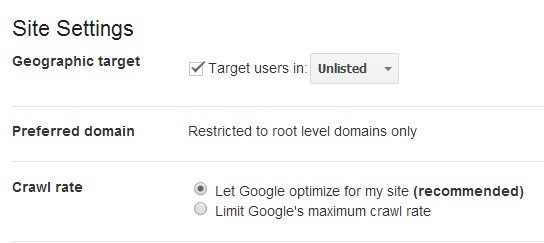
Set geographic target Next, set your geographic target. Google wants to return the most relevant sites in response to a user query. As a result, the search results shown in the U.S. may vary from the results returned to a user in the U.K.  

If your site has a generic top-level domain, such as .com or .org, and targets users in a particular geographic location, you can provide information to help Google determine how your site appears in the search results. Sites with country-coded top-level domains (such as .ie, .co.uk or .fr) are already associated with a geographic region. In this case, you won't be able to specify a geographic location.

Pro tip: If your site has subdirectories targeting different countries (e.g., www.example.com/us or www.example.com/fr), set these up as individual sites in webmaster tools for SEO and configure the geotargeting accordingly.

Changing the crawl rate The crawl rate refers to the speed of Googlebot requests to your server during a crawl. Unless there is a known issue with your server, or reason you need to adjust this, we would recommend allowing Google to automatically optimise the crawl rate.

crawl rate settings in google webmaster tools - brightedge

Submit XML sitemap A Sitemap is a list of all the pages in your site, and a way to tell Google about these pages that it might not otherwise discover. See how to create an XML Sitemap, here.  

Here are a few steps to submit your Sitemap to Google Webmaster Tools for SEO:

  • On your Google Webmaster Tools home page, select your site.
  • In the left sidebar, click “Crawl” and then “Sitemap.”
  • Click the “Add/Test Sitemap” button in the top right.
  • Enter Sitemap URL into the text box that appears.
  • Click “Submit Sitemap.”

Tips for reporting data with Google Webmaster Tools

Sitelinks

Navigate to: Search Appearance > Sitelinks Sitelinks are meant to help users navigate your site. Google analyzes the link structure of your site to find shortcuts that will save users time, and allow them to quickly find the information they're looking for. Sitelinks are only shown if Google thinks they’ll be useful for the user, and the structure of your site allows for it.  

Keep in mind, they are automated. You can try to secure sitelinks by ensuring you use anchor text and alt text that's informative, compact and avoids repetition. If you think that a sitelink URL is inappropriate or incorrect, you can demote it in webmaster tools for SEO. Demoting a URL for a sitelink tells Google that you don't consider this URL a good sitelink candidate for a specific page on your site.

Remember, it can take time for your demotion to take effect!

Structured data for webmaster tools

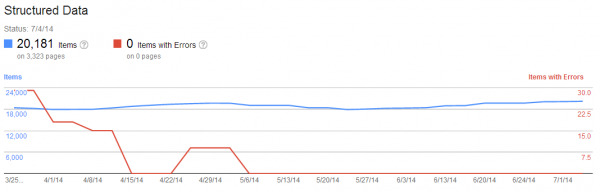
In Google Webmaster Tools for SEO, navigate to: Search Appearance > Structured Data Google uses Schema.org markup to inform “rich snippets” displayed in the SERPs, such as reviews, event dates, recipes etc. Getting rich snippets for your site listings can dramatically improve your CTR.

The structured data report shows how many pages on your site were found to have structured data, and the type of structured data that was found.

You can also use the data highlighter tool to markup events (more will probably become available in the future) on your pages without touching the HTML code. Just highlight the data and input your event information, and then Google will save and apply this to the page.

Linking to your site

Navigate to: Search Traffic > Links to Your Site This report provides a list of domains/URLs that have linked to your site. Check out how your site is linked to by the anchor text.

If you find you are not ranking for a term for which you have many links using the same anchor text, it could be because too many links are using this same anchor text.

In this instance, you would need to get rid of some of these links. You have the option to export all links to .csv for review. If you have a link penalty, you may be spending a lot of time using this tool.

Index status

Navigate to: Google Index > Index Status Index status shows how many URLs are indexed out of all those Google can find on your site. Use this to quickly spot issues such as duplicate content, canonical URL problems and more.

For example, if you submit a Sitemap, and Google indexes 5,000 out of a potential 10,000 URLs, then you probably have a canonical/duplicate content issue.

Crawl errors

In Google Webmaster Tools for SEO, navigate to Crawl > Crawl Errors If your website is not working correctly and you’re getting a high number of crawl errors regularly, then you need to fix this. Each error represents a usability issue and has the potential to make you lose a visitor.

google webmaster tools shows harmful errors - brightedge

Crawl stats

Navigate to: Crawl > Crawl Stats Crawl stats show the number of pages crawled per day. The more pages crawled and downloaded, the better. The more time its takes for your site to perform, the worse off your site is. Remember, site speed is a factor in Google’s algorithm. 

Blocked URLs

Navigate to: Crawl > Blocked URLs The robots.txt file is the first port of call when crawlers or search engine bots visit your site – it tells them which pages to index or not.

The blocked URLs report shows any URLs that have been blocked from crawling by your robots.txt file. It may pick up pages that are blocked, but that you want indexed; in which case, review your robots.txt file and edit accordingly.

Fetch as Google

Navigate to: Crawl > Fetch as Google Use “fetch as Google” to understand exactly how Google sees pages within your site. This is helpful when you need to verify if a page is accessible.

You can also grab as Googlebot-Mobile, which will help you identify any potential issues with your pages when they’re viewed on smartphone devices.

This post is a great starter guide to getting up and running in Google Webmaster Tools for SEO, but there’s still much to be learned. At the least, I hope this guide helps you implement GWT data into your SEO diagnostic process.

Oh, and did I mention that BrightEdge’s S3 platform integrates with Google Webmaster Tools for SEO? Check it out!  

,