
As the Web has become increasingly complex, JavaScript has found itself playing a useful role in the development of engaging websites. Although it was once used to accent content that was otherwise contained within HTML, it is now increasingly on the center stage.
Issues with JavaScript and SEO, however, remain a concern for many website developers. Site owners want to make sure that Googlebot and other search engine crawlers can properly understand sites that contain a lot of JavaScript so that their pages do not suffer in the search engine results. This discussion has even prompted Google to release a series of videos on JavaScript SEO to help you ensure that you prepare your JavaScript pages for the SERPs effectively.
We wanted to break down the essentials of JavaScript SEO to help our community keep their sites optimized and ready to compete on the SERPs.
Understanding rendering with JavaScript SEO
Before we can dive into JavaScript SEO, we must first explore how JavaScript sites behave and how they interact with users and search engine crawlers.
First, Google distinguishes between JavaScript sites and sites that merely have some JavaScript on their page. In the latter, the JavaScript helps to create some special effects, but the core content--the most important information--appears as HTML. This means that the JavaScript does not impact the ability of Googlebot to read and understand the site and thus does not impact SEO.
A Javascript site, however, uses JavaScript to display critical information. This means that content you want included in your index relies on JavaScript to be displayed, making rendering an essential part of the indexing process.
Understanding rendering
Rendering is the process that takes the content, templates, and other features of your site and displays them to the user. There are two main types of rendering: server-side rendering and client-side rendering.
Server-side rendering
In server-side rendering, the templates are populated on the server. Each time a user or a crawler accesses the site, the page is rendered on the server and then sent to the browser. This means that when the user accesses your website, they receive all of the content as HTML markup immediately. Generally, this benefits SEO because Google doesn't have to render the JavaScript separately to access all the content you have created.
Client-side rendering
For certain situations, however, such as single-page apps, client-side rendering does have some advantages.
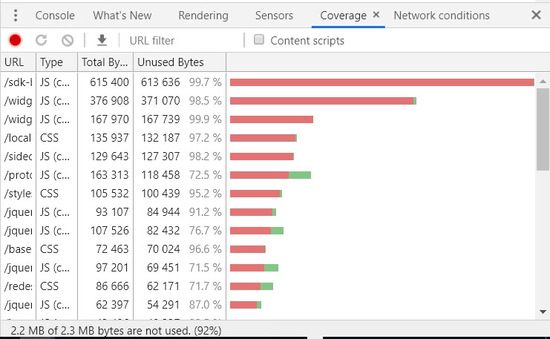
Client-side JavaScript can be expensive in terms of performance. It is super important that you do not lose sight of page load performance when making the decision to use JavaScript SEO to render elements in your page. Target page load times for 4G connections on mobile should be under 2 seconds. Having a slow page load can have a negative impact on your overall page rank. Google has stated that page load performance is a ranking factor. Slower page load times can result in higher than normal bounce rates, lower overall time on page, lower than average pages per session, lower conversion percentages and ultimately lower page ranks which directly impacts page visits overall. Avoid using shared libraries across your site and instead try to use your JavaScript SEO and CSS efficiently. Mid-tier handsets have slower processors, usually lower RAM and slower GPUs. When a Browser loads a web page the handset has to download, parse, compile and execute all JavaScript. So, if you pass large percentages of code that is not used, you can greatly slow down the overall page load times. The following is an example page from a live site that has a large percentage of unused code. This report is produced through Chrome Developer Tools Coverage Report. As you can see in this example, 2.2 MBs out of 2.3 MBs are unused.
It is also important to surface as many important links in the html so that they can be crawled in the first pass. By rendering important links by JavaScript you can delay getting those links crawled.
Work closely with your development team and set realistic goals for capabilities that you want to surface on your website that are balanced against having a small footprint in terms of bytes and test the page load performance against different handset types with 4G network speeds.
Some sites also find that they can combine these two main forms of rendering, resulting in dynamic rendering. For example, for a site that has content that will change a lot, dynamic rendering helps sites take advantage of the benefits of both client-side and server-side rendering.
This technique allows sites to switch between the two, depending upon who is accessing the site. Using rendertron, you can program your site to create pre-rendered content that can be delivered to certain user agents, like Googlebot. When regular users access the site, however, the site can use client-side rendering so that the visitor accessing your site can get the most updated information as efficiently as possible. Note that if you do use this strategy, you will want to update your cached version of the site regularly to ensure that the version seen by the crawlers remains up-to-date.
Rendering and JavaScript SEO
Google understands JavaScript relatively well. However, the crawler attempts to interpret and rank billions of websites around the globe, and JavaScript does require more effort than standard HTML. This can sometimes put it at a disadvantage.
Google reports that Googlebot indexes JavaScript sites in two waves. During the first pass through, the crawler will look at the HTML content and use that to begin indexing the site. At a later date, they will return to render the JavaScript that needs rendering. Keep in mind that sites created with server-side rendering, however, display content with HTML markup. Since the main content is already displayed, Googlebot will not have to return to render the JavaScript on the site to properly index the content. This can make your JavaScript SEO strategy significantly easier.
Because of the delay between the first and second passes through a site, the content contained within the JavaScript will not be indexed as quickly. This means that the content will not count towards initial rankings and changes may take a while for Google to notice and adjust rankings accordingly.
For this reason, brands that use JavaScript SEO will want to make sure that they put as much essential content as possible within the HTML of their site. Critical information that they want to have count towards their ranking should be written so that the crawlers can interpret it the first time through.
Common errors with JavaScript SEO
Although JavaScript helps create some exciting websites, some errors do commonly pop up that harm the site’s SEO and online potential. We want to bring a few of them to your attention.
Neglecting the HTML
Containing the most important information in the site within the JavaScript means that the crawlers will have little information to work with the first time they index your site. As already discussed, make sure that critical information you want indexed quickly is created with HTML.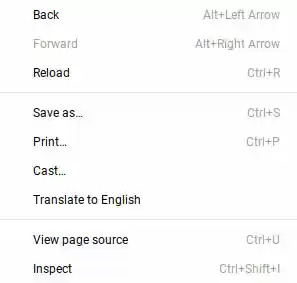
If you are not sure where your critical content lives, you can inspect your page source by right clicking anywhere on the page and selecting "Inspect" from the menu. The content that you find in the inspect page is the content that the Googlebot sees right away. You can also turn JavaScript off in your browser to see the content that remains.
As you progress through a site audit, ContentIQ also has the capacity to interpret your JavaScript frameworks, helping you understand the entire experience your site creates for users.
Not using links properly
Links play an essential role in any website as they help crawlers and users understand how the pages connect. When it comes to JavaScript SEO, it also helps keep people better engaged with your website and interested in your content.
For JavaScript SEO, however, you want to make sure your links have been set up correctly. This means using relevant link anchor text and HTML anchor tags, including the URL for the destination page in the href attribute. Google advises staying away from other HTML elements, such as <span> as well as JavaScript event handlers. These types of linking strategies can make it harder for people to follow links and can also create a poor user experience for those on assistive technology.

Google also recommends staying away from hash-based routing techniques. If JavaScript helps to create a transition between pages, then using the history API works much better.
Accidently preventing Google from indexing your JavaScript
Keep in mind that Googlebot does not render JavaScript until a second pass through your site. Therefore, some sites make the mistake of including markups, such as ‘no index’ tag in the HTML that loads during Google’s first pass through the site. This tag may prevent Googlebot from returning to run the JavaScript contained within the site, which then blocks the proper indexing of the site.
Another common mistake is blocking crawlers from crawling the JavaScript directory. So, make sure that you DO NOT have a Disallow: /JavaScript entry in your robots.txt file.
JavaScript continues to be an important feature of the web as brands use it to mark up their pages and create more engaging websites for their users. Understanding how Googlebot and other crawlers read JavaScript and how it can potentially interact with JavaScript SEO, however, remains a priority for many.