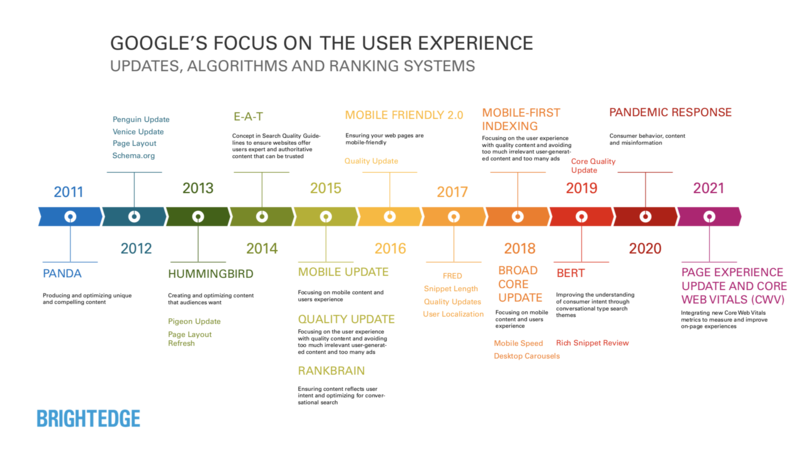
February 2022 marks the start of Google using Page Experience as a ranking factor for desktop search. The search company says the desktop rollout will be complete by the end of March. Page Experience has been used as a ranking factor for mobile searches since August 2021.
Page Experience is essentially Google’s way of rewarding or penalizing websites based on a page’s user experience. If a page loads too slowly, shifts once loaded or inhibits users from accessing the page’s content with intrusive ads, for example – even if the content is relevant – Google effectively sees this as diminishing the value of the content. It is in keeping with a long-standing focus on returning the best result after understanding the intent of a given search.
At the heart of Page Experience are (mostly) objective measures of technical performance for a given page, starting with what Google calls Core Web Vitals. For desktop Page Experience, the five elements of performance are as follows:
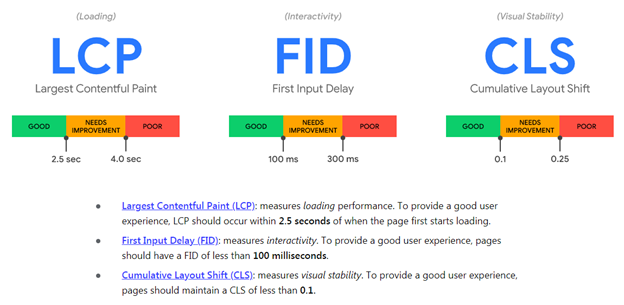
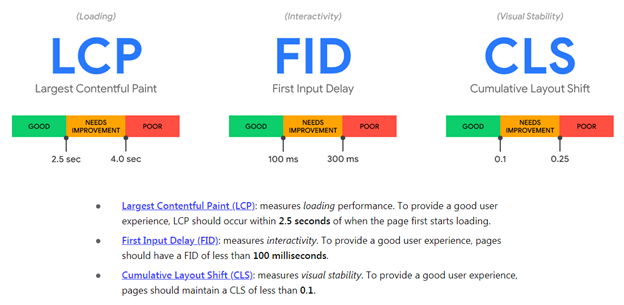
1) Largest Contentful Paint (LCP): A measure of the time it takes for a page’s main content to load. Google recommends a target of 2.5 seconds or less for LCP. (Core Web Vital 1 of 3)
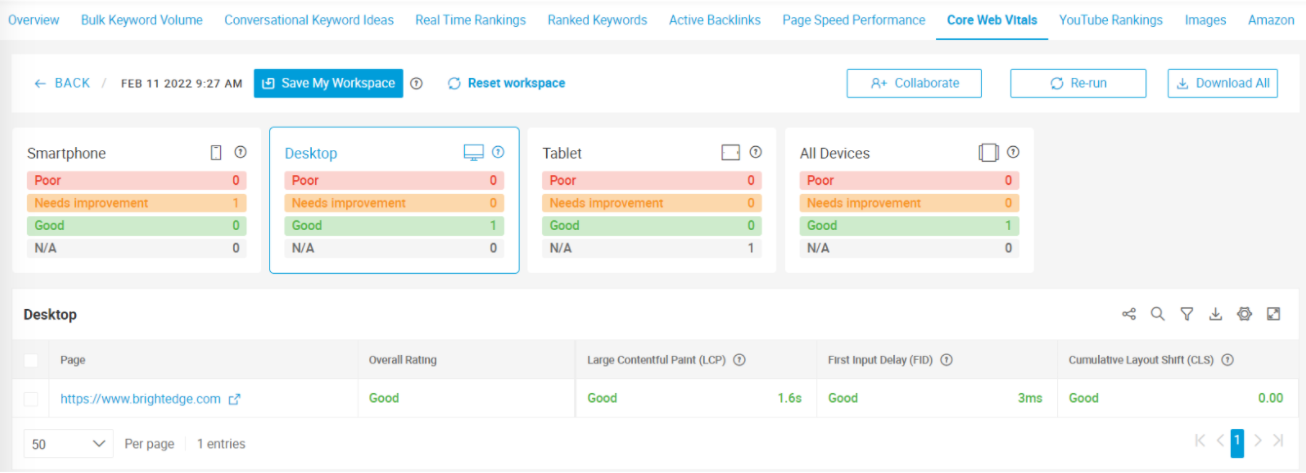
2) Cumulative Layout Shift (CLS): Refers to the stability of the content once it’s loaded. If content shifts up or down while a user is viewing it, Google deems this a negative experience. Google recommends a CLS of less than .1, which sites can measure using BrightEdge or Google’s Page Experience Report. (Core Web Vital 2 of 3)
3) First Input Delay (FID): The time between when the first web page objects load (a button, image, scroll bar) and when the page becomes interactive. If page content takes too long to be interactive, Google views this as a poor user experience. Google recommends an FID of less than 100 milliseconds. (Core Web Vital 3 of 3)
4) Proper use of HTTPS security protocols: Pages not served over hypertext transfer protocol secure (HTTPS), represent greater risk to the user and, accordingly, a poor user experience that negatively impacts the page’s search ranking. Learn more about HTTPS.
5) The absence of intrusive interstitials: Intrusive interstitials are pop-ups and overlays that interfere with the content on the page and are a Page Experience no-no.
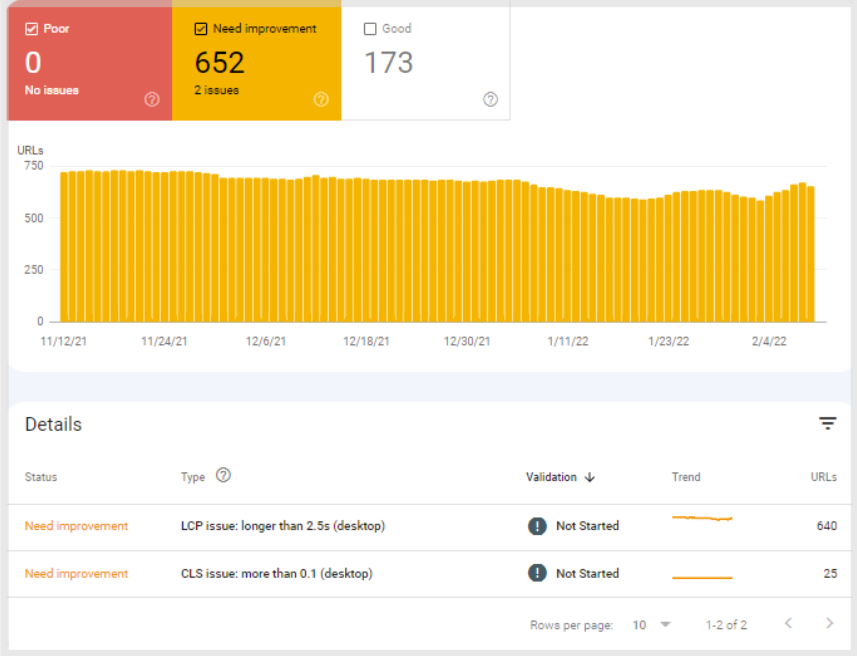
Per Google, the elements and their thresholds are the same as those used for mobile Page Experience (minus mobile-friendliness, which only applies to mobile search rankings.) Brands that have already optimized for mobile Page Experience, in other words, are ahead of the game, but should still measure desktop Page Experience and address any desktop-specific issues. Google has added dedicated desktop performance reporting in its Search Console to help highlight any disparities in Page Experience-related performance for mobile and desktop users of their sites.
For websites that have not yet been optimized for Page Experience, here are some additional resources to help site operators understand the new ranking factor and make the necessary improvements:
Measuring and Managing Page Experience with BrightEdge Instant
BrightEdge Instant provides analysis and dashboards for users to evaluate, prepare and implement changes to improve Page Experience on both desktop and mobile. Ongoing reporting within the tool makes it easy to see and communicate the impact of website changes.
We will keep an eye on the impact of Page Experience on desktop search results. As a potential point of comparison, early indications from the rollout in mobile search suggest a comparatively high prioritization of Page Experience as a ranking factor.
If you have waited to evaluate and improve your site for Page Experience -- perhaps the majority of your traffic comes from desktop, for example – we’d strongly recommend prioritizing it in 2022.
In Mid-June, Google began rolling out Core Web Vitals as part of its Page Experience update. Page Experience is aimed at improving the user experience according to three metrics – known as Core Web Vitals:
Largest Contentful Paint (LCP), which measures loading performance.
First Input Delay (FID), which pertains to how quickly a visitor can interact with a page.
Cumulative Layout Shift (CLS), which measures visual stability.
By prioritizing these page performance metrics as ranking factors, Google is incentivizing website owners to improve the user experience. High-performing pages are rewarded with greater consideration for high search ranks, and poor-performing pages are penalized in the quest for high search rankings.
In a recent article, Google drew attention to an experimental markup-based signal called Priority Hints to help web developers control how page elements load. In simple terms, Priority Hints better enables developers to instruct the browser as to which resources are important, and which are not. By helping control how elements are loaded in the browser, Priority Hints can directly improve page performance and Core Web Vitals metrics.
Developers can employ the tag <link rel=preload> and the attributes async and defer to manage the downloading and execution of scripts. Priority Hints goes a step further, effectively controlling the loading of other elements. Currently, Priority Hints can apply an “importance” attribute of high, low or auto to four-page elements:
link
img
script
iframe
According to Google, Priority Hints can help:
“1. Boost the priority of the LCP image by specifying importance="high" on the image element, causing LCP to happen sooner.
2. Increase the priority of async scripts using better semantics than the current hack that is commonly used (inserting a <link rel="preload"> for the async script).
3. Decrease the priority of late-body scripts to allow for better sequencing with images.”
Priority Hints Improve Core Web Vitals
Priority Hints give developers more granular control over the downloading of resources than existing tools like “preload,” “async,” and “defer.”
While “preload” will tell a browser to prioritize downloading images as a category, for example, the experimental “importance” attribute can tell a browser which images to load first by marking their importance “high” while marking other images as “low” importance. It’s important to note that Priority Hints are precisely that, hints, and not directives to the browser.
In practice, this can ensure that elements that are needed in the active viewport when a page is loading are loaded first, improving the Core Web Vitals largest contentful paint and first input delay. It can also improve the Core Web Vital metric, cumulative layout shift. Layout shifts generally happen when an element is loaded after the page becomes interactive. When that happens, the content a visitor is interacting with can move, disrupting the flow of interaction. As the visitor is reading a block of copy, for example, it suddenly moves down the page as an image above it is loaded, or the link they are about to click suddenly shifts away from the cursor. Priority Hints help minimize disruption to the browsing experience.
What’s Good for Page Experience is Good for SEO
Because Core Web Vitals are ranking factors, any opportunity to improve these key metrics in page performance also improves a page’s ability to rank highly for relevant searches. While Core Web Vitals are just several of many ranking factors, they have a significant impact, especially for e-commerce web pages.
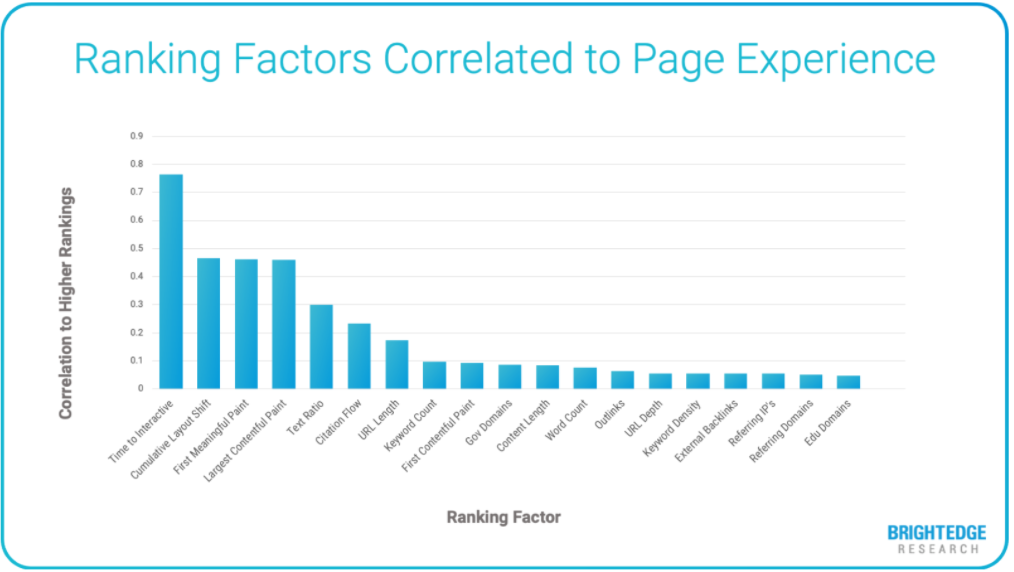
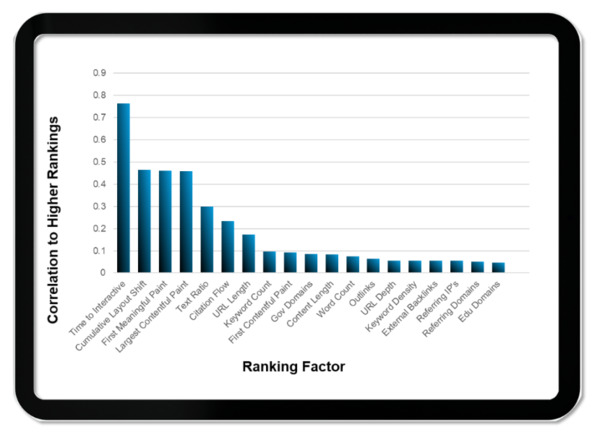
In a recent study, BrightEdge tracked 6,000 e-commerce keywords across 10 search categories over the past three years and analyzed the patterns in the data. Among a slew of ranking factors, Core Web Vitals had the greatest correlation to higher search result ranks.
Deploying Priority Hints
Currently, Priority Hints is in what Google calls origin trials with browser support slated to roll out with Chrome 96, which is scheduled to release on November 21, 2021. Interestingly, Google ran an origin trial for Priority Hints two years ago but received limited interest. With Core Web Vitals taking on greater importance, the participation will likely be much higher this time around.
TIP: To evaluate if and how to apply the “importance” attribute, developers can check the priority assigned to different resources by using the Chrome Dev Tools network tab while loading a page and viewing the “priority” column.
Competing for the top positions on search engine results pages (SERPs) requires a deft mixture of targeted, relevant content, carefully constructed pages, fast-loading sites and myriad other touches to win the approval of the search engine gods (i.e. algorithms).
Search Engine Land’s exceptional and easy-to-follow guide to search ranking factors, “The Periodic Table of SEO Factors” is a good starting point for understanding and accounting for search ranking factors. Ultimately, however, accounting for search ranking factors is a sort of minimum bar to cross. It is not a guarantee of ranking success.
So, what exactly is the recipe that leads to search engine success? Google, by far the leading search engine, provides guidance in its detailed “Search Quality Evaluator Guidelines.” The guidelines present a handful of principles that combine to impact every piece of content that gets ranked. The principles include:
“People search the internet for a variety of purposes, ranging from accomplishing a quick task to researching a topic in-depth.”
“Search engines must provide a diverse set of helpful, high quality search results, presented in the most helpful order.”
“Different types of searches need very different types of search results.”
“People all over the world use search engines; therefore, diversity in search results is essential to satisfy the diversity of people who use search.”
“Finally, search results should help people. Search results should provide authoritative and trustworthy information, not lead people astray with misleading content.”
With these guiding principles for search quality, Google is effectively saying that a given webpage may be ranked differently for a given search. It will determine how to rank results for keywords differently depending on, among other external variables, the location and intent of the searcher. The net effect for SEOs and content creators is that the ranking factors they are optimizing against are not always applied equally.
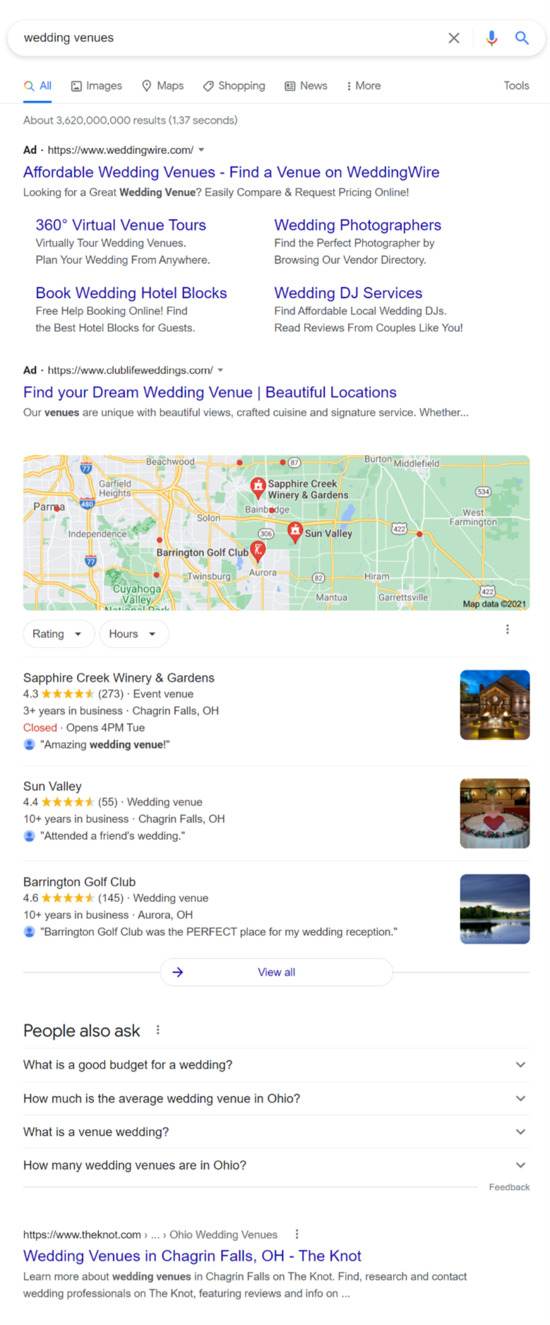
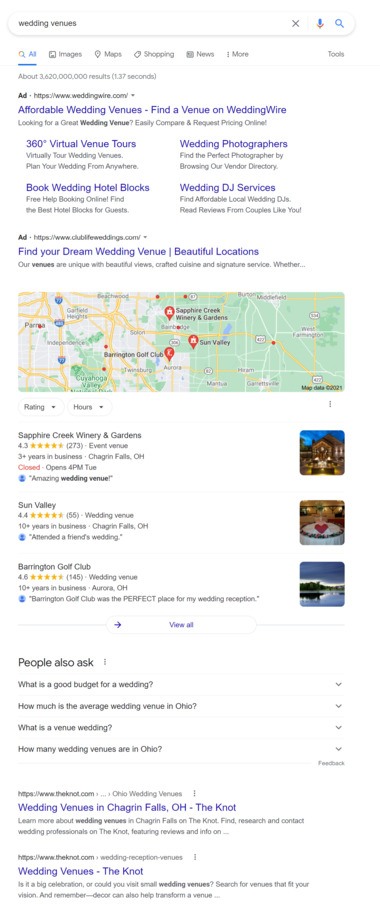
The screenshots below reflect the variability of search rankings for the same keywords. In this case, the keyword is “wedding venues.” The searches, however, were made from two different locations. This, of course, affects the Google Maps-supported location results, because lacking any direct input from the user on preferred location, Google infers that the user is looking for venues nearby. In this case, TheKnot.com has done a good enough job of localizing its content to secure the first organic text link in both searches. The results also vary in other ways, primarily the addition of “People Also Ask” results in the second SERP example.
Steps to Optimize Content for Unique Ranking Scenarios
At the heart of it, SEO is about maximizing the biggest opportunities. This starts with understanding what and where the opportunities lie, then evaluating the existing content or creating new content to capitalize on those opportunities. The competition in each case is two-fold: it is the content that is currently occupying your desired position, and it is the search engine ranking factors that award it that position.
First, it’s important to evaluate the content you have for keyword and page opportunities. A handful of questions can help guide that process.
Does existing content have traction?
Is existing content competitive?
Where do competitors rank that you don’t?
Is current content in the right format?
Does current content deliver qualified traffic?
Are new searches emerging that current content can’t support?
Once the opportunities have been identified, it is necessary to determine how known ranking factors are affecting the ranking by evaluating your content and the content that is occupying the top spots.
Determining the impact of known ranking factors:
Measure attributes known to impact SEO and how content is actually ranking to ascertain what matters
Monitor existing content ranking fluctuations to understand how your site is being treated by algorithms
Measure technical aspects of ranking pages (Core Web Vitals, etc.)
In a perfect world, a piece of content would be optimal for all ranking factors for all search intents in all locales, but the world is far from perfect. While the manual nature of these techniques means they reach a point of diminishing returns fairly quickly, a targeted approach like this, especially with insights and time-saving support from the BrightEdge platform enables you to identify and optimize for the most important audiences and search scenarios with the resources you have. Eventually, we anticipate that artificial intelligence and machine learning will enable us to look at the nuances of search at scale to eliminate the manual time and effort required to understand what SEO efforts will be the most impactful.
Last month we hosted a webinar on Core Web Vitals ahead of the Google Page Experience Update scheduled for May, 2021. With nearly 2000 registrations, we were prepared for a lot of questions and knew we likely wouldn’t get to them all. Following the webinar, we reviewed the questions, and felt there were some common themes that would be valuable to address more broadly.
Follow-up question 1: A majority of our visits are on desktop, and we are performing well there; is it still important to improve the mobile Core Web Vitals if most visits are coming from desktop?
There are searches and industries that are mostly driven by desktop queries, which makes it crucial to ensure your desktop experience is sound. We'll get to the Core Web Vital issue, but it’s also important to note that there are other updates happening beyond May’s Page Experience update that will be critical for sites with mostly desktop traffic. For example, Google announced mobile first indexing last year. The thing to keep in mind here is that if you’re serving a different experience, or your desktop experience has more content than mobile, you could risk that additional content not being included in a crawl. So Core Web Vitals aside, if your site is largely desktop-driven, you want to ensure your mobile experience is at least as crawlable as your desktop.
Core Web Vitals is based on browser data. The implication would be that if the majority of users are accessing your site via desktop browsers, then that would be fueling the data the Crux database has on your site. So you could be in a good position. In this case, we encourage you to make sure you’re assessing your site against your competitors with the desktop metrics to see how you’d stack up and that will give you a sense of how the page experience update will impact you. But make sure you’re paying attention to your mobile and desktop content regardless!
Follow-up question 2: Are there any recommendations for improving mobile site speed if the desktop version is already performing well?
We are definitely seeing that mobile pages are the most challenged from a speed perspective, and many BrightEdge clients have indicated the same. One solution could be to implement AMP pages, if you have not already. Accelerated Mobile Pages would provide a faster experience for mobile users that would address many of the challenges facing a slow loading mobile site. There have been some specific advancements with AMP for Core Web Vitals that could be extremely beneficial if your native site has challenges meeting mobile criteria. One common issue AMP pages can help with is if your site is in a sluggish hosting environment. Since AMP pages are cached, this could potentially provide a faster experience and help with issues like LCP.
There are advantages and disadvantages to implementing something like AMP. If you would like to pursue building out AMP pages, then plan on having your brand and IT teams involved, as there will be design limitations in AMP that may need to be considered.
Follow-up question 3: Is it normal for LCP scores to shift daily?
It depends on where you’re looking. If you are using Page Speed Performance in BrightEdge, or Google’s Page Speed tool, you are essentially testing the performance of that page at that moment. So as you make changes to the page, or as network lags occur, you can expect that metric to drift a bit (and hopefully improve) as you make optimizations. However, it’s important to remember that this is not how Google will be measuring Core Web Vitals. Rather, they’ll be using their Chrome User Experience database which is essentially a 28-day average of these metrics across all the browsers it has captured loading that particular URL. This data is used to generate scores for the website. If you are a BrightEdge Instant customer, you can access this database’s metrics using the Core Web Vitals tab. You should expect this data to remain consistent as it is a monthly average. The workflow we recommend is to use the Core Web Vitals as benchmarks for you and your competitors. Then you can use Page Speed Performance to see if your optimizations are impacting the Core Web Vitals. After a month, run the URLs again in Core Web Vitals to see if the 28-day average has aligned to the optimizations you’ve been making.
Follow-up question 4: Have you seen any problems related to cookie banners and the way they are blocking some script/functionality depending on consent?
This can definitely impact input delay and depending on how the banner is rendered, it will increase the pages cumulative layout shift. Unfortunately, the cookie banners are required for many sites, so we need to be mindful of them. One suggestion is to look at the waterfall of how scripts are loading on your site. Chrome has a resource loading tool you can use to see exactly how this is impacting your site’s overall load time. Depending on where this script appears in the load, it could be blocking other elements of the site from becoming interactive. If you are seeing this happen on your site, then it’s a great opportunity to have a conversation with your Development team to determine a better load sequence that could reduce the input delay.
Follow-up question 5: Do you know if Google will look at a site as a whole (domain and subdomains together) for a ranking 'boost' possibility, or specifically on a URL by URL basis?
What we’ve found, and Google has verified this, is that the Crux database doesn’t have data on many URLs simply because there isn't enough traffic to them to create a statistically significant sample. The view on how this update will roll out continues to evolve, but as of this post, the latest from John Mueller is that Google will be using groups of pages to assess the overall score. This is useful in the sense that product pages that don’t get a lot of traffic may not be in the Crux database, but similar pages of more popular products may have data, and Google can use those to assess how product pages will perform. This also reduces over-reliance on the homepage.
Knowing this methodology, there are two factors that we can expect to be at play:
Competitors in SERPs -- are you over or underperforming against them?
Do sections of your site consistently return high performance Core Web Vitals?
So it may be possible a specific URL will receive a boost for a specific query because, all things held equal, it delivers a faster experience with the same relevance.
We appreciate everyone who registered and joined us for the webinar and especially those who submitted their questions! If you are already using BrightEdge, we invite you to discuss the Page Experience Update with your Customer Success Manager. And if you are ready to learn more about the BrightEdge platform, please make sure to request a demo with one of our experts!
One of the most important issues this year facing digital marketers is how to prepare for Google’s upcoming Page Experience Update.This May, Google will begin using three key metrics to help assess the user experience of a given webpage based on actual browser data. The three metrics that are critical for this update include:
Largest Contentful Paint: This is the time it takes to load the largest visible element of your page (images, videos etc). Google says load times of less than 2.5 seconds for this element are ideal.
First Input Delay: This is the time it takes for the first interactive element on a page to respond to the user (hitting play on a video, clicking into a link or a drop down menu etc). Google has stated times less than 100 milliseconds is ideal.
Cumulative Layout Shift: As pieces of a site load, elements of the page will move around as pieces render. This shift in layout can cause people to click on the wrong things and ultimatley provide a poor user experience. This is measured from a score to 0-1. While some layout shift is inevitable, Google has stated less than .1 is ideal.
For large companies whose websites have lots of moving parts, it can be challenging to meet these benchmarks without making drastic changes to their entire infrastructure. Sitewide changes involves multiple stakeholders, conflicting business priorities and often lead to sizable projects. To be successful in preparing for this update, digital marketers need compelling data and very prescriptive prioritization in order to sell requirements into their organization.
Here are five key strategies that can help you address the core web vitals of your website and justify the implementation work needed.
Assess how your segment is doing
Evaluate your infrastructure
Use Log File Analysis as a priority guide
Build a holistic fallover plan
Use a combination of micro and macro trends to forecast overall impact
1. Assess how your segment is doing
It’s critical you keep a pulse on this for your own web properties. But you also need to understand your landscape. It can be difficult to scale measuring multiple URLs if you’re only using things like Google’s Page Speed Insight Tool. Tools like Brightedge Instant enable users to look at batches of URLs and compare their performancees. If they measure URLs with the top share of voice in a keyword group and run the page speed test on them, they have an instant readout of what competitors are vulnerable and where they have opportunity. Some ways to use this approach include:
Brand Protection: Get a high level view of how sensitive your branded searches are to changes in May by assessing the core web vitals of the top brands.
Striking Distance Keywords: Build a keyword group by using Data Cube to see which keywords are on page 2. Use the Share of Voice report to aggregate the top URLs to help your company understand what could be gained or lost for terms you’re almost on the first page for.
Product level keywords: Build and measure URLs that dominate key product categories. Pinpointing which of these categories are going to be sensitive to the Page Experience Update in May will help you put the context of the update in business impact. This can help your organization understand what the visibility fluctuations could mean for customers looking for your products.
2. Evaluate your infrastructure
There are a range of issues that could cause metrics like first input delay to be slow. You should be able to address many of these through common code optimization techniques. If pages are built on custom apps or content management systems that require multiple javascripts to render content, you may need to seek other ways to help your site meet performance benchmarks.
How your site is hosted, and its total infrastructure can have an impact on how well it serves content. In addition to evaluating on-page factors and loading aspects specific to a page, consider how your site it hosted, what platforms it is built on and so forth. These may be big overhauls but if you’ve got data to show how significant it could impact the channel, it may be worth it.
3. Use Log File Analysis as a priority guide
One of the most common challenges with enterprise websites, is they feature legacy code, and elements that are no longer in service. Log files can help marketers see what aspects of the site may be particularly prone to slowing down load times reducing the sites ability to react quickly to user input. SEO’s typically use log file analyzers to get a birds eye view into how crawlers are getting through the site. This same principle can help you address contentful paint and input delay issues at scale. While Google has stated this measurement is driven by browser data, the experiences crawlers have on the site can offer invaluable data points to prioritize how to optimize your site’s experience. Some examples of how log file analysis can help marketers prepare for the Core Vitals update:
Identify which parts of your site are likely to be prone to core web vital issues and why
Sense and help forecast what gains could be hindered by a poor page experience using log file analysis
Pinpoint what files need compression help at scale
Fuel automated optimization services
Once you are aware of these issues, there are scaled ways to address them. For example, Brightedge’s AutoPilot compresses images automatically, eliminating this as a task.
4. Build a holistic failover plan
If you’ve used share of voice reporting to identify which of your search results are prone to fluctuations in May during the Page Experience Update, you have a critical collaboration point for your media teams. If you anticipate having some vulnerabilities when the update rolls out, it may be wise to lean on paid search to help run air cover while you implement.
Create paid keyword campaigns designed to provide coverage where you anticipate ranking loss
Build proactive conquesting campaigns for keyword groups where organic search results are particularly sensitive
If you’re using BrightEdge Daily Pulse, it can serve as your virtual war room in the month of May to see what needs to be turned on/off
5. Use a combination of micro and macro trends to forecast overall impact
Measuring trends on both a macro and a daily level not only help you understand where those may be, but they can also help you anticipate what opportunities you could realize by meeting the Core Vitals Benchmarks. For example, Brightedge users that are using Market Insights can see at a high level what behavioral trends are fueling search behavior. This insight fuels things like content strategy, but when coupled with tools like Search console and page speed inisghts on the leaders in each space, it is now possible to forecast and predict what content is likely to be displaced at scale. For Brightedge customers, Daily Pulse makes it simple to visualize how positions are shifting leading up to the rollout, and even pinpoint when it occurs on results that matter to your business.
We can expect Google’s Page Experience update in May to have significant impacts on the organic channel as a whole. It is important to be armed with the right data and the right tactics to pivot and adjust. Even if your website is meeting the benchmarks, you can use this as an opportunity to pinpoint where you need to focus to generate positive traction. If you’re interested to learn more about how Brightedge’s suite of enterprise technology could help your business navigate things like the May Page Experience Update, please reach out and we can set up a demo today.
Website performance is an important aspect of maintaining high ranking in the SERPs. Regularly checking on your site’s performance, especially your page speed insights, is a must for any SEO. A great user experience is becoming more and more important to search engines particularly Google as it prepares for its Page Experience Update coming May 2021.
Understanding Core Web Vitals related to page speed tests
Users expect to begin interacting with a website within seconds. They will very quickly click off of a site if content isn’t loading and they’re unable to interact with your site almost immediately.
While there are a number of metrics Google measures to consider page speed, there are three Core Web Vitals that score how quickly your page content loads. Understanding these metrics and how to correct your web vitals will be beneficial to your page speed and SEO as Google prepares to severely impact sites with their May update. Below are the three metrics necessary for you to familiarize yourself with:
LCP – Largest Contentful Paint refers to the point when main content is loaded on a page
CLS – Cumulative Layout Shift is layout instability and refers to when content shifts up or down and you unexpectedly interact with part of a site you didn’t mean to
FID – First Input Delay refers to the delay when your page is loading but you can’t immediately interact with it
There are a number of resources to dive deep into the health and performance of your website. You can use them to test the performance of your site as well as competitors. Understanding how your page speed compares to your competitors should be part of your competitive analysis. Sometimes, you might find that fixing the errors provided to you by one resource may not have improved scores the way they were predicted to. Because of this, it’s important to have several tools you can combine to gain different suggestions or recommendations into fixes. You can perform a page speed test using any of the below resources.
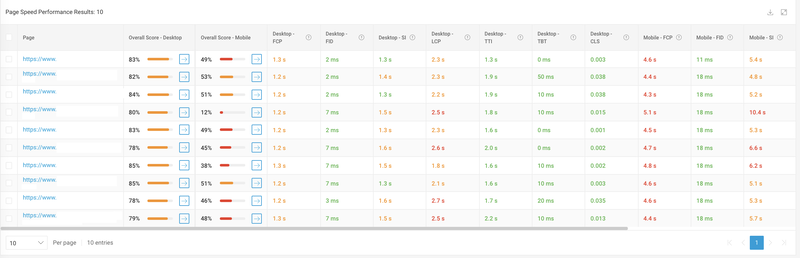
BrightEdge Instant. You can leverage BrightEdge Instant to assess page speed performance and gain insights into Core Web Vital metrics. Instant provides actionable and prescriptive recommendations to improving page speed across the most important pages of your site. You can run ten URLs to test website speed with Instant, speeding up the task compared to inputing one URL at a time using Lighthouse.
From your analysis, you can export all of the granular information pointing to specific files that may be causing page speed issues. Below you can see what testing website speed in Instant looks like.
BrightEdge ContentIQ. Performing a website audit using ContentIQ will also give you an audit into page speed insights and how quickly your pages are loading. ContentIQ offers a response time which is tied to a metric called TTFB – or time to first byte. TTFB measures how long a browser has to wait to receive its first byte – or piece of data – from your site.
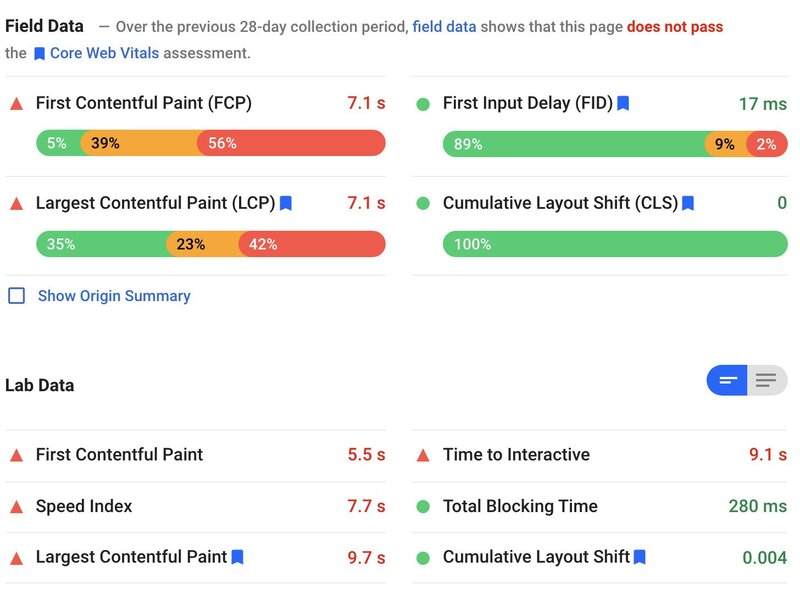
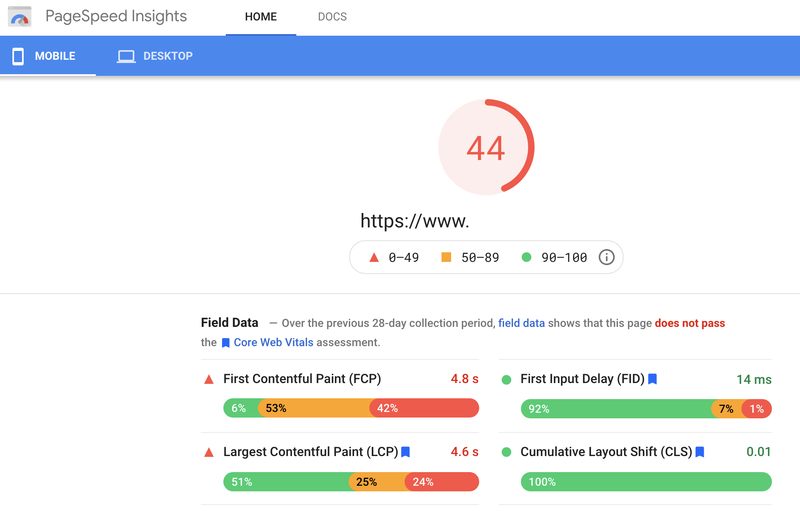
Google PageSpeed Insights. PageSpeed Insights is also referred to as Lighthouse. It analyzes and calculates your page to give you an overall performance score on both mobile and desktop. If you test your page multiple times, you might notice that the scores fluctuate. The reasons for this are many and can include testing on different devices, browser extensions, traffic routing and more. Google recommends you think of your site performance as an overall score that includes more than one score rather than a single number.
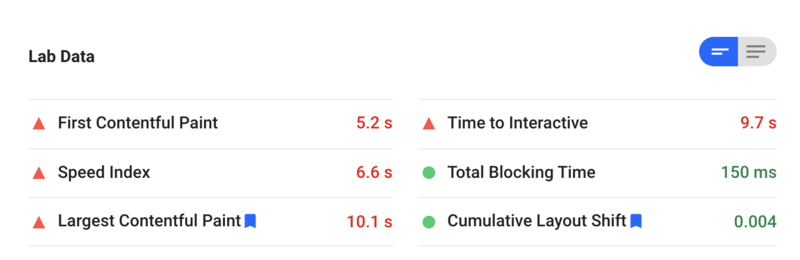
The weight of each performance metric Lighthouse 6 considers includes:
First Contentful Paint – 15%
Speed Index – 15%
Largest Contentful Paint – 25%
Time to Interactive – 15%
Total Blocking Time 25%
Cumulative Layout Shift – 5%
Below you can see the information Lighthouse provides you about your page speed insights.
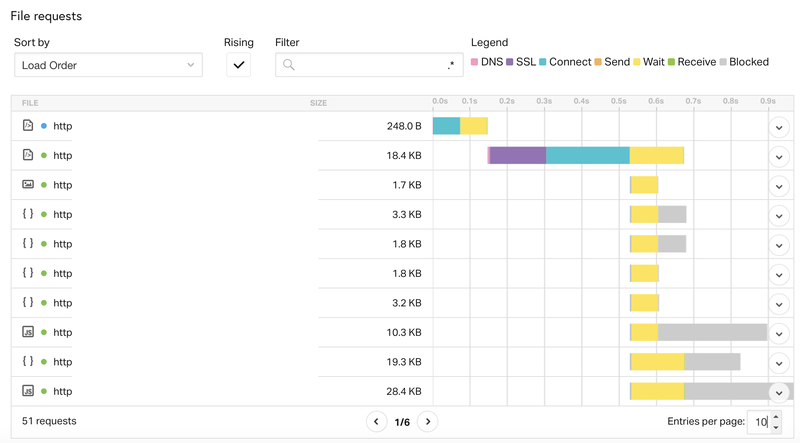
Pingdom Speed Test. The most basic use of Pingdom is free and offers a different visualization into page speed insights and recommendations on improve page speed performance. With Pingdom, you can sort by what’s most important to you. You can determine strategies to fix errors by sorting by load order, load time, receive time, send time and more. Understanding which areas are costing your site a slow loading time and sorting them by most impactful can lead to efficiency when fixing. Below you can see an example of the information Pingdom offers when testing website speed.
Improving page speed performance
Once you test performance, it’s time to fix any errors that bog down your load times. If you have the time, strategize around which fixes are most impactful to the health of your website.
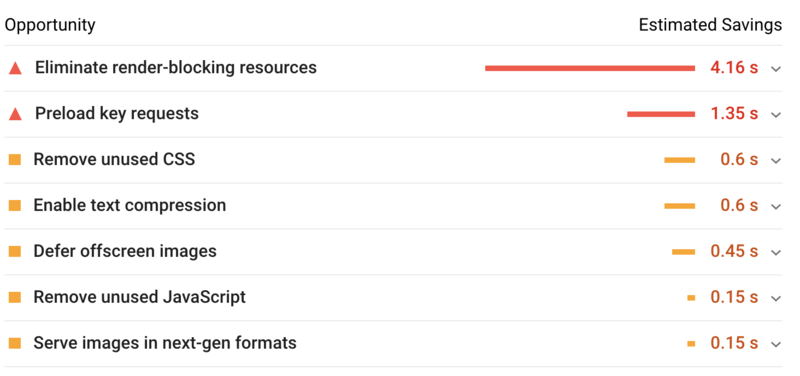
Take a look at your scores and locate the elements of your site that take the longest to load and fix those first. For example, if Lighthouse is indicating it takes 4.16 seconds for render blocking resources to load, you can save up to 4.16 seconds of load time by eliminating render blocking resources.
Faster pages make users happy and provide an overall better user experience. If your pages take too long to load, you could be losing customers within seconds. The first step in maintaining good organic ranks and quality traffic to your site is by performing page speed tests to understand where you can improve page speed.
This will be a major update to the Google algorithm that will bring a wide variety of metrics known as Core Web Vitals together to form a page experience ranking factor. It’s slated to occur in May of 2021, so you have some time to address any changes that need to be made to your site.
Google rarely announces algorithm updates before they’re released, so this will have a significant impact on how Google ranks websites. The impact on individual websites may be minimal, especially for industries that have already prioritized page load times and quality UX, but may be significant to niche ecommerce websites, news blogs and more with outdated user experiences.
Google is continuing their charge of improving mobile web performance here. Starting with the shift to https (helping to remove the stigma surrounding purchasing on unsecure networks) and then the change to mobile-first indexing, Google has made it clear that mobile search is the future. Now, through rewarding fast loading sites, Google is laying out the roadmap for successful online businesses and websites.
What are Core Web Vitals?
Core Web Vitals, are three metrics that score a user's experience loading a webpage. These metrics score how quickly page content loads, how quickly a browser loading a webpage can respond to a user's input, and how unstable the content is as it loads in the browser. These three metrics are going to be bundled alongside Mobile Friendliness, Safe Browsing, HTTPS and Intrusive Interstitials into a signal Google is calling the "Page Experience Signal".
LCP – Largest Contentful Paint
This is simply put as the point in which a page’s main content has loaded. You may have heard your Dev Team or an SEO mention things like the DOM or DOMContentLoad in the past. That’s similar, but Google is claiming that this is a simpler measurement that looks at the render time of the largest visible image or text block.
So, in other words, if you have a large image on your site, or a video background that takes a long time to load, you’re in trouble.
Likewise if you have a large amount of render-blocking JS or CSS (another favorite SEO & Dev topic), or your site is setup with client-side rendering, you’ll likely have to spend some time in the next few months improving your LCP to better meet Google’s new guidelines.
CLS - Cumulative Layout Shift
Have you ever been on a website when the entire content shifted up or down? Sometimes more than one element shifted or shifted multiple times. Almost as if the layout shifted each time something loaded on the page and it all added up to a bunch of shifting in a, more or less, cumulative manner…
Yeah, you guessed it, this is finally being flagged as a terrible user experience.
The Google web.dev group shared this fantastic video that highlights this experience:
Captured so perfectly…
So, how do we understand and address this issue? Basically, resources and content are being loaded to the page after and above existing content. Maybe you have an image that’s too large and you’ve chosen to defer it to after critical content is loaded. Maybe there’s an ad that pushes down content after you’ve loaded everything else on your page. Maybe there’s a sidebar widget that pushes the main article to the right.
All of these are examples of layout instability that count towards a Cumulative Layout Shift, which is a measured by a score based on the sum of all the unexpected layout shifts.
FID - First Input Delay
When we load webpages in a browser, as users we usually have an expectation that the second we see a visual element, like a button, an image, or a scroll bar, load on the screen that the page is immediately ready to receive my input. This expectation is that we can click the button or scroll down the page, even if the page still appears to be loading.
We find it frustrating when our experience does not meet that expectation and a page does not begin to respond to our actions.
The reality is that often the browser can’t respond because it is busy parsing a large JavaScript that controls an on-page function. While the browser is loading this file, it does not have the necessary resources to run event listeners that would respond the user’s input.
First input delay (FID) helps quantify this user frustration into a user-centric metric. It is important to note that FID does not measure the event processing time or the time it takes to render changes to page layout or content, only the delay in processing the event initiated by the user.
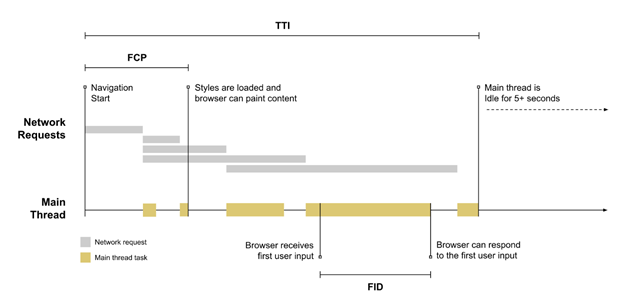
In the above example, which can be found at https://web.dev/fid/, we can see a solid example of FID measurement. In this scenario, a user has begun loading the page. As the page content load and begins to render the browser’s main thread is busy running tasks like loading a JavaScript file.
The page has already begun to load visual elements, and the user sees something of interest and tries to interact with the page. Since the main thread is already actively engaged in other tasks, it has to delay acting on the user’s input until the current task is completed. The time between when the user tried to engage with the page and when the browser can actually respond to that user’s input is FID.
Evaluating your Core Web Vitals
Now that we know all about the Core Web Vitals, how do we find out where our pages stand? Thankfully, there are a few ways to analyze your site.
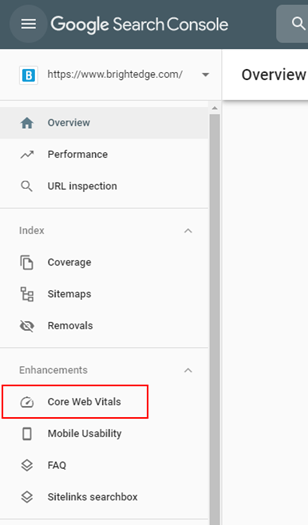
Using Google Search Console is the easiest way to address multiple pages on a large site. GSC has a section under Enhancements in the main navigation where you can see the number of pages on your site affected by each Core Web Vital.
After clicking through to this section, you’ll see a report for each Core Web Vital issue where your site may be struggling.
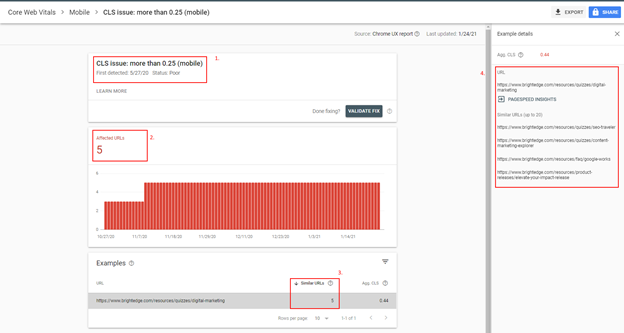
As you can see in the example below, the brightedge.com site has a minor issue with CLS. 5 of our pages have a CLS issue. I’ve highlighted how to best read this report:
The issue and guideline, in this case CLS greater than .25
The number of pages on your site that are affected by this particular Core Web Vital
An example page where this issue is occurring. This is a key differentiator between this report and other GSC reports. The Core Web Vitals reports won’t show you every page you need to fix. Frankly, that would be a slow and painful way to address all the Web Vital issues as you’re likely going to need fix things on a templated level to fix more than one page at a time.
A list of up to 20 similar pages where this issue is happening. Each example URL will show you some similar pages. Google is using this method to highlight where the same issues found on your example page are found on other pages throughout your site. For example, if you have an issue on your /blog/ and the same issue is happening on pages in your /press-releases/ section, you’ll only see the one of those in the example urls, but the other will show up in example details. This should suggest to you that more pages in /press-releases/ will need the same fix.
Fixing your Core Web Vitals
Now that you better understand what each Core Web Vitals metric is measuring and how they represent pain points for your audiences trying to access your content and engage with your brands, it is time to take action to improve these metrics – but more importantly, improve your engagement with your audience.
Each site is going to be somewhat unique. It would be rare for two separate sites to suffer from exactly the same issues – so it’s important to really dig into and analyze your domains individually to prioritize updates that will be the most beneficial.
Of course, there are more common issues websites face, and subsequently we can point to common fixes for issues that you may face.
Common activities to address LCP
Apply instant loading with the PRPL pattern
Optimizing your Critical Rendering Path
Optimize CSS files
Optimize image file sizes and compression
Optimize or remove web fonts
Optimize or reduce your JavaScript (for client-rendered sites)
Common activities to address FID
Reduce the impact of third-party code
Reduce JavaScript execution time
Minimize main thread work
Keep request counts low and transfer sizes small
Common activities to address CLS
Include the size attributes on your images and video elements or reserve the space with CSS aspect ratio boxes
Never insert content above existing content, except in response to a user interaction
Use transform animations instead of animations of properties that force layout changes