A Guide to Structured Data


Marketers, developers and search engine optimization specialists have been talking about structured data since before 2011, when Google, Bing, Yahoo! And Yandex decided to collaborate on and support an open source platform to define entities and their attributes.
This collaboration led to the creation of the Schema.org vocabulary, which has become the backbone for most structured data today. Schema is critical to SEO success, especially during a time where 0 click results are increasing rapidly. Check out this report to better understand the importance of schema and SEO.
Why should I care about structured data?
The landscape of a SERP is busy. Not only do you have to compete with your competitors for top organic listings, you also have ads, images, carousels and myriad new search result features that can keep you from getting your listing to appear in those coveted pixels “above the fold” of your audience’s screens.
Even when new features aren’t competing for your audience’s attention, you could still have problems with getting your content to stand out and grab the attention you are seeking.
This is where structured data can help. Google has been awarding enhanced search result listings, which they are now calling “rich results”, for over 10 years. I am sure you’ve all seen review ratings associated with product pages in the search results by now.
Not only does Google rely on structured data to help power those rating results, Google has expanded on the types of rich result you can get to include video snippets that can be played in the search results, recipe cards, how-to instructions, FAQ results, event details, and highlight job listings.
Studies have also shown that listings with rich results typically get more organic impressions, organic clicks, and see increased audience engagement with more time being spent on the pages.
On top of that, structured data can help you control the information presented in your brand’s Google Knowledge Panel and may even help optimize your website for voice search in Google Assistant.
Some Googlers have hinted that structured data is going to become more important to search over the next several years, if not longer – meaning now is a great time to get onboard and become comfortable understanding and speaking about structured data within our own organizations.
Now that we know why you should care about structured data, let’s start defining what it is.
What is structured data?
Simply put, structured data is any set of data that has been organized or categorized in some way.

Example of Unstructured Data – books in unsorted piles

Example of Structured Data – books arranged on a shelf by category and author
When we talk about structured data for SEO, we usually are referring to the combination of a specific vocabulary for defining entities and attributes (schema.org is the most commonly used) combined with a syntax for expressing the vocabulary as part of a webpage’s HTML code (JSON-LD is Google’s preferred syntax).
How do I get started with structured data on my site?
When looking to incorporate structured data on a page, I use the following workflow to guide my decisions:
- Review the page content
- Review entity types on schema.org
- Check Google’s Structured Data Developer Guide and Rich Result Search Gallery
- Create and deploy structured data code
Review the page content
Open the landing page, or draft if reviewing a page in advance of its publication, to identify the following:
- What page type is it (homepage, recipe page, product page, blog article, FAQ, etc.)?
- If it is a homepage, does the website have a site search function?
- Does the page have breadcrumb navigation?
- What is the page’s main topic or focus (entity)?
- What are the most important topic attributes to my audience?
- Is there a secondary page topic and how does it directly relate to the main topic?
- Is it an offer (product offer, service offer, special discount, event offer, etc.) or reviews that can be associated to the main topic?
- What are the secondary topics attributes that are most relevant to the main topic?
I like to compile this information into an unordered list nesting in the attribute details, like this:
- Page type - product
- name – ACME Anvil
- description – The pinnacle anvil for all your needs.
- price - $99 US dollars
- url – https://www.example.com/acme-anvils
- image - https://www.example.com/images/acme-anvil.jpg
- sold by – Acme Anvil Corporation
- entity type – corporation
- logo - https://www.example.com/images/acme-logo.png
- etc.
This will prove helpful later when it comes time to create the structured data code as it will follow a similar pattern.
Now that we’ve identified the most important information we are looking to mark up, it’s time to review what entity type on Schema.org best matches my page’s main topic.
Review entity types on Schema.org
My next step in the workflow is visiting the full hierarchy of Schema.org types. This list displays the relationship between parent and child types, allowing me to quickly find relevant entity types and identify new additions to the hierarchy.
After identifying an entity type that looks like a good fit for the content I am marking up, I review the entity type documentation to understand how schema.org defines it. Most of the definitions are obvious, but some definitions don’t always align with how we might view our entity.
Credit card, for example, is defined as a specific form of service:
Thing > Intangible > Service > FinancialProduct > LoanOrCredit > CreditCard
Thing > Intangible > Service > FinancialProduct > PaymentCard > CreditCard
Credit card providers might internally refer to a credit card as a product, not as a service offering. This disconnect between how schema.org defines an entity and how we individually or as an organization define the same entity can create confusion and can lead people to select inappropriate entity types that result in less than ideal outcomes.
It also limits some of the attributes that can be used as schema.org defines a “service” differently than a “product” and may provide unique attributes for each entity type.
Remember, it’s a good idea to review the list of available attributes per entity type, even if you are very familiar with the entity type. Schema.org is a “living” vocabulary which means it is constantly growing and getting added to on a regular basis.
Once you have the list of entity attributes for each entity you are defining, it is time to move on to Google’s structured data documentation.
Check Google’s Structured Data Developer Guide and Rich Result Search Gallery
Google’s Structured Data Developer Guide is a useful tool because it gives examples of structured data markup and provides guidelines for rich result eligibility. I want to call out that Google’s documentation only focuses on the attributes used to generate a rich result. On occasion, you may see Google use attribute markup in a different way than on schema.org, which is why I like to review both websites before creating the structured data code.
From here we can also review the search gallery to see what types of content, when properly marked up, can be awarded a rich result. This list is constantly growing as Google adds more support and rich results based off schema.org vocabularies.
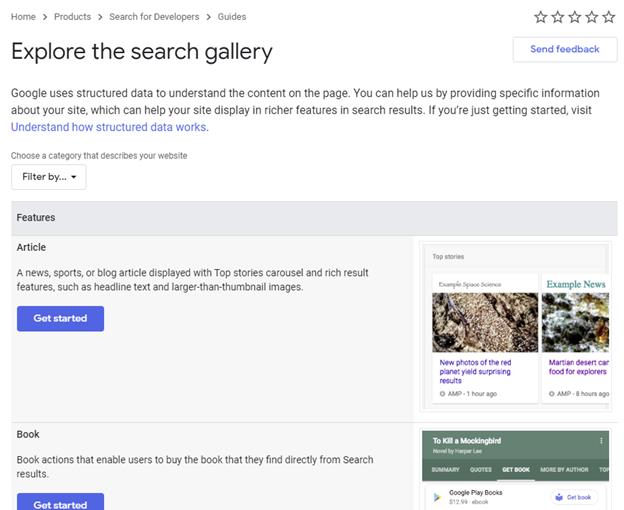
Clicking any of the “Get started” buttons in the search gallery will take you to a rich results documentation guide that will show:
- the required and recommended attributes to be eligible for a rich result
- JSON-LD code examples for that rich result
- tips on troubleshooting errors in your code
- quick links to the Rich Results Testing Tool
- examples of what the rich results might look like when the structured data is properly implemented.
Before moving onto implementation and writing the code, we need to ask ourselves a question.
Am I creating a “zero-click” listing, and is that okay?
Rich results can be amazing. They make us stand out from the competition, help build a brand’s reputation, and can help improve click-throughs from organic search results.
It’s important to note that there can be a downside to being awarded a rich result – the “zero-click” listing.
This phenomenon is usually a result of being featured in a quick answer at the top of a search result that thoroughly and concisely answers a searcher’s question so well that the searcher decides they don’t need to click on the result to learn more.
As Google expands into Question and Answer and FAQ rich results we could see even more questions being answered in the search result, negating the need to click deeper in the page.
Depending on the type of content your website produces, zero-click results might not be right for you. For example, content publishers could see a reduction in incoming revenue if users no longer need to click into the site to get the information they seek. Likewise, traffic to pages with frequently asked questions about products or services could decrease if people are finding answers in the search result.
Ultimately, your organization will have to determine if the zero-click result could negatively impact business. If the rich result is not a good fit, you should clearly communicate the potential impact to traffic so that everyone involved can make an informed decision.
Create and deploy structured data code
At this point we have:
- Matched our webpage main topic to an entity on schema.org
- Reviewed associated attributes and secondary entities
- Identified the type of rich snippet and required attributes needed to be awarded a rich result
Now we have identified all the entities, attributes and requirements we need to write, test and deploy the structured data into our HTML.
Google’s preferred implementation syntax is JSON-LD. This syntax easy to learn for anyone already familiar with JavaScript, it makes nesting entities easy since it is not interleaved to the page text, it provides a concise block of information for search engines and web agents to consume, is the easiest syntax to troubleshoot for errors, and it is Google’s preferred syntax – so it will be my focus in this article.
JSON-LD, when paired with schema.org vocabularies, can be included in the HTML either in the <head> element of the document (most search engines expect the code to be found here), or near the closing </body> tag if concerned about the extra code negatively impacting page load times.
<script type="application/ld+json">
{
 "@context": "https://schema.org",
 "@type": "WebSite",
 "url": "https://www.brightedge.com/",
 "potentialAction": {
  "@type": "SearchAction",
  "target": "https://www.brightedge.com/search/node/{search_term_string}",
  "query-input": "required name=search_term_string"
 },
 "mainEntity": {
  "@type": "Organization",
  "name": "BrightEdge Technologies, Inc.",
  "@id": "https://brightedge.id.com",
  "logo": "https://www.brightedge.com/sites/all/themes/custom/brightedge_theme/logo.svg",
  "url": "https://www.brightedge.com/",
  "contactPoint": [{
   "@type" : "ContactPoint",
   "telephone": "1 (800) 578-8023",
   "name": "BrightEdge US & Corporate HQ",
   "contactOption" : "TollFree",
   "areaServed" : ["US", "CA"]
   },{
   "@type" : "ContactPoint",
   "telephone": "+44 203 884 0370",
   "name": "BrightEdge Europe",
   "areaServed" : ["UK", "BE", "BG", "CZ", "DK", "DE", "EE","IE", "EL","ES", "FR", "HR", "IT", "CY", "LV", "LT", "LU", "HU", "MT", "NL", "AT", "PL", "PT", "RO", "SI", "SK", "FI", "SE", "IS", "NO", "LI", "CH"]
   },{
   "@type" : "ContactPoint",
   "telephone": "+81 3 5847 8233",
   "name": "BrightEdge Japan",
   "areaServed" : "JP"
   },{
   "@type" : "ContactPoint",
   "telephone": "+61 (0) 289737441",
   "name": "BrightEdge Australia",
   "areaServed" : "AU"
  }]
 }
}
</script>
Example JSON-LD syntax with Schema.org vocabulary
It should be clear now why you should format the entity data before writing the JSON-LD code – it is very easy to create templates that allow me to copy and paste the pertinent information into the code block.
If you aren’t comfortable writing your own code, there are free online generators and third-party vendor pay tools that may be of help to you. If you’ve written your own code, or used a tool to generate the code block for you, your next step is to head over to one of Google’s structured data testing tools:
- Google’s Structured Data Testing Tool (SDTT)
This was the first testing tool Google released are still supporting for the time being. The tool allows you to inspect a specific URL or to copy and paste the code directly into the tool, and will highlight any missing required fields, missing recommended fields, and highlight when the code has errors.
- Google’s Rich Results Testing Tool (RRTT)
While not officially set to replace the SDTT yet, this tool has received most of the recent updates including providing examples of the rich results your structured data could be awarded. Much like the SDTT, you can inspect an individual URL, or you can copy and paste the code into the tool directly.
*Tip – while both tools do their best to identify syntax errors and tell you where the errors are, they are usually one line off. For example, if the tool is reporting an error on line 38 try looking for the error starting with line 37 and work your way backwards until you find it.
It is worth noting that for organizations using a CMS with plugins it is still a good idea to test your code before publishing if possible.
If you are using a CMS like WordPress or Drupal and you want to test your structured data before publishing live, you can copy and paste the HTML directly into tool. This allows you to test for errors before publishing the page.
Once you are satisfied with the test results it’s time to publish your page and track the performance. Search Console has structured data reports to let you know how many pages and how many structured data errors Google has encountered.
Since Google updates guidelines and attributes often, routinely checking the GSC rich results and structured data reports will help you stay up to date on new features, requirements and opportunities to earn rich results.
Recap
The best way to get started with structured data on your website is to:
- Review the content on your website you want to:
- Identify the important entities to define
- Identify the most important attributes those entities have for your audience
- Review the entity types on schema.org to find as close a match to your content entities as possible
- Check Google’s Structured Data Developer Guide and Rich Result Search Gallery to identify what attributes will make your content eligible for rich results
- Create and deploy your structured data code in JSON-LD syntax and publish your page to the internet
- Monitor results in GSC
Though structured data is not a silver bullet that will zap you to the top of any search result, it will help search engines better understand your offerings by providing more information about your organization and the products and services you offer.
This additional information can better connect you with your target audiences by helping you stand out in search results with rich results, better control your brand’s Knowledge Graph listing, and help you optimize your site for voice search which could result in improved organic performance for your brand.



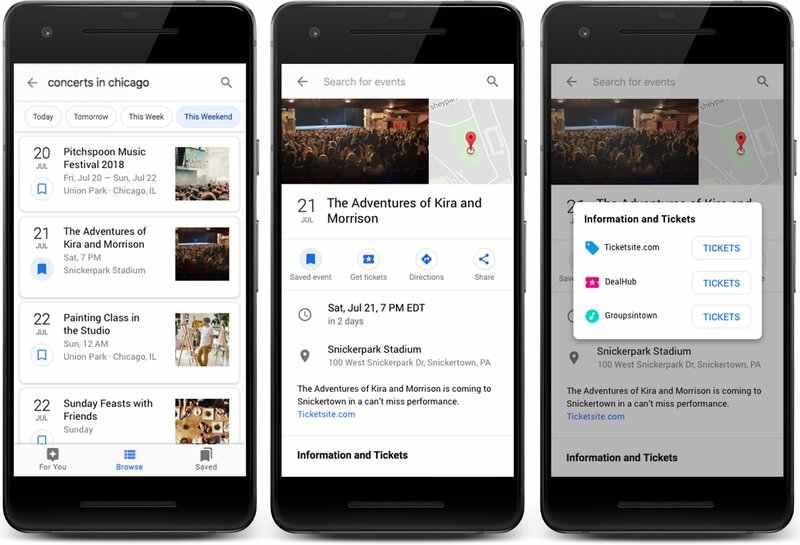
 The LIVE Badge! Google GA’d this feature in December 2018, and if you haven’t adopted, now is the time.