SEO For Mobile - How BrightEdge Drives Mobile SEO

koleary
koleary
M Posted 7 years 9 months ago
t 9 min read

It is no question that every business now has to consider their marketing strategies on all device types. Understanding how your customers engage with you throughout the buying journey, typically starts with research on a mobile device. For many industries, mobile traffic from organic has surpassed desktop traffic; the latest BrightEdge research has found that on average 57% of the traffic to your website now arrives from either mobile or tablet devices. Ninety-three percent of people who perform research on mobile devices will go on to make a purchase and mobile drives or influences over 40% of revenue for leading B2B organizations. In recent years, your customers are no longer just researching on their mobile devices, but are also starting to convert at higher rates on mobile. It has become critical to have a mobile-first strategy, and a mobile-friendly site. These mobile users want to see quality websites--mobile users who do make a purchase through their devices will visit the website for the brand an average of 6 times before they hit "buy." As the importance of paying attention to mobile users becomes clear, so too does the need to optimize specifically for customers on these devices. The mobile SERP has become increasingly contextual. In an effort to boost personalization, search engines use factors such as the person’s physical location when performing searches. The SERP can also differ greatly from desktop searches. Forty-seven percent of keywords in positions 1 to 20 rank differently on mobile versus desktop SERPs. This indicates that people need to create a mobile-specific optimization strategy. Only by focusing efforts on these mobile users can brands effectively engage with on-the-go users and begin to tap into this continually growing market. seo for mobile quote from home depot - brightedge
Establish baseline to prepare for mobile SEO optimization

The first step of creating an effective mobile optimization strategy is establishing a baseline. The baseline describes the state of your mobile marketing efforts right now before you change anything. You can use this baseline to understand where you are today, and help you prioritize your efforts as you begin your SEO for mobile.

Step 1

On the BrightEdge platform, log in to view your Share of Voice report. Here you will be able to benchmark your current content against your natural competitors. You want to track and understand how your natural competitors on mobile differ from desktop. This will let you know the strength, or areas to improve, your brand presence when your targeted customers are on mobile.

Step 2

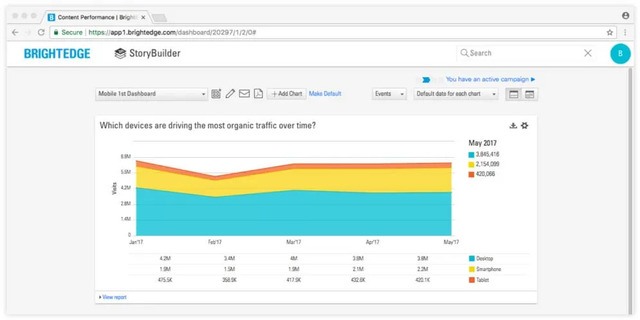
Next, click over to see your traffic report. To better understand how your customers find you, create a chart based on traffic by device type. You will be able to see what percentage of your traffic comes from people on mobile devices versus desktop. seo for mobile storybuilder dashboard example - brightedge
Step 3

As a part of this baseline report, you also want to look for potential mistakes. Use BrightEdge ContentIQ to help you identify potential errors in your content development. You can run a site audit crawl based on a Google smartphone bot, similar to how you would run a mobile friendly test with Google. When you setup the crawl, make sure you also add your mobile domain, or if a responsive site (which is preferred) run the crawl on your entire domain.

Step 4

You also want to examine your site for common mobile errors. These might include:

  • Using Flash, which is not particularly mobile friendly. Many mobile devices will not play these elements
  • Issues with your viewport that make it difficult for users to see what you posted
  • Content or images not appearing clearly on mobile devices. Small fonts or images can both cause issues here
  • Touch elements living too closely together. People on mobile devices use their fingers to navigate your site
  • Elements, such as submit buttons, placed too closely together will make it difficult for people to properly use the site

Find content opportunities to optimize SEO for mobile

Once you have established your baseline, the next task will be to find opportunities for mobile-centered content development. BrightEdge Data Cube will help you to surface great mobile keyword opportunities. You can measure traffic rates and see which words will likely provide the most return. Central to your strategy should also be "striking distance" keywords. This describes the keywords that you already rank for, where your page falls between positions 5 and about 15. Check your keyword ranking reports. You can filter for mobile devices to find your own list of keywords in these positions on mobile devices. Through fixing site errors and optimizing the content based on your mobile target keywords, you have the best shot of boosting the rankings for these pages. As you use these two strategies, do not neglect to see how the SERP looks for these particular keywords. On mobile devices, the screen can easily be dominated completely by a Quick Answer or video results. You want to select keywords that have the highest possibility of visibility above the fold. Verify the SERP of your selected keywords and tailor your content development efforts for these needs. The best way to understand your organic opportunity is to run the Intent Signal dashboard for mobile (smartphone). We have created a dashboard template for you within StoryBuilder. Target the keywords in the Optimize and Create categories. This is where there is organic content above the fold, but you need to either optimize content in striking distance or create new content for those keywords. Once you have categorized those keywords, you can also use Keyword Reporting to understand the content type, regular web listing or a universal result. If a high-value mobile keyword has a Quick Answer (a universal result), consider using our Quick Answer white paper for more information about earning this coveted rich answer position.

Optimize content for mobile

Now that you have identified your mobile optimization opportunities, you want to create your content. The material you develop should be smart. It should:

  • Target exactly what customers need
  • Be optimized to ensure visibility
  • Be up-to-date
  • Be integrated with the rest of your marketing efforts
  • Be profitable

Remember the goals that your mobile users most likely have, and incorporate the answers to their needs into your content. Data Cube can help you find semantically related keywords. These related keywords can help you further optimize your content and demonstrate your value to the search engine. Google uses these keywords to better understand content and see how it relates to queries. Incorporating the appropriate ones will show depth.

Measure and improve for mobile

Once you begin to publish your mobile-centric content, you will want to keep a careful eye on your results. This will let you know if your efforts are helping you accomplish your goals. It will also help you redirect your efforts if necessary. Page Reporting will be used to track your traffic and compare it to your revenue. Here you will see how well your traffic boost rates compare to revenue. If you do not see corresponding lifts in revenue, then you can look for problems towards the end of your sales funnel and make the appropriate corrections. Page Reporting will also help you see how much time people spend on your page as well as your bounce rates. Poor numbers in these areas can be good indications that your content does not align well with user intent. You will want to reexamine other high ranking content on the SERP for these queries to see where important adjustments need to be made. BrightEdge also offers a mobile-first dashboard. You can add in any more charts that you want to include, customizing it to best meet your needs. As you look at your progress, watch your rankings. Look for improvements as well as new striking-distance keywords that you can capitalize on. The modern consumer is a mobile consumer. People use their mobile devices to engage with people around them and businesses they care about. The better prepared you are to work with these customers, the easier it will be to interest them in engaging with your business. Get started to today!

  1. Establish your baseline
  2. Prioritize mobile keywords
  3. Optimize/Create content targted to mobile
  4. Measure and track progress
  5. Iterate plan based on progress

Get AMPed: Optimize Your Content for Mobile Search

A BrightEdger
A BrightEdger
M Posted 9 years 9 months ago
t 9 min read

Google and the Micro-Moment

Whether it’s spontaneous curiosity or the need for insights to support a decision, consumers now rely on mobile more than desktop in their quest for information. Google has defined this new search behavior as the micro-moment: critical moments that, when added together, drive greater engagement across the customer journey. With this in mind, content creators no longer have to guess at the types of content that will resonate with audiences, or risk sharing content that fails to engage. Instead, the most successful content creators utilize rich data about each micro-moment, including insights on search intent and context, creating experiences that satisfy each customer at a specific point in their journey.discover the importance of amp - brightedge

Accelerated Mobile Pages (AMP) Project: Creating Frictionless Micro-Moments

Increasing reliance on mobile has also raised expectations for immediate results. When pages load slowly, they are often abandoned as the searcher seeks out the next-best content that quickly and effectively meets his need. In response to this, Google announced the Accelerated Mobile Pages (AMP) Project, an open source initiative designed to help publishers build light-weight web pages that optimally perform on mobile search. Publishers should AMP-enable their content in order to deliver a high-quality experience for mobile searchers. These improvements can help secure better placement on mobile search results which helps mobile users more quickly and easily find and access the publisher’s content. The benefits of AMP-enabling content can be observed in the Top Stories section, a carousel of up-to-the-minute news appearing at the top of mobile results pages for relevant searches. This universal listing fulfills the “I-Want-to-Know” micro-moment: an in-the-moment search for knowledge. AMP-enabled content, as designated by the lightning bolt symbol and acronym shown below the story title, is eligible to appear in this prime section on mobile results pages as one of the first news items a mobile searcher sees.

BrightEdge Drives AMP-Enabled Top Stories for I-Want-to-Know Micro-Moments

To help publishers deliver stand-out experiences optimized for mobile, BrightEdge is the first platform to identify keywords where Top Stories and AMP-enabled content appear. Going a step further, BrightEdge also shows how content is performing for these search results. With this insight, content creators can easily see where their content aligns with what mobile searchers are looking for--and where they are missing the mark.

In order to qualify for placement in Top Stories and align with the experience searchers want, the platform also highlights for publishers where AMP-enabled content is preferred. For these micro-moments, publishers can see where their web pages are currently AMP-compliant, and where there is opportunity to optimize with AMP. These actionable insights help publishers focus on the highest impact AMP-enablement activities to optimally align with search intent.  

BrightEdge customers can drive major business impact with these new metrics by leveraging them with StoryBuilder dashboards to show how AMP-optimization in I-Want-to-Know micro-moments results in greater traffic, conversions and revenue. Within Keyword Reporting, customers can identify critical gaps in AMP-compliance to prioritize optimization activities with the greatest impact, driving prime placement in Top Stories and other AMP-enabled search results aligned to what consumers are looking for. Customers can also customize Anomaly Detection rules to receive automatic notifications on significant content changes, such as when AMP-compliance drops to unacceptable levels or when Top Stories now display in search results for targeted keywords. These new capabilities help SEOs and digital marketers develop a high-impact mobile strategy, aligning their AMP-optimization efforts to the micro-moments where searchers will experience the greatest benefit.  BrightEdge customers will receive this new functionality in August 2016 at no extra charge.

How Google AMP Will Streamline Content

Default avatar
AnnaFrancis
M Posted 10 years ago
t 9 min read

People are searching with their mobile devices more now than ever before, so having a good user experience is essential. However, with increased mobile usage (and growing mobile e-commerce) comes an increased expectation for speed and agility, as data has shown that 40% of people will abandon a site after just three seconds if the page they are looking at doesn’t load quickly enough. While a slow load speed is bad enough for the user, it is also bad for the content creator, as it means their content isn’t actually being seen. Google AMP can help. There has been a lot of talk recently about Google’s Accelerated Mobile Pages (AMP) and what it means for search and content marketing. Google first announced AMP back in October 2015, saying that AMP content loaded around four times faster, using ten times less data than non-AMP content. So, what is Google AMP and how will it affect content?

High-speed content

AMP is an accessible framework that creates fast-loading mobile webpages. AMP is designed to easily improve the speed of content displayed on mobile and subsequently enhance user experience. Currently, Google, Twitter, and some other companies have rolled out AMP, and it comes not long after Facebook launched Instant Articles and Apple launched its News service. It basically works by using a new version of HTML, a streamlined version of CSS, and a JavaScript framework for mobile pages – thereby ensuring fast loading times and smooth readability.

AMP HTML

A new stripped-down version of HTML, AMP HTML has a new set of properties and limits existing styles and tags. If you are familiar with HTML, then you will have no problem understanding and adapting your pages to AMP HTML. It’s a good idea to have a look at all the required markup your AMP content will need.

AMP .JS

Third party JavaScript is out when it comes to AMP, but it does offer a JavaScript framework specifically for mobile pages. AMP .JS makes the loading of external resources asynchronous, stopping any external scripts from blocking page rendering.

AMP CDN

This optional content delivery network will cache your AMP-enabled pages and optimize them where necessary, making them instantaneously accessible on a mobile phone. Images only load as they scroll into view and will use the amp-img element, and Google will cache and host your content so it no longer needs to be fetched from your server. Currently, only available to publishers, Google AMP will be available for all content marketers before long, so it’s best to get up to speed on how you can prepare your site and your content for the change.

Examples

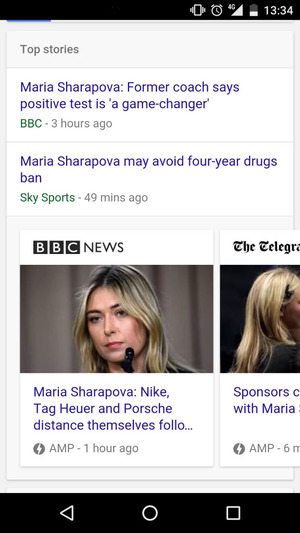
Examples of AMP pages live in Google’s search results can be seen when searching for any topical search query on a mobile that is likely to return results from publishers. One such example is a search for ‘Sharapova’, after the tennis star was recently embroiled in a doping scandal. Google AMP News - brightedge The grey lightning symbol indicates an AMP result, and clicking on one of these instantly opens up the result within the browser. The blue bar at the top then gives the user the opportunity to swipe between related articles, all structured around the AMP framework.    

How to use Google AMP for your website

The first thing you need to do is build alternative AMP pages for your site that adhere to all the new specifications. There are quite a few different elements that AMP does not allow, including lead forms and on-page comments, so you may need to completely re-write your site template to accommodate these new restrictions.

Code Implementation

The BBC has been quick to adopt Google AMP across all their news content and are a great example to follow if we want to learn how a page should be structured. The content in the above example is available at http://www.bbc.co.uk/news/business-35751916 as well as http://www.bbc.co.uk/news/amp/35751916 - one for desktop search and one for AMP search. The important element is the <link> tag in the source code of each page that indicates to Google about its respective equivalent. On http://www.bbc.co.uk/news/business-35751916, we find: And on http://www.bbc.co.uk/news/amp/35751916, we see: This allows Google to serve the correct URL dependent upon the query and device, without seeing the two as duplicate content.

And further down, we find this: This is the JavaScript code that makes everything work – loading all custom AMP elements and managing resource loading and prioritization (such as image lazy-loading). In terms of structure, this tag must be the last element before the closing </head> tag.

Schema

In order to get your content to appear for relevant keyword queries, you must include the correct schema markup. This gives further information to search engines about the content and helps them display it correctly in AMP search. On the BBC article, the following schema is applied using the JSON-LD implementation method: There’s a lot of information being presented here, but it all has a purpose. For more information about schema and its implementation, read the official documentation: http://schema.org/. In terms of multimedia, there is a whole separate range of AMP tags that can be employed, including amp-video, amp-carousel and amp-image-lightbox. Extended components can also be used for GIFs (amp-anim) and YouTube (amp-youtube). The main social media networks also have their own extended components.

Plugins

Luckily for WordPress users, there is already an official Google AMP plugin. All you need to do is download it and voilà: all your future posts will be AMPlified. It’s important to remember though that the plugin does not support ‘pages’ or any archived posts. Here are Google’s guidelines to getting your AMP pages to properly display in Google Search:

  • Design: Create webpages in line with the AMP HTML specifications.
  • Discovery: Make your AMP pages discoverable by linking to them from other indexed pages and listing them in your sitemap.
  • Validation: Check your AMP pages are valid so that they work properly for both Google and the user.
  • Structured Data: Your content will be presented more prominently if you have the correct structured data markup.
  • Status: Check the AMP status report to find a list of successfully indexed Google AMP pages on your website and any errors that may have been found.

Benefits of Google AMP

There are several different benefits to using AMP on your website:

  • User experience
  • Speed
  • Increased engagement
  • Publisher control
  1. User Experience. Speed is a crucial element of user experience when it comes to browsing the web on a mobile device. People can quickly lose interest if a page doesn’t load fast enough and studies have shown that pages that are just one second faster experience a 27% increase in conversion rate.

  2. Speed. The speed in which a page loads could also have an effect in terms of SEO. Page speed is one of the many ranking factors Google uses, so if your page loads too slowly, there is a chance it will have a decreased level of visibility.

  3. Increased Engagement. Faster web pages mean higher levels of readership and, therefore, better engagement. Users can quickly search for a blog topic, click on an AMP search result and instantly see a responsive piece of content that is easy to read and share.

  4. Publisher Control. AMP gives publishers more autonomy over their content, increases the reach of content produced, and makes content distribution easier. It also allows for effective advertising across the mobile web by supporting a range of ad formats, networks and technologies.

Does Google AMP Affect Rankings?

In short, no. John Mueller at Google said only recently that AMP is not a ranking signal – yet: “At the moment, it is not a ranking signal. It is obviously one way to make mobile-friendly pages, so that might be an option where you do that. I’ve already seen some websites where they’ve moved the whole website to the AMP format. Obviously, that is mobile-friendly setup, so it kind of picks up the mobile- friendly thing. But just AMP itself is not something that we have a ranking signal at the moment.” Considering the amount of investment that Google is putting into AMP, it would not be a surprise to see this happen in the future, and the words “at the moment” definitely suggest this may be the case. Google is obviously promoting AMP articles within its search interface due to the prominence of the news carousel. The majority of content available in this section of the search results is now AMP, so despite it not being a direct ranking signal, you can achieve greater SERP prominence by adopting the new framework. In the future, AMP could become part of the existing mobile-friendliness algorithm, or it could simply become a ranking factor in its own right.

Conclusion

With mobile search levels continually on the rise, the introduction of Google AMP will give publishers and content creators a flexible platform on which to promote their articles. AMP officially launched at the end of February and is currently being displayed at the top of Google’s search results in a carousel of top stories, but it could move into other areas too. Dave Besbris, Vice President of Engineering at Google, said at SMX West that “everywhere we use content, we want to embrace AMP.” At the moment, only news and editorial content will appear as Google AMP results in the carousel, but the type of content displayed could vary from query to query (and day to day). For brands that want to increase their organic visibility and stay at the front of the ever-changing competitor landscape, AMP is a no-brainer. There is no point in creating amazing content if it takes five times longer than your competitors’ content to load on mobile. Pages that load faster will provide a better user experience and may also have a positive effect on SEO down the line, so Google AMP is definitely something to keep an eye on. Anna Francis is a Content Manager at the BrightEdge agency partner Search Laboratory, based in Leeds, UK.  

,