
Europe's Product Grid Is Gone, but Google Shopping Still Leads the Replacement
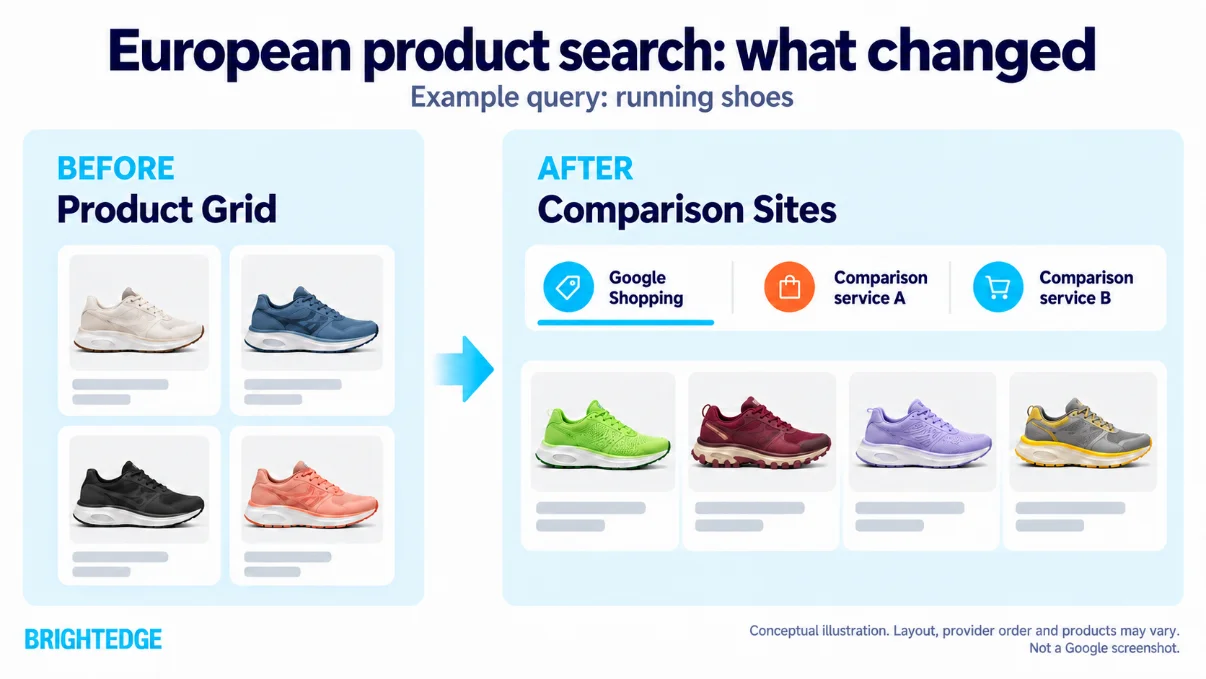
If you’re a retailer selling e-commerce in the European Economic Area (EEA), Europe’s single-market trade zone, you need to understand this change to your products’ coverage. Google’s free Product Grid, sourced from your Merchant Center Feed and Product pages disappeared overnight on September 16th. Google replaced it with a Comparison Sites box meant to give rival shopping services a fair shot. Yet Google Shopping retained a substantial lead, appearing 16 to 35 times as often as the next-largest service in Germany, France, Spain and Italy.
While doing so, Google retained dominance, owning that space with the same products in 94%+ of all SERPs (Source: BrightEdge Total Search Visibility). For retailers, the practical question is whether their priority products appear in those results. Check your free-listing eligibility in Merchant Center and whether third-party comparison catalogs carry accurate, current information about your products.
Key takeaways
- One date, every tracked market: Product Grid listings stopped appearing in all 14 EEA markets BrightEdge tracks, and Comparison Sites began appearing in the same 14 markets on the same day, Sept. 16.
- A dip, then a recovery: The number of keywords showing a comparison section was 38% below the old grid baseline on day one, stayed roughly 12% to 23% below it through Sept. 29, then stepped back above it on Sept. 30.
- Not every market recovered: Germany, Italy and Spain climbed back above their baselines by Oct. 3, while Finland and Norway were still about 14% and 6% below theirs on Oct. 13.
- Google Shopping leads the new box: It appears 16 to 35 times as often as the next-largest service, and 71% of Comparison Sites appearances land in the top four result positions.
- What to do first: Opt into visibility and choose Google as the comparison shopping service (CSS) that places your free listings in Merchant Center given its dominance in results.
Data collected
The figures come from BrightEdge Professional Services analysis of daily search results collection on a tracked product query set, not from AI Catalyst or AI HyperCube. This period covers the two weeks prior to the change for base-lining and the subsequent time period until metrics stabilized.
| Item | Detail |
|---|---|
| Markets | 14 EEA markets: Austria, Belgium, Czechia, Denmark, Finland, France, Germany, Greece, Italy, Netherlands, Norway, Poland, Spain, Sweden. The UK, US, Canada and Australia serve as non-EEA comparisons |
| Window | Sept. 1 to Oct. 13, 2026, daily |
| Measure | Distinct keywords per day showing a Product Grid (through Sept. 15) or a Comparison Sites section (from Sept. 16) |
| Baseline | Each market's Product Grid average for Sept. 10 to 14, set to 100 |
| Reading the counts | Counts show volume, not whether the same keywords appear before and after |
| Share and position data | EEA product results analysis for Germany, France, Spain and Italy, Oct. 2026 |
Why the grid disappeared
Google removed the grid to comply with a July 23, 2026 European Commission ruling under the Digital Markets Act (DMA), which found Google favored its own shopping, hotel, transport and sports results and fined it EUR 460 million for that finding (coverage). A separate EUR 430 million fine over Google Play brought the day's total to EUR 890 million.
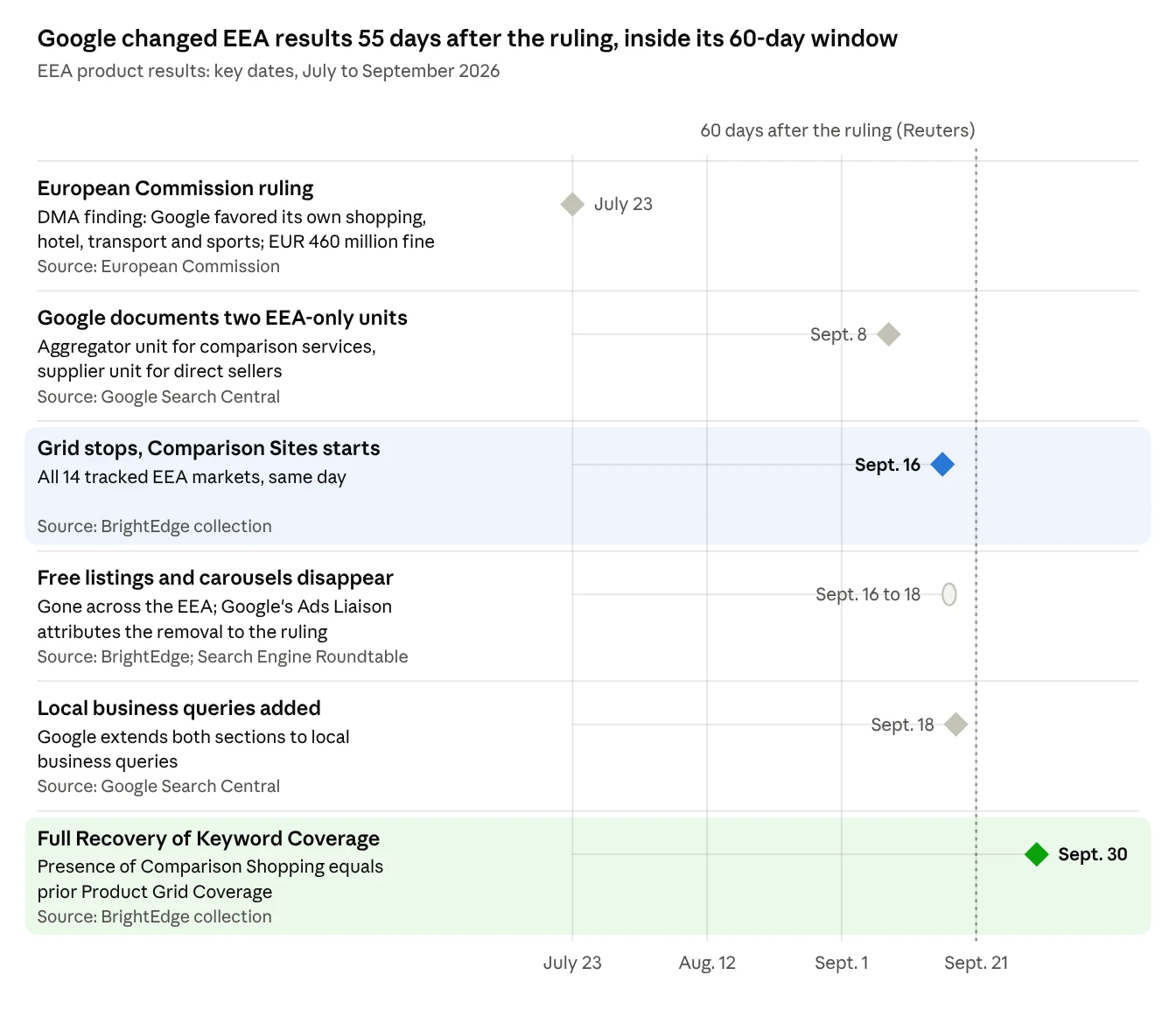
Google disagrees with the ruling and told Reuters on Sept. 8 that the changes are the largest reduction in quality of service in its 29-year search history. Reuters reported that Google had 60 days to comply, and the Sept. 16 change landed inside that window. Because this is a compliance step, there is no sign it reverses while the ruling stands.
Product grids vanished on one day, and keyword counts took about two weeks to recover
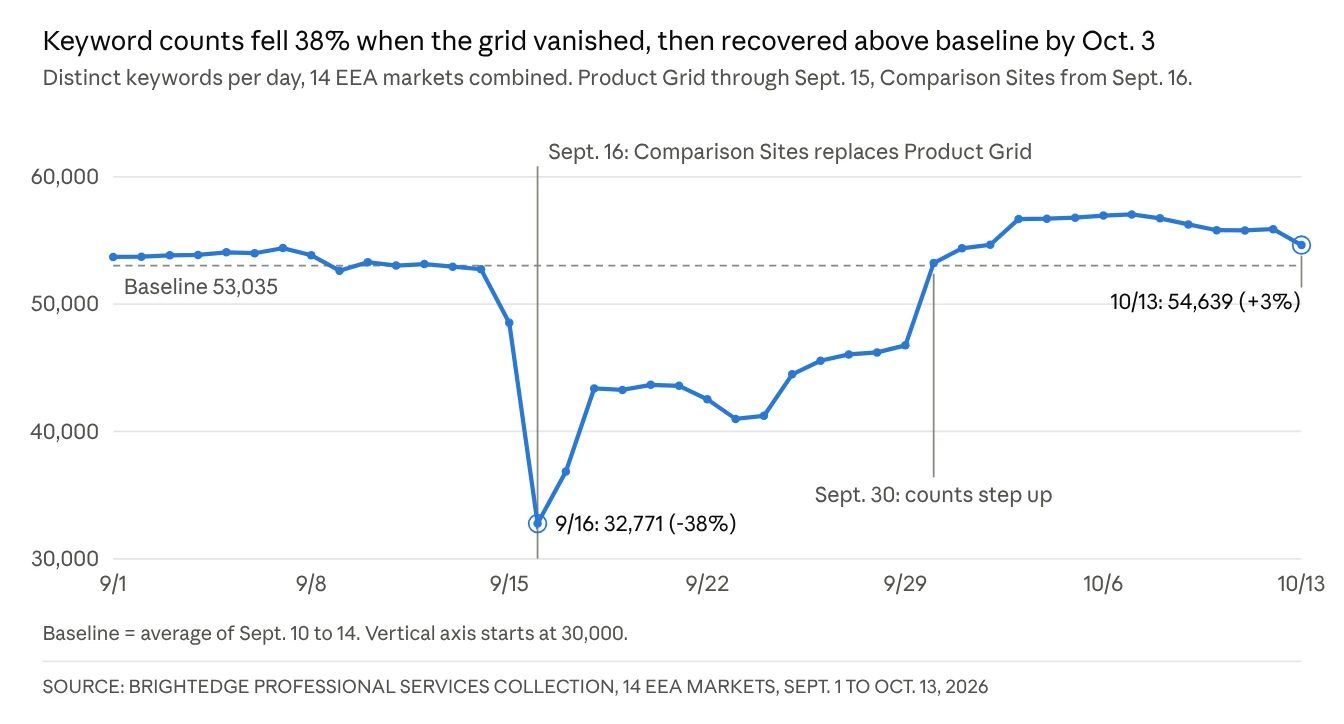
Product Grid listings stopped appearing in all 14 markets after Sept. 15, and the Comparison Sites section began on Sept. 16, the same day everywhere. Day one counted 38% fewer keywords than the old baseline. Counts then sat at roughly 77% to 88% of baseline between Sept. 18 and Sept. 29, and stepped up on Sept. 30. Since Oct. 3 the combined count has held 3% to 8% above baseline. Product Grid stayed flat throughout in the UK, US, Canada and Australia, which sit outside the change.
Read this as a change in volume, not proof that the same keywords moved from one section to the other. The Sept. 30 step also hit the largest markets together, so part of the early dip may reflect the new section being collected and classified in stages.
Large markets rebounded past their old baseline; Finland and Norway never did
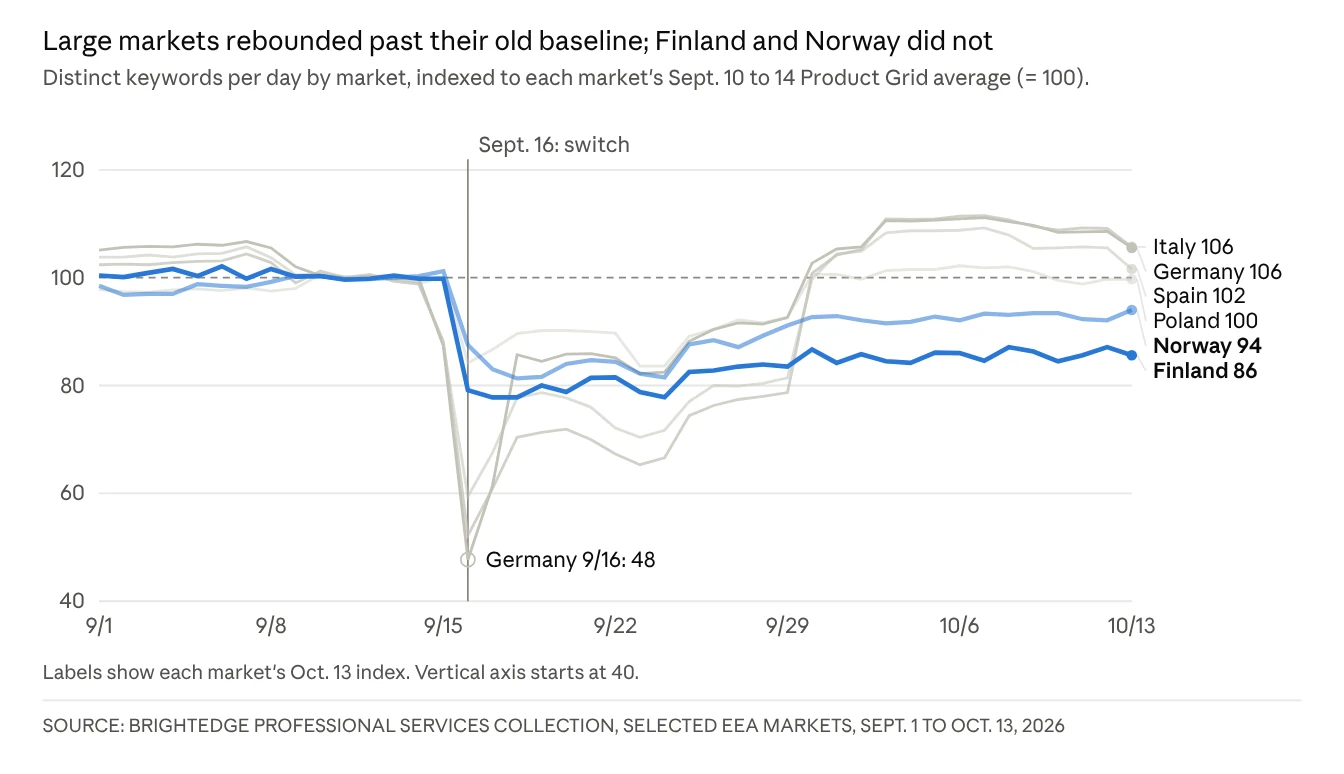
Germany, Italy and Spain took the deepest day-one hits (Germany fell to about half its old count) and recovered slowest, then jumped back above baseline on Sept. 30 and reached about 108% to 111% of it by Oct. 3. Poland dipped less and settled at baseline. Finland and Norway took smaller early hits, missed the Sept. 30 step, and were still about 14% and 6% below baseline on Oct. 13.
Finland and Norway are small markets where a few dozen keywords move the index, so treat them as markets to watch, not proof of lasting loss. The six markets shown are the clearest examples of each pattern; the other eight markets mostly follow the large-market or Poland shape.
Google Shopping leads the new box in every market, for now
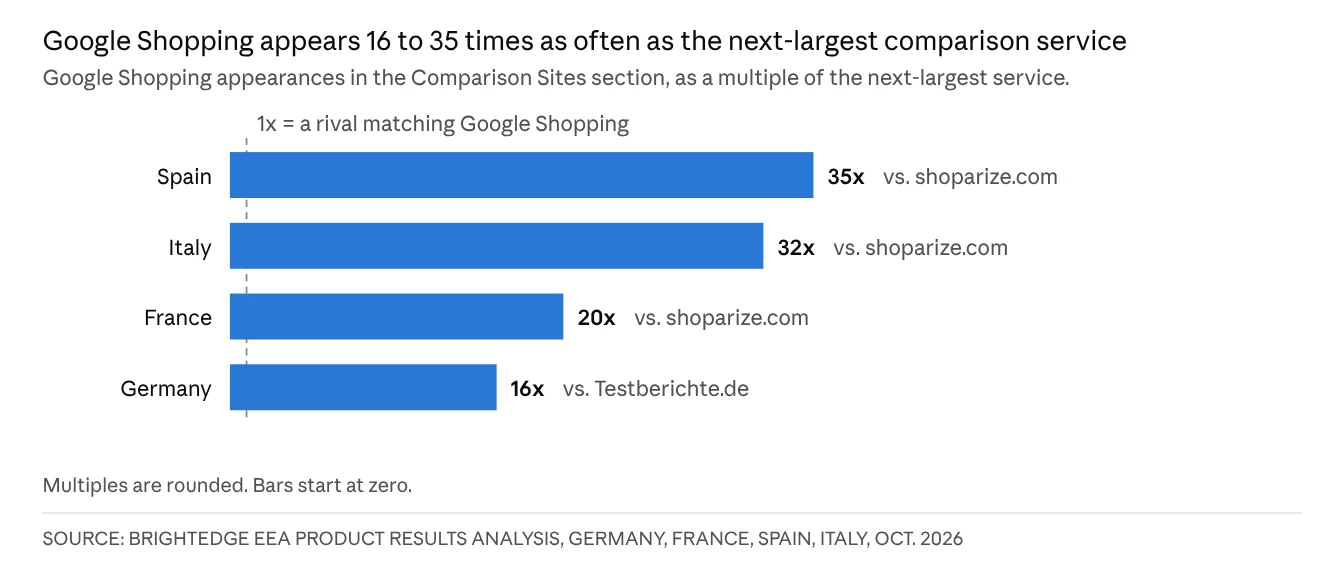
Across the four markets analyzed, 71% of Comparison Sites appearances fell in the top four result positions, from 61% in France to 76% in Spain and Italy, so the box is premium space.
The lead is wide today, but the ruling exists to give third-party services comparable prominence. Any service that qualifies or gains share moves visibility toward boxes that Merchant Center does not fill. BrightEdge has no data yet on how fast that happens.
Products still reach EEA searchers by two routes
The change moves where products appear more than whether they can, and it adds a dependency outside Google: part of a merchant's European product visibility now runs through comparison services and the feeds that supply them.
| Route | Fed by | What the searcher sees | Merchant lever |
|---|---|---|---|
| Google Shopping box | Merchant Center feed, product and offer schema, page content | Product tiles that open the multi-seller product panel the old grid used, or the Google Shopping page | Feed quality, and selecting Google as the CSS for free listings |
| Third-party service boxes (idealo, billiger.de, Bigshopper and others) | Each service's own catalog, fed by direct feeds, affiliate networks or feed-management partners | A box with one service expanded and others collapsed beneath it | Presence and data accuracy in each service's catalog |
Google's merchant help says a merchant places free listings through one CSS, chosen in the Merchant Center CSS dashboard, and Google Shopping is one of the options. Because you can only opt for one CSS through the free listings, and with Google outranking other CSSs by more than 16x, we recommend you select Google as your preferred CSS. BrightEdge has not yet tested how a merchant who selects another CSS shows up inside Google's box, and does not recommend a non-Google CSS unless required.
Two business models face extra limits. Google bars a primarily marketplace business from operating as a comparison service, though it can list through one. Comparison-service rules also bar links to merchant sites that sell only to businesses, which narrows the third-party route for a business-only checkout.
Ordinary organic listings keep their role. With the grid gone they have one fewer feature to clear, which puts more of the organic load on product and category pages.
Start here: priority actions
If you do one thing this week, check which CSS your Merchant Center account uses for free listings. It is entirely in your control and it decides which service places those listings. Beyond that, feed hygiene still matters but is no longer the whole job: four actions are urgent, two need evaluation, and one needs monitoring.
| Priority | Action | Why |
|---|---|---|
| Do now | Select Google as the CSS for free listings in each Merchant Center account (several CSSs can be selected for paid campaigns, only one for free) | Google Shopping holds the leading box in every tracked market |
| Do now | List the comparison sites and affiliate partners that carry your products in each EEA market, and the feed behind each | Third-party boxes fill from their own catalogs, so presence is decided outside Google |
| Do now | Align titles, images, price, availability and GTIN across partner feeds and the Merchant Center feed | A product should read the same in every box, and a shared identifier lets each service match the right offer |
| Do now | Re-baseline EEA product visibility from Sept. 16 and stop comparing it with earlier periods | Before and after measure different page layouts |
| Evaluate | Map coverage gaps by category and market where no service other than Google Shopping lists your range | These gaps lose visibility first if third-party services gain share |
| Evaluate | For price-comparison or marketplace properties, assess the CSS program and Google's structured data carousel (beta) | The comparison side of the section is application-gated |
| Monitor | Track UK product grid visibility and each service's share of the Comparison Sites section in the EEA | A falling Google share is the early signal of a third-party shift |
Six best practices for product visibility in the EEA
Google builds a product listing from inputs it reads from your catalog, and retailers directly supply three of them: the product feed, the structured data on the product page, and the web content describing the product. Those same inputs now feed the Google Shopping box, the third-party services that ingest your data, and Google's AI surfaces. Most lost visibility traces to gaps in these inputs, not to a missing strategy, which makes it fixable data work.
| Input | What it does | The common gap |
|---|---|---|
| Merchant Center feed | The structured catalog Google ingests for Shopping, free listings and AI surfaces | Missing or invalid attributes, identifiers or disapprovals quietly suppress products |
| Product page | The page Google crawls, and the page that has to earn the click | Thin or unrenderable pages do not earn ranking, or the click when they do appear |
| Structured data | Confirms what the product is: price, availability, brand, reviews | Without valid Product and Offer markup, Google cannot confirm price, availability or reviews |
1. Fix the Merchant Center feed first
A product that is disapproved or missing identifiers is not eligible for the surfaces that matter, so start with approval and completeness. Review disapprovals and warnings, identifiers (GTIN, MPN, brand), title, attribute and image quality, and the accuracy of price, availability and shipping information.
Shipping accuracy matters more than most teams expect. In one BrightEdge Professional Services analysis for a national home improvement retailer, a competitor lost visibility every weekend because its 2-day shipping applied only on business days. The client gained traffic after supplying more accurate, up-to-date shipping information in its Merchant Center feed.
2. Choose your comparison shopping service on purpose
In the EEA, a retailer's free listings run through one comparison shopping service (CSS), chosen in the Merchant Center CSS dashboard. Select Google Shopping unless you are required to do otherwise, because it leads the section in every market measured. If the account's CSS is not the one selected, Merchant Center disapproves the products with the message CSS not selected for this destination. Then confirm, market by market, which service carries your free listings, and check that your products appear in the comparison-service results for each market. BrightEdge has not yet tested how a merchant who picks another CSS appears inside Google's box.
3. Make product pages complete and readable by machines
The page has to earn the click, and it has to be readable to the systems that assemble product answers. Serve price, variants, availability and reviews in the page code itself instead of loading them with client-side JavaScript. Most AI agents do not run JavaScript, and Adobe scored US retail product pages 66% machine-readable, the lowest of the page types it measured, and UK product pages averaged the same 66 out of 100.
To check, crawl a sample of product pages without JavaScript and compare what appears with the browser view, and confirm that server logs show AI crawlers fetching the full product content. Where pages are thin, add depth: specifications, sizing, delivery and returns, and trust signals such as reviews. BrightEdge's guide to AI agents covers the access and rendering checks in detail, and BrightEdge AI Agent Insights tracks which agents reach your pages.
4. Add and validate Product and Offer structured data
Structured data confirms what a product is. Use valid Product and Offer markup with price, currency, availability, brand and identifiers, add AggregateRating where you have reviews and BreadcrumbList for context, and cover every product template, not only the top sellers. The markup, the page and the feed should agree, because a mismatch between them undermines the confirmation that structured data exists to provide.
5. Describe every product the same way everywhere
The same product now appears in Google's box, in third-party comparison services fed by their own catalogs, and in AI shopping answers. Compare titles, prices, variants and product numbers across Merchant Center, partner and affiliate feeds, any AI shopping feeds you supply, and the product page. You know it is working when the same details appear in Google and in comparison-service listings for the same product.
6. Measure on a new baseline, and watch availability daily
Results before and after Sept. 16 come from different page layouts, so start EEA product visibility trends again from that date. Track Comparison Sites presence by market and, where you can, each service's share of the section. BrightEdge GSC Reporting is one place to watch clicks on either side of Sept. 16.
Watch the products that carry your visibility. A few products usually drive most of a retailer's product-surface presence, and an out-of-stock or suppressed item can erase it, a drop that Search Console alone can surface weeks late. Report AI-referred visits as their own channel beside organic search, so a shift between channels is visible rather than buried in organic.
EEA product visibility checklist
Feed and CSS
- Merchant Center disapprovals and warnings reviewed, with no products suppressed by missing or invalid attributes
- GTIN, MPN and brand present on every product that has them
- Titles, images, price, availability and shipping information accurate and current
- Google Shopping selected as the CSS for free listings in each Merchant Center account, or the reason for another choice documented
Product pages and structured data
- Price, variants, availability and reviews present in the page code, not loaded only by client-side JavaScript
- A no-JavaScript crawl of sample product pages compared with the browser view
- Valid Product and Offer markup on every product template, with AggregateRating and BreadcrumbList where they apply
- Feed, page and markup agree on price and availability
Partners and measurement
- Comparison sites and affiliate partners that carry your products listed for each EEA market, with the feed behind each
- Titles, identifiers and variants consistent across partner feeds
- EEA product visibility trends re-baselined from Sept. 16
- Daily availability monitoring on the products that carry most of your visibility
- AI-referred visits reported as their own channel beside organic search
What we do not know yet
The biggest gap for a marketer is the traffic cost. This data measures visibility, not clicks or revenue. Directionally, BrightEdge has seen product page clicks decline and clicks to non-product pages rise alongside this change, but not clearly enough to say the pattern is consistent. Treat it as a lead to test in your own data, not a finding.
Three more questions would change this advice if they resolved differently:
- Whether the supplier unit, Google's separate section for direct sellers, appears on product queries at all. No capture shows it yet.
- How Google ranks the services inside the section. Its documentation omits this.
- Where traffic from the section is reported in Search Console and Merchant Center. Google has not documented it.
How BrightEdge reporting treats the new layout is covered in the FAQ below.
Frequently asked questions
What happened to Google's product grid in Europe?
On Sept. 16, 2026, Google stopped showing its free product grid across the European Economic Area and began showing a Comparison Sites section, where comparison shopping services list products. The change followed a July 23, 2026 European Commission ruling under the Digital Markets Act that fined Google EUR 460 million for favoring its own shopping results.
Which countries are affected?
The EEA, which is the EU plus Iceland, Liechtenstein and Norway. BrightEdge measured the same-day switch in 14 tracked markets. The UK is outside the EEA and kept its product grid.
Is the product grid coming back?
BrightEdge sees no sign that it returns while the ruling stands. Google disagrees with the ruling, but the change is a compliance step.
What is a comparison shopping service (CSS)?
A comparison service that places products in Google results in Europe. A retailer can select only one for its free listings in Europe, and Google Shopping is one of the options. Google's guide to working with comparison shopping services covers the setup.
Should I use a CSS other than Google Shopping?
BrightEdge does not recommend it unless you are required to. Google Shopping appears 16 to 35 times as often as the next-largest service in the markets measured, and BrightEdge has not yet tested how a merchant who picks another CSS appears inside Google's box.
Does feed optimization still matter?
Yes. The feed, the page's structured data and the web content describing the product are the three inputs retailers directly supply behind a Google product card, and third-party comparison services ingest similar product data.
Did my traffic drop?
BrightEdge has directionally seen product page clicks decline and clicks to non-product pages rise alongside this change, but not clearly enough to call the pattern consistent. Check your own data, and compare periods on either side of Sept. 16 with care because they reflect different page layouts.
Where do clicks from the Comparison Sites section show up in reporting?
Google has not documented where these clicks are reported in Search Console and Merchant Center.
Do BrightEdge Product Grid reports still work in the EEA?
From the week of Sept. 27, 2026, platform Product Grid reports reflect the new layout, so grid title, grid rank, product count and seller count can shift for reasons unrelated to SEO performance.
Sources and further reading
From BrightEdge
- Weekly AI and Search Insights
- AI Agents for Search Marketers
- AI Agent Insights
- GSC Reporting
- SEO and AI search case studies
- SEO glossary
Google and other sources
- Aggregator unit in Google Search, Google Search Central
- About the Comparison Shopping Services dashboard, Merchant Center Help
- Working with Comparison Shopping Services, Merchant Center Help
- Google rolls out redesigned search results across the EEA, Search Engine Journal
- European Commission fines Google over breaches of the Digital Markets Act, JURIST
- AI traffic is surging, but many retail sites are not readable, Adobe