JavaScript SEO: How Search Engines Understand JavaScript

enewton@brightedge.com
M Posted 7 years ago
t 9 min read

As the Web has become increasingly complex, JavaScript has found itself playing a useful role in the development of engaging websites. Although it was once used to accent content that was otherwise contained within HTML, it is now increasingly on the center stage.

Issues with JavaScript and SEO, however, remain a concern for many website developers. Site owners want to make sure that Googlebot and other search engine crawlers can properly understand sites that contain a lot of JavaScript so that their pages do not suffer in the search engine results. This discussion has even prompted Google to release a series of videos on JavaScript SEO to help you ensure that you prepare your JavaScript pages for the SERPs effectively.

We wanted to break down the essentials of JavaScript SEO to help our community keep their sites optimized and ready to compete on the SERPs.

Understanding rendering with JavaScript SEO

Before we can dive into JavaScript SEO, we must first explore how JavaScript sites behave and how they interact with users and search engine crawlers.

First, Google distinguishes between JavaScript sites and sites that merely have some JavaScript on their page. In the latter, the JavaScript helps to create some special effects, but the core content--the most important information--appears as HTML. This means that the JavaScript does not impact the ability of Googlebot to read and understand the site and thus does not impact SEO.

A Javascript site, however, uses JavaScript to display critical information. This means that content you want included in your index relies on JavaScript to be displayed, making rendering an essential part of the indexing process.

Understanding rendering

Rendering is the process that takes the content, templates, and other features of your site and displays them to the user. There are two main types of rendering: server-side rendering and client-side rendering.

Server-side rendering

In server-side rendering, the templates are populated on the server. Each time a user or a crawler accesses the site, the page is rendered on the server and then sent to the browser. This means that when the user accesses your website, they receive all of the content as HTML markup immediately. Generally, this benefits SEO because Google doesn't have to render the JavaScript separately to access all the content you have created.

Client-side rendering

For certain situations, however, such as single-page apps, client-side rendering does have some advantages.

Client-side JavaScript can be expensive in terms of performance. It is super important that you do not lose sight of page load performance when making the decision to use JavaScript SEO to render elements in your page. Target page load times for 4G connections on mobile should be under 2 seconds. Having a slow page load can have a negative impact on your overall page rank. Google has stated that page load performance is a ranking factor. Slower page load times can result in higher than normal bounce rates, lower overall time on page, lower than average pages per session, lower conversion percentages and ultimately lower page ranks which directly impacts page visits overall. Avoid using shared libraries across your site and instead try to use your JavaScript SEO and CSS efficiently. Mid-tier handsets have slower processors, usually lower RAM and slower GPUs. When a Browser loads a web page the handset has to download, parse, compile and execute all JavaScript. So, if you pass large percentages of code that is not used, you can greatly slow down the overall page load times. The following is an example page from a live site that has a large percentage of unused code. This report is produced through Chrome Developer Tools Coverage Report. As you can see in this example, 2.2 MBs out of 2.3 MBs are unused.
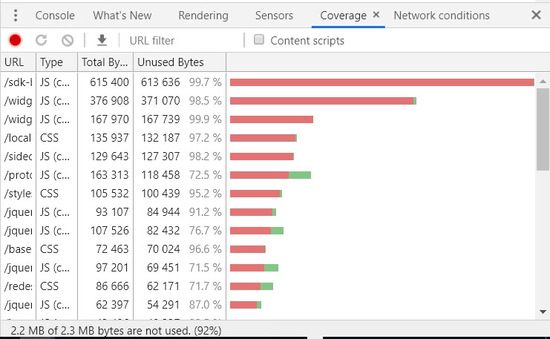
brightedge discusses javascript seo with chrome developer tools

It is also important to surface as many important links in the html so that they can be crawled in the first pass. By rendering important links by JavaScript you can delay getting those links crawled.

Work closely with your development team and set realistic goals for capabilities that you want to surface on your website that are balanced against having a small footprint in terms of bytes and test the page load performance against different handset types with 4G network speeds.

Some sites also find that they can combine these two main forms of rendering, resulting in dynamic rendering. For example, for a site that has content that will change a lot, dynamic rendering helps sites take advantage of the benefits of both client-side and server-side rendering.

This technique allows sites to switch between the two, depending upon who is accessing the site. Using rendertron, you can program your site to create pre-rendered content that can be delivered to certain user agents, like Googlebot. When regular users access the site, however, the site can use client-side rendering so that the visitor accessing your site can get the most updated information as efficiently as possible. Note that if you do use this strategy, you will want to update your cached version of the site regularly to ensure that the version seen by the crawlers remains up-to-date.

Rendering and JavaScript SEO

Google understands JavaScript relatively well. However, the crawler attempts to interpret and rank billions of websites around the globe, and JavaScript does require more effort than standard HTML. This can sometimes put it at a disadvantage.

Google reports that Googlebot indexes JavaScript sites in two waves. During the first pass through, the crawler will look at the HTML content and use that to begin indexing the site. At a later date, they will return to render the JavaScript that needs rendering. Keep in mind that sites created with server-side rendering, however, display content with HTML markup. Since the main content is already displayed, Googlebot will not have to return to render the JavaScript on the site to properly index the content. This can make your JavaScript SEO strategy significantly easier.

Because of the delay between the first and second passes through a site, the content contained within the JavaScript will not be indexed as quickly. This means that the content will not count towards initial rankings and changes may take a while for Google to notice and adjust rankings accordingly.

For this reason, brands that use JavaScript SEO will want to make sure that they put as much essential content as possible within the HTML of their site. Critical information that they want to have count towards their ranking should be written so that the crawlers can interpret it the first time through.

Common errors with JavaScript SEO

Although JavaScript helps create some exciting websites, some errors do commonly pop up that harm the site’s SEO and online potential. We want to bring a few of them to your attention.

Neglecting the HTML

Containing the most important information in the site within the JavaScript means that the crawlers will have little information to work with the first time they index your site. As already discussed, make sure that critical information you want indexed quickly is created with HTML.brightedge talks about how to Inspect your page source to check for content in Javascript SEO
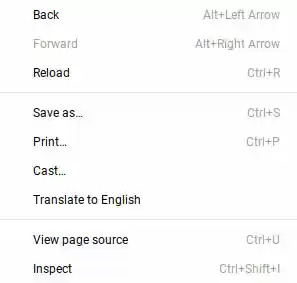
If you are not sure where your critical content lives, you can inspect your page source by right clicking anywhere on the page and selecting "Inspect" from the menu. The content that you find in the inspect page is the content that the Googlebot sees right away. You can also turn JavaScript off in your browser to see the content that remains.

As you progress through a site audit, ContentIQ also has the capacity to interpret your JavaScript frameworks, helping you understand the entire experience your site creates for users.

Not using links properly

Links play an essential role in any website as they help crawlers and users understand how the pages connect. When it comes to JavaScript SEO, it also helps keep people better engaged with your website and interested in your content.

For JavaScript SEO, however, you want to make sure your links have been set up correctly. This means using relevant link anchor text and HTML anchor tags, including the URL for the destination page in the href attribute. Google advises staying away from other HTML elements, such as <span> as well as JavaScript event handlers. These types of linking strategies can make it harder for people to follow links and can also create a poor user experience for those on assistive technology.
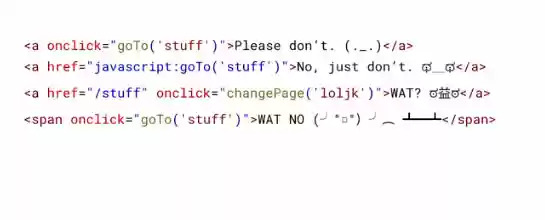
brightedge shows a Google example of bad linking strategies for Javascript SEO

Google also recommends staying away from hash-based routing techniques. If JavaScript helps to create a transition between pages, then using the history API works much better.

Accidently preventing Google from indexing your JavaScript

Keep in mind that Googlebot does not render JavaScript until a second pass through your site. Therefore, some sites make the mistake of including markups, such as ‘no index’ tag in the HTML that loads during Google’s first pass through the site. This tag may prevent Googlebot from returning to run the JavaScript contained within the site, which then blocks the proper indexing of the site.

Another common mistake is blocking crawlers from crawling the JavaScript directory. So, make sure that you DO NOT have a Disallow: /JavaScript entry in your robots.txt file.

JavaScript continues to be an important feature of the web as brands use it to mark up their pages and create more engaging websites for their users. Understanding how Googlebot and other crawlers read JavaScript and how it can potentially interact with JavaScript SEO, however, remains a priority for many.


 

Ask the Experts Webinar -- Titans of SEO and a Real Fire Drill

enewton@brightedge.com
M Posted 7 years 4 months ago
t 9 min read

Titans of SEO running a webinar from a minivan - BrightEdge

Does your job seem like a fire drill? Well, ours sure did when the fire alarm went off in the middle of the 1-hour Titans of SEO webinar. The alarm was so loud that we went on mute and then decided we would do the expected thing and evacuate. Dre de Vera and Eugene Feygin kept the Q&A info flowing from Pleasanton and Chicago respectively. Kirill Kronrod, Yulia Kronrod, Mark Aspillera, and I went down to the Kronrods' minivan and dialed back in and continued.

So now we have done a live broadcast during a fire alarm from a car. Check out how the titans of SEO pulled it off. You can hear the fire alarm from 35:48. Ok so back to the webinar: we brought together 4 titans of SEO for a live community Q&A. The audience asked 167 questions of the intermediate, and advanced level.

Mark Aspillera, senior product marketing manager at BrightEdge, and I moderated, and we tossed the hot potato questions to 4 of the most talented SEOs we know in the industry. These are the people I go to for advice and confirmation on SEO best practices. 

View On Demand Now.

Brightedge Titan of SEO - Dre de Vera - Workday

Dre de Vera is currently the Search Marketing Global Lead at Workday and has almost 20 years’ experience in SEO. He has led global SEO efforts at 5 other companies: SAP, SuccessFactors, Anaplan, SmartRecruiters, and ABS-CBN.

Dre is strong at vertical search and YouTube and takes a scientific approach to SEO by conducting single-variable tests. He currently ranks #1 for “enterprise SEO consulting” on Google for his digital agency, Dreme Digital and #1 for “enterprise SEO expert” for his BrightEdge customer video on YouTube.

Brightedge Titan of SEO Yulia Kronrod - Insureon Director of Organic and Paid

Yulia Kronrod is the director of SEO at Insureon, 

a small business insurance marketplace, where she drives 45% YOY growth in organic visits and 30% YOY growth in SEO conversions through content marketing and optimization, information architecture, technical SEO, user experience testing, and conversion rate optimization.

From prior work at Adobe, Yulia has extensive international SEO experience, including localization and geo-targeting (hreflang). Yulia hosted the last BrightEdge San Jose User Group. 

Brightedge Titans of SEO - Eugene Feygin - Workday

Eugene Feygin is the Sears Home Services SEO manager managing SearsHomeServices.com & SearsPartsDirect.com with over a decade of SEO experience in the E-Commerce arena from content strategist to technical research and implementation.

Among his many achievements in his SEO career, he improved page load speed by 80% and conversion by more than 500% at Quill.com. Eugene is the moderator for the Chicago BrightEdge User Group.

Brightedge Titans of SEO - Kirill Kronrod - Adobe

Kirill Kronrod manages global SEO at Adobe and has been with the company for 8 years. His focus is content strategy, technical SEO, analytics, testing, and user experience enhancements that push Adobe Natural Search presence and conversions. He has spoken at multiple BrightEdge Share conferences.

Fun fact: Kirill has introduced non-branded optimization at Adobe, and in addition to broad success in Google Quick Answer rankings, he has 1st SERP position (and sometimes the Quick Answer) for the "google quick answer” query for the article he published on the BrightEdge blog.

We hope you can join us for this amazing session.

Site Architecture for SEO

ssharma@brightedge.com
M Posted 7 years 7 months ago
t 9 min read

Before you spend all the time, money and effort you've laid aside for SEO, consider this: your site architecture might be negating any effort you spend in offsite SEO. In fact, poor site architecture could be causing you to throw away your money. You've got to be sure that your site is set up in a way that will not only bring in visitors but keep them there long enough to generate a lead, make a sale, sign up for your newsletter or become an active member of your community -- and site architecture is key to those goals!Site Architecture SEO with brightedge

What Exactly Is Site Architecture?

Ten or more years ago, there were very few ways to set up a website. Perhaps you had directories with relevant names, or your directories may not have been named well. All your files might have existed in your root directly, and you may have used file names and page titles that only made sense to you. However, the Internet has come a long way from that point, and how you set up your site is important.

Site architecture is a way to group and organize content on your site which encompasses URLs, directories, file names and navigation. The way you set up your site ensures that both computers and humans can find everything on it with ease. But if you do site architecture wrong, you're actually make it more difficult for your readers and search engines, which could seriously hurt your bottom line!

One of the biggest components of site architecture is the number of clicks it takes to achieve a task. Once upon a time, webmasters assumed that readers would click infinitely, but the opposite has proved to be true. If it takes too many clicks to find an article, check out from your store or sign up for a newsletter, your readers might simply leave your site. This is especially true with mobile users.

Although traditional site architecture uses nested directories in a practice now known as silos, this required more clicks to find pages. The pages further down the silos had fewer links to them than the articles further up the silo. While grouping your pages in directories named with keywords is helpful for SEO, you'll want to ensure you're not making them click too many times to find the "bottom" pages. Think of ways you can reduce clicks to any page on your site to three to four clicks at most without decreasing the usefulness of silo structure.  

Keyword Research in Relation to Site Architecture

Although Google no longer favors sites simply because the domain contains a keyword, choosing page URLs with your relevant keywords will certainly help your users as well as crawlers. Good keyword research will indicate topics & themes to be included in your site architecture and page URLs. This URL structure will also help you manage content in respective directories and sub directories.

Before you can give your files, directories and links their proper names, you have to determine a method for naming that will benefit your site. These are the words that searchers would use to find your business. They revolve around industry, services, products and sometimes location if you serve a specific geographic area. But if your website exists mostly to educate visitors, the appropriate keywords will differ than if you're selling something to consumers.

Many webmasters and SEO experts become too focused on short keywords. Yes, they're easier to think of, but there's also more competition for those short keywords coming from similar sites and businesses. This is why long-tail keywords, which are longer keyword phrases, can be so beneficial. In comparison, long-tail keywords have less competition and might get fewer clicks, but visitors who use them are more targeted likely to convert to customers.  

Using Keywords in Directories, File Names, and URL Structure

Once you identify keywords, you'll want to use them in page URLs, categories, post titles, anchor text, file names and image alt attributes, among other on-page locations that benefit SEO. This ensures that your visitors know exactly what to expect from the address of the page. Search engine robots use these same cues.

It's important for more than just your pages to use keywords, however. Images, videos and even archives that you provide for download should use human-friendly keywords. So you'll want to take the time to rename videos and pictures from the automatic names that your camera gives them. Anything that you download from the Internet and upload to your website might need to be renamed, too.

For example, the popular blogging platform WordPress offers several options for formatting your links. However, the default format uses post and page IDs, which are virtually useless to Google and your visitors. A URL such as http://yourdomain.com/successful-site-architecture-seo is preferable to http://yourdomain.com/?p=123 because your visitors know what to expect simply by looking at the address bar.

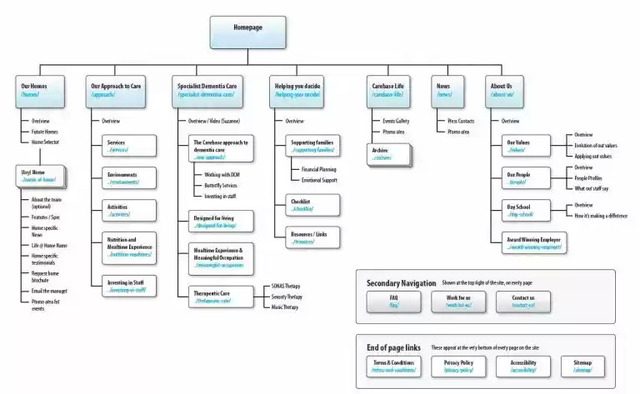
Site Architecture Example with brightedge


Link to Your Own Content/Internal Links

By now, you're intent on enabling Google and other search engines, not to mention your visitors, to find all your content. In the past, SEO has focused heavily on backlinks -- links from other sources -- but this isn't the only way to do that. In fact, linking to your own content, a process known as internal linking, is just as important as external back-linking. Internal linking helps to spread link value on your own site, but it also ensures that no content becomes lost and impossible to find for crawlers as well as your visitors.  

What Does Bad Architecture Look Like?

You've read plenty of advice to help you structure your site in a way that's useful to readers and beneficial to your search engine optimization efforts, but how do you know if you're using it right? Is your current site architecture failing you? Here are a few examples of poor site architecture:

  • Site directory contains numbers and not user friendly words. Example – YourSite.com/shoes/mens vs. www.YourSite.com/1234/shoes-page
  • It takes more than three or four clicks to get to any page from the index
  • Images and files do not use keywords in names, images lack alternative text
  • Small sites have unnecessary directories that cause confusion for users
  • There are too many links on the home page or navigation
  • Navigation changes between pages or sections on the site
  • Pages exist that aren't linked to from multiple sources
  • Page URLs misuse long-tail keywords, which can be vital to a site's success
  • There is no sitemap (page) or, if there is, the site architecture cannot be adequately shown in the sitemap

In fact, devising a site map is one way to quickly locate the weaknesses in your site architecture. If it takes more than three clicks to get to a page on your site, a sitemap will quickly illustrate this. Not all loopholes will be revealed with this method, but it’s one place to start! If you want your website to stand out from the competition, you'll need more than "About Us" and "Contact Pages." In fact, when you become comfortable creating strong site architecture, you might look for a reason to use it. Adding a blog to your eCommerce website, for example, is one way to use and improve those skills while boosting your site's SEO. But even if your website is small, you'll be remiss if you don't pay attention to site structure and what it can do for SEO.  

,