​Google Begins Using Page Experience to Rank Desktop Search Results

tvura
tvura
M Posted 4 years 3 months ago
t 9 min read

February 2022 marks the start of Google using Page Experience as a ranking factor for desktop search. The search company says the desktop rollout will be complete by the end of March. Page Experience has been used as a ranking factor for mobile searches since August 2021. 

Page Experience is essentially Google’s way of rewarding or penalizing websites based on a page’s user experience. If a page loads too slowly, shifts once loaded or inhibits users from accessing the page’s content with intrusive ads, for example – even if the content is relevant – Google effectively sees this as diminishing the value of the content.  It is in keeping with a long-standing focus on returning the best result after understanding the intent of a given search. 

At the heart of Page Experience are (mostly) objective measures of technical performance for a given page, starting with what Google calls Core Web Vitals. For desktop Page Experience, the five elements of performance are as follows:  

1) Largest Contentful Paint (LCP): A measure of the time it takes for a page’s main content to load. Google recommends a target of 2.5 seconds or less for LCP. (Core Web Vital 1 of 3) 

2) Cumulative Layout Shift (CLS): Refers to the stability of the content once it’s loaded. If content shifts up or down while a user is viewing it, Google deems this a negative experience. Google recommends a CLS of less than .1, which sites can measure using BrightEdge or Google’s Page Experience Report. (Core Web Vital 2 of 3) 

3) First Input Delay (FID): The time between when the first web page objects load (a button, image, scroll bar) and when the page becomes interactive. If page content takes too long to be interactive, Google views this as a poor user experience. Google recommends an FID of less than 100 milliseconds. (Core Web Vital 3 of 3)  

4) Proper use of HTTPS security protocols: Pages not served over hypertext transfer protocol secure (HTTPS), represent greater risk to the user and, accordingly, a poor user experience that negatively impacts the page’s search ranking. Learn more about HTTPS.   

5) The absence of intrusive interstitials: Intrusive interstitials are pop-ups and overlays that interfere with the content on the page and are a Page Experience no-no.  

Per Google, the elements and their thresholds are the same as those used for mobile Page Experience (minus mobile-friendliness, which only applies to mobile search rankings.) Brands that have already optimized for mobile Page Experience, in other words, are ahead of the game, but should still measure desktop Page Experience and address any desktop-specific issues. Google has added dedicated desktop performance reporting in its Search Console to help highlight any disparities in Page Experience-related performance for mobile and desktop users of their sites. 
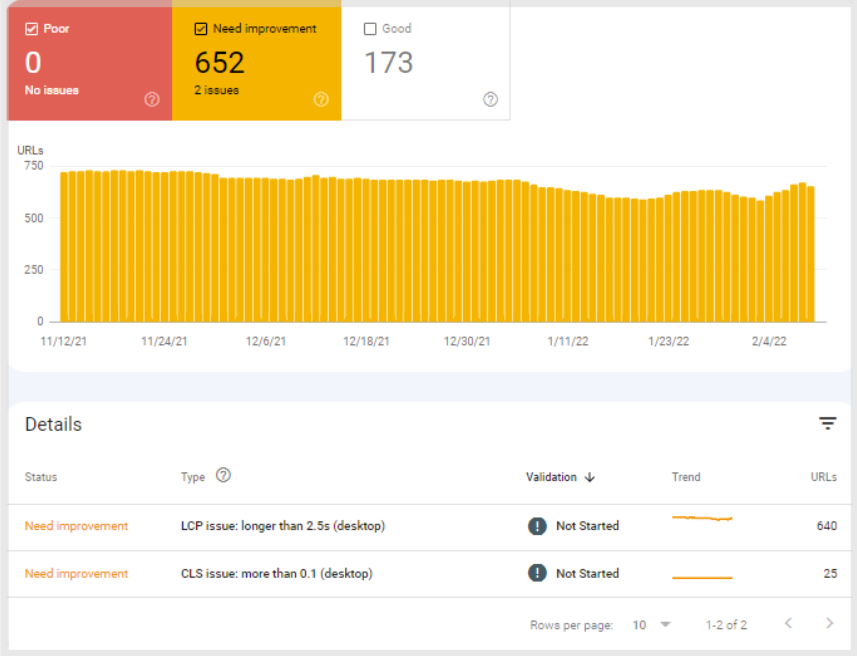
For websites that have not yet been optimized for Page Experience, here are some additional resources to help site operators understand the new ranking factor and make the necessary improvements: 

Measuring and Managing Page Experience with BrightEdge Instant 

BrightEdge Instant provides analysis and dashboards for users to evaluate, prepare and implement changes to improve Page Experience on both desktop and mobile. Ongoing reporting within the tool makes it easy to see and communicate the impact of website changes. 
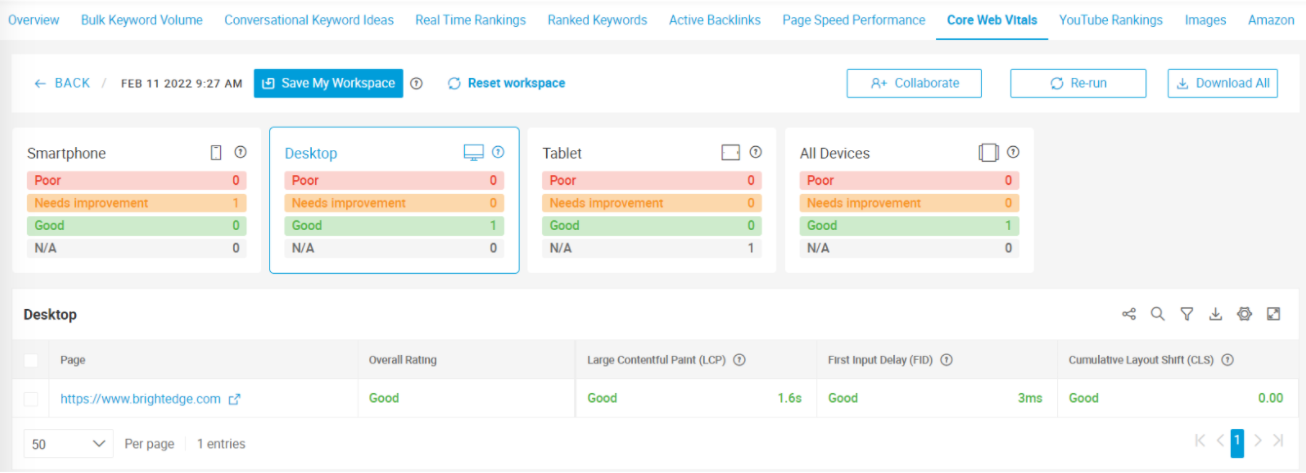
BrightEdge Instant Use Case: Website Performance Analysis 

Key Takeaways 

We will keep an eye on the impact of Page Experience on desktop search results. As a potential point of comparison, early indications from the rollout in mobile search suggest a comparatively high prioritization of Page Experience as a ranking factor.  
If you have waited to evaluate and improve your site for Page Experience -- perhaps the majority of your traffic comes from desktop, for example – we’d strongly recommend prioritizing it in 2022


Google Priority Hints – More Firepower to Support Core Web Vitals

tvura
tvura
M Posted 4 years 7 months ago
t 9 min read

In Mid-June, Google began rolling out Core Web Vitals as part of its Page Experience update. Page Experience is aimed at improving the user experience according to three metrics – known as Core Web Vitals:  

  • Largest Contentful Paint (LCP), which measures loading performance. 
  • First Input Delay (FID), which pertains to how quickly a visitor can interact with a page. 
  • Cumulative Layout Shift (CLS), which measures visual stability.  

By prioritizing these page performance metrics as ranking factors, Google is incentivizing website owners to improve the user experience. High-performing pages are rewarded with greater consideration for high search ranks, and poor-performing pages are penalized in the quest for high search rankings. 

In a recent article, Google drew attention to an experimental markup-based signal called Priority Hints to help web developers control how page elements load. In simple terms, Priority Hints better enables developers to instruct the browser as to which resources are important, and which are not. By helping control how elements are loaded in the browser, Priority Hints can directly improve page performance and Core Web Vitals metrics.   

Developers can employ the tag <link rel=preload> and the attributes async and defer to manage the downloading and execution of scripts. Priority Hints goes a step further, effectively controlling the loading of other elements. Currently, Priority Hints can apply an “importance” attribute of high, low or auto to four-page elements: 

  • link  
  • img 
  • script 
  • iframe 

According to Google, Priority Hints can help: 

“1. Boost the priority of the LCP image by specifying importance="high" on the image element, causing LCP to happen sooner. 

2. Increase the priority of async scripts using better semantics than the current hack that is commonly used (inserting a <link rel="preload"> for the async script). 

3. Decrease the priority of late-body scripts to allow for better sequencing with images.” 


Priority Hints Improve Core Web Vitals 

Priority Hints give developers more granular control over the downloading of resources than existing tools like “preload,” “async,” and “defer.” 

While “preload” will tell a browser to prioritize downloading images as a category, for example, the experimental “importance” attribute can tell a browser which images to load first by marking their importance “high” while marking other images as “low” importance. It’s important to note that Priority Hints are precisely that, hints, and not directives to the browser. 

In practice, this can ensure that elements that are needed in the active viewport when a page is loading are loaded first, improving the Core Web Vitals largest contentful paint and first input delay. It can also improve the Core Web Vital metric, cumulative layout shift. Layout shifts generally happen when an element is loaded after the page becomes interactive. When that happens, the content a visitor is interacting with can move, disrupting the flow of interaction. As the visitor is reading a block of copy, for example, it suddenly moves down the page as an image above it is loaded, or the link they are about to click suddenly shifts away from the cursor. Priority Hints help minimize disruption to the browsing experience. 


What’s Good for Page Experience is Good for SEO 

Because Core Web Vitals are ranking factors, any opportunity to improve these key metrics in page performance also improves a page’s ability to rank highly for relevant searches. While Core Web Vitals are just several of many ranking factors, they have a significant impact, especially for e-commerce web pages. 

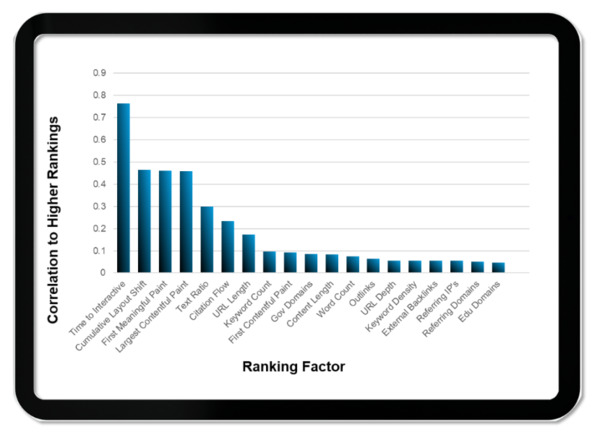
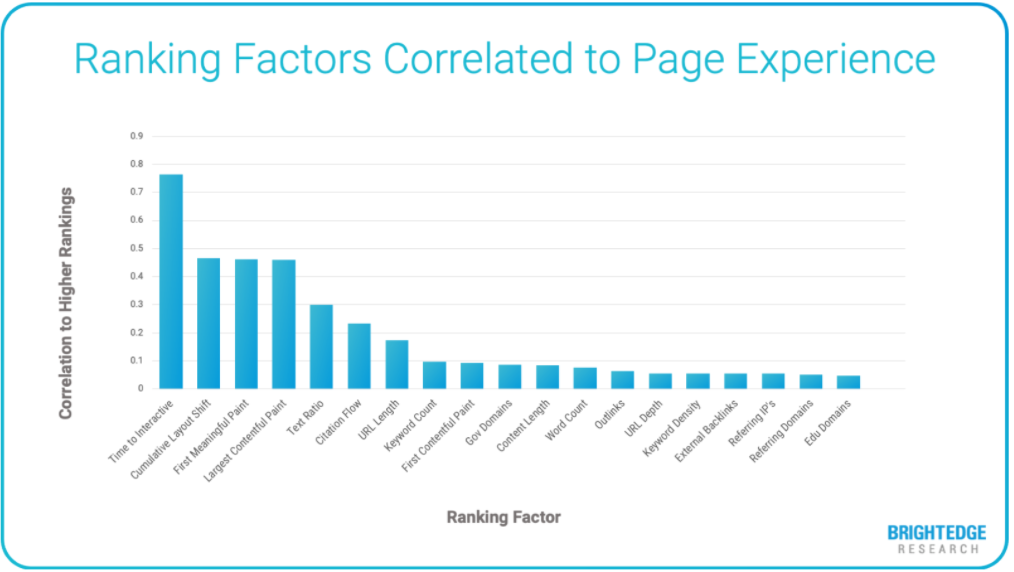
In a recent study, BrightEdge tracked 6,000 e-commerce keywords across 10 search categories over the past three years and analyzed the patterns in the data. Among a slew of ranking factors, Core Web Vitals had the greatest correlation to higher search result ranks. 


Deploying Priority Hints 

Currently, Priority Hints is in what Google calls origin trials with browser support slated to roll out with Chrome 96, which is scheduled to release on November 21, 2021. Interestingly, Google ran an origin trial for Priority Hints two years ago but received limited interest. With Core Web Vitals taking on greater importance, the participation will likely be much higher this time around. 

To participate in the origin trial, developers must register here: https://developer.chrome.com/origintrials/#/view_trial/365917469723852801

TIP: To evaluate if and how to apply the “importance” attribute, developers can check the priority assigned to different resources by using the Chrome Dev Tools network tab while loading a page and viewing the “priority” column. 


Five Strategies to Prepare for the Core Web Vitals Update

dmcanally
dmcanally
M Posted 5 years 2 months ago
t 9 min read

One of the most important issues this year facing digital marketers is how to prepare for Google’s upcoming Page Experience Update.This May, Google will begin using three key metrics to help assess the user experience of a given webpage based on actual browser data. The three metrics that are critical for this update include:

Largest Contentful Paint: This is the time it takes to load the largest visible element of your page (images, videos etc). Google says load times of less than 2.5 seconds for this element are ideal. 

First Input Delay: This is the time it takes for the first interactive element on a page to respond to the user (hitting play on a video, clicking into a link or a drop down menu etc). Google has stated times less than 100 milliseconds is ideal. 

Cumulative Layout Shift: As pieces of a site load, elements of the page will move around as pieces render. This shift in layout can cause people to click on the wrong things and ultimatley provide a poor user experience. This is measured from a score to 0-1. While some layout shift is inevitable, Google has stated less than .1 is ideal. 

DOWNLOAD THE FREE CORE WEB VITALS WEBINAR

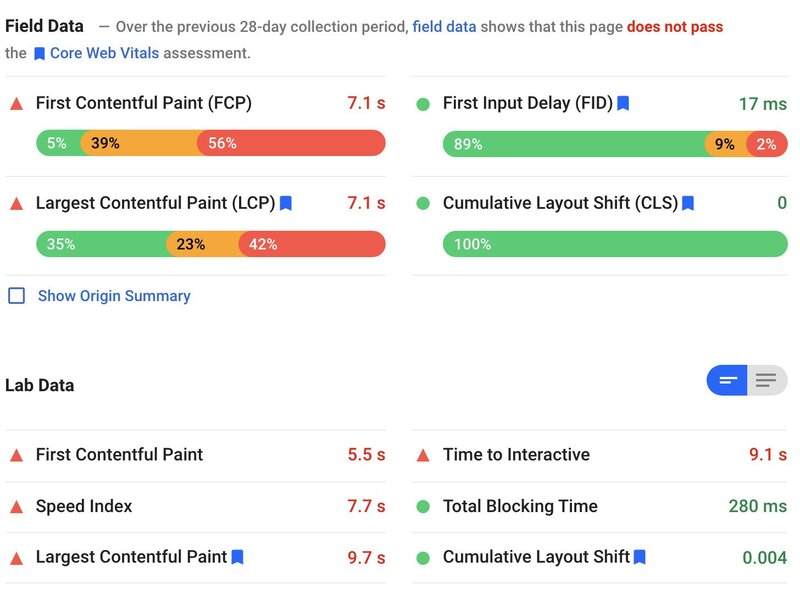
Example of FCP, LCP and more - BrightEdge

What will this mean for websites? 

For large companies whose websites have lots of moving parts, it can be challenging to meet these benchmarks without making drastic changes to their entire infrastructure. Sitewide changes involves multiple stakeholders, conflicting business priorities and often lead to sizable projects. To be successful in preparing for this update, digital marketers need compelling data and very prescriptive prioritization in order to sell requirements into their organization. 

Here are five key strategies that can help you address the core web vitals of your website and justify the implementation work needed.

  1. Assess how your segment is doing
  2. Evaluate your infrastructure
  3. Use Log File Analysis as a priority guide
  4. Build a holistic fallover plan
  5. Use a combination of micro and macro trends to forecast overall impact

1. Assess how your segment is doing

It’s critical you keep a pulse on this for your own web properties. But you also need to understand your landscape. It can be difficult to scale measuring multiple URLs if you’re only using things like Google’s Page Speed Insight Tool. Tools like Brightedge Instant enable users to look at batches of URLs and compare their performancees. If they measure URLs with the top share of voice in a keyword group and run the page speed test on them, they have an instant readout of what competitors are vulnerable and where they have opportunity. Some ways to use this approach include: 

  • Brand Protection: Get a high level view of how sensitive your branded searches are to changes in May by assessing the core web vitals of the top brands. 
  • Striking Distance Keywords: Build a keyword group by using Data Cube to see which keywords are on page 2. Use the Share of Voice report to aggregate the top URLs to help your company understand what could be gained or lost for terms you’re almost on the first page for. 
  • Product level keywords: Build and measure URLs that dominate key product categories. Pinpointing which of these categories are going to be sensitive to the Page Experience Update in May will help you put the context of the update in business impact. This can help your organization understand what the visibility fluctuations could mean for customers looking for your products. 

2. Evaluate your infrastructure

There are a range of issues that could cause metrics like first input delay to be slow. You should be able to address many of these through common code optimization techniques. If pages are built on custom apps or content management systems that require multiple javascripts to render content, you may need to seek other ways to help your site meet performance benchmarks.  

How your site is hosted, and its total infrastructure can have an impact on how well it serves content. In addition to evaluating on-page factors and loading aspects specific to a page, consider how your site it hosted, what platforms it is built on and so forth. These may be big overhauls but if you’ve got data to show how significant it could impact the channel, it may be worth it. 

3. Use Log File Analysis as a priority guide

One of the most common challenges with enterprise websites, is they feature legacy code, and elements that are no longer in service. Log files can help marketers see what aspects of the site may be particularly prone to slowing down load times reducing the sites ability to react quickly to user input. SEO’s typically use log file analyzers to get a birds eye view into how crawlers are getting through the site. This same principle can help you address contentful paint and input delay issues at scale. While Google has stated this measurement is driven by browser data, the experiences crawlers have on the site can offer invaluable data points to prioritize how to optimize your site’s experience. Some examples of how log file analysis can help marketers prepare for the Core Vitals update:

  • Identify which parts of your site are likely to be prone to core web vital issues and why
  • Sense and help forecast what gains could be hindered by a poor page experience using log file analysis
  • Pinpoint what files need compression help at scale
  • Fuel automated optimization services

Once you are aware of these issues, there are scaled ways to address them. For example, Brightedge’s AutoPilot compresses images automatically, eliminating this as a task. 

4. Build a holistic failover plan

If you’ve used share of voice reporting to identify which of your search results are prone to fluctuations in May during the Page Experience Update, you have a critical collaboration point for your media teams. If you anticipate having some vulnerabilities when the update rolls out, it may be wise to lean on paid search to help run air cover while you implement. 

  • Create paid keyword campaigns designed to provide coverage where you anticipate ranking loss
  • Build proactive conquesting campaigns for keyword groups where organic search results are particularly sensitive
  • If you’re using BrightEdge Daily Pulse, it can serve as your virtual war room in the month of May to see what needs to be turned on/off

5. Use a combination of micro and macro trends to forecast overall impact

Measuring trends on both a macro and a daily level not only help you understand where those may be, but they can also help you anticipate what opportunities you could realize by meeting the Core Vitals Benchmarks. For example, Brightedge users that are using Market Insights can see at a high level what behavioral trends are fueling search behavior. This insight fuels things like content strategy, but when coupled with tools like Search console and page speed inisghts on the leaders in each space, it is now possible to forecast and predict what content is likely to be displaced at scale. For Brightedge customers, Daily Pulse makes it simple to visualize how positions are shifting leading up to the rollout, and even pinpoint when it occurs on results that matter to your business.  

We can expect Google’s Page Experience update in May to have significant impacts on the organic channel as a whole. It is important to be armed with the right data and the right tactics to pivot and adjust. Even if your website is meeting the benchmarks, you can use this as an opportunity to pinpoint where you need to focus to generate positive traction. If you’re interested to learn more about how Brightedge’s suite of enterprise technology could help your business navigate things like the May Page Experience Update, please reach out and we can set up a demo today.

,